Analysis: Julia
Using PyJulia, we could call functions and scripts in Julia directly from Python as shown in analysis_julia.py.
Initialization of the Julia backend may take up to 30 seconds. Pre-defined Julia functions could be loaded at startup by specifying the julia_file keyword in the configuration file. Upon loading, Julia functions could be wrapped and used as if it's a Python function in the following manner.
j_func = julia.eval('julia_function')
j_func(2)When sending a NumPy array to Julia, PyJulia copies the entire array by default. This is safer but comes at a speed cost. By specifying the conversion type to PyArray, however, a zero-copy transfer can be achieved. For more details, check the Python object interfaces section in the PyCall readme (PyJulia is based on PyCall).
j_func = julia.eval('pyfunction(julia_function, PyArray)')
j_func(np.zeros((100,100)
Array transfers from Julia, on the other hand, is zero-copy by default.
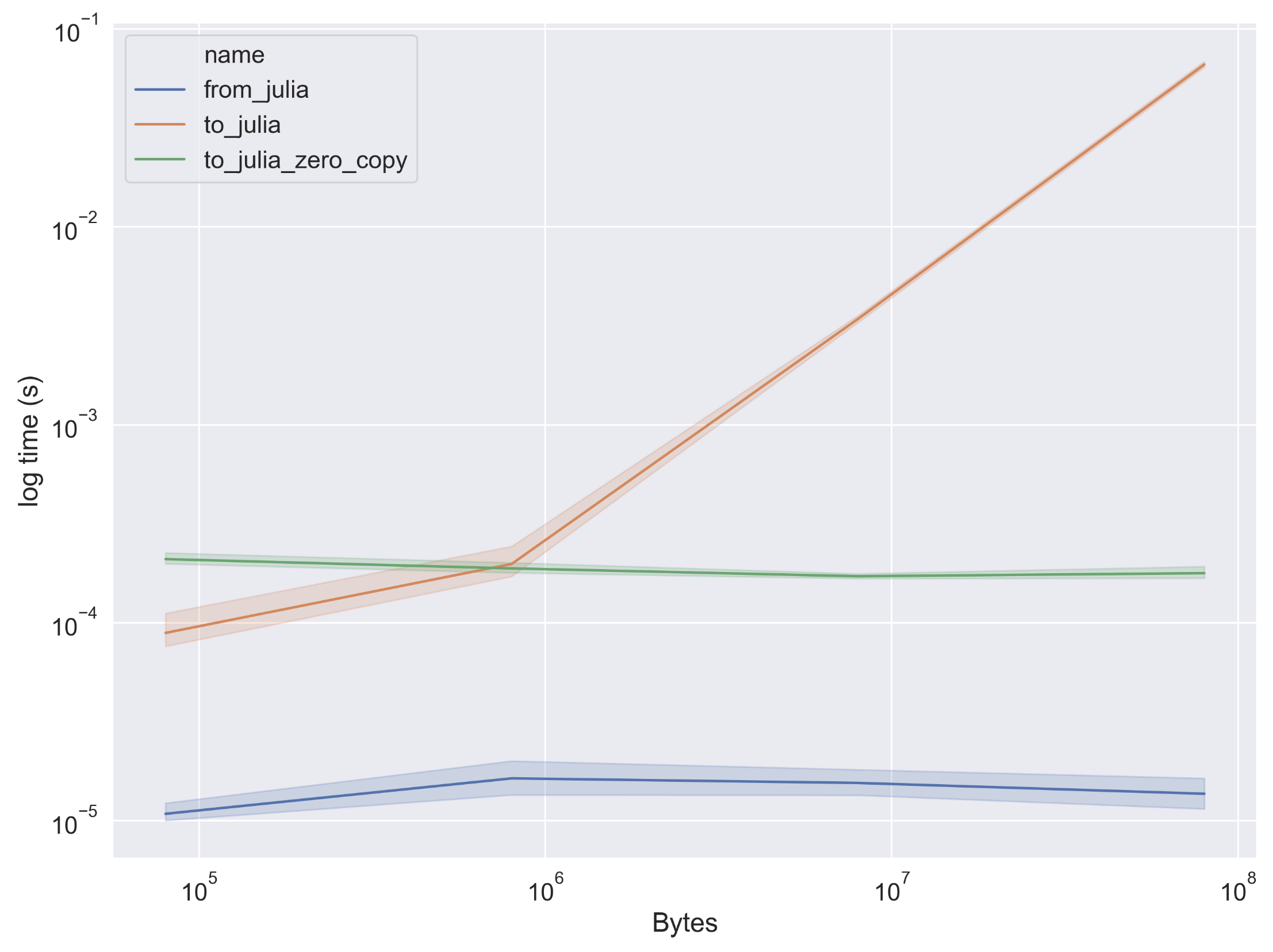
Scaling of NumPy array transfer time from/to Julia. Error bar is 95% CI.