Swift port of the FLUX.2 diffusion models using mlx-swift.
This repo includes:
Flux2— a Swift library for text-to-image (t2i) and image-to-image (i2i) generation on Apple Silicon.flux2-cli— a command-line tool that wraps the library.
- Apple Silicon Mac.
- macOS 14 (Sonoma) or newer. Wired GPU memory requires macOS 15 (Sequoia).
- Swift 6.0+.
- Memory: FLUX.2-dev requires ~24 GB (bf16) or ~13 GB (q8). Start with the klein models if your machine is tight on RAM.
- Download
flux2-cli.macos.arm64.zipfrom the latest release. - Unzip it. Run the CLI from the unzipped folder (the executable expects its
.bundleresources next to it).
unzip -o flux2-cli.macos.arm64.zip
chmod +x flux2-cli.macos.arm64/flux2-cli
./flux2-cli.macos.arm64/flux2-cli --helpThis repo uses Swift Package Manager, but build and test via xcodebuild.
- Build the CLI into
./.build/flux2-cli:
./scripts/build-cli.sh
./.build/flux2-cli --help- Run tests:
xcodebuild -scheme Flux2-Package -destination "platform=macOS" testflux2-cli accepts either a local snapshot directory or a Hugging Face model id via --model.
- Local path: a directory containing
model_index.jsonand subfolders (tokenizer/,scheduler/,transformer/,text_encoder/,vae/). - Model id:
org/repo(optionallyorg/repo:revision).
Weights are resolved via swift-transformers and cached in the standard Hugging Face hub cache:
| Source | Location |
|---|---|
HF_HUB_CACHE |
Highest priority |
HF_HOME + /hub |
Fallback |
| Default | ~/.cache/huggingface/hub |
Authentication uses the usual Hugging Face sources (hf auth login, HF_TOKEN, HUGGINGFACE_HUB_TOKEN).
./flux2-cli.macos.arm64/flux2-cli download-snapshot \
--repo black-forest-labs/FLUX.2-klein-4BThe commands below assume the precompiled binary at ./flux2-cli.macos.arm64/flux2-cli. If you built from source, use ./.build/flux2-cli instead.
Generate an image from a text prompt, optionally conditioned on one or more reference images.
| Flag | Type | Default | Description |
|---|---|---|---|
--model / --snapshot |
String |
required | Model path or Hugging Face model id |
--repo |
String |
— | Hugging Face model id (overrides --model) |
--revision |
String |
main |
Git revision / branch / tag on the hub |
--prompt |
String |
required | Text prompt for generation |
--image |
String |
— | Conditioning image path or URL. Repeatable |
--images |
String |
— | Comma-separated conditioning images |
--height |
Int |
512 | Output height in pixels |
--width |
Int |
512 | Output width in pixels |
--steps |
Int |
model-dependent | Number of denoising steps |
--guidance-scale |
Float |
4.0 |
Classifier-free guidance scale |
--seed |
Int |
random | Random seed for reproducibility |
-o / --output |
String |
flux2.png |
Output path (.png, .jpg, .jpeg) |
--dtype |
String |
bfloat16 |
Weight dtype: float16, float32, bfloat16 |
--max-length |
Int |
512 |
Max token length for the text encoder |
--image-id-scale |
Int |
10 |
Image id scale for reference images |
--upsample-prompt |
String |
none |
Prompt upsampling: none or local (dev only) |
--print-upsampled-prompt |
flag | off | Print the upsampled prompt |
--wired-memory |
String |
disabled | Bytes to pin, or "max" |
--metrics-json |
String |
— | Path to write JSON timing metrics |
--download-base |
String |
— | Override hub cache directory |
--hf-token |
String |
— | Hugging Face token |
--include |
String |
— | Comma-separated download globs |
--download-all |
flag | off | Download full repo snapshot |
Klein models are distilled. Distilled models ignore --guidance-scale values above 1.0 (the CLI warns).
Output format is inferred from the --output extension. If you omit the extension, .png is appended.
./flux2-cli.macos.arm64/flux2-cli generate \
  --model black-forest-labs/FLUX.2-klein-4B \
  --prompt "A studio photo of a tabby cat with green eyes, ultra realistic, shallow depth of field" \
  --guidance-scale 1.0 \
  --seed 42 \
  --steps 4 \
--output temp/klein4b_t2i.png./flux2-cli.macos.arm64/flux2-cli generate \
--model black-forest-labs/FLUX.2-klein-4B \
--prompt "Put black sunglasses on the cat, realistic photo" \
--image "https://huggingface.co/spaces/zerogpu-aoti/FLUX.1-Kontext-Dev-fp8-dynamic/resolve/main/cat.png" \
--guidance-scale 1.0 \
--seed 42 \
--steps 4 \
--output temp/klein4b_i2i_cat.png./flux2-cli.macos.arm64/flux2-cli generate \
--model black-forest-labs/FLUX.2-dev \
--seed 42 \
--steps 50 \
--guidance-scale 4 \
--prompt "Realistic macro photograph of a hermit crab using a soda can as its shell, partially emerging from the can, captured with sharp detail and natural colors, on a sunlit beach with soft shadows and a shallow depth of field, with blurred ocean waves in the background. The can has the text \`BFL Diffusers\` on it and it has a color gradient that start with #FF5733 at the top and transitions to #33FF57 at the bottom." \
--output temp/dev_t2i.pngExpands the prompt with the local vision-language model (Pixtral-style) before generation.
./flux2-cli.macos.arm64/flux2-cli generate \
  --model black-forest-labs/FLUX.2-dev \
  --seed 42 \
  --steps 50 \
  --guidance-scale 4 \
  --prompt "Describe what the red arrow is seeing" \
  --upsample-prompt local \
  --print-upsampled-prompt \
  --image "https://raw.githubusercontent.com/black-forest-labs/flux2/main/assets/i2i_upsample_input.png" \
--output temp/dev_i2i_upsample.pngQuantize a model snapshot (transformer + text encoder) and write a new snapshot directory.
| Flag | Type | Default | Description |
|---|---|---|---|
--model / --snapshot |
String |
required | Source model path or Hugging Face model id |
-o / --output |
String |
required | Output snapshot directory |
--bits |
Int |
8 |
Bit width: 4 or 8 |
--group-size |
Int |
64 |
Group size: 32, 64, or 128 |
--mode |
String |
affine |
Quantization mode: affine or mxfp4 |
--overwrite |
flag | off | Overwrite existing output directory |
--verbose |
flag | off | Print per-shard statistics |
./flux2-cli.macos.arm64/flux2-cli quantize \
  --model black-forest-labs/FLUX.2-klein-4B \
  --bits 8 \
  --group-size 64 \
-o ./klein4b-q8Download a Hugging Face model snapshot into the local cache.
./flux2-cli.macos.arm64/flux2-cli download-snapshot \
--repo black-forest-labs/FLUX.2-klein-4BAdd the Flux2 package to your Package.swift:
dependencies: [
  .package(url: "https://github.com/mzbac/flux2.swift.git", branch: "main"),
],
targets: [
  .target(name: "YourTarget", dependencies: [
    .product(name: "Flux2", package: "flux2.swift"),
  ]),
]The library provides two pipeline types, one per model family.
Klein (4B / 9B):
import Flux2

let snapshotURL = URL(fileURLWithPath: "/path/to/FLUX.2-klein-4B")
let pipeline = try Flux2KleinPipeline(snapshot: snapshotURL)

let output = try pipeline.generate(
  prompts: ["A studio photo of a tabby cat"],
  height: 512,
  width: 512,
  numInferenceSteps: 4
)
// output.decoded is an MLXArray with shape [batch, H, W, C]
Dev:
let pipeline = try Flux2DevPipeline(snapshot: snapshotURL)

let output = try pipeline.generate(
  prompts: ["A hermit crab using a soda can as its shell"],
  height: 1024,
  width: 1024,
  numInferenceSteps: 50,
  guidanceScale: 4.0
)Pass one or more reference images as [MLXArray] with shape [1, H, W, C] (float32, 0..1 range):
let output = try pipeline.generate(
  prompts: ["Put sunglasses on the cat"],
  height: 512,
  width: 512,
  numInferenceSteps: 4,
  images: [referenceImage]
)
CAUTION: Large reference images combined with large output dimensions can exceed the 4 GB attention memory budget. The pipeline throws
Flux2AttentionBudgetError.attentionExceedsBudgetbefore allocating if this limit would be exceeded. The error message includes the estimated size and suggests reducing dimensions.
The progressHandler parameter on generate() and generateTokens() fires after each denoising step:
let output = try pipeline.generate(
  prompts: ["A cat"],
  height: 512,
  width: 512,
  numInferenceSteps: 50,
  progressHandler: { progress in
    print("Step \(progress.step)/\(progress.totalSteps)")
  }
)
The callback receives a DenoiseProgress value:
| Property | Type | Description |
|---|---|---|
step |
Int |
Current step (1-based) |
totalSteps |
Int |
Total denoising steps |
currentLatents |
MLXArray |
Intermediate latent tensor (useful for live previews) |
Each pipeline provides generateStream() that wraps the callback API in an AsyncStream<GenerationEvent>:
let stream = pipeline.generateStream(
  prompts: ["A cat"],
  height: 512,
  width: 512,
  numInferenceSteps: 50
)

for await event in stream {
  switch event {
  case .progress(let progress):
    print("Step \(progress.step)/\(progress.totalSteps)")
  case .completed(let output):
    // output.decoded contains the final image
    break
  }
}On Apple Silicon, the OS can page GPU memory to disk under pressure, causing latency spikes. Use wiredMemoryLimit to pin allocations in physical RAM via Metal's MTLResidencySet.
let output = try pipeline.generate(
  prompts: ["A cat"],
  height: 512,
  width: 512,
  numInferenceSteps: 4,
  wiredMemoryLimit: 8_589_934_592  // 8 GB, or nil to disable (default)
)
The wired limit is applied after the model loads into GPU memory. MLX wiring is retroactive — it immediately pins existing allocations, not only future ones.
How much to wire: The main cost is model weights.
| Model | bf16 | q8_64 |
|---|---|---|
| FLUX.2-klein-4B | ~8 GB | ~5 GB |
| FLUX.2-klein-9B | ~18 GB | ~10 GB |
| FLUX.2-dev | ~24 GB | ~13 GB |
Add ~1-2 GB on top for activations, latent buffers, and the VAE decode pass.
Check your device maximum:
import MLX
print(GPU.deviceInfo().maxRecommendedWorkingSetSize) // bytes
Requirements: macOS 15+ (Sequoia) or iOS 18+, Metal GPU Family 3.
In img2img mode, the joint attention matrix can grow large. Flux2AttentionBudget estimates the buffer size before any GPU allocation happens:
let bytes = Flux2AttentionBudget.attentionBytes(
  numHeads: 24,               // klein-4B has 24; klein-9B/dev have 32/48
  outputHeight: 1024,
  outputWidth: 1024,
  referenceImageDims: [(height: 1024, width: 1024)],
  textSeqLen: 512
)

let exceeds = Flux2AttentionBudget.wouldExceedBudget(
  numHeads: 24,
  outputHeight: 1024,
  outputWidth: 1024,
  referenceImageDims: [(height: 1024, width: 1024)],
  textSeqLen: 512
  // maxBytes defaults to 4 GB
)
The formula: numHeads * totalSeq^2 * 4 bytes, where totalSeq = (outH/16)*(outW/16) + sum((refH/16)*(refW/16)) + textSeqLen.
Both pipelines check this automatically before encoding reference images and throw Flux2AttentionBudgetError.attentionExceedsBudget if the budget would be exceeded.
Both pipelines provide a generateTokens() method for pre-tokenized input. This is useful when you want to control tokenization separately (e.g. for batch processing or caching):
// Klein pipeline
let output = try kleinPipeline.generateTokens(
  inputIds: tokenBatch.inputIds,
  attentionMask: tokenBatch.attentionMask,
  height: 512,
  width: 512,
  numInferenceSteps: 4
)

// Dev pipeline
let output = try devPipeline.generateTokens(
  inputIds: inputIds,
  attentionMask: attentionMask,
  height: 1024,
  width: 1024,
  numInferenceSteps: 50,
  guidanceScale: 4.0
)let spec = Flux2QuantizationSpec(groupSize: 64, bits: 8, mode: .affine)
try Flux2Quantizer.quantizeAndSave(
from: sourceSnapshotURL,
to: outputSnapshotURL,
spec: spec,
overwrite: false,
verbose: true
)Supported values:
- Bits: 4, 8
- Group sizes: 32, 64, 128
- Modes:
.affine,.mxfp4
A quantized snapshot is a regular snapshot directory with an additional quantization.json manifest. The pipelines detect and apply quantization automatically on load.
For advanced use cases, you can load and compose components individually:
// Load components
let transformer = try Flux2Transformer2DModel.load(from: snapshotURL, dtype: .bfloat16)
let scheduler = try FlowMatchEulerDiscreteScheduler.load(from: snapshotURL)
let vae = try Flux2AutoencoderKL.load(from: snapshotURL, dtype: .bfloat16)

// Load weights with filtering
let loader = Flux2WeightsLoader(snapshot: snapshotURL)
let weights = try loader.load(component: .transformer, dtype: .bfloat16)

// Read individual tensors from a safetensors file
let reader = try SafeTensorsReader(fileURL: safetensorsURL)
let tensor = try reader.tensor(named: "model.layers.0.weight")For FLUX.2-klein-4B and FLUX.2-klein-9B models.
| Parameter | Type | Default | Description |
|---|---|---|---|
prompts |
[String] |
required | Text prompts (one per batch item) |
height |
Int |
required | Output height in pixels |
width |
Int |
required | Output width in pixels |
numInferenceSteps |
Int |
required | Number of denoising steps |
numImagesPerPrompt |
Int |
1 |
Images per prompt |
latents |
MLXArray? |
nil |
Custom initial noise |
guidanceScale |
Float |
1.0 |
CFG scale (ignored when distilled) |
modelTimestepScale |
Float |
0.001 |
Timestep scaling factor |
images |
[MLXArray]? |
nil |
Reference images for i2i |
imageIdScale |
Int |
10 |
Image position id scale |
progressHandler |
DenoiseProgressHandler? |
nil |
Per-step callback |
wiredMemoryLimit |
Int? |
nil |
Bytes to pin in GPU RAM |
Returns: Flux2KleinPipelineOutput with packedLatents, decoded, promptEmbeds, textIds, latentIds, imageLatents, imageLatentIds.
Throws: Flux2KleinPipelineError, Flux2AttentionBudgetError.
For the FLUX.2-dev model.
| Parameter | Type | Default | Description |
|---|---|---|---|
prompts |
[String] |
required | Text prompts |
height |
Int |
required | Output height in pixels |
width |
Int |
required | Output width in pixels |
numInferenceSteps |
Int |
required | Number of denoising steps |
numImagesPerPrompt |
Int |
1 |
Images per prompt |
latents |
MLXArray? |
nil |
Custom initial noise |
guidanceScale |
Float |
4.0 |
CFG scale |
modelTimestepScale |
Float |
0.001 |
Timestep scaling factor |
images |
[MLXArray]? |
nil |
Reference images for i2i |
imageIdScale |
Int |
10 |
Image position id scale |
maxLength |
Int? |
nil |
Max token length override |
progressHandler |
DenoiseProgressHandler? |
nil |
Per-step callback |
wiredMemoryLimit |
Int? |
nil |
Bytes to pin in GPU RAM |
Returns: Flux2DevPipelineOutput with packedLatents, decoded, promptEmbeds, textIds, latentIds, imageLatents, imageLatentIds.
Throws: Flux2DevPipelineError, Flux2AttentionBudgetError.
Both pipelines accept a snapshot URL for one-line construction:
// Klein: loads Qwen-3 text encoder
let klein = try Flux2KleinPipeline(
  snapshot: url,
  dtype: .bfloat16,           // default
  hiddenStateLayers: [9, 18, 27],  // default
  loadTokenizer: true         // default; set false for pre-tokenized workflows
)

// Dev: loads Mistral-3 text encoder + Pixtral processor
let dev = try Flux2DevPipeline(
  snapshot: url,
  dtype: .bfloat16,           // default
  hiddenStateLayers: [10, 20, 30],  // default
  loadProcessor: true         // default; set false for pre-tokenized workflows
)All error enums are public and can be caught individually.
| Error | Thrown by | Key cases |
|---|---|---|
Flux2DevPipelineError |
Flux2DevPipeline |
.promptEncoderReleased, .missingProcessor, .invalidLatentChannels, .invalidNumInferenceSteps, .invalidImageCount |
Flux2KleinPipelineError |
Flux2KleinPipeline |
.promptEncoderReleased, .missingTokenizer, .missingNegativeTokens, .invalidNegativeTokens, .negativeInputIdsShapeMismatch, .negativeAttentionMaskShapeMismatch, .invalidLatentChannels, .invalidNumInferenceSteps, .invalidImageCount |
Flux2AttentionBudgetError |
Both pipelines (i2i) | .attentionExceedsBudget(estimatedGB:maxGB:outputHeight:outputWidth:referenceCount:) |
SafeTensorsReaderError |
SafeTensorsReader |
.fileTooSmall, .invalidHeaderLength, .invalidOffsets, .tensorNotFound — all have LocalizedError descriptions with recovery suggestions |
Flux2QuantizationError |
Flux2Quantizer |
.alreadyQuantized, .invalidGroupSize, .invalidBits, .outputDirectoryExists |
Flux2LatentPreparationError |
Flux2LatentPreparation |
.failedToCreateLatents, .emptyImages, .invalidImageShape |
Flux2WeightsLoaderError |
Flux2WeightsLoader |
.componentDirectoryMissing, .noSafetensorsFound |
-
Generation crashes with no error on large i2i: The attention matrix exceeded GPU memory. Reduce
--height/--widthor use smaller reference images. The library now throwsFlux2AttentionBudgetErrorbefore this happens (4 GB budget). -
Tensor 'X' data extends beyond the file boundary: The safetensors file is truncated, likely from an interrupted download. Fix: delete the cached file and re-download (flux2-cli download-snapshot --repo ...). -
swift testshows 0 tests: Metal GPU libraries are not available in CLI-basedswift test. Fix: run tests viaxcodebuildinstead. -
Distilled model ignores
--guidance-scale: This is expected. Klein models are step-wise distilled and do not use classifier-free guidance. The CLI warns when--guidance-scale> 1.0 is passed to a distilled model. -
Slow generation / GPU paging: Memory pressure causes the OS to page GPU allocations to disk. Fix: use
--wired-memory maxor passwiredMemoryLimitin the library API.
The examples/ folder contains renders from the CLI to showcase current fidelity (including 8-bit quantized models created by flux2-cli quantize):
| Model | Mode | Prompt | Reference image | Output |
|---|---|---|---|---|
| FLUX.2-klein-4B | t2i | A studio photo of a tabby cat with green eyes, ultra realistic... | — |  |
| FLUX.2-klein-4B | i2i | Put black sunglasses on the cat, realistic photo |  |
 |
| FLUX.2-klein-4B (q8_64) | t2i | A studio photo of a tabby cat with green eyes, ultra realistic... | — |  |
| FLUX.2-klein-4B (q8_64) | i2i | Put black sunglasses on the cat, realistic photo | |
 |
| FLUX.2-klein-9B | t2i | A studio photo of a tabby cat with green eyes, ultra realistic... | — |  |
| FLUX.2-klein-9B | i2i | Put black sunglasses on the cat, realistic photo | |
 |
| FLUX.2-klein-9B (q8_64) | t2i | A studio photo of a tabby cat with green eyes, ultra realistic... | — |  |
| FLUX.2-klein-9B (q8_64) | i2i | Put black sunglasses on the cat, realistic photo | |
 |
| FLUX.2-dev | t2i | Realistic macro photograph of a hermit crab using a soda can as its shell... | — |  |
| FLUX.2-dev | i2i | Put black sunglasses on the cat, realistic photo | |
 |
| FLUX.2-dev (q8_64) | t2i | Realistic macro photograph of a hermit crab using a soda can as its shell... | — |  |
| FLUX.2-dev (q8_64) | i2i | Put black sunglasses on the cat, realistic photo | |
 |
| FLUX.2-dev (prompt upsampling) | i2i | Describe what the red arrow is seeing | 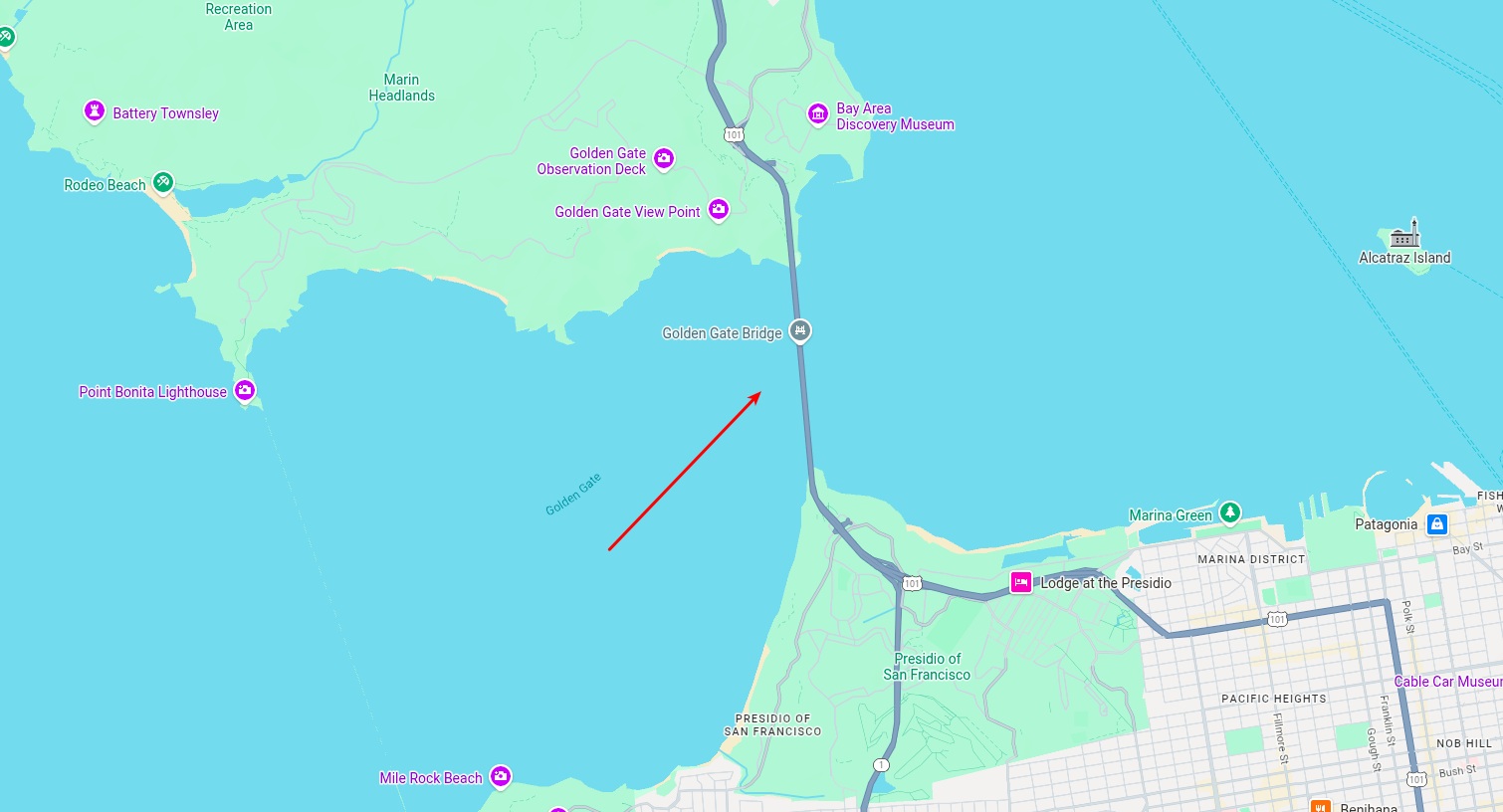 |
 |
These prompts can be used to validate your environment. Recreating them should produce similar compositions within minor stochastic differences.
- mlx-swift (Apple MLX): https://github.com/ml-explore/mlx-swift
- swift-transformers (HF): https://github.com/huggingface/swift-transformers
- diffusers reference implementation: https://github.com/huggingface/diffusers
- flux2.c (attention budget porting): https://github.com/antirez/flux2.c
Apache-2.0. See LICENSE.