Swift port of the FLUX.2 diffusion models using mlx-swift.
This repo includes:
- A
Flux2Swift library - A
flux2-cliexecutable for text-to-image (t2i) and image-to-image editing (i2i).
- Apple Silicon Mac (mlx-swift).
- macOS 14 (Sonoma) or newer.
- Memory: FLUX.2-dev is very large; start with the klein models if you’re unsure your machine can fit it.
You can download a precompiled flux2-cli from GitHub Releases (macOS arm64 / Apple Silicon):
- Download
flux2-cli.macos.arm64.zipfrom a release. - Unzip it and run the CLI from the unzipped folder (the executable expects its
.bundleresources to sit next to it).
# Or download directly:
# curl -L -o flux2-cli.macos.arm64.zip https://github.com/mzbac/flux2.swift/releases/latest/download/flux2-cli.macos.arm64.zip
#
unzip -o flux2-cli.macos.arm64.zip

# Run in-place:
chmod +x flux2-cli.macos.arm64/flux2-cli
./flux2-cli.macos.arm64/flux2-cli --helpThis repo uses Swift Package Manager, but build/test via xcodebuild.
Build the CLI into ./.build/flux2-cli:
./scripts/build-cli.sh
./.build/flux2-cli --help
Run tests:
xcodebuild -scheme Flux2-Package -destination "platform=macOS" testflux2-cli accepts either a local snapshot directory or a Hugging Face model id via --model:
- Local path: a directory containing
model_index.jsonand the expected subfolders (tokenizer/,scheduler/,transformer/,text_encoder/,vae/). - Model id:
org/repo(optionallyorg/repo:revision).
Weights are resolved via swift-transformers and cached in the standard Hugging Face hub cache:
HF_HUB_CACHE, orHF_HOME+/hub, or- default:
~/.cache/huggingface/hub
Authentication uses the usual Hugging Face sources (e.g. hf auth login, HF_TOKEN, HUGGINGFACE_HUB_TOKEN).
The commands below assume you installed the precompiled release artifact and have ./flux2-cli.macos.arm64/flux2-cli. If you built from source, replace that path with ./.build/flux2-cli.
Klein models are distilled; step-wise distilled models ignore CFG > 1 (the CLI will warn).
Output format is inferred from --output extension (.png, .jpg, .jpeg). If you omit an extension, .png is appended.
./flux2-cli.macos.arm64/flux2-cli generate \
  --model black-forest-labs/FLUX.2-klein-4B \
  --prompt "A studio photo of a tabby cat with green eyes, ultra realistic, shallow depth of field" \
  --guidance-scale 1.0 \
  --seed 42 \
  --steps 4 \
--output temp/klein4b_t2i.png./flux2-cli.macos.arm64/flux2-cli generate \
--model black-forest-labs/FLUX.2-klein-4B \
--prompt "Put black sunglasses on the cat, realistic photo" \
--image "https://huggingface.co/spaces/zerogpu-aoti/FLUX.1-Kontext-Dev-fp8-dynamic/resolve/main/cat.png" \
--guidance-scale 1.0 \
--seed 42 \
--steps 4 \
--output temp/klein4b_i2i_cat.png./flux2-cli.macos.arm64/flux2-cli generate \
--model black-forest-labs/FLUX.2-klein-9B \
--prompt "Put black sunglasses on the cat, realistic photo" \
--image "https://huggingface.co/spaces/zerogpu-aoti/FLUX.1-Kontext-Dev-fp8-dynamic/resolve/main/cat.png" \
--seed 42 \
--guidance-scale 1.0 \
--steps 4 \
--output temp/klein9b_i2i_cat.png./flux2-cli.macos.arm64/flux2-cli generate \
--model black-forest-labs/FLUX.2-dev \
--seed 42 \
--steps 50 \
--guidance-scale 4 \
--prompt "Realistic macro photograph of a hermit crab using a soda can as its shell, partially emerging from the can, captured with sharp detail and natural colors, on a sunlit beach with soft shadows and a shallow depth of field, with blurred ocean waves in the background. The can has the text \`BFL Diffusers\` on it and it has a color gradient that start with #FF5733 at the top and transitions to #33FF57 at the bottom." \
--output temp/dev_t2i.pngThis reproduces the “prompt upsampling” workflow from the upstream FLUX.2 docs by expanding the prompt with the local vision-language model (Pixtral-style) before generation.
./flux2-cli.macos.arm64/flux2-cli generate \
  --model black-forest-labs/FLUX.2-dev \
  --seed 42 \
  --steps 50 \
  --guidance-scale 4 \
  --prompt "Describe what the red arrow is seeing" \
  --upsample-prompt local \
  --print-upsampled-prompt \
  --image "https://raw.githubusercontent.com/black-forest-labs/flux2/main/assets/i2i_upsample_input.png" \
--output temp/dev_i2i_upsample.pngThe examples/ folder contains a few straight-from-the-CLI renders to showcase current fidelity (including 8bit quantized model created by flux2-cli quantize):
| Model | Mode | Prompt | Reference image | Output |
|---|---|---|---|---|
| FLUX.2-klein-4B | t2i | A studio photo of a tabby cat with green eyes, ultra realistic… | — |  |
| FLUX.2-klein-4B | i2i | Put black sunglasses on the cat, realistic photo |  |
 |
| FLUX.2-klein-4B (q8_64) | t2i | A studio photo of a tabby cat with green eyes, ultra realistic… | — |  |
| FLUX.2-klein-4B (q8_64) | i2i | Put black sunglasses on the cat, realistic photo | |
 |
| FLUX.2-klein-9B | t2i | A studio photo of a tabby cat with green eyes, ultra realistic… | — |  |
| FLUX.2-klein-9B | i2i | Put black sunglasses on the cat, realistic photo | |
 |
| FLUX.2-klein-9B (q8_64) | t2i | A studio photo of a tabby cat with green eyes, ultra realistic… | — |  |
| FLUX.2-klein-9B (q8_64) | i2i | Put black sunglasses on the cat, realistic photo | |
 |
| FLUX.2-dev | t2i | Realistic macro photograph of a hermit crab using a soda can as its shell… | — |  |
| FLUX.2-dev | i2i | Put black sunglasses on the cat, realistic photo | |
 |
| FLUX.2-dev (q8_64) | t2i | Realistic macro photograph of a hermit crab using a soda can as its shell… | — |  |
| FLUX.2-dev (q8_64) | i2i | Put black sunglasses on the cat, realistic photo | |
 |
| FLUX.2-dev (prompt upsampling) | i2i | Describe what the red arrow is seeing | 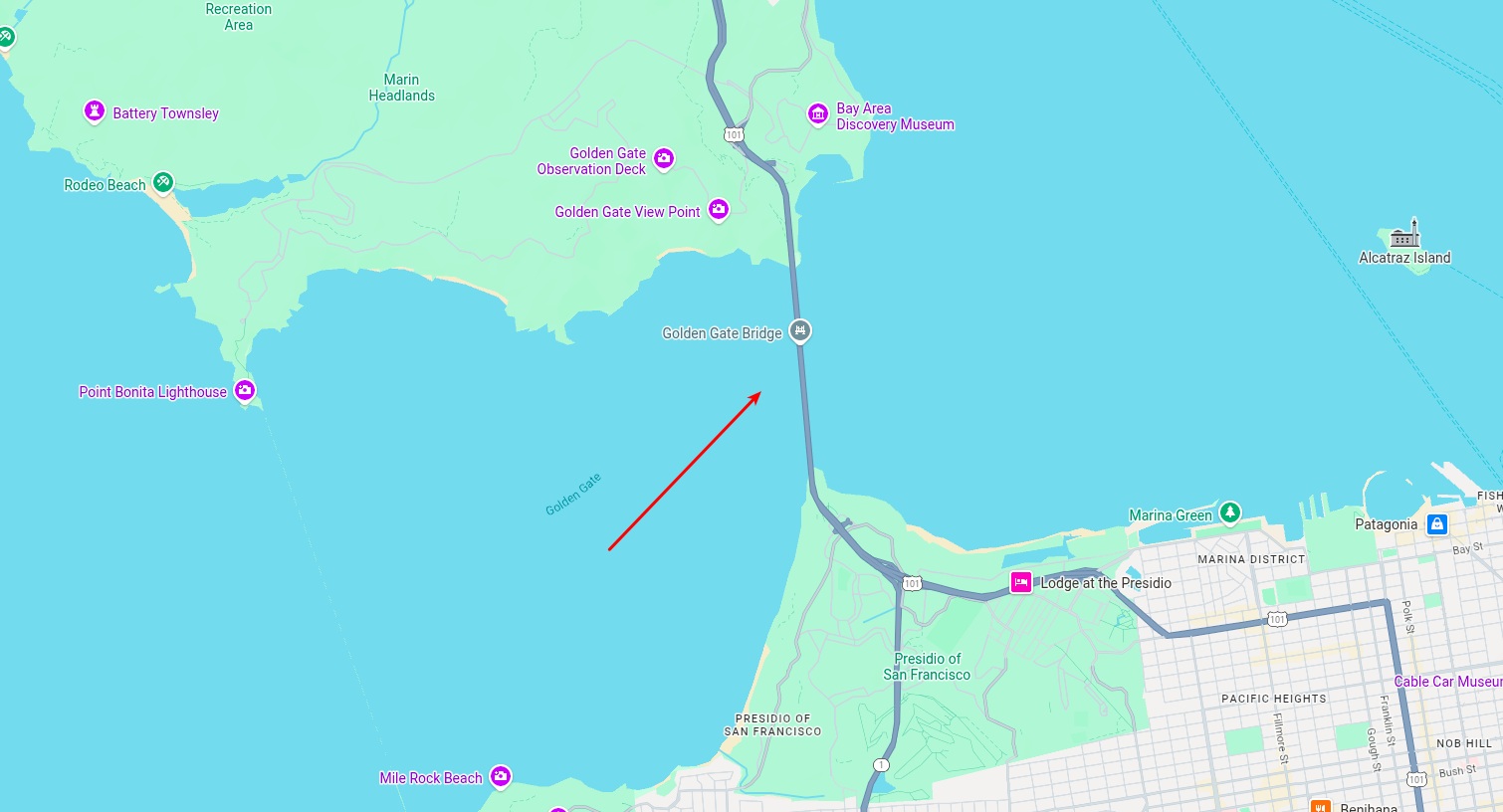 |
 |
Feel free to reference these prompts to validate your environment; recreating them should produce similar compositions within minor stochastic differences.
- mlx-swift (Apple MLX): https://github.com/ml-explore/mlx-swift
- swift-transformers (HF): https://github.com/huggingface/swift-transformers
- diffusers reference implementation: https://github.com/huggingface/diffusers
- flux2.c (for performance optimization): https://github.com/antirez/flux2.c
Apache-2.0. See LICENSE.