forked from dubbelosix/ansol
-
Notifications
You must be signed in to change notification settings - Fork 38
Update README.md #7
New issue
Have a question about this project? Sign up for a free GitHub account to open an issue and contact its maintainers and the community.
By clicking “Sign up for GitHub”, you agree to our terms of service and privacy statement. We’ll occasionally send you account related emails.
Already on GitHub? Sign in to your account
Open
gsalberto
wants to merge
1
commit into
Overclock-Validator:master
Choose a base branch
from
gsalberto:patch-1
base: master
Could not load branches
Branch not found: {{ refName }}
Loading
Could not load tags
Nothing to show
Loading
Are you sure you want to change the base?
Some commits from the old base branch may be removed from the timeline,
and old review comments may become outdated.
Open
Changes from all commits
Commits
File filter
Filter by extension
Conversations
Failed to load comments.
Loading
Jump to
Jump to file
Failed to load files.
Loading
Diff view
Diff view
There are no files selected for viewing
This file contains hidden or bidirectional Unicode text that may be interpreted or compiled differently than what appears below. To review, open the file in an editor that reveals hidden Unicode characters.
Learn more about bidirectional Unicode characters
| Original file line number | Diff line number | Diff line change |
|---|---|---|
|
|
@@ -2,57 +2,72 @@ | |
|
|
||
| ### What is it good for? | ||
|
|
||
| The goal of the Autoclock RPC ansible playbook is to have you caught up on the Solana blockchain within 15 minutes, assuming you have a capable server and your SSH key ready. It formats/raids/mounts disks, sets up swap, ramdisk (optional), downloads from snapshot and restarts everything. It is currently configured for a Latitude.sh s3.large.x86 (see "Optimal Machine Settings" below), but we hope to adapt it more widely later on. For a more catch-all ansible playbook and in depth guide on RPC's refer to https://github.com/rpcpool/solana-rpc-ansible | ||
| The goal of the Autoclock RPC ansible playbook is to have you caught up on the Solana blockchain within 15 minutes, assuming you have a capable server and your SSH key ready. | ||
|
|
||
| It formats/raids/mounts disks, sets up swap, ramdisk (optional), downloads from snapshot and restarts everything. | ||
|
|
||
| It is currently configured for a Latitude.sh s3.large.x86 (see "Optimal Machine Settings" below), but we hope to adapt it more widely later on. | ||
|
|
||
| For a more catch-all ansible playbook and in depth guide on RPC's refer to https://github.com/rpcpool/solana-rpc-ansible | ||
|
|
||
| ### Optimal Machine Settings | ||
|
|
||
| - Our Latitude.sh s3.large.x86 server starts with the settings below, which we prefer because: | ||
|
|
||
| - the initial state of the machine is cleaner than others that we have tried | ||
| - disks are named consistently (nvme01, nvme0n2) | ||
| - ubuntu installed (preferably ubuntu 20.04, 22.04) - this won't work with centos, etc. since they don't use aptitude by default | ||
| - the login user being ubuntu helps (all the solana operations are done using the solana user that the ansible playbook creates) | ||
| - ubuntu is in the sudoer's list | ||
| - unmounted disks are clean - if your root is on one of partitions and you pass it as an argument, this could be disastrous | ||
| - The initial state of the machine is cleaner than others that we have tried | ||
| - Disks are named consistently (nvme01, nvme0n2) | ||
| - Ubuntu installed (preferably ubuntu 20.04, 22.04) - this won't work with centos, etc. since they don't use aptitude by default | ||
|
There was a problem hiding this comment. Choose a reason for hiding this commentThe reason will be displayed to describe this comment to others. Learn more. There was a problem hiding this comment. Choose a reason for hiding this commentThe reason will be displayed to describe this comment to others. Learn more. It works as expected on Ubuntu 20.04 |
||
| - The login user being ubuntu helps (all the solana operations are done using the solana user that the ansible playbook creates) | ||
| - Ubuntu is in the sudoer's list | ||
| - Unmounted disks are clean - if your root is on one of partitions and you pass it as an argument, this could be disastrous | ||
|
|
||
| - All the above are satisfied by a fresh s3.large.x86 launch found here: https://www.latitude.sh/pricing | ||
| - Zen3 AMD Epyc’s such as the 7443p are considered some of the most performant nodes for keeping up with the tip of the chain at the moment, and support large amounts of RAM. | ||
|
|
||
| - Recommended RPC Specs | ||
| - 24 cores or more | ||
| - 24 cores or more (2.85GHz minimum) | ||
| - 512 GB RAM if you want to use ramdisk/tmpfs and store the accounts db in RAM (we use 300 GB for ram disk). without tmpfs, the ram requirement can be significantly lower (~256 GB) | ||
| - 3-4 TB (multiple disks is okay - i.e. 2x 1.9TB - because the ansible playbook stripes them together) | ||
|
|
||
| ### Step 1: SSH into your machine | ||
| ### Step 1: Deploy your machine | ||
|
|
||
| - If you are using latitude.sh infrastructure, you should go with the s3.large.x86 | ||
| - Select OS: Choose between Ubuntu 20.04 or Ubuntu 22.04 | ||
| - Select your SSH Key: Leave it Blank if you want to connect to SSH using credentials, or select the SSH previously created through the UI | ||
| - User Data: Leave it blank | ||
| - Select No RAID (As we are building the RAID through the ansible playbook below already) | ||
| - Hostname: No need to change | ||
|
|
||
| ### Step 2: SSH into your machine | ||
|
|
||
| ### Step 2: Start a screen session | ||
| ### Step 3: Start a screen session | ||
|
|
||
| ``` | ||
| screen -S sol | ||
| ``` | ||
|
|
||
| ### Step 3: Install ansible | ||
| ### Step 4: Install ansible | ||
|
|
||
| ``` | ||
| sudo apt-get install ansible -y | ||
| ``` | ||
|
|
||
| ### Step 4: Clone the autoclock-rpc repository | ||
| ### Step 5: Clone the autoclock-rpc repository | ||
|
|
||
| ``` | ||
| git clone https://github.com/overclock-validator/autoclock-rpc.git | ||
| ``` | ||
|
|
||
| ### Step 5: cd into the autoclock-rpc folder | ||
| ### Step 6: cd into the autoclock-rpc folder | ||
|
|
||
| ``` | ||
| cd autoclock-rpc | ||
| ``` | ||
|
|
||
| ### Step 6: Run the ansible command | ||
| ### Step 7: Run the ansible command | ||
|
|
||
| - this command can take between 10-20 minutes based on the specs of the machine | ||
| - it takes long because it does everything necessary to start the validator (format disks, checkout the solana repo and build it, download the latest snapshot, etc.) | ||
| - it takes long because it does everything necessary to start the validator (format disks, checkout the solana repo, build it and download the latest snapshot, etc.) | ||
| - make sure that the solana_version is up to date (see below) | ||
| - check the values set in `defaults/main.yml` and update to the values you want | ||
|
|
||
|
|
@@ -68,13 +83,13 @@ time ansible-playbook runner.yaml | |
| - ramdisk_size: this is optional and only necessary if you want to use ramdisk for the validator - carves out a large portion of the RAM to store the accountsdb. On a 512 GB RAM instance, this can be set to 300 GB (variable value is in GB so 300) | ||
| - solana_installer: whether to install solana from the installer. If set to false it will build solana cli from the solana github | ||
|
|
||
| ### Step 7: Once ansible finishes, switch to the solana user with: | ||
| ### Step 8: Once ansible finishes, switch to the solana user with: | ||
|
|
||
| ``` | ||
| sudo su - solana | ||
| ``` | ||
|
|
||
| ### Step 8: Check the status | ||
| ### Step 9: Check the status | ||
|
|
||
| ``` | ||
| source ~/.profile | ||
|
|
||
Add this suggestion to a batch that can be applied as a single commit.
This suggestion is invalid because no changes were made to the code.
Suggestions cannot be applied while the pull request is closed.
Suggestions cannot be applied while viewing a subset of changes.
Only one suggestion per line can be applied in a batch.
Add this suggestion to a batch that can be applied as a single commit.
Applying suggestions on deleted lines is not supported.
You must change the existing code in this line in order to create a valid suggestion.
Outdated suggestions cannot be applied.
This suggestion has been applied or marked resolved.
Suggestions cannot be applied from pending reviews.
Suggestions cannot be applied on multi-line comments.
Suggestions cannot be applied while the pull request is queued to merge.
Suggestion cannot be applied right now. Please check back later.

There was a problem hiding this comment.
Choose a reason for hiding this comment
The reason will be displayed to describe this comment to others. Learn more.
Not always the case:
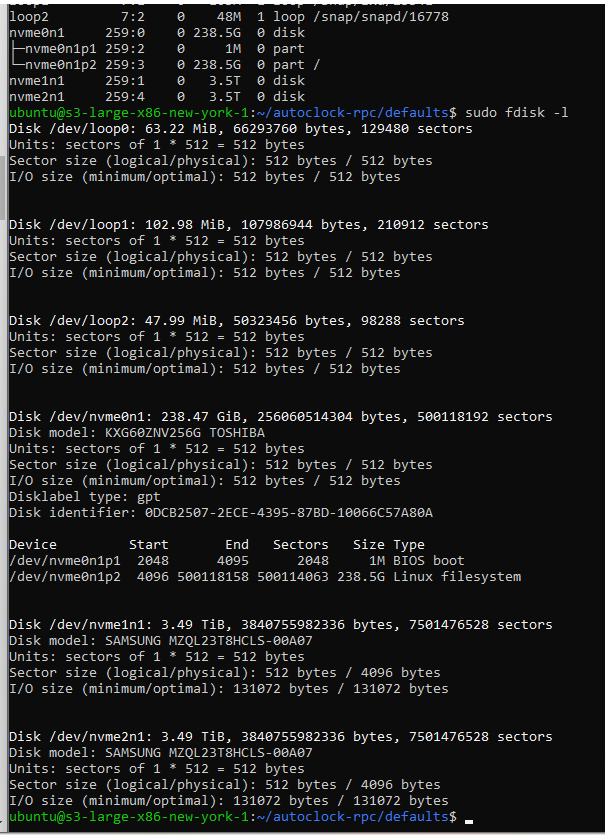
Mine are:
nvme0n1
nvme1n1
nvme2n1