This repository contains the ROS2 packages, simulation's and the documentation website files for the Find My Kitten, AI! software project. Documentation website here: https://catscanners.github.io/find-my-kitten/
For all the system requirements, check the dedicated requirements page
NOTE: Make sure to have installed git-lfs, after which you should clone the repository.
If you have already cloned the repository, run the following commands:
git lfs fetch
git lfs pull| term | shortened name | description | doc link |
|---|---|---|---|
| ROS 2 | ROS 2 | Software libraries that for developing robots | https://docs.ros.org/en/kilted/index.html |
| PX4 | PX4 | Autopilot software for drone that can be integrated with ROS 2 | https://docs.px4.io/main/en/ |
| Isaac ROS | Isaac | Nvidia's version of ROS that supports Nvidia GPU acceleration | https://developer.nvidia.com/isaac/ros |
| ROS 2 Humble | Humble | ROS 2 version compatible with Ubuntu 22 | https://docs.ros.org/en/humble/index.html |
| ROS 2 Jazzy | Jazzy | ROS 2 version compatible with Ubuntu 24 | https://docs.ros.org/en/jazzy/Installation.html |
For Quick start, follow the document at the location: docs/Quick Start/Quick Start.md,
or you can find it by clicking this link
For a simple setup of the environment and tools, follow the rest of the README
After receiving the drone, set up the toolchain on the drone by following these instructions
After the drone's toolchain is set up, what should you do to get the drone running?
- Pull this repository and
cd ros2_ws - The run operation can be divided into two parts: drone pilot part and ROS2 packages part.
- Drone pilot part
- Refer to this.
- ROS2 packages part
- This again can be split to two parts: vision_package and px4_handler.
- vision_package: get the camera input and enable object detection by referring to Machine vision guide
- px4_handler: once the drone is flying and offboard-mode is enabled, refer to Actions startup
- This again can be split to two parts: vision_package and px4_handler.
- Drone pilot part
- Want to make any changes? Make your changes on the packages in
ros2_ws,colcon build --packages-select <your-package>,source install/setup.bash.
This project uses a development container from isaac_ros_common. There is a
wrapper script to build and start the container in start_isaac_dev.sh.
The script uses the custom configuration to install the dependencies
into the container. Check here
for documentation on the wrapped script's arguments, which you can pass after --.
You can enable the simulator layer of the container by passing -s|--sim to
the script, which installs extra dependencies only required for running IsaacSim
The container will also install Python dependencies via uv. ROS2 installs some python modules into the system's Python, so the container installs the dependencies into the system's Python as well. A virtual environment will bypass the system Python, and should not be used inside the container.
Note
The start_isaac_dev.sh script will always query remote registries for
ready-built images. You can make it skip this and query locally with the
-c|--no-check flag, which is a lot faster. You can also skip building
entirely with -b|--no-build, but this also won't take into account any
possible changes.
Warning
Do not use a venv if using the development container! (Container is recommended)
This project uses UV dependency management for python dependencies. To get started:
- Install UV using:
pip install uv - Setup venv using
uv syncin project root directory - Activate venv:
source .venv/bin/activate
Refer to architecture for the general architecture. Shortly explained the directory structure:
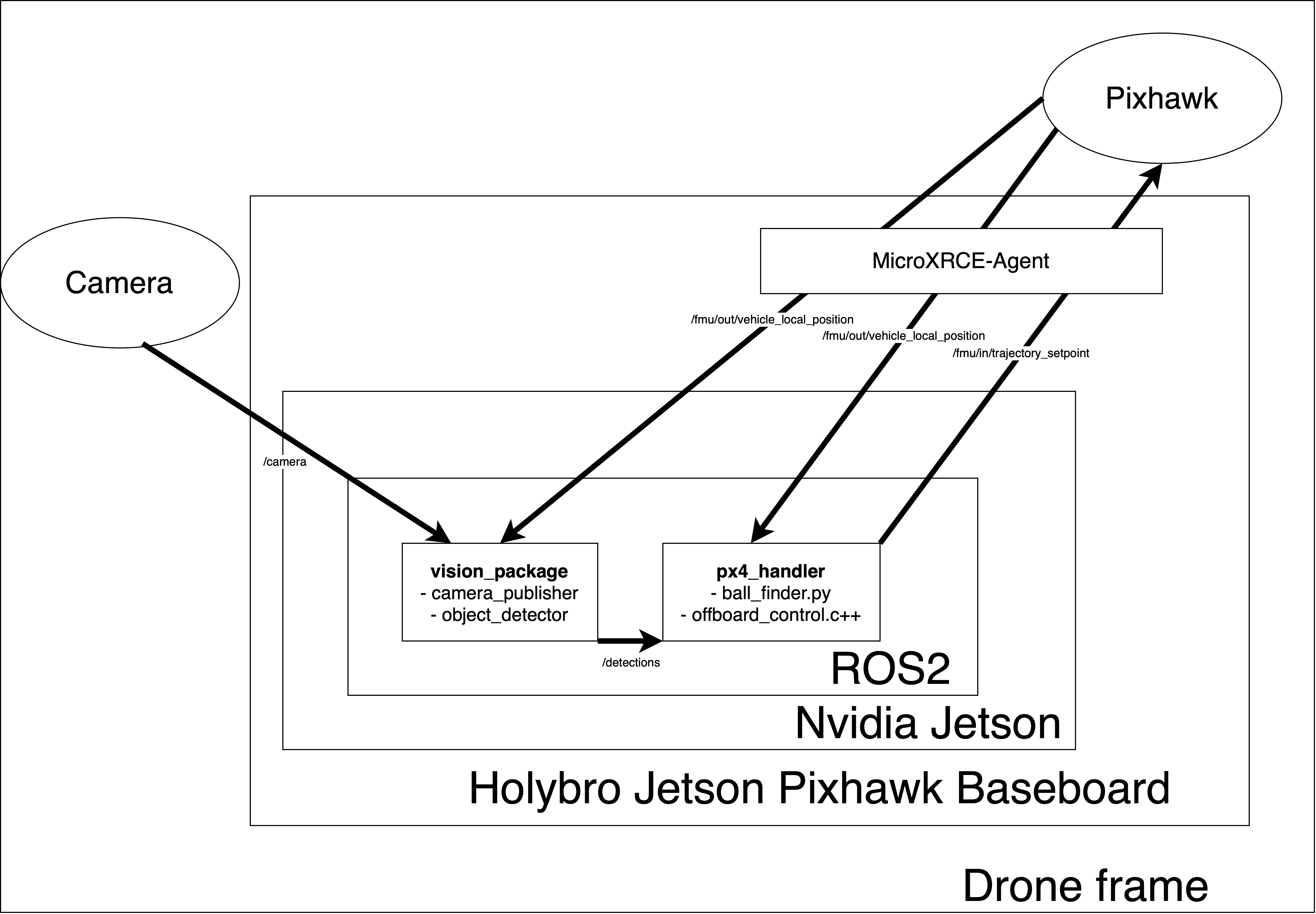
| Path | Description |
|---|---|
/ |
Root of the project. Contains the main README, license, and configuration files. |
/ros2_ws/ |
Contains our ROS2 packages. Run all ROS-commands here (then build will appear in this directory). |
/ros2_ws/src/px4_handler/ |
px4_handler-package for motions |
/ros2_ws/src/vision_package/ |
vision_package-package for camera and object detection |
/ros2_ws/src/launch |
Some ROS2 launch files, have not really used. |
/simulation |
Some files for the simulation, refer to this |
/docs/ |
Documentation files. |
Contributions are mainly introduced and added through PRs, which require at least one project member's approval.
Commits cannot be added directly to main.