


Instantly query taxi arrival times.
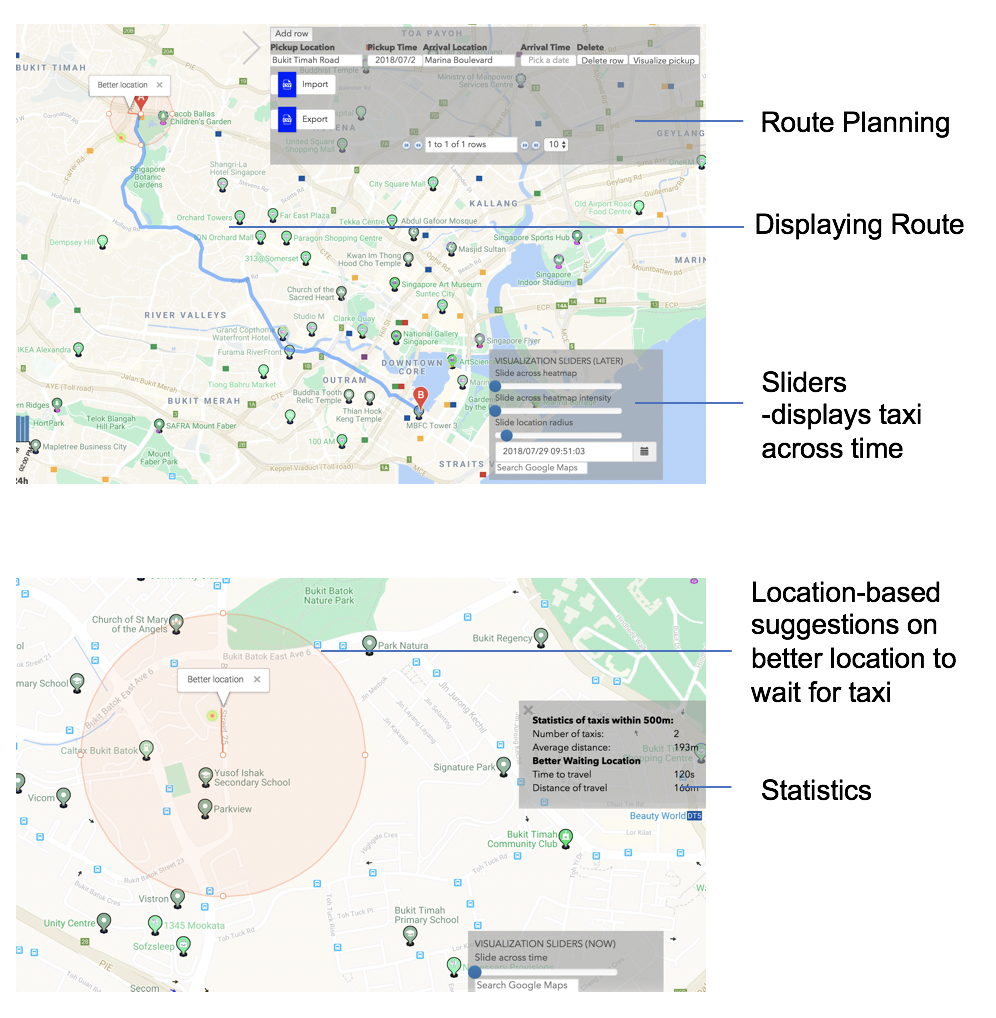
All the following instructions executed from same folder as this README.md.
Each instruction is a command, and a description of the command.
- Install the
taxibrospackage.python3 -m pip install --upgrade . - Follow
.env.templateto store all secret keys in a file named.env. Get yourDJANGO_SECRET_KEYby:python3 -c "from django.core.management.utils import get_random_secret_key; print(get_random_secret_key())" - Follow
taxibros/settings/local_settings.py.templateto create your personal settings intaxibros/settings/local_settings.py. - Migrate, as well as synchronize apps without migrations.
python3 manage.py makemigrations python3 manage.py migrate --run-syncdb - Run server.
python3 manage.py runserver`
- Create account.
python3 manage.py createsuperuser - Log in at
/admin.
- Run the server (see
Running django serversection). - Visit
/daemonsto check number of coordinates and timestamp, or/adminand select background_tasks to check if daemon is running - Check
logs/debug.logfor debug output. For example:INFO 2018-05-17 12:26:54,905 tasks 8245 140658619733760 Running daemons.download.start_download DEBUG 2018-05-17 12:26:54,906 download 8245 140658619733760 start_download DEBUG 2018-05-17 12:26:55,219 download 8245 140658619733760 2018-05-17T12:26:46+08:00 4950 healthy INFO 2018-05-17 12:26:56,828 tasks 8245 140658619733760 Ran task and deleting daemons.download.start_download DEBUG 2018-05-17 12:26:58,045 process_tasks 8245 140658619733760 waiting for tasks ...
- When the
download_timestampsfunction is called, there are some changes to the database. These changes are removed if aSIGINTbyC-Cis sent beforedownload_timestampsfinishes. - If some background_task/task had error, and fixing the cause of error then restarting the server does not fix the issue, then delete task from database.
Tests are executed using the django manager.
- Run the test client
python3 manage.py test
- Download dependencies.
sudo apt install postgresql-server-dev-9.5 postgresql-9.5-postgis-2.3 - You may have to manually create the data directory and start the server.
Filenames might be different.
su - postgres initdb -D /var/lib/postgresql pg_ctl -D /var/lib/postgresql -l logfile start - Create user and database.
su - postgres
psql
CREATE USER geodjango PASSWORD 'geodjango';
ALTER ROLE geodjango SUPERUSER;
CREATE DATABASE geodjango OWNER geodjango;
exit
- Dump and load data
- Ignore old django migrations. A few other notes.
netstat -nlp | grep 5432to see where the socket is, if it exists.- Remove/ignore all conversions of
QuerySets to Python lists beforeAppConfigis ready. If those conversions are executed,./manage.py migratewill query the empty database.
- For more context in map (including street and thoroughfare details), install PROJ.4 datum shifting files.
Automatic CI on each new commit with .travis.yml in the repo.
However, sometimes build errors occur (specifically test_unique_timestamp fails),
even though it passes on your local machine.
Assuming your local_settings.py matches travis' settings in production.py,
restart build on Travis CI and pray.
- Generate
.coveragefile.coverage run manage.py test - Optional: show report.
coverage report -m - Generate coverage badge. You might have to alias
python3 .../path/to/coverage_badge/__main__.pytocoverage-badge.coverage-badge -o coverage.svg
- Run with sensible defaults.
black .
- Install
memcachedand dev tools.sudo apt install -y memcached libmemcached-dev - Follow guide on django cache docs.
We use musjs.
- Create new mouse database by
python manage.py migrate --database=mouse_db. - Play tracked mouse movements at
/mouse.