
Let your AI agents talk to each other, across harnesses and machines. Control them from any device.


Use Pulsar to send a question from Claude Code to Codex, follow an OpenCode session from your phone, or approve a command while you’re away from your terminal. Agents can find each other by project, branch, or pull request.
Pulsar runs on your machine. Enable the optional Tailscale mesh to reach sessions on your other machines from the same app. Each machine serves the app and keeps its provider credentials locally.

npx pulsar setupSetup finds your agents, shows what it will change, and backs up every file it touches. Restart your agents afterwards. To upgrade, run npx pulsar@latest setup. To remove everything, run npx pulsar setup --uninstall.
No Node? Run curl -fsSL https://raw.githubusercontent.com/yocontra/pulsar/main/install.sh | bash.
Harness plugins and other MCP clients
| Harness | Command |
|---|---|
| Claude Code | /plugin install pulsar --marketplace yocontra/pulsar |
| Codex | codex plugin marketplace add yocontra/pulsar && codex plugin add pulsar@pulsar |
| omp | omp install pulsar |
| pi | pi install npm:pulsar |
Any other MCP client: { "command": "npx", "args": ["-y", "pulsar", "mcp"] }. pulsar setup also sets a few harness options that plugin installs can't. See docs/adapters.md.
Ask any agent in plain words:
> list agents on apparish

3 agents (project=apparish):
- apparish-auth   · [claude] · branch=main · busy
- codex@apparish  · [codex]  · branch=feat/billing · idle
- omp@apparish    · [omp]    · branch=main · idle

> tell everyone on apparish that main is frozen until the release is tagged

Sent m_mwk3jlo0 to 3 agents.
Agents are tagged with their harness, model, project, branch, PR and GitHub issue. Send to a name, a selector (project=apparish, pr=1402 role=reviewer, issue=1378), or * for everyone. Agents know a message comes from another agent, not from you, and that it can't approve anything.
The agent tools are list_agents, send, respond, wait, inbox and set_identity. Delivery details: docs/delivery.md.
Run these commands in the project where you want the agent to work. The first command lists providers and shows which executables Pulsar found. The second starts a session with a signed-in Antigravity CLI.
pulsar acp --list
pulsar acp antigravity
The app also uses the Agent Client Protocol (ACP) when it finds a compatible executable. Antigravity and OpenCode speak ACP directly. Claude Code and Codex use separate ACP adapters. The provider guide lists the executable, available features, and live test results for each provider. ACP provider guide
To continue a closed conversation, search for its name or project, open the saved transcript, and select Resume session. Pulsar reopens that conversation in its original workspace. This works with the six native harnesses and with managed ACP providers that support resume or load. Session links and saved conversations
For cloud work, open Hosted agents to view or start GitHub Copilot, Codex Cloud, or Cursor Cloud tasks. Choose the machine signed in to the provider. That machine verifies your passkey before submitting work. Hosted agent setup
The mesh links every machine on your Tailscale network that runs Pulsar. Agents on one machine can message agents on any other, and every machine serves the Pulsar app.
- Install Tailscale on each machine and on your phone, signed in to the same account.
- In the Tailscale admin console, turn on HTTPS Certificates (DNS page).
- On each machine, say yes when
pulsar setupasks about the mesh, or runpulsar mesh on.
Machines signed in as you link on their own. There are no pairing codes. pulsar doctor --mesh finds problems and tells you how to fix them. Servers, tagged devices, Linux notes and how linking works: docs/federation.md. Running your own control server: docs/headscale.md.
Run pulsar qr and scan the code with your phone, then add the page to your home screen. On a computer, run pulsar ui.
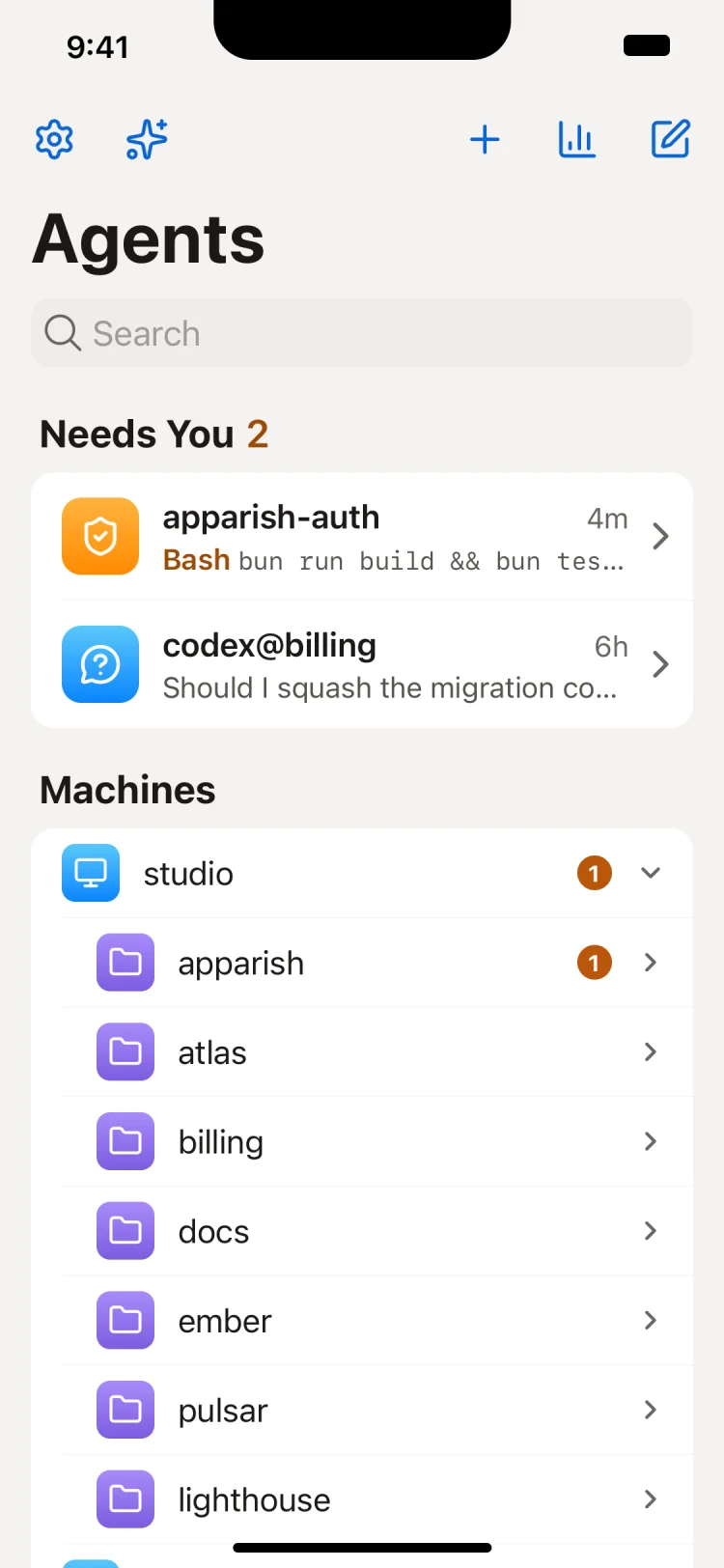
- Open Needs you to answer a permission prompt or question. The terminal prompt stays available.
- Follow live replies, tool output, diffs, and images. Codex hides empty wait events and keeps output and errors.
- Send messages and attachments, start a session in a worktree, or stop a turn. The controls available depend on the harness and how the session was started.
- Browse files, review changes, commit, push, or review a pull request from the session.
- Enable push notifications for approvals, completed turns, and failures. Lock-screen previews use plain text.
- Open Usage to compare tokens and costs by harness, model, and day. Pulsar distinguishes reported costs, estimates, and local models.
App tour and keyboard shortcuts · Controls available per harness
Your agents run with your permissions. So an agent must never be able to approve its own actions, or send a message that looks like it came from you. Pulsar asks for Face ID, Touch ID, Windows Hello or your device PIN before the app does anything as you.
The app asks before you:
- answer a prompt;
- send a message as you;
- stop an agent;
- start an agent;
- commit, push or open a PR;
- upload files;
- turn on notifications.
You prove once in each machine's app. It lasts 12 hours in a computer's browser and 7 days on a phone. An action on an agent on another machine asks again, because each machine checks for itself.
Some commands change who can reach your agents: pulsar mesh allow, deny, forget, owner, and pulsar passkeys remove. Agents can run them too, so each one waits until you confirm it with Touch ID (or Windows Hello, or polkit) on that machine, or with your passkey in the app. Details: docs/presence.md.
pulsar ls [selector]               # who is online
pulsar send '*' "main is frozen"   # send as the operator
pulsar ask "who is editing src/auth/session.ts"
pulsar interrupt codex@apparish    # stop an agent's current turn
pulsar ui                          # open the app in your browser
pulsar qr                          # QR code of the app, for your phone
pulsar mesh                        # mesh status; `pulsar mesh on` / `off`
pulsar doctor                      # check the daemon, harnesses and mesh
pulsar --help lists everything.
- On one machine, your user account is the trust boundary.
- The app listens only on Tailscale and accepts only your Tailscale identity.
- No telemetry.
Read SECURITY.md for the full model and to report a vulnerability.
bun install
bun run check     # typecheck, lint, tests
bun run mock      # the app against a simulated pool
See CONTRIBUTING.md.
MIT