PyMin embodies Python's minimalist philosophy: a focused tool that does one thing exceptionally well. The name reflects our commitment to minimalism - minimal configuration, minimal complexity, but maximum effectiveness in Python development workflow.
Just as Python emphasizes readability and simplicity, PyMin provides a clean, intuitive interface for package management and development environment setup. No unnecessary features, no complex configurations - just straightforward, reliable development tools.
The name "PyMin" carries dual meanings:
In English: "Py" (Python) + "Min" (Minimal/Minimalist)
- Represents our commitment to minimalist design and focused functionality
- Follows Python's "Simple is better than complex" philosophy
In Taiwanese: "歹命" (Pháiⁿ-miā)
- A humorous reference to the common challenges in Python development
- Reflects developers' daily struggles with environment setup and package management
- Turns development pain points into a playful and helpful tool
This duality in naming captures both our design philosophy and the real-world problems we're solving, while adding a touch of Taiwanese developer humor to the Python ecosystem.
Built on top of standard Python tools (pip, venv, requirements.txt), PyMin enhances rather than replaces your familiar workflow. It seamlessly integrates with existing Python development practices, ensuring 100% compatibility with standard tools while providing enhanced functionality and better user experience.
A CLI tool for PyPI package management, providing package name validation, virtual environment management, and project information display with rich output formatting.
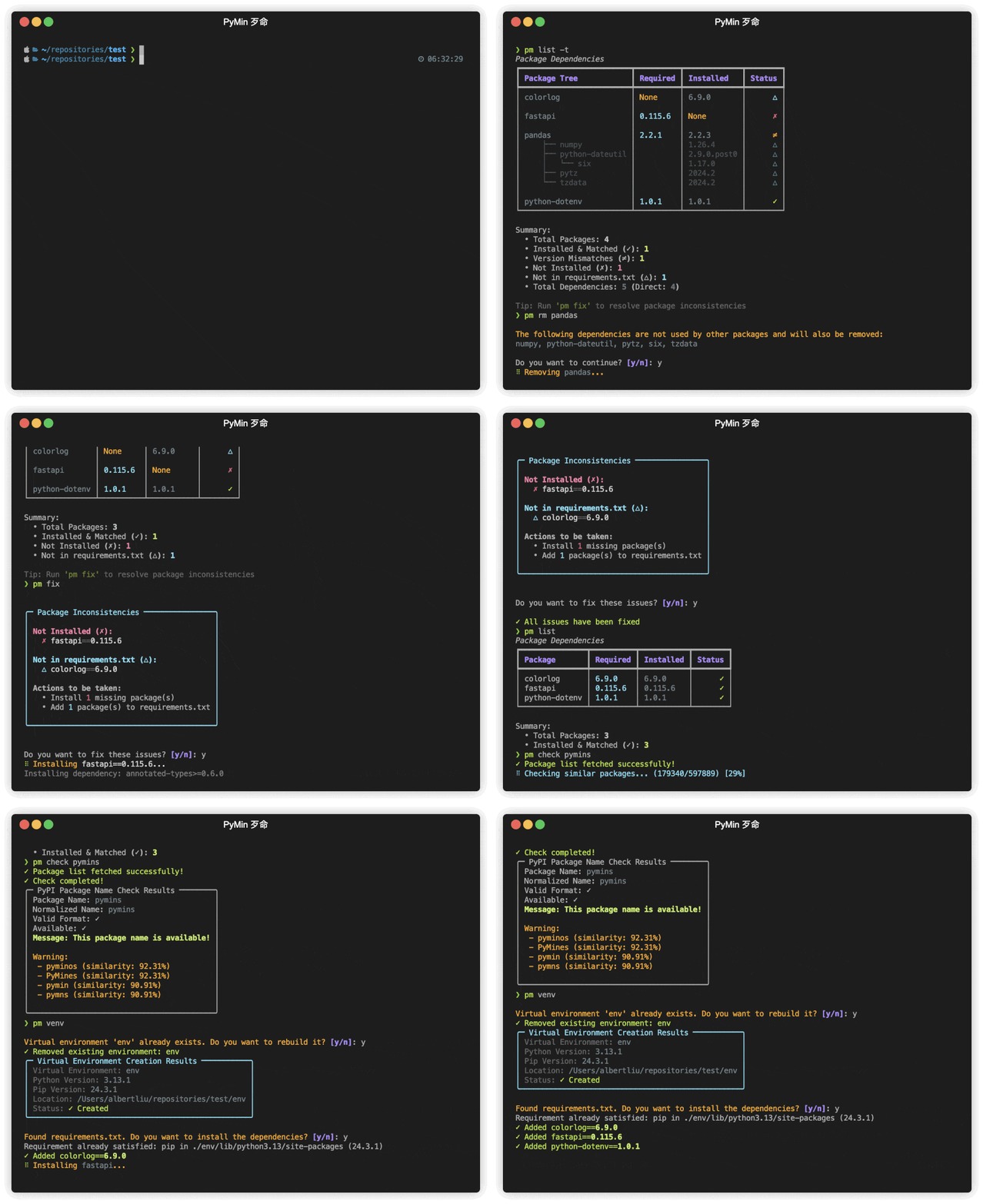
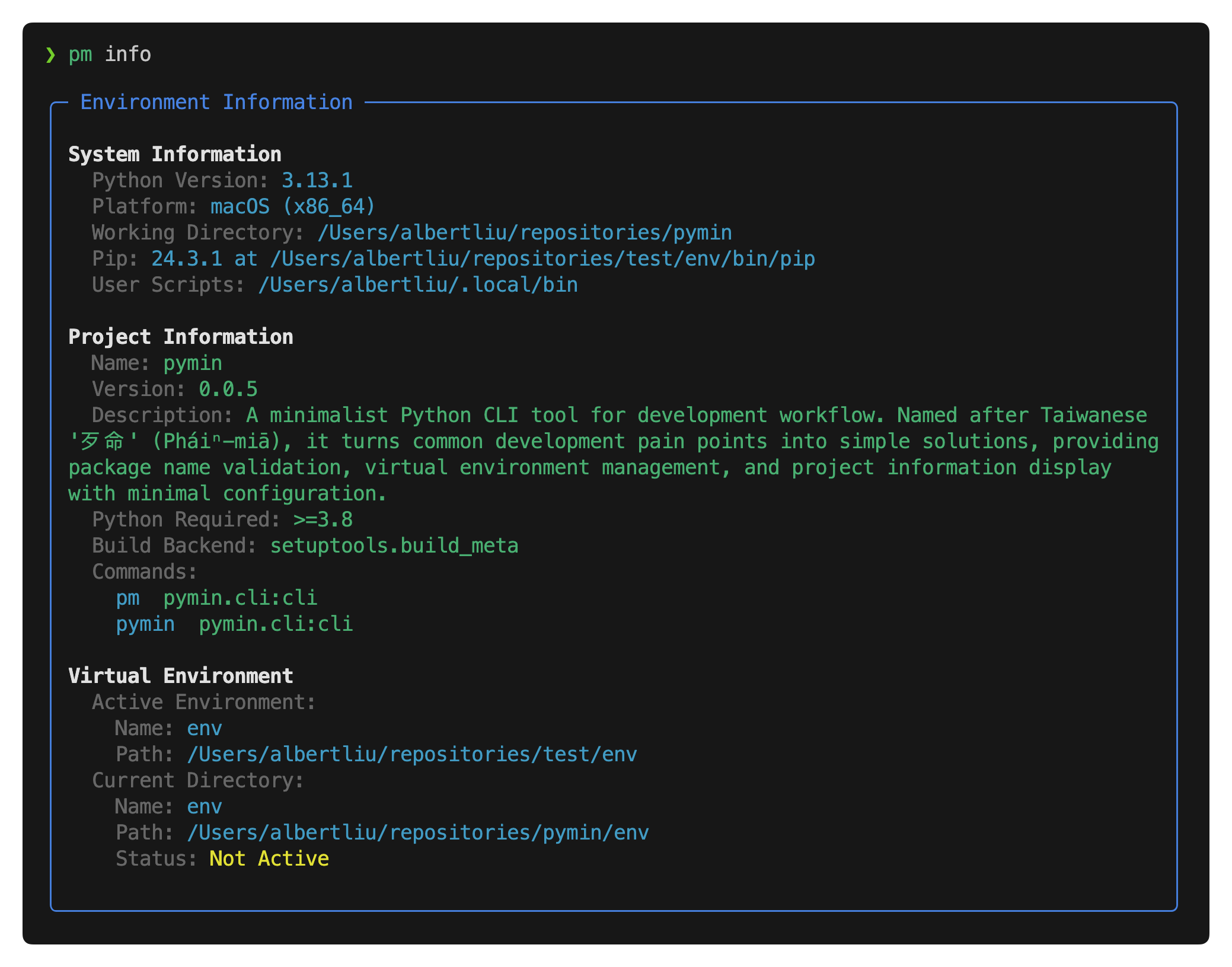
-
Environment Management
- Virtual environment creation and management (
pm venv/pm env) - One-command environment switching (
pm activate/pm deactivate) - Comprehensive environment information display (
pm info) - Automatic dependency installation and removal from requirements.txt
- Cross-platform compatibility
- Virtual environment creation and management (
-
Package Management
- Smart dependency visualization with tree structure (
pm list -t) - Efficient package installation and version management:
- Add new packages with version control
- Update existing packages to specific versions
- Support for both requirements.txt and pyproject.toml
- Intelligent package removal with dependency cleanup (
pm rm) - Comprehensive package inconsistency detection and auto-fix (
pm fix):- Version mismatches (≠)
- Missing packages (✗)
- Redundant dependencies (⚠)
- Unlisted installed packages (△)
- Dual dependency management support:
- Smart requirements.txt management
- pyproject.toml integration with PEP 621 compliance
- Synchronized dependency tracking across both files
- Case-sensitive package name handling
- Automatic version normalization
- Bulk package operations support
- One-command package updates (
pm update/pm up) - Version conflict detection and resolution
- Clear visual indicators for package status
- Smart dependency visualization with tree structure (
-
PyPI Integration
- Package name availability check (
pm check) - Similar package name search with threshold control (
pm search -t) - One-command package publishing (
pm release) - Test PyPI support for pre-release testing (
pm release --test) - Secure credential management
- Package name availability check (
Install via pipx:
$ pipx install pymin| Component | Requirement |
|---|---|
| Python | >=3.8 |
| OS | Platform independent |
PyMin provides a streamlined command interface with intuitive aliases:
| Command | Description |
|---|---|
pm |
Main command (recommended) |
pymin |
Alternative full name |
| Command | Description | Alias/Options |
|---|---|---|
info |
Show environment information | |
venv |
Create a virtual environment | env, -y: auto-confirm |
activate |
Activate the virtual environment | on |
deactivate |
Deactivate current virtual environment | off |
Both add and remove commands support multiple packages in one operation
add supports version specification using package==version format
| Command | Description | Alias/Options |
|---|---|---|
list |
List installed packages | ls, -a: all, -t: tree |
add |
Add or Update packages | -p: use pyproject.toml |
remove |
Remove packages from requirements.txt | rm |
update |
Update all packages to latest versions | up, -y: auto-confirm |
fix |
Fix package inconsistencies | -p: use pyproject.toml, -y: auto-confirm |
The fix command automatically resolves all package inconsistencies:
- Installs missing packages (✗)
- Updates packages to match required versions (≠)
- Removes redundant packages from requirements.txt/pyproject.toml (⚠)
- Adds unlisted installed packages to requirements.txt/pyproject.toml (△)
| Command | Description | Alias/Options |
|---|---|---|
check |
Check package name availability | |
search |
Search for similar package names | -t: threshold |
release |
Build and publish package to PyPI | --test: Test PyPI |
# Show environment info
$ pm info

# Create and manage virtual environment
$ pm venv          # Create with default name 'env'
$ pm venv my_env   # Create with custom name
$ pm venv -y       # Create without confirmation
$ pm env           # Alias for venv

# Activate/Deactivate
$ pm activate      # or pm on
$ pm deactivate # or pm off# Add packages
$ pm add fastapi # Add to requirements.txt
$ pm add fastapi -p # Add to pyproject.toml
$ pm add fastapi==0.100.0 # Add or Update to specific version
$ pm add fastapi sqlalchemy # Multiple packages
# Remove packages
$ pm rm fastapi
# List packages
$ pm list # Show main packages
$ pm list -a # Show all packages
$ pm list -t # Show dependency tree
# Update and fix
$ pm update # Update all packages
$ pm update -y # Update without confirmation
$ pm fix # Fix based on requirements.txt (default)
$ pm fix -p # Fix based on pyproject.toml
$ pm fix -y # Fix without confirmation
$ pm fix -p -y # Fix based on pyproject.toml without confirmation# Check package name
$ pm check my-package-name
# Search similar names
$ pm search fastapi # Default similarity (80%)
$ pm search fastapi -t 0.85 # Custom threshold
# Publish package
$ pm release # Publish to PyPI
$ pm release --test # Publish to Test PyPIThis document was automatically generated by ReadGen.