A computer vision application that allows you to control audio volume with hand gestures.
Hand Volume Handler is a Python application that uses your webcam to detect hand gestures and control the volume of audio applications running on your computer. Using the power of MediaPipe for hand tracking and pycaw for audio control, this application allows you to adjust volume levels with natural hand movements.
- Real-time hand tracking and gesture recognition
- Volume control using the pinch gesture (distance between thumb and index finger)
- Automatic detection of compatible audio applications (browsers and music players)
- Visual feedback showing current hand position, gesture recognition, and volume levels
- Audio session caching to maintain control even when applications temporarily stop producing sound
- Python 3.7+
- Webcam
- Windows OS (pycaw is Windows-specific)
- Clone this repository:
git clone https://github.com/stkvs/HandVolumeHandler.git
cd HandVolumeHandler- Install the required dependencies:
pip install -r requirements.txtpython main.py- Position your hand infront of the camera.
- To activate the volume changing close your Middle, Ring and Pinky finger
- Bring your Index and Thumb finger closer together or further apart to change volume
- To stop changing volume, open your hand with all fingers extended.
- Press 'ESC' to exit the application.
- Hand Detection: The application uses MediaPipe to detect and track hand landmarks in real-time from your webcam feed.
2a. Gesture Recognition: The system identifies a specific hand gesture (index finger and thumb extended, other fingers folded down) as the control position. By utilising the points listed on the MediaPipe documentation:
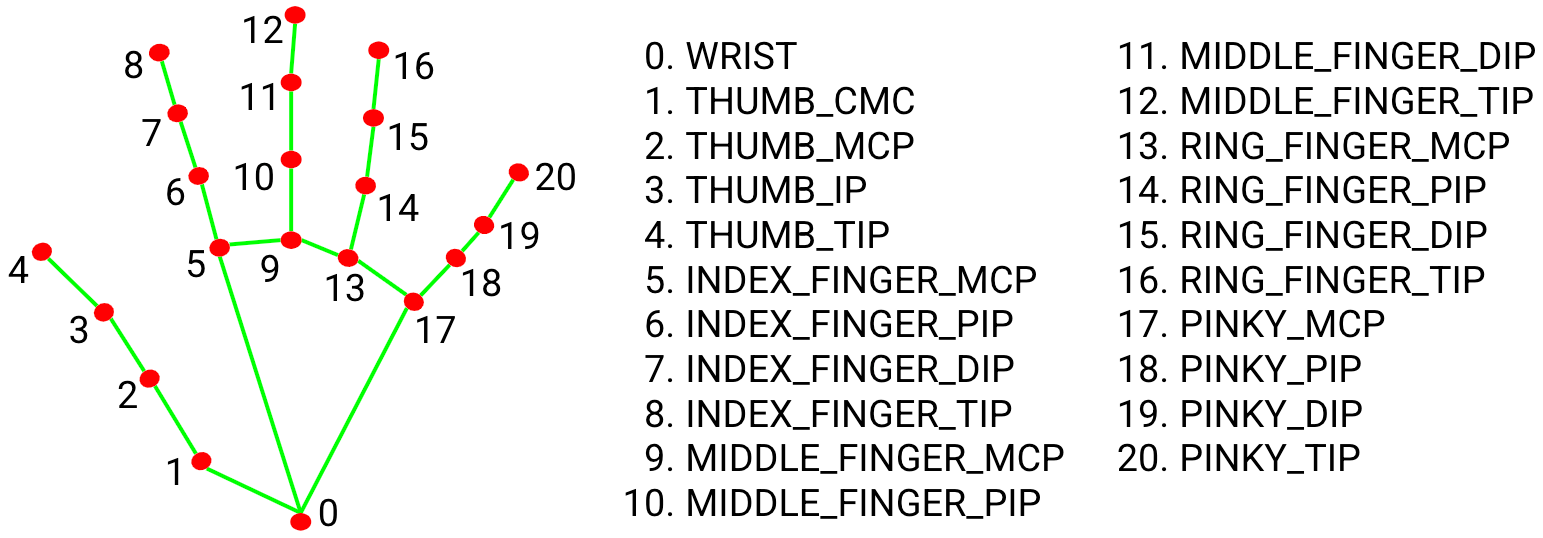
2b. How it works: Utilising the specific points of 8 (Index Finger) and 4 (Thumb Tip) to handle volume changes and points 12 (Middle Finger), 16 (Ring Finger) and 20 (Pinky Finger) to check if they are below the Index finger will then ensure the volume control is on.
- Audio Control: Using pycaw (Python Core Audio Windows), the application adjusts the volume of active audio sessions for browsers and music applications.
The following applications are supported for volume control:
- Chrome
- Firefox
- Microsoft Edge
- Opera
- Brave
- Safari
- Spotify
- Windows Music
- Amazon Music
- Tidal
- Deezer
- iTunes
- VLC
Contributions are welcome! Please feel free to submit a Pull Request.
MIT