
Inspect HTTP, gRPC, WebSocket, SSE and Cap’n Proto from one local workbench. Follow the network path, inspect this device, and work with service evidence without a ProtoPeek account or database. A Go app runs on your machine; your browser provides the interface.
Website · Guides · Releases · Issues
v0.7.0 brings a connected local workbench. The installers below select the latest published stable release and verify its SHA-256 archive. The v0.7.0 stable release is published; package channels retain their independent receipts. Nightly is a separate, rolling preview. Package channels promote their own pinned manifests independently.
macOS / Linux
curl -fsSL https://raw.githubusercontent.com/shreyam1008/ProtoPeek/master/install.sh | shWindows PowerShell
irm https://raw.githubusercontent.com/shreyam1008/ProtoPeek/master/install.ps1 | iexThen open a new terminal and run:
pp- Open Inspect → HTTP and paste your service’s full
http://orhttps://URL. - Choose a method and add headers or a body only if needed.
- Choose Send. Read the status, body, headers and timing beside the request.
In the v0.7.0 build, Home is shorter: choose HTTP request, paste the URL, and choose Open HTTP, then Send. Opening a workbench does not send a request or run discovery. For gRPC, select gRPC · TLS or gRPC · plaintext deliberately, then connect with reflection or your schema. Find a service instead is available when you need protocol discovery.
Homebrew, Scoop, APT, pinned installs and uninstall · HTTP guide · gRPC guide
| Task | Start here | What you can inspect |
|---|---|---|
| Send an HTTP request | HTTP | Status, headers, body, redirects, verified TLS and timing |
| Call a gRPC method | gRPC | Schema, stream mode, messages, metadata, headers, trailers and final status |
| Follow a live event stream | WebSocket / SSE | Bounded sessions, WebSocket text/binary messages, SSE names and IDs |
| Inspect a Cap’n Proto service | Cap’n Proto | Source/compiled schema, exact integers, transport and native RPC results |
| Find a connection problem | Network diagnostics | v0.7.0: 13 bounded diagnostics for DNS, TCP/TLS, proxies, protocol checks and offline subnet planning; explicit Run/Cancel |
| Understand the host or path | This Device, Network | Local listeners, selected routes, measured hops, packet evidence and saved maps |
| Set up an optional tool | Extensions | v0.7.0: 20 optional entries with install guidance and clearly labelled integration levels; no automatic checks or installs |
| Send a local file | Local transfer | v0.7.0: encrypted direct ProtoPeek-to-ProtoPeek transfer over LAN or existing VPN routes; receiver approval and SHA-256 receipts |
| Download an artifact | Downloader | Resumable local queue and SHA-256 evidence |
| Save media or a page | Media downloads | v0.7.0: native direct files and HTML media; optional verified site engines and webpage archives |
In published v0.7.0, Windows x64 includes an aria2 fallback for Downloader; other platforms use installed aria2. TCP port scans and bounded private-network discovery are built in. Nmap, live capture through dumpcap, and provider access/publishing integrations use separately installed tools. They remain optional: opening the workbench does not download them or start their work.
In current source and Nightly, choose Guide for an interactive tour of the active workbench. Current source offers 20 managed companions in Extensions, including standalone networking and diagnostics tools. Available packages depend on the host platform. The published Nightly contains the earlier six companions.
Run pp extensions status --json to inspect versions or pp agent search subnet to discover an agent workflow.
See the extension guide for supported hosts. The published Nightly's
lightweight Windows x64 package can install aria2 from Extensions or use a
verified offline ZIP.
Published v0.7.0 embeds aria2 on Windows x64.
Current source also includes a built-in HTTP(S) downloader for fresh profiles without aria2. It uses one connection per download, supports bounded concurrent jobs and safe resume when the server provides a strong ETag, and preserves partial files when safe resume is unavailable. Configured or installed aria2 remains available for its advanced connection and allocation options.

| Channel | What it means |
|---|---|
| Stable | Default installers select the latest published stable archive, never a draft or prerelease. |
| Package channels | Homebrew, Scoop and APT pin independently promoted versions. Check the installed version and the channel's current manifest. |
| Nightly | Manually refreshed opt-in preview from main/master; read the release page for the archive’s source. Stable/package promotion is separate. |
| v0.7.0 build | The published stable build includes 20 optional extension entries, 23 local agent tools and 13 diagnostics. Publication, native/provider acceptance and package promotion are separate gates. |
| Legacy Edge | Older manual preview archives and dated screenshots, retained as historical evidence. It is not the recommended rolling channel. |
The v0.7.0 build uses Home, Inspect, Network, Extensions, Files and Settings. Existing deep
links remain valid. This Device under Network retains /this-pc; optional tools live under
Extensions. The roadmap separates shipped features, current source
and external acceptance. The workspace guide explains navigation.


Actual v0.7.0 Windows package captures, taken on 23 October 2026 before publication. The public package bytes were later verified unchanged. They show a clean browser with no fixture data or host checks; they do not establish provider or Store-signed installation acceptance.
Historical legacy Edge capture · 7 September 2026

Real legacy Edge capture from 7 September 2026. It documents the earlier navigation, not the v0.7.0 quickstart. Dated browser acceptance and the screenshot manifest retain the original evidence.
Home and Extensions · captured from unreleased source on 23 October 2026
These actual Windows browser captures were taken before v0.7.0 publication, separately from v0.6.1 and the dated legacy Edge image above. They document the captured build, not release publication or vendor setup.

Home opens an unsent HTTP or gRPC draft; discovery remains a separate action.

The captured library reported 20 optional entries. Availability checks ran only when requested.
Debian / Ubuntu: add the signed APT repository once, then run
sudo apt update && sudo apt install protopeek. Includes the pp alias.
Ubuntu amd64 installation and removal through the public HTTPS repository passed
on 12 September 2026. Snap Store publication is still pending.
Homebrew on macOS or Linux:
brew install shreyam1008/tap/protopeekScoop on Windows:
scoop bucket add shreyam https://github.com/shreyam1008/scoop-bucket
scoop install shreyam/protopeek
Or use the verified release resolver on Unix:
curl -fsSL https://raw.githubusercontent.com/shreyam1008/ProtoPeek/master/install.sh | shOr with wget:
wget -qO- https://raw.githubusercontent.com/shreyam1008/ProtoPeek/master/install.sh | shWindows PowerShell, per user:
irm https://raw.githubusercontent.com/shreyam1008/ProtoPeek/master/install.ps1 | iexThe verified installers select the latest stable release and verify its published SHA-256 archive. Windows x64 bundles pinned aria2 1.37.0, with its notices and source companion included in release packaging. A configured executable takes priority, followed by PATH and then the bundle. Homebrew and Scoop can supply aria2 as a package dependency; see their manifests for the packaged version. The install guide covers updates, pinned releases, PATH, rollback and uninstall.
Included in v0.7.0: run pp update or protopeek update on Windows, macOS, or Linux.
Use --check to check only and --channel stable|nightly|edge to choose a channel; the default
follows the installed channel. Settings → Updates provides the same release preview,
explicit install confirmation, cancellation and restart guidance. Direct installs verify
SHA-256 and update both owned commands; managed installs show the manager's commands.
The v0.6.1 binary lacks this command and needs one installer upgrade to a published build
containing it. To choose a preview deliberately, see Nightly setup.
Nightly is refreshed manually from main or master. Stable releases and package updates
require explicit, independent promotion. Legacy Edge is also refreshed manually.
Go fallback:
go install github.com/shreyam1008/ProtoPeek/cmd/protopeek@latest
go install github.com/shreyam1008/ProtoPeek/cmd/pp@latest
Distribution checked 23 October 2026: GitHub, signed APT, Homebrew and Scoop provide v0.7.0. Public installers passed fresh installation and real v0.6.1 upgrades on Windows, Linux and macOS. Microsoft Store v0.7.0 passed fresh installation, packaged runtime and removal checks on the current Windows host. A prior Store-version upgrade and Start-menu/browser opening remain unverified. The checksummed Snap candidate is on GitHub; desktop acceptance, maintainer credentials and Store approval remain separate. Snap Store and Flatpak publication are not claimed. See the dated verification record. See the shared publication status.
Official downloads and package links: ProtoPeek distribution tracker. Stable release, Homebrew and Scoop links are kept separate from planned distribution channels.
Microsoft Store: the public ProtoPeek listing was verified on 23 October 2026. The v0.7.0.0 MSIX update was submitted the same day and later passed certification; Partner Center showed Publishing. An official WinGet Store installation then delivered the Store-signed 0.7.0.0 package. Both registered aliases, public-release binary hashes, local HTTP/assets, the bundled aria2 transfer and removal passed on this Windows host. Store v0.6.1→v0.7.0 upgrade and Start-menu/browser opening remain unverified. Use the official listing to install or update. See the MSIX and publication record.
Stable GitHub releases also include protopeek_<version>_amd64.snap. The
candidate uses classic confinement so ProtoPeek can inspect local sockets and
invoke explicitly installed tools such as Tailscale, Nmap, dumpcap, aria2, and
cloudflared. The Snap Store candidate workflow is manual and credential-gated;
publication is not claimed until the package has passed a Linux desktop smoke
test.
The v0.7.0 release workflow builds and verifies the GitHub Snap candidate before
publication. A local maintainer build starts from the exact stable tag and runs
bash scripts/prepare-snap-version.sh "$TAG" with that tag before snapcraft; the isolated
build reads that validated tag file and refuses a missing version. The manual
GitHub repair workflow can attach an absent candidate without replacing an existing one.
Verify a local result with bash scripts/verify-snap.sh "$TAG" path/to/candidate.snap.
Agent setup and API discovery are documented in Local AI agents. ProtoPeek does not host your model or sign into provider accounts for you.
Detailed capabilities, storage, transport limits and historical release evidence
Published v0.7.0: these additions extend v0.6.1 and earlier legacy Edge archives. The roadmap distinguishes implementation from native/provider/package acceptance. This release does not automatically promote package channels or a new Store package.
- Network diagnostics joins 13 checks for DNS/resolver, TCP/TLS, IPv4/IPv6, finite sampling, TCP/UDP exchange, proxies, h2c, HTTP/3 and offline subnet planning in one explicit Run/Cancel workflow. Eligible subnet plans prepare an unsent nearby-device scan.
- HTTP adds environment templates, session-only secrets, library import/merge and reviewed cURL import. gRPC renders incremental native stream evidence; Cap’n Proto adds generic bindings and typed returned-capability plans. Loading or importing never sends a request.
- Network history compares immutable observations conservatively and previews Nmap XML-to-map losses. Packet triage separates sections/transports and offers default-off bounded TCP payload evidence with visible gaps/conflicts. Native macOS ICMP/counters now have an implementation and native CI tests; real macOS/runtime acceptance remains distinct from portable fixtures.
- Private access adds a separate Headscale login-server flow and native NetBird evidence. Publishing adds reviewed canonical user-config operations and owned temporary Serve/Quick Tunnel/Funnel sessions on Windows/Linux. Linux requires a direct native vendor Go command; scripts, Snap/Flatpak launchers and unknown builds are refused. All foreground publishing modes remain unavailable on macOS. Actual accounts, installed tools, permissions and endpoint/cleanup checks remain explicit prerequisites and acceptance gates. See the Linux ownership boundary.
Local AI agents attach through protopeek mcp or the JSON CLI, using your
own model. The 23-tool catalog includes bounded gRPC/Cap’n Proto, receive-only events and caller-shared
packet metadata alongside HTTP and host tools. Pair from Settings → AI agents; RPC mutations,
connections, capture and downloads require write actions. Sanitized session activity keeps at most
40 receipts in this tab’s memory and resumes endpoints as unsent manual drafts.
Historically, v0.6.1 has six permanent destinations:
| Destination | Responsibility | Current and compatibility paths retained |
|---|---|---|
| Home | resume and bounded discovery | / |
| Inspect | gRPC, HTTP, WebSocket/SSE, Cap’n Proto, website and TLS evidence | /protocols, /protocols/grpc, /protocols/http, /security, /grpc, /http |
| Network | this device, next hop, path, authorized discovery, map, and history | /network/*, /this-pc, /routes |
| Publish | Cloudflare host evidence and guarded service actions | /tunnels |
| Files | Downloader and artifact evidence | /downloader, /downloads |
| Settings | appearance, local dependencies, host policy, and About | /settings, /roadmap |
v0.7.0 adds Extensions in the same six-destination layout: Home, Inspect, Network, Extensions, Files and Settings. Its 20 optional entries separate six native workbenches from seven Command guides, four MCP setup guides, two Endpoint guides and one ChatGPT web External link. Detail content loads only for the selected entry; Check this host is explicit and checks one CLI without running it. Pins and manual setup-platform choices store only catalog and platform IDs in this browser, without credentials or results. Setup links refer to the machine running ProtoPeek. This library installs nothing and adds no vendor/model bundles; the existing Windows x64 aria2 fallback remains the explicit exception. The table above records the historical v0.6.1 layout.
In v0.7.0, choose HTTP, gRPC with verified TLS, or gRPC plaintext on Home, enter an address, and choose Open HTTP or Open gRPC. This prepares an unsent draft; Find a service instead remains a separate discovery action. Full HTTP paths and queries are preserved in the live draft. Collapse the tool sidebar when you need more editor space. Recent tools links return to a tool; active calls end when you leave it. HTTP results retain their sent request identity, OpenAPI imports wait for an explicit operation choice, and gRPC schema failures offer recovery in place.
Existing deep links remain valid, including /tunnels, /network/tailnet and /network/nmap.
The historical v0.6.1 layout places installed Tailscale status, peers, netcheck and reviewed CLI actions under
Network. v0.7.0 groups that workbench under Extensions and adds the bounded private-access
and temporary publishing flows above. Integrated sign-in/elevation and provider administration remain
outside those flows. A feature belongs in ProtoPeek only when it operates on
a service or related artifact, strengthens an existing journey or typed handoff, remains useful
local-first, stays lazy/bounded/quiet, and has a truthful Windows, Linux, and macOS story that one
maintainer can support. See the suite strategy and selected
desktop workbench contract.
Roadmap and Help remain available through commands and About/documentation, not as permanent destinations.
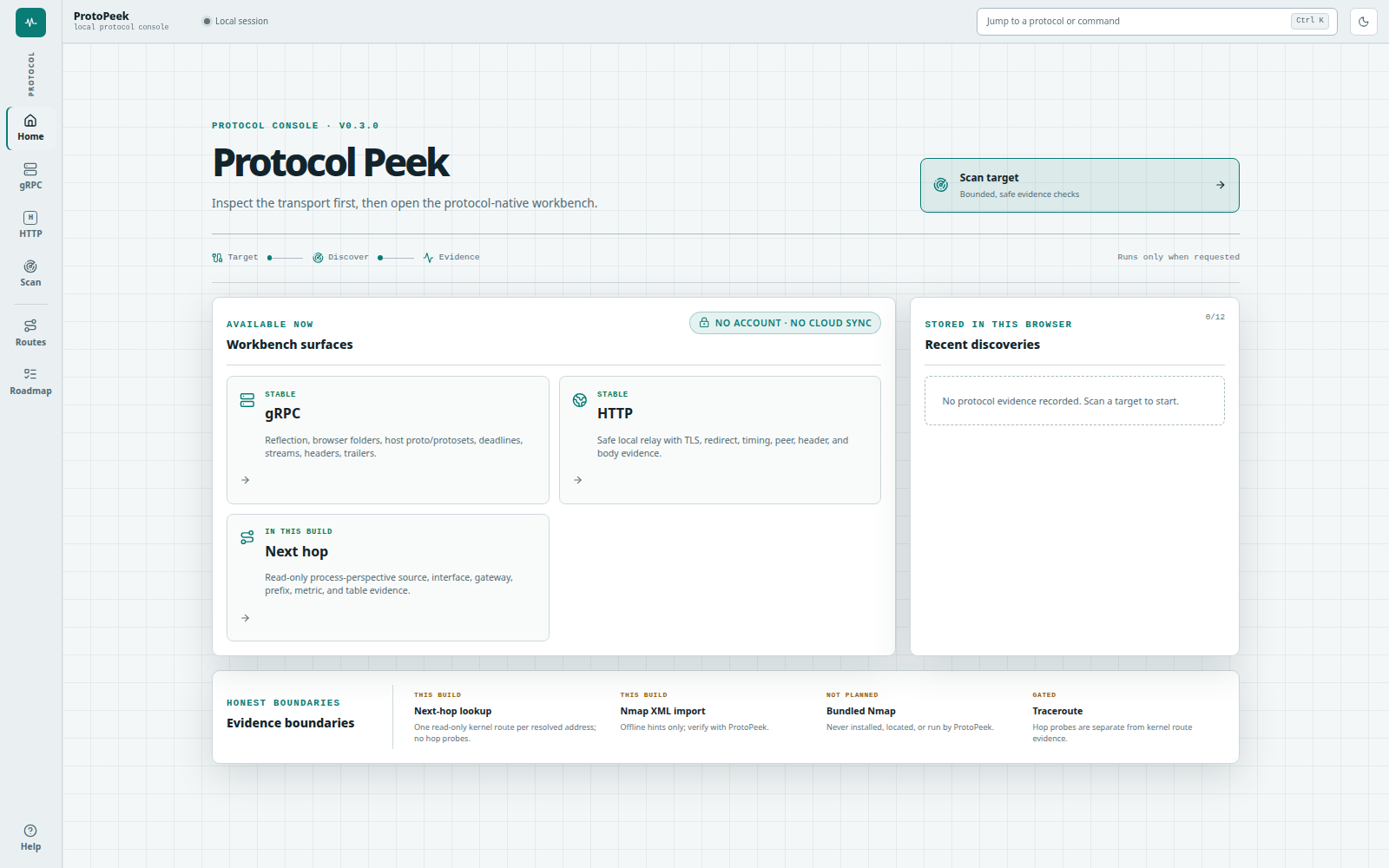
The screenshot is a real local Chrome capture of the v0.3.0 embedded dashboard. It remains versioned as historical shipped-product evidence; the release gallery also includes real v0.5.0 Downloader captures.
pp                                # Home workbench
pp localhost                      # Home + bounded inspection of localhost:50051 and :443
pp https://api.example.test       # Home + inspection of the stated/default verified-TLS port
pp -plaintext localhost:50051     # exact direct mode in gRPC under Inspect
In v0.6.1, Home opens at / with side navigation for Home, Inspect, Network, Publish, Files and
Settings. Legacy /grpc, /http, /routes and /downloads links remain compatible.
v0.6.1 retains /this-pc as the canonical deep link for This Device under Network. Its
first render is local-only: it reads capabilities, hostname/OS/architecture, and bounded interface
evidence from the running ProtoPeek process. Linux and native Windows can explicitly inspect bounded
TCP/UDP socket ownership and sample aggregate interface counters; macOS reports both operations as
unsupported. Windows process basenames are best-effort and permission-sensitive, and a Windows UDP
bind is endpoint evidence, not proof that an application receives datagrams. Public IPv4/IPv6 and
BGP-origin lookup and the small Cloudflare quality run remain separate user-triggered operations.
An eligible fresh, unscoped TCP listener can open typed unsent HTTP, gRPC, next-hop, or Publish
drafts, but consuming a handoff performs no DNS, probe, connection, request, or publishing action. A
traffic rate uses the measured interval between representative counter reads rather than merely the
selected wait; partial reads compare only interfaces present in both observations and remain
labelled. A local listener is never presented as an Internet-open port, interface counters are never
presented as per-process traffic, and provider throughput is never presented as the ISP line maximum.
The v0.7.0 scan and inspection actions start directly from their action buttons,
with visible request disclosures, elapsed-time feedback, progress, and cancellation.
The v0.7.0 port scanner supports all 65,535 TCP ports on one IP through cancellable batches with progress and partial results. Large results remain in the tab.
The v0.7.0 port scanner connects loopback checks, private-network discovery, and single-IP scans. Discovered devices can prefill a port scan, and “What can I scan?” explains the available checks before you run them.
The v0.7.0 socket table adds port-first rows, numeric sorting, combined search and TCP/UDP filters, and snapshot counts for ports and observed processes.
See the This Device boundary and Connected Workbench contract.
v0.6.1 retains /tunnels as the canonical deep link for the domain-native Cloudflare
Tunnel workspace under Publish. It performs no work until Inspect this host is chosen, then
uses the real host adapter to read only the canonical cloudflared OS service, documented config
candidates, and bounded executable metadata. An absent executable or service is a valid empty
result, never replaced by a sample deployment. It identifies effective versus competing YAML,
redacts credential values, and shows ingress routes with parsed counts that include the final
catch-all. A remote-managed connector retains Cloudflare account authority and no local YAML
destination. ProtoPeek detects Wrangler and Docker without reusing Wrangler authentication or
contacting the Docker daemon. A separate Check latest version action reads the official latest
GitHub release; no
release request runs on load. Confirmed start/stop/restart actions target only the canonical
Windows SCM, systemd, or launchd service, reject stale state, and verify the re-observed result. If
permission is missing, the OS—not ProtoPeek—owns any Administrator/UAC/sudo password interaction.
Installation, updates, route/config writes, and Cloudflare account/cloud mutation never run
automatically. Draft ingress route treats paths as regular expressions (for example,
^/api/.*) and remains a browser-only preview with no Apply action.
A new gRPC target defaults to localhost:50051; each saved
target keeps its own plaintext/TLS settings, authority override, schema source (reflection, a
browser-folder snapshot, host proto paths, or host protoset paths), and cert paths. A new HTTP draft
defaults to http://localhost:8080/. Exact localhost, 127.0.0.1, and [::1] shorthand may omit
the scheme and is normalized to HTTP; every non-loopback host must state http:// or https://.
HTTP history shows its 12 newest secret-safe entries with total observed time, and JSON formatting
is optional—invalid JSON remains sendable verbatim. You can also import an explicit,
bounded OpenAPI 3.x or Swagger 2.0 JSON definition by file or URL, including a Swagger UI or Scalar
page that exposes its linked JSON definition. Light is the first-run theme; dark mode and local
histories are stored only in the browser profile.
v0.5.0 adds a local Downloader surface plus one explicit one-shot transfer command. The browser queues one URL or up to 32 independent jobs, reports partial batch success without retrying jobs that already started, supports per-job destination, bounded request headers and User-Agent, and exposes job and whole-queue pause/resume controls. Output naming and expected SHA-256 remain single-job options so evidence cannot be applied to the wrong artifact.
Exact retry/resume requires the source URL and any supplied headers. The form clears those values after queueing and queue/API results never return them, but ProtoPeek and aria2c retain the required values in private local host state (mode 0600 where supported). Do not use credentials on a machine whose local account or transfer-state directory you do not trust.
The v0.7.0 build adds Media, galleries & webpages inside Downloader. Go handles direct files, HTML media discovery and original HTML snapshots without installing another engine. YouTube and supported social sites use optional one-click, SHA-256-verified yt-dlp or gallery-dl installation. The local media queue supports bounded playlist/gallery ranges, progress, cancellation and retry. ArchiveBox is an optional separate application for richer webpage captures; it is not bundled and native Windows is unavailable. See media downloads for exact capabilities, dependencies and limitations. Older v0.6.1 does not include this workspace.
The CLI contract remains deliberately smaller:
pp download [--output NAME] [--sha256 64_HEX] URLIt accepts exactly one absolute HTTP(S) URL. Published v0.7.0 uses configured or PATH aria2c,
with a bundled Windows x64 fallback; current source can also use the built-in HTTP engine.
The command owns its local engine session, writes progress to stderr, prints only the completed
path to stdout, and preserves partial data and resumable state when interrupted. It does not attach
to an already-running ProtoPeek process. The command
ships in v0.5.0 and is available through the release installers, Homebrew, and Scoop.
v0.5.0 also includes a read-first, non-destructive GoBarryGo state bridge:
pp migrate-gobarry                                      # preview only; no writes
pp migrate-gobarry --apply                              # copy compatible state
pp migrate-gobarry --rollback RECEIPT_ID                # guarded restore
The preview reads only GoBarryGo's known local profile after the command or Settings action is explicitly invoked. Import keeps the original preferences, session, executable cache, and downloaded files untouched; compatible HTTP(S) session jobs enter ProtoPeek paused, unsafe options are rejected, and a mode-0600 receipt records source hashes, exact before/after target hashes, and private backups. Proposed setting conversions remain preview-only. Rollback proceeds only when the current ProtoPeek config/session still match that receipt, otherwise it refuses and preserves the newer state. The bridge does not retire the standalone GoBarryGo v0.0.9 release. Its public redirect and repository retirement remain incomplete and separately gated.
For a server without reflection, choose Browser folder and then Choose folder. ProtoPeek
preserves relative imports and uploads only lowercase .proto files when Connect is pressed. The
snapshot is bounded to 512 files, 4 MiB per file, and 16 MiB total. It goes to the machine or
container running this ProtoPeek instance, never to the gRPC target. ProtoPeek compiles the bounded
bytes in memory and clears the upload buffers before dialing or publishing the session. Every import
must resolve inside the selected root (apart from built-in Google well-known protos). Folder handles,
file bytes, root names, and temporary paths are never saved; a saved browser-folder target therefore
requires a fresh selection after reload.
Host proto paths and Host protoset paths remain separate advanced modes. Those values are read by the ProtoPeek process, so a path in a remotely opened or containerized console is not a path on the browser machine. A JSON schema connection accepts at most 128 proto entry paths, 64 import roots, or 32 protoset paths; each path is at most 4,096 UTF-8 bytes and all configured paths share a 32 KiB budget. Explicit proto entry and protoset files must be regular files and are preflighted before dialing or parsing at 4 MiB each and 16 MiB total. An import root grants the host process authority to resolve referenced imports under that root; ProtoPeek does not pre-read every file in the directory. Parsed imports are instead covered by the retained descriptor limits below.
At most two non-upload workspace schema connections run per manager. Reflection resolves exposed services incrementally and stops requesting descriptors when a limit is reached instead of issuing an unbounded all-files fetch. Before any reflection, host-path, protoset, or browser-folder session is published, ProtoPeek retains at most 512 services, 10,000 methods, 1,024 descriptor files, 10,000 messages, 50,000 fields, 4,096 enums, 50,000 enum values, and 32 levels of message nesting, plus 8 MiB of serialized descriptors and a 16 MiB generated schema catalog. Structural limits run before catalog summaries and proto text are materialized. Cancellation and manager shutdown stop work before dialing or publication wherever the parser/transport permits. Limit and parse errors identify the source and corrective action without echoing schema contents or metadata values.
Ambient discovery checks only a fixed list of loopback candidates. A private or link-local IP requires the per-scan private-network opt-in. A public address or hostname is accepted only as the single explicit target: ProtoPeek does not expand it into an arbitrary port scan. Hostnames are resolved once, every returned address is classified against that opt-in, and probes dial a validated numeric address so DNS cannot silently change the destination between policy and connection. Passing that explicit target to the CLI opens the same visible scan dialog. A host without a port tries only 50051 with plaintext and 443 with verified TLS; an explicit HTTP(S) authority uses its stated or default port. Each candidate has fixed time limits and can report verified gRPC, a safe non-following HTTP HEAD response, or open TCP evidence. At most two scan requests run at once; retained service names, reflection responses, HTTP fields, errors, and details have explicit byte limits, and the result says when evidence was truncated. Scans are cancellable, never follow redirects, and never send a state-changing request.
Next-hop lookup asks the local kernel for one currently selected route per resolved address from the ProtoPeek process. It resolves at most eight addresses, performs at most four route lookups concurrently, and requests a two-second aggregate deadline. It reports source address, interface, reported gateway or on-link status, prefix, and metric/table when the platform provides them. It is not traceroute: it performs no hop probes, mutates no routes, and requires no elevation. Entering a hostname can still perform normal DNS resolution. VPN, proxy, policy-routing, ECMP, and later route changes remain explicit sources of uncertainty.
Network Path adds a separate active observation. Linux uses ProtoPeek's built-in unprivileged UDP error-queue backend; it does not shell out, install a tool, or request root. A trace resolves once, pins one numeric address, retains bounded DNS answers and the kernel-selected route, then preserves every per-TTL probe sample—including timeouts and multiple responders. The default plan is 24 hops × 3 probes; hard bounds are 32 hops, 4 probes per hop, 96 probes total, 100–2,000 ms per probe, a 30-second wall, and 20 probes per second. Returned total duration is accepted only through the selected wall plus a fixed 2-second resolver/return allowance; that allowance is not extra probe time or a latency measurement. Every RTT is round-trip time from the ProtoPeek process to one responder, never claimed as latency between adjacent hops. Minimum, median, and maximum values are calculated independently per responder instead of blending ECMP replies. The destination median appears only when reply samples came from the exact pinned destination; ProtoPeek never substitutes the last responding router. Silent hops do not prove a device is down, and ECMP or other load balancing can produce several responders at one TTL. The Run action starts the displayed active probe plan, including public targets. Windows uses native IPv4/IPv6 ICMP echo; The v0.6.1 release reports Darwin active probing as unsupported. v0.7.0 adds native unprivileged Darwin ICMP echo matching and aggregate interface counters, with macOS loopback/cancellation/traffic CI tests. Real intermediate-hop and installed-runtime acceptance still require actual native evidence. No elevation is requested; Darwin socket/process ownership remains unavailable. Optional, explicitly requested IPWHOIS labels add dated ASN/ISP and approximate location evidence to responding public IPs. Local addresses are skipped, and labels survive saving the trace.
Network opens Nearby devices with an available local interface selected and a map/list of this computer plus cached neighbors. Choose a device to inspect its ports or prepare a local traffic capture. Neither opening the page nor these handoffs starts a scan or capture. Scan network adds fresh bounded TCP and mDNS/DNS-SD evidence, including advertised names/services when received. Device types remain source-backed clues, and cached addresses are not a live device census.
Local network discovery is an explicit operation. Its capability check reads interface metadata,
the OS neighbor cache, and the selected route. A scan accepts an authorized RFC 1918 IPv4 CIDR no broader than
/24 and one visible TCP profile. The capability response returns at most 32 deduplicated interface
suggestions and omits a configured CIDR unless the whole prefix is inside one RFC 1918 block; a
broad accepted interface is suggested as its containing /24. Each profile exposes both ports
and the exact applicationProbePorts: Quick uses 80, 443, 50051, 8080 for both; gRPC common uses
443, 6565, 7000, 7443, 9090, 50051 for both; Web/API uses 80, 443, 3000, 4000, 5000, 8000, 8080, 8443 for both; Expanded selects 22, 53, 80, 443, 445, 631, 1883, 3000, 3306, 3389, 5432, 6379, 8000, 8080, 8443, 9090, 9100, 50051, but its application subset is only 80, 443, 3000, 8000, 8080, 8443, 9090, 50051.
Application-probe ports may receive bounded gRPC reflection plus HTTP HEAD /; redirects are off.
Every other selected port—including Expanded's 22, 53, 445, 631, 1883, 3306, 3389, 5432, 6379, 9100—receives a TCP connect only. Limits are 18 ports, 4,572 attempts, 32 workers, 15 seconds, and
one scan at a time. A 64 KiB aggregate verbose-evidence budget can omit additional protocol detail,
but every observed open-port record remains. probeDurationMs is the full elapsed duration of that
TCP-connect or application probe, not network latency. attemptsCompleted counts selected endpoint
probe calls that returned, including cancellation returns; it is not an open-port,
successful-connect, or reached-target count. Only positive selected-TCP evidence is retained. An
absent address is not labeled offline, and inferred roles are never presented as OS,
hardware, ownership, VLAN, or physical-link evidence.
Path and discovery evidence can be saved into a versioned protopeek-network JSON workspace with
editable labels, tags, notes, groups, positions, and immutable snapshots. Appending a later
observation preserves saved manual labels, tags, notes, pinned positions, group assignments, manual
groups, and manual relationships instead of replacing them with scanner output. Unsaved edits are
guarded before switching workspaces, importing, appending an observation, restoring history,
deleting, unloading, or leaving the network workbench; the user must save or deliberately discard
them. Saved path responders are observed; silent-hop placeholders, an unconfirmed synthetic
destination, and logical trace-adjacency edges are inferred. Scoped IPv6 identities are retained
only with a bounded safe interface zone. The map is logical evidence, not physical topology. Its
interactive canvas is capped at 160 nodes, 640 relationships, and 64 groups; larger workspaces use
a complete 100-record paged inventory instead of dropping evidence.
IndexedDB persistence uses a 20-record bounded cursor restore and refuses overflow instead of evicting old work: at most 20 workspaces, 4 MiB each, and 32 MiB total. Compare-and-swap writes and deletes reject a stale cross-tab copy without overwriting it. A failed persistent delete keeps the workspace visibly present, while denial, quota failure, unavailability, or corrupt/overflow restore produces a visible session-only fallback. Historical snapshot restore takes two explicit actions and replaces only the editable current map. Canonical JSON is the lossless import/export path. GraphML is lossy and accepts only one flat directed graph; undirected or mixed edges, nested graphs, hyperedges, ports, duplicate structures, and XML 1.0-invalid controls are rejected rather than reinterpreted. CSV is an export-only flat inventory.
The Scan dialog can also import up to 8 MiB of XML previously written by nmap -oX, without Nmap installed. Network history can additionally preview that XML as a workspace, disclose exact omitted hosts/ports/hints, then save a new immutable snapshot without inventing links. v0.7.0 also offers Extensions → Nmap for an installed Nmap: one literal IP or an authorized private IPv4 /24-or-smaller subnet, TCP connect or light service detection, an exact scope preview, cancellation, and JSON export. It does not bundle or install Nmap/Npcap and accepts no arbitrary arguments. See the Nmap workflow for limits. Imported or scanned service labels remain hints; Inspect service opens the selected endpoint for explicit verification before gRPC or HTTP. Uploaded XML and scanned inventory are not persisted automatically.
One running ProtoPeek handler also shares small admission budgets across browser sessions: eight
ordinary gRPC invokes total across the direct and workspace paths, four HTTP relays, and two native
route requests. Method and CSRF policy run before admission; a full budget returns 429 Too Many Requests with no-store and nosniff before reading the rejected body or starting network work.
Success, validation failure, cancellation, panic unwinding, and workspace-session deletion release
their slots. These process budgets are separate from—and do not replace—the existing per-request
candidate, message, redirect, address, and route-worker caps.
Each admitted ordinary gRPC invoke retains at most 512 response messages and 8 MiB of serialized response-message JSON. Message 513 or the first message that would cross the byte boundary cancels the RPC and returns the retained headers/messages as explicitly partial local-limit evidence; ProtoPeek does not invent a server status or trailers. Exactly 512 messages or exactly 8 MiB may still finish normally. An omitted or greater-than-60-second deadline receives a 60-second local handler wall, while a positive user deadline at or below 60 seconds remains unchanged.
| Surface | What it does |
|---|---|
| Method rail | Search and filter reflected services/methods with clear unary and streaming modes |
| Target registry | Save and switch gRPC endpoints without restarting |
| Local discovery | Distinguish reflection, gRPC-without-reflection, safe HTTP response evidence, and open TCP with bounded loopback and explicit-target policies |
| Next-hop evidence | Read one kernel-selected route per resolved address from the ProtoPeek process without hop probes, polling, privilege, or route mutation |
| Network Path | On Linux, resolve and pin one destination, retain kernel-route context, and run consented unprivileged UDP probes with truthful per-TTL source RTT, silent hops, ECMP responders, and fixed limits |
| Private-network inventory | Preview one RFC 1918 IPv4 /24-or-smaller plan; only profile-declared application ports receive bounded gRPC/HTTP probes, every other selected port is TCP-connect-only, and full probe duration is not labeled network latency |
| Topology notebook | Save tagged immutable snapshots, preserve manual annotations across later observations, guard unsaved edits, and use a bounded logical canvas with a complete paged-list fallback—never a physical-link or VLAN claim |
| Network exchange | Use canonical protopeek-network JSON for lossless round trips, one-flat-directed-graph disclosed-loss GraphML, and CSV for flat inventory export |
| Offline Nmap import | Parse bounded nmap -oX host/port hints and require ProtoPeek verification before opening a workbench |
| Payload generator | Scaffold JSON from reflected protobuf schemas |
| Browser proto folder | Upload one bounded, temporary .proto snapshot with nested imports while keeping browser handles and server paths out of saved profiles |
| Proto explorer | Browse files, messages, enums, deps; export .proto or catalog JSON |
| Metadata and auth | Editable live metadata, Bearer helper, and deadlines; automatic history and default exports redact credentials and binary metadata |
| Saved gRPC requests | Keep secret-sanitized gRPC recipes locally, replay them, and import/export workspace JSON |
| Unary Repeat | Run 2–50 sequential unary checks with cancellation, explicit deadlines, a 60 s cap, separate gRPC status and relay/transport failures, and honest handler-vs-console timing |
| gRPC Health | Run canonical grpc.health.v1 Check or one bounded live Watch with headers, transitions, trailers, cancellation, and final gRPC status kept distinct |
| Response timeline | Ordered messages with callback-observed timing, filtering, copy/export, headers, trailers, and final status |
| Fast controls | Cancel active calls, Cmd/Ctrl+Enter to invoke, / to search, and Cmd/Ctrl+K for commands |
| Assertions | Validate status, latency, metadata, and payload text locally |
| Transport lens | gRPC-Web, Envoy bridging, and transport context alongside the console |
| HTTP workbench | Send bounded HTTP(S) requests with native response evidence; import OpenAPI/Swagger JSON or a reviewed cURL subset; save up to 50 named requests, import/merge libraries and use environment templates with session-only secrets; loading prepares an unsent editor; export redacted cURL |
| Downloader · v0.5.0 | Queue 1–32 independent HTTP(S) jobs with partial-success reporting, shared bounded per-job destination/headers/User-Agent, job and whole-queue controls, single-job naming/SHA-256 evidence, or one explicit pp download; configured/system aria2c in v0.5.0; Windows x64 fallback in v0.6.1 |
| Security evidence · v0.5.0 | With separate disclosures and consent, query historical certificate-name candidates through crt.name or send exactly one public-only, non-following, bodyless HEAD with pinned DNS/TLS/HTTP evidence; no security score |
| Website workbench · v0.7.0 | Side sections for response/TLS, five standard-path HEAD checks and historical indexed names; rejected-certificate evidence, JSON exports, name filtering and reviewed Inspect handoffs; bounded browser-local origin/domain memory |
| This Device · v0.7.0 | Local identity/interfaces, explicit Linux/Windows socket-owner evidence, one-shot aggregate Windows/Linux/macOS interface counters, public IPv4/IPv6/BGP observations and bounded optional connection-quality checks. macOS socket/process ownership remains unavailable; native acceptance is separate from cross-compilation; no ambient monitor or public-port verdict |
| Cloudflare Tunnel · v0.7.0 | Canonical host/service/config inspection, reviewed service controls, native validation/route matching and bounded logs/metrics/diagnostics. Configuration writes require the exact writable user-owned canonical file, fresh revision, explicit review, validation and rollback; administrator files, credentials and cloud/account changes stay user-owned |
gRPC timing is cumulative from invoke start and marks lifecycle boundaries observed by ProtoPeek's grpcurl handler callbacks and invoke return. Unary callbacks may cluster after transport completion; the values are not packet-arrival, server-processing, or TTFB measurements. Handler invoke duration includes JSON/protobuf conversion and callbacks but excludes the browser/HTTP relay; console round trip includes that relay and response parsing. Every Unary Repeat attempt is a real RPC that may mutate service data; protobuf descriptors do not reliably guarantee idempotency.
While Repeat owns the request, assertions are disabled and ordinary Invoke is refused. Leaving Checks cancels the run and preserves partial evidence instead of continuing hidden. Completed results retain their run-start timestamp and frozen count, think time, and deadline; changed controls are marked as a previous run.
Unary Repeat export includes the method, target, run ID/start timestamp, frozen configuration, counts, per-attempt offsets/timings, classifications, and error/status text. It excludes request bodies and metadata; review internal addresses and service/relay text before sharing.
Health is an explicit diagnostic, never background polling. A blank service asks for overall server
health; an unknown named service is canonical NOT_FOUND for Check and SERVICE_UNKNOWN for Watch.
Watch observes one selected backend connection for 1–600 seconds, retains the latest 200 of at most
512 status observations, and never retries. Its timestamps are ProtoPeek handler/relay observations,
not server emission time or fleet-wide proof. Health results and request metadata are neither saved
nor exported.
Workspace export writes the explicit protopeek-workspace version 1 format. The default export
contains saved requests, environments, assertions, and inactive target profiles, but excludes
automatic RPC history. Saved request bodies are deliberate workspace data, so review them before
sharing a file. Import rejects files larger than 4 MiB before reading them, validates bounded
collections and strings, contains errors inside the running console, and never connects an imported
target. Imported host proto, protoset, CA, client-certificate, and key paths are paths on the machine
running ProtoPeek; explicitly connecting that profile authorizes the ProtoPeek process to read those
local paths. Browser-folder profiles contain no folder handle, file bytes, root name, or path and
remain inactive until the user chooses a fresh folder and explicitly connects.
Every deliberate workspace write is validated before it reaches browser storage. Full saved-request, environment, and target lists refuse the new item instead of evicting an older one. If an existing section is malformed or over its bound, ProtoPeek keeps the exact readable original untouched, recovers only valid bounded records for the live session, and offers separate download and explicit adoption actions. A normal export remains paused until that recovery is resolved.
Saved and historical gRPC requests are scoped to the target/profile that created them. Legacy
unscoped records remain usable when their method exists, then bind to the current target on first
replay. Redacted metadata is restored blank with a re-entry warning, and blank or [redacted]
sensitive metadata is never sent. Automatic HTTP history retains the URL, method, a small allowlist
of non-credential header values, and response summary—not request bodies. It strips URL user info,
redacts credential-like query values and every header outside that allowlist, then resets all
non-persisted request/response settings on replay. Opening a newly discovered HTTP origin also
cancels and invalidates prior work before starting from a clean GET request.
Copy as cURL is an explicit export-only action. Send and Copy first apply the same URL, user-info, header, body, and timeout validation; the command preserves the prepared method, duplicate query parameters, non-sensitive headers, timeout, and active body while omitting auth and credential-like headers and leaving credential-like URL values blank. Redirect-enabled drafts are refused because one portable cURL command cannot reproduce ProtoPeek's bounded redirect, method/header, and HTTPS downgrade policy. Export inspects at most 64 effective headers and refuses commands over 512 KiB. Request bodies are deliberate user-authored content and are copied verbatim, so review the command before sharing or running it. The command runs in your shell rather than ProtoPeek's relay, so DNS, network namespace, proxies, trust roots, and implicit cURL headers can differ. v0.7.0 also imports a reviewed single-request cURL subset: preview, then load an unsent editor. Shell expressions, file arguments, proxy switches and insecure TLS are rejected; imported credentials remain in memory.
ProtoPeek is intentionally broader than a gRPC-only brand, but intentionally narrower than a generic cloud API platform. The desktop shell owns navigation, session/context chrome, appearance, and bounded action entry. Each domain workbench owns its target and evidence workflow, while each adapter owns discovery, schema, invocation, cancellation, and its native inspector.
This table describes the v0.7.0 implementation. It is not a store-publication or installed-provider acceptance record; older version references identify historical foundations.
| Adapter | Build / boundary | Implemented slice |
|---|---|---|
| gRPC | v0.7.0 | Reflection, temporary browser-folder snapshots, host .proto/protoset sources, unary and streaming calls, canonical Health Check/Watch, metadata, headers, trailers, status, callback-observed handler lifecycle timing, and bounded Unary Repeat |
| HTTP / REST | v0.7.0 | Bounded HTTP(S), verified TLS, timing and cancellation; OpenAPI/Swagger and reviewed cURL import; environment templates, session-only secrets and portable saved-request libraries |
| WebSocket / SSE | v0.7.0 | Inspect → Event streams: real text/binary WebSocket sends, named SSE events and IDs, headers, subprotocols, verified TLS, bounded timelines, disconnect and navigation cleanup |
| Host port scanner | v0.7.0 | All 65,535 TCP ports on one resolved IPv4/IPv6 address in bounded batches; open/refused/no-response evidence, progress, cancellation and a protocol-inspection handoff; no built-in UDP scan |
| Next-hop route evidence | Shipped · v0.3.0 | Read-only Linux netlink, Darwin routing socket, or Windows GetBestRoute2; one process-perspective route per resolved address, no hop probes |
| Network Path | Shipped · v0.4.0 · Linux | Built-in unprivileged UDP error-queue tracing with separate DNS, route, per-TTL sample, and source-RTT evidence; active probes require explicit consent |
| Windows Network Path | v0.7.0 | Native IPv4/IPv6 ICMP echo tracing, automatic backend choice, per-hop RTT/status, bounded probes and cancellation without installing traceroute or requesting elevation |
| Private-network discovery | Shipped · v0.4.0 | Authorized RFC 1918 IPv4 /24-or-smaller profiles with exact application-inspection versus TCP-connect-only ports, full-probe duration, cancellation, positive evidence only, and a 64 KiB aggregate verbose-detail budget |
| Network topology | Shipped · v0.4.0 | Inference-labelled logical canvas, complete paged-list fallback, immutable snapshots, manual-field preservation, unsaved-edit/stale-tab guards, bounded browser persistence, canonical JSON, strict disclosed-loss GraphML, and CSV inventory |
| Nmap XML evidence | Shipped · v0.3.0 · optional input | Bounded streaming offline import; Nmap is not required to import a file |
| Installed Nmap | v0.7.0 · external tool | Explicit bounded TCP connect or light service scans, private subnet scope preview, cancellation, paginated evidence, export and Inspect handoff |
| Downloader | Shipped · v0.5.0 | Configured or system aria2c; 1–32 independent jobs, partial-success reporting, per-job destination/headers/User-Agent, job and whole-queue controls, single-job SHA-256 evidence, and one explicit pp download; bundled Windows x64 aria2 fallback in v0.6.1 |
| Security evidence | Shipped · v0.5.0 | Disclosed crt.name historical candidates plus a separate consented, public-only, non-following one-HEAD observation with pinned DNS/TLS/HTTP evidence and no score |
| This Device | v0.7.0 | Device identity/interfaces, Linux/Windows socket owners, native Windows/Linux/macOS aggregate counters, unsent listener handoffs and explicit public-IP/quality observations; macOS process ownership remains unavailable, with no ambient monitor or public-port verdict |
| Cloudflare Tunnel | v0.7.0 · external tool | Canonical host/service/config evidence, reviewed controls, validation/route matching, bounded diagnostics and guarded user-owned config changes with rollback; credentials, installation and cloud/account authority remain user-owned |
| Tailscale client | v0.7.0 · external tool | Extensions → Tailscale: installed-client peers/routes, reviewed connection/account/exit-node actions, diagnostics and Taildrop, plus a separate Headscale login-server flow. NetBird has its own workbench; native sign-in/elevation and provider administration remain user-owned |
| Cap’n Proto | v0.7.0 | Source/compiled schemas, exact integers, verified TLS, generic bindings and returned-capability plans up to eight steps, cancellation and JSON export; optional external source compiler |
| Packet inspection | v0.7.0 | PCAP/PCAPNG metadata, filters/details/export and explicit bounded TCP payload evidence; live capture needs installed dumpcap, OS support and separate native acceptance |
| Darwin active hops/counters | v0.7.0 · native acceptance gate | Native unprivileged ICMP and aggregate counters, with macOS loopback/cancellation/traffic CI tests; actual macOS runtime and intermediate-hop acceptance remain required; no process ownership |
| Bundled Nmap execution | Not planned for the core binary | Existing XML import stays dependency-free; any future opt-in companion needs explicit executable choice, previewed scope, hard budgets, and an auditable command |
| Broader or public range discovery | Not planned for the core flow | Current discovery remains selected TCP ports inside one authorized RFC 1918 IPv4 /24-or-smaller scope |
| SMTP, FTP, and others | Later | Only after protocol-specific security, evidence, and UX are designed |
Bundled Nmap execution is not planned for the core binary. Active path and private-network operations never start on page load and remain distinct from the passive kernel-route lookup and offline Nmap XML import. Wider range expansion remains gated; live capture requires separately installed dumpcap and OS capture support.
See the detailed network workbench guide, network diagnostics, This Device evidence and connection-quality boundary, Connected Workbench v0.7 implementation contract, suite product, redesign, and migration strategy, private-network integration plan (TailScout remains standalone), Cloudflare Tunnel workspace guide, Cloudflare Tunnel integration plan, route, path, discovery, and Nmap evidence boundary, protocol roadmap, competitive workflow decisions, transport boundaries, and go-to-market runbook.
Found an installer/runtime defect? Open a GitHub issue. Questions and workflow feedback belong in GitHub Discussions.
bun install --frozen-lockfile     # install frontend deps
bun run test                      # tsgo typecheck + Biome lint + Vitest
bun run build                     # build console/site and enforce bundle budgets
go test ./...                     # Go test suite
make install                      # install protopeek and pp locally
make docker-smoke # build/probe the guarded scratch imagemake docker
docker run --rm -p 127.0.0.1:8080:8080 protopeek:devScratch-compatible image: static Go binary, embedded web app, CA certs, and a non-root user. The
image uses -allow-non-loopback-bind to listen on its container interface while still rejecting
non-loopback browser Hosts and Origins. Keep the host-side port mapped to loopback as shown; the
separate -unsafe-allow-remote mode disables that request-host guard and is only for an
authenticated, TLS-terminated, rate-limited boundary. A browser-folder snapshot is uploaded to this
container and compiled through bounded in-memory buffers; it is never written to a schema staging
directory.
ProtoPeek originated from a fork of fullstorydev/grpcui. The product, docs, branding, and release flow are now ProtoPeek's own.