A Model Context Protocol (MCP) server that provides shell command execution on macOS with session management, working directory persistence, environment isolation, and background process management.
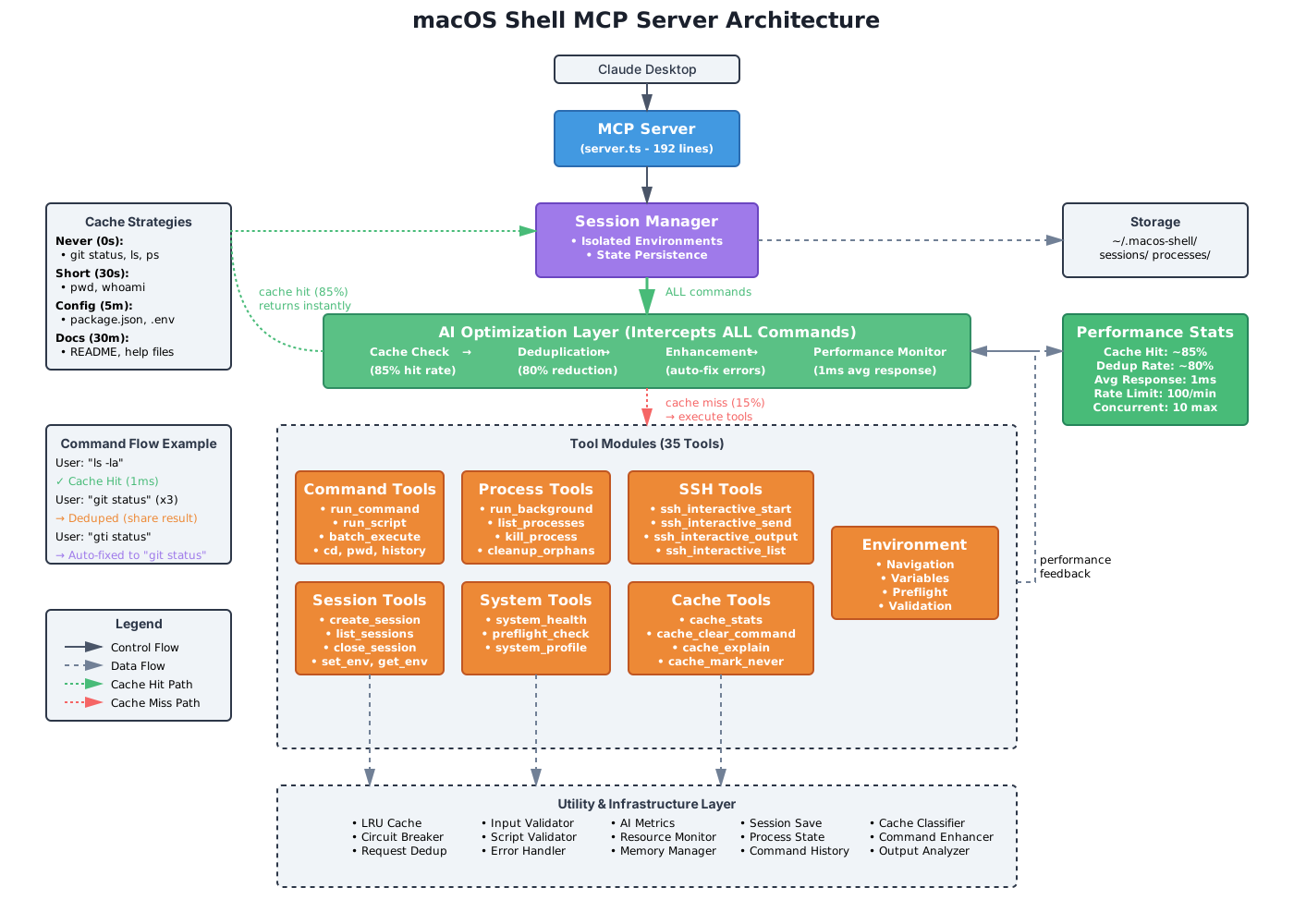
The server includes a layer that intercepts all commands, providing caching (85% hit rate), deduplication (80% reduction), and error correction. Commands that hit the cache return in ~1ms, while 15% of requests require tool execution.
# Clone the repository
git clone https://github.com/quanticsoul4772/macos-shell.git
cd macos-shell

# Install dependencies
npm install

# Build the server
npm run build

# Run tests (optional)
npm test

# Start the server (optional)
npm startAdd to your Claude Desktop configuration file:
Location: ~/Library/Application Support/Claude/claude_desktop_config.json
{
  "mcpServers": {
    "macos-shell": {
      "command": "node",
      "args": [
        "/path/to/macos-shell/build/server.js"
      ],
      "type": "stdio"
    }
  }
}
Restart Claude Desktop after adding the configuration.
- Session Management: Create multiple named sessions with isolated environments
- Working Directory Persistence: Each session maintains its own working directory
- Environment Variables: Set and manage environment variables per session
- Command History: Track executed commands with timing and output
- Script Execution: Run multi-line shell scripts
- Background Processes: Run processes in the background with output capture
- Semantic Search: AI-powered search over command history, documentation, and error solutions using Voyage AI embeddings
- Smart Recommendations: Get command suggestions based on intent and historical success patterns
- Error Handling: Error reporting with exit codes and intelligent error solution lookup
- Cacheable commands execute in 1ms vs 120ms uncached
- Status commands (
git status,ls,docker ps) are never cached - Variable TTLs:
- Never: Status/monitoring commands
- 30s: Directory context (
pwd,whoami) - 5m: Config files (
cat package.json) - 30m: Documentation (
cat README.md) - 1h: Static content (
node --version,--help)
- Cache hit indicator:
"cached": truewith"cacheStrategy"in responses - Disable caching: Set
MCP_DISABLE_CACHE=trueenvironment variable
- 10-second deduplication window for identical commands
- Batches multiple executions into single operation
- Normalizes command variations (
ls -la=ls -al)
- Corrects file path typos using Levenshtein distance
- Retries network errors with exponential backoff
- Adds flags like
--legacy-peer-depsfor npm errors - Suggests command alternatives (python → python3)
- Stats logged every minute to stderr
- Tracks cache hit rate, deduplication rate, error recovery
- Shows command patterns for optimization
-
run_command- Execute shell commands- Parameters:
command,args[],session?,cwd?,env?,timeout? - Returns: Exit code, stdout, stderr
- Parameters:
-
run_script- Execute multi-line shell scripts- Parameters:
script,session?,timeout? - Returns: Exit code, stdout, stderr
- Parameters:
-
batch_execute_enhanced- Execute commands with conditional logic and retries- Parameters:
commands[]with conditions,parallel?,stopOnFirstFailure?,maxOutputLines?,includeFullOutput? - Returns: Execution results with skip reasons
- Output truncation to prevent context window overload
- Parameters:
-
create_shell_session- Create a new named session with isolated environment- Parameters:
name,cwd?,env? - Returns: Session ID and working directory
- Parameters:
-
list_shell_sessions- List active sessions with details- Parameters: None
- Returns: List of sessions with creation time, last used, command count, background process count
-
close_session- Close a session and free resources- Parameters:
session - Returns: Success confirmation
- Parameters:
-
cd- Change working directory (persists in session)- Parameters:
path,session? - Returns: New working directory path
- Parameters:
-
pwd- Get current working directory- Parameters:
session? - Returns: Current directory path
- Parameters:
-
set_env- Set environment variables in a session- Parameters:
name,value,session? - Returns: Confirmation with variable details
- Parameters:
-
get_env- Get environment variables- Parameters:
name?,session? - Returns: Variable value(s)
- Parameters:
history- View command history for a session- Parameters:
session?,limit? - Returns: Commands with timestamps, exit codes, duration
- Parameters:
-
run_background- Start a command in the background- Parameters:
command,args[],session?,name? - Returns: Process ID, PID, status
- Parameters:
-
list_processes- List background processes with resource monitoring- Parameters:
session?(optional filter) - Returns: JSON with processes including CPU%, memory, trends, and runtime
- Parameters:
-
get_process_output- Retrieve output from a background process with search- Parameters:
process_id,lines?,from_line?,search?,case_sensitive? - Returns: Buffered stdout/stderr with line numbers and type indicators
- Parameters:
-
stream_process_output- Stream output from a background process- Parameters:
process_id,after_line?,timeout?,max_lines? - Returns: New output lines as they arrive, with streaming hints
- Parameters:
-
kill_process- Terminate a background process (including orphaned processes)- Parameters:
process_id,signal?(SIGTERM/SIGKILL) - Returns: Success confirmation
- Parameters:
-
cleanup_orphans- Manage processes from previous server sessions- Parameters:
mode?(list/kill/interactive),force?(use SIGKILL) - Returns: List of orphans or cleanup results
- Parameters:
-
kill_all_matching- Kill processes matching a pattern- Parameters:
pattern,pattern_type?(text/regex),signal?,dry_run? - Returns: List of killed processes or dry run preview
- Parameters:
-
save_process_output- Save process output to a file- Parameters:
process_id,file_path,format?(text/json),include_metadata? - Returns: Success confirmation with file details
- Parameters:
-
get_system_health- Get system health information- Parameters:
session? - Returns: System metrics including memory, CPU, disk, and resource usage
- Parameters:
-
preflight_check- Validate multiple conditions before operations- Parameters:
commands[],paths[],ports[],env_vars[],session? - Returns: Validation results with summary
- Parameters:
-
system_profile- Gather system information in one call- Parameters:
include[](os, shell, node, python, git, docker, etc.) - Returns: Structured system information
- Parameters:
-
ssh_interactive_start- Start an SSH session- Parameters:
host,port?,user?,options[]?,key_file? - Returns: Session ID and initial output (ANSI codes stripped)
- Parameters:
-
ssh_interactive_send- Send input to an SSH session- Parameters:
session_id,input,add_newline? - Returns: Output after sending input
- Parameters:
-
ssh_interactive_control- Send control characters (e.g., Ctrl+C)- Parameters:
session_id,char - Returns: Success confirmation
- Parameters:
-
ssh_interactive_output- Get output from SSH session with search- Parameters:
session_id,lines?,from_line?,search?,search_type?,case_sensitive?,invert_match? - Returns: Output with optional search filtering and match counts
- Parameters:
-
ssh_interactive_wait- Wait for new output from SSH session- Parameters:
session_id,after_line,timeout? - Returns: New output lines as they arrive
- Parameters:
-
ssh_interactive_resize- Resize terminal dimensions- Parameters:
session_id,cols,rows - Returns: Success confirmation
- Parameters:
-
ssh_interactive_close- Close an SSH session- Parameters:
session_id - Returns: Success confirmation
- Parameters:
-
ssh_interactive_list- List active SSH sessions- Parameters: None
- Returns: List of sessions with host, status, runtime, and output line count
-
cache_stats- Get cache statistics- Parameters: None
- Returns: Cache size, hit rate, strategy breakdown, learned rules
-
cache_clear_command- Clear specific commands from cache- Parameters:
command - Returns: Number of entries cleared
- Parameters:
-
cache_clear_pattern- Clear commands matching regex pattern- Parameters:
pattern - Returns: Number of entries cleared
- Parameters:
-
cache_mark_never- Mark command to never be cached- Parameters:
command,reason - Returns: Success confirmation
- Parameters:
-
cache_explain- Explain cache decision for a command- Parameters:
command - Returns: Cache strategy, TTL, reason, and analysis
- Parameters:
AI-powered semantic search using Voyage AI embeddings and vector similarity search. Requires VOYAGE_API_KEY in environment.
-
semantic_command_search- Search command history by intent, not exact text- Parameters:
query,limit?,min_similarity?,session? - Returns: Commands semantically similar to query with context and success metrics
- Example:
{"query": "deploy to production", "limit": 5}
- Parameters:
-
search_documentation- Search command documentation using semantic similarity- Parameters:
query,limit?,command_filter? - Returns: Relevant command documentation with usage examples
- Example:
{"query": "how to list files", "command_filter": "ls"}
- Parameters:
-
recommend_commands- Get command suggestions based on intent and historical patterns- Parameters:
intent,max_recommendations?,min_confidence?,session? - Returns: Recommended commands with confidence scores and reasoning
- Example:
{"intent": "fix database connection", "max_recommendations": 3}
- Parameters:
-
error_solution_lookup- Find solutions for error messages from knowledge base- Parameters:
error_message,limit?,min_similarity? - Returns: Similar errors with known solutions and severity
- Example:
{"error_message": "EADDRINUSE: address already in use"}
- Parameters:
-
analyze_output- Extract patterns, insights, and suggestions from command output- Parameters:
command,stdout,stderr?,exit_code,duration_ms?,cwd? - Returns: Summary, extracted patterns (URLs, paths, errors), actionable items
- Example: Analyze test output to identify failures and suggest fixes
- Parameters:
-
semantic_search_stats- Get statistics about semantic search system- Parameters: None
- Returns: Command count, cache hit rate, latency, initialization status
📖 Full documentation: Semantic Search Features
Configuration: Add to claude_desktop_config.json:
{
  "mcpServers": {
    "macos-shell": {
      "env": {
        "VOYAGE_API_KEY": "pa-YOUR-VOYAGE-API-KEY-HERE"
      }
    }
  }
}- Check existing sessions before creating new ones with
ssh_interactive_list() - Reuse session IDs for command execution to avoid connection overhead
- Sessions persist across multiple tool calls
- Create new connections only when necessary
- Keep sessions alive for servers requiring multiple commands
- Use interactive sessions instead of
run_commandwith sshpass
- Creating new SSH connections for each command
- Using
run_commandwith sshpass for multiple commands - Forgetting to check
ssh_interactive_listfirst
- Language: TypeScript (ES2020)
- Runtime: Node.js (>=18.0.0)
- Dependencies: MCP SDK, Zod, Execa, UUID
- Shell:
/bin/zsh(macOS default) - Module System: NodeNext with .js extensions
- Sessions are stored in memory using a Map data structure
- Each session maintains:
- Unique ID (UUID v4)
- Name (user-defined)
- Working directory
- Environment variables (isolated)
- Command history (last 1000 commands in memory)
- Background processes
- Creation and last used timestamps
- Default session is created automatically
- Sessions persist to disk in
~/.macos-shell/sessionsas JSON files - On server restart:
- Existing sessions are restored (except default)
- Working directories are validated
- Command history restored (last 100 commands)
- Background processes marked as terminated
- Processes run with
detached: trueusing execa - Output captured line-by-line to CircularBuffer
- CircularBuffer features:
- Stores last 300 lines per process
- Waiter management prevents memory leaks
- Max 100 concurrent waiters per buffer
- 60-second maximum wait timeout for long-polling operations
- Cleanup of stale waiters every 30 seconds
- Cleanup when approaching waiter limit
- Batch notification processing
- Cleanup on process termination
- Separate tracking for stdout and stderr
- Process states: STARTING → RUNNING → STOPPED/FAILED/KILLED/ORPHANED
- Cleanup 5 seconds after process termination
- Resource limits enforced at spawn time
- Orphan detection on server startup using
process.kill(pid, 0) - Handling for
bash -ccommands to prevent shell escaping issues
- Commands wrapped in try/catch blocks
- Typed errors with ExecaError
- Exit codes captured (null if process killed)
- Stdout/stderr typed and captured
- Timeout errors handled
- Background process spawn failures captured in output
- Bash command parsing fixed to prevent server crashes
The server has been refactored from a 1,910-line file into modular components:
- Main Server: Reduced to 192 lines - handles initialization
- Tool Modules: 20 tools distributed across 4 focused modules
- Utility Modules: Reusable components (LRU cache, debouncer, buffer)
- Session Manager: Centralized session and process management (577 lines)
Architecture characteristics:
- Each module under 500 lines with single responsibility
- Memory leak prevention in background processes
- New tools can be added without touching core logic
- Components can be tested in isolation
macos-shell/
├── src/
│   ├── server.ts                    # Main server (192 lines)
│   ├── session-manager.ts           # Session orchestrator (350 lines)
│   ├── sessions/                    # Session modules
│   │   ├── session-types.ts         # Types and constants
│   │   ├── session-persistence.ts   # Save/load functionality
│   │   ├── background-process-manager.ts
│   │   └── command-history-manager.ts
│   ├── tools/                       # Tool implementations
│   │   ├── command-tools.ts         # Command tool orchestrator
│   │   ├── command/                 # Command tool modules
│   │   ├── process-tools.ts         # Process tool orchestrator
│   │   ├── helpers/                 # Process helper modules
│   │   ├── interactive-ssh-tool.ts  # SSH tools
│   │   ├── session-tools.ts         # Session management
│   │   ├── system-tools.ts          # System health
│   │   ├── semantic-tools.ts        # Semantic search tools (6 tools)
│   │   ├── enhanced-ssh-tool.ts     # SSH execution
│   │   ├── preflight-tools.ts       # Validation tools
│   │   └── cache-management-tools.ts # Cache management
│   ├── services/                    # Service layer
│   │   ├── embedding-service.ts     # Voyage AI embeddings
│   │   ├── vector-storage.ts        # SQLite VSS storage
│   │   ├── semantic-search.ts       # Semantic search core
│   │   ├── command-indexing-service.ts
│   │   ├── command-recommendation-service.ts
│   │   ├── documentation-rag-service.ts
│   │   ├── error-knowledge-base.ts
│   │   └── output-analysis-service.ts
│   ├── config/
│   │   └── embedding-config.ts      # Embedding configuration
│   ├── ai-*.ts                      # AI optimization layer (5 files)
│   └── utils/                       # Utility modules
│       ├── logger.ts                # Structured logging
│       ├── enhanced-circular-buffer.ts
│       ├── batch-executor.ts
│       └── resource-monitor.ts
├── build/                           # Compiled JavaScript
├── docs/                            # Feature documentation
├── test/                            # Test files
├── README.md                        # Main documentation
├── package.json                     # Dependencies
└── tsconfig.json                    # TypeScript config
- 30-second default timeout for synchronous commands (configurable, max 10 minutes)
- macOS only (uses
/bin/zsh) - Commands run with the permissions of the user running Claude Desktop
- Sudo commands require password input (unless passwordless sudo is configured)
- Output buffer limited to 300 lines per process (older output is discarded)
-
"Session not found" error
- Ensure you're using the correct session name
- Check if the session was closed
- Use
list_shell_sessionsto see active sessions
-
Command timeout
- Increase timeout for commands
- Default is 30 seconds, max recommended is 600000 (10 minutes)
- Use
run_backgroundfor processes that need to run longer
-
Permission denied
- Commands run with the permissions of the user running Claude Desktop
- Sudo commands require interactive password input (unless passwordless sudo is configured)
- Ensure the user has necessary permissions for the commands being run
-
Environment variables not working
- Variables are session-specific
- Use
set_envbefore running commands that need them - Check with
get_envto verify
-
"Maximum process limit reached"
- Check running processes with
list_processes - Kill unnecessary processes with
kill_process - Close sessions to free their processes
- Check running processes with
-
Process output truncated
- CircularBuffer stores only last 300 lines
- Use
from_lineparameter to track output position - Consider writing output to files for permanent storage
-
Orphaned processes after server restart
- Use
list_processesto check for orphaned processes (marked with WARNING) - Use
cleanup_orphansto manage them:cleanup_orphans()- Interactive mode shows orphans and suggestionscleanup_orphans({ mode: "list" })- Just list orphanscleanup_orphans({ mode: "kill" })- Kill orphans
- Individual orphans can be killed with
kill_process
- Use
-
Server crashes with bash commands (Fixed)
- Previously,
bash -ccommands with scripts would crash the server - This has been fixed by detecting bash commands and preventing double shell interpretation
- Commands like
bash -c "while true; do echo test; done"work
- Previously,
-
Server crashes when killing processes (Fixed)
- Previously, killing background processes would crash the server with unhandled promise rejection
- This has been fixed by adding error handling for process termination
- The server remains stable when processes are killed with SIGTERM or SIGKILL
-
Tool naming conflicts
- If you have iterm-mcp installed, use the correct tool names:
- Use
create_shell_session(notcreate_session) - Use
list_shell_sessions(notlist_sessions)
- Use
- These were renamed to avoid conflicts
- If you have iterm-mcp installed, use the correct tool names:
The project maintains comprehensive test coverage with 712+ tests across 41 test suites.
- Pass Rate: 100% [PASSED]
- Code Coverage: 60.62%
- Test Execution: ~32 seconds
# Run all tests
npm test

# Run with coverage report
npm test -- --coverage

# Run in watch mode
npm test -- --watch

# Run specific test file
npm test -- src/ai-cache.test.ts- Complete Testing Guide - Comprehensive testing documentation
- Test Status Report - Current test metrics and coverage
- Testing Roadmap - Future testing plans
# Install dependencies
npm install

# Build TypeScript
npm run build

# Start server (for testing)
npm start

# Development mode (if configured)
npm run dev- Process groups and job control
- Command aliases and templates
- Shell detection (bash, fish, etc.)
- Process CPU/memory monitoring
Contributions are welcome! Please submit pull requests or issues on GitHub.
See CHANGELOG.md for version history.
ISC