
An example of how you can de-facto inject a highly capable agent — and a full MCP client — into just about any software service.
This one wires Claude Code into Linear. A tiny daemon polls your workspace and pipes every new ticket comment into one continuous Claude session. Claude reads the comment, uses whatever tools you've connected over MCP (an aggregator, Linear's own MCP server, your internal services), and its answer is posted straight back to the ticket.
The interesting part isn't the Linear glue — it's the shape. A ~250-line harness turns a SaaS comment stream into an agent with memory, skills, and access to every system you expose over MCP. Swap Linear for your own service and the same pattern applies.
linear-mcp-client-bridge-demo.mp4
- Split screen: a Linear issue on the left; the bridge's built-in live activity view (
localhost:8787) on the right. - Boot the daemon (
npm run dev) — it authenticates as a dedicated Claude bot user and polls every few seconds. - A comment triggers it — someone comments "run the sentinel check"; the daemon picks it up on the next poll and the agent comes online with its full toolset, Linear's MCP server included.
- Watch it think — the feed streams every step live as the agent loads the repo's local
sentinel-checkskill and calls the hosted Linear MCP server to read the issue. - Reply auto-posted — Claude's answer (the sentinel pass-phrase, plus proof that both the local skill and Linear MCP fired) lands straight back on the ticket.
         ┌──────────────┐   new comment   ┌────────────────────────────┐
         │   Linear     │ ───────────────▶│  bridge (this repo)         │
         │  workspace   │                 │                            │
         │              │◀─────────────── │  • polls Linear            │
         └──────────────┘   posts reply   │  • one persistent Claude    │
                                          │    Code session (memory)    │
                                          │  • CLAUDE.md + skills       │
                                          └─────────────┬──────────────┘
                                                        │ MCP (.mcp.json)
                            ┌───────────────────────────┼───────────────────────┐
                            ▼                           ▼                       ▼
                   MCP gateway / aggregator      Linear MCP server         your other
                   (front many servers)         (optional, add it)        MCP servers
- It's the Claude Code CLI under the hood. Each turn shells out to
claude -p(headless print mode) — the same binary you run locally — so you get Claude Code's native system prompt, CLAUDE.md discovery, skills, and MCP client for free. No SDK, no bespoke agent loop. - One session, shared memory. Every comment is handled as the next turn in a
single Claude Code conversation (via
--resume). Ticket #42 can be answered with what Claude learned on ticket #7. The session id is persisted, so restarts and redeploys keep the thread. - Two clean halves: the harness and the tools. The daemon's
LINEAR_API_TOKENdoes exactly one job — a deterministic poll/post loop that reads new comments and posts replies over Linear's GraphQL API. That's the harness: plain glue code, no agent involved. - The agent's tools are all MCP. Everything Claude can do comes from
.mcp.json: ideally a single MCP gateway/aggregator fronting many upstream servers, but you can also list individual servers directly — your docs, databases, CI, CRM. Want Claude to act inside Linear as a tool (search, create, update)? Add Linear's official hosted MCP server as one of those servers — ready to copy in.mcp.example.json. The tool layer stays separate from the harness above: the daemon owns the token; the agent owns.mcp.json. - Behavior is editable.
CLAUDE.mdis the operating rulebook and.claude/skills/holds reusable procedures. A bundledstrategy-contextskill teaches Claude to answer strategy questions about technical work by grounding them in Zoom meeting transcripts and Notion documentation.
The full path from a fresh machine to Claude replying on your tickets. Three things to gather — Docker, a Linear key, and a way for Claude to authenticate — then one command.
Docker runs the bridge; you don't need Node or anything else on your machine.
- Mac / Windows: install Docker Desktop. Compose is included.
- Linux: install Docker Engine plus the Compose plugin.
Verify it works (both commands should print a version):
docker --version
docker compose versiongit clone https://github.com/<you>/linear-mcp-client-bridge.git
cd linear-mcp-client-bridgeIn Linear: Settings → Security & access → Personal API keys → New key
(see Linear's API docs if the menu
has moved). Copy the value — it looks like lin_api_xxxxxxxxxxxxxxxx. The daemon
uses this key for one thing: polling Linear for new comments and posting replies.
(Giving the agent Linear tools is a separate, optional step — that's the MCP
layer, covered in Giving the agent more powers.)
The bridge acts as the user who owns this key — it reads what that user can read and comments under their name. For anything beyond a quick trial, create a dedicated Linear user ("Claude", a bot account) and generate the key from there, granting it access only to the teams it should touch.
Each comment is handled by shelling out to claude -p, which has to log in to
Anthropic. There are two ways to provide that — pick whichever you already have.
Option A — Anthropic API key (simplest, recommended for Docker). Pay-as-you-go billing, fully self-contained in the container.
- Create a key at https://console.anthropic.com/settings/keys (looks like
sk-ant-…). - You'll paste it into
.envasANTHROPIC_API_KEYin the next step. Done.
Option B — Ambient claude login (reuse an existing Claude subscription). If
you already use Claude Code locally via claude login (a Pro/Max plan), the
bridge can reuse that login instead of an API key — leave ANTHROPIC_API_KEY
unset.
There's nothing to set up: the default docker-compose.yml already mounts your
host ~/.claude into the container (${HOME}/.claude:/home/node/.claude), and
running locally (npm run dev / npm run smoke) finds ~/.claude directly. The
mount is harmless if you picked Option A — an ANTHROPIC_API_KEY takes precedence.
The container runs as the
nodeuser (uid 1000), so your host~/.claudemust be readable/writable by that uid (true on most single-user Linux/macOS setups). The CLI refreshes its token in place, which is why it's mounted read-write. Using plaindocker runinstead of Compose? Add the mount yourself (shown in the Plain Docker snippet below).
⚠️ macOS + Docker: Option B does not work — use Option A. This one is easy to miss. On macOS,claude loginstores its subscription token in the login Keychain, not in~/.claude/.credentials.json. So even if the~/.claudebind mount copies a.credentials.jsoninto the (Linux) container, it carries no usable Anthropic login — the bundledclaudestarts up logged-out and every turn errors with an authentication failure. Two ways around it on a Mac:
- Set
ANTHROPIC_API_KEY(Option A). This is the recommended path for Docker on macOS and is fully self-contained in the container.- Skip Docker and run locally with
npm(see Local development). The CLI then runs natively on the host, reaches the Keychain directly, and reuses your subscription login with no API key.Linux hosts are unaffected — there the login really does live in
~/.claude, so the mount works as described above.
cp .env.example .env
$EDITOR .env
Set:
LINEAR_API_TOKEN— thelin_api_…key from step 3 (required).ANTHROPIC_API_KEY— thesk-ant-…key from step 4, only if you chose Option A. Leave it commented out for Option B.
Everything else has sensible defaults (see Configuration).
docker compose up --build -d   # build the image and start the daemon
docker compose logs -f # watch it poll and replyGo to any issue in your Linear workspace and add a comment — for a first smoke test, comment "run the sentinel check". Within one poll interval (default 20s) Claude replies on the ticket. That's it.
To stop: docker compose down. Your session memory survives in the
bridge-state volume; docker compose down -v wipes it.
docker build -t linear-mcp-client-bridge .
docker run -d --name linear-bridge \
  --env-file .env \
  -v linear-bridge-state:/data \
  linear-mcp-client-bridge
  # For ambient login (Option B) add: -v ~/.claude:/home/node/.claude
# (Compose mounts this for you; plain `docker run` does not.)The bridge ships with a built-in, zero-dependency web view of everything it's doing — polls, the comment it picked up, each message and tool call Claude works through, and the reply it posts. It's the easiest way to watch the agent think, and it's made for a split-screen demo: Linear on one side, this on the other.
It's on by default. Once the daemon is running, open:
http://localhost:8787
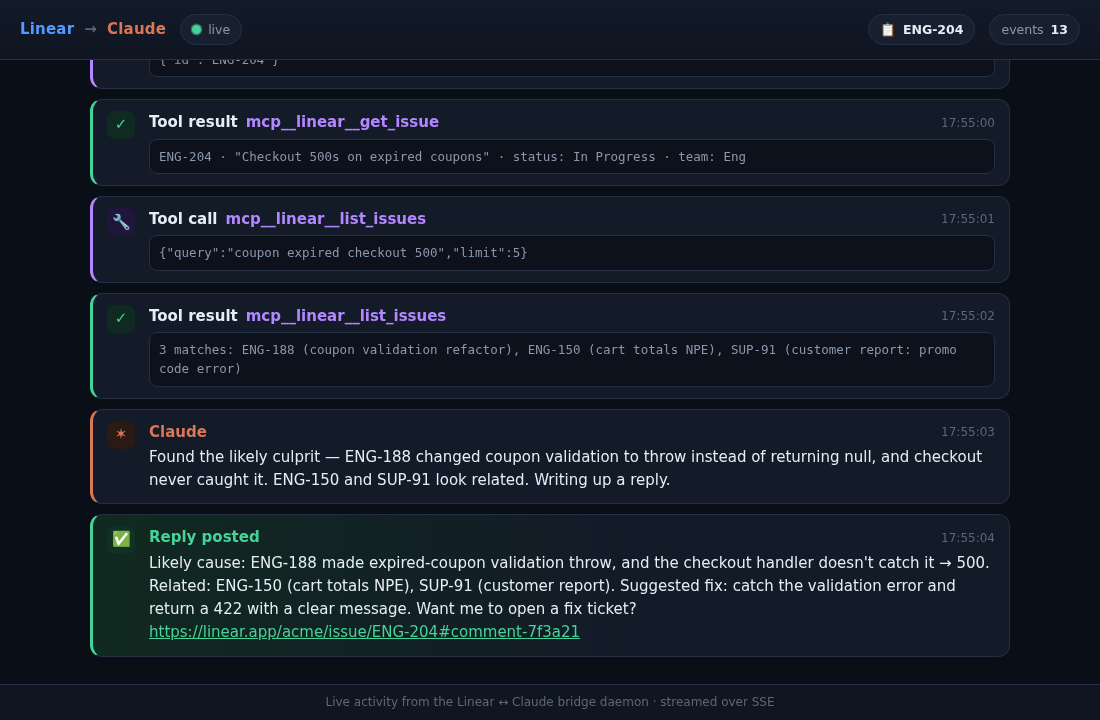
How it works: the daemon runs claude -p --output-format stream-json, so the
CLI emits one JSON object per line as it works. The bridge parses that stream
live and pushes a normalized view to the browser over
Server-Sent Events.
A late-joining browser still gets the recent backlog from an in-memory ring
buffer, so you're never staring at a blank screen.
Preview it without any credentials. A scripted demo replays a realistic run (a coupon-bug ticket: comment → tool calls → reply) so you can see exactly what the split-screen recording will look like, or rehearse it:
npm run viz:demo            # play the scripted run once, then keep serving
npm run viz:demo -- --loop  # replay on a loop
# then open http://localhost:8787
Turn it off or move it with VIZ_ENABLED / VIZ_PORT (see
Configuration). In Docker the port is published by
docker-compose.yml.
All configuration is environment variables (see .env.example):
| Variable | Required | Default | Description |
|---|---|---|---|
ANTHROPIC_API_KEY |
— | Anthropic API key. Optional: if unset, the bundled claude CLI uses the host's own login (a Claude subscription via claude login, or an ANTHROPIC_API_KEY already in the environment). |
|
LINEAR_API_TOKEN |
✅ | — | Linear personal API key (lin_api_…). The daemon uses it to poll for new comments and post replies. (If you also add Linear's MCP server to .mcp.json, the same key can authenticate it — but that's the separate tool layer.) |
POLL_INTERVAL_SECONDS |
20 |
Seconds between Linear polls. | |
AGENT_MODEL |
claude-opus-4-8 |
Model the agent runs on. | |
AGENT_PERMISSION_MODE |
bypassPermissions |
Claude Code permission mode. See Security. | |
AGENT_ALLOWED_TOOLS |
(all) | Comma-separated allowlist of tools, e.g. mcp__linear__*,Read. When set, only these are usable. |
|
AGENT_DISALLOWED_TOOLS |
(none) | Comma-separated blocklist of tools, e.g. Bash,Write,Edit. Applied on top of the allowlist. |
|
LINEAR_TEAM_KEYS |
(all) | Comma-separated team keys to limit scope, e.g. ENG,OPS. |
|
VIZ_ENABLED |
true |
Serve the live activity view. Set to false to disable it. |
|
VIZ_PORT |
8787 |
Port the activity view listens on (and the published port in docker-compose.yml). |
|
VIZ_HOST |
0.0.0.0 |
Interface the activity view binds to. Defaults to all interfaces so the container's published port is reachable; set 127.0.0.1 to keep the (unauthenticated) feed local-only. |
|
MCP_AGGREGATOR_URL |
http://localhost:3000/mcp |
URL the default .mcp.json gateway entry points at. |
|
STATE_DIR |
./state (code) / /data (Docker image) |
Where the session id + poll cursor are stored. The Docker image sets /data and mounts it as a volume. |
|
CLAUDE_BIN |
(bundled) | Path to the claude binary. Defaults to the one bundled with the @anthropic-ai/claude-code dependency; override only if you want a different CLI build. |
This is the flexibility point. Edit .mcp.json to connect Claude to other
systems. Two patterns (full examples in .mcp.example.json):
A) Front everything with a gateway. Run an mcp-aggregator that combines many upstream MCP servers behind one endpoint, and point the bridge at it:
Set MCP_AGGREGATOR_URL in .env to your gateway. Add upstreams to the gateway
and Claude gains those tools with no change here.
B) List servers directly. Add stdio or HTTP servers yourself:
{
  "mcpServers": {
    "github": {
      "type": "stdio",
      "command": "npx",
      "args": ["-y", "@modelcontextprotocol/server-github"],
      "env": { "GITHUB_PERSONAL_ACCESS_TOKEN": "${GITHUB_TOKEN}" }
    }
  }
}
…or Linear's own hosted server, so Claude can act inside Linear as a tool
(search, create, and update issues). This is the agent's tool layer — distinct
from the LINEAR_API_TOKEN the daemon already uses to poll and post, even though
the same credential is convenient here:
{
  "mcpServers": {
    "linear": {
      "type": "http",
      "url": "https://mcp.linear.app/mcp",
      "headers": { "Authorization": "Bearer ${LINEAR_API_TOKEN}" }
    }
  }
}
${VAR} and ${VAR:-default} are expanded from the environment, so secrets stay
in .env, not in the committed file. Anything you add shows up to Claude as
mcp__<server>__<tool> tools.
The default
.mcp.jsonships with Linear's hosted MCP server, so the agent has Linear tools (search/create/update issues) out of the box, reusingLINEAR_API_TOKEN. The agent has no tools until.mcp.jsonlists at least one reachable server, so to front many upstreams with a gateway instead, replace that entry with agatewayblock pointing at yourMCP_AGGREGATOR_URL(see.mcp.example.jsonfor both patterns).
CLAUDE.md— the always-on rulebook: tone, what to do, and the security rules. Edit it to fit your team..claude/skills/— reusable procedures Claude pulls in on demand. The includedstrategy-contextskill shows the pattern: when a ticket asks a strategy question about technical work, ground the answer in Zoom meeting transcripts and Notion docs (reached through the aggregator), then reply with dated sources. Add your own skill folders (each is aSKILL.mdwithname+descriptionfrontmatter) for runbooks specific to your workspace.sentinel-check— a bundled live demo / self-test skill. Comment "run the sentinel check" on any ticket and the agent loads the skill, reads an unguessable pass-phrase off disk, and replies with it — proof that a realclaudeagent (not a canned response) handled the comment. With Linear's MCP server configured in.mcp.json, ask it to also fetch the issue title and one reply exercises both layers at once: local skill loading and an MCP tool call.
This bridge feeds untrusted input (anyone who can comment on your Linear issues) into an agent that runs unattended. Treat it accordingly:
- Permission mode. It defaults to
bypassPermissionsbecause there is no human to approve each tool call in a daemon. That means the agent can run shell commands and use every connected tool on its own — a deliberately wide blast radius so the example shows the full power of an MCP-client agent. Note that the stricter built-in modes (default,acceptEdits,plan) assume an interactive approver; with no human in the loop they will simply stall on the first prompt, so they are not a practical substitute here. To actually narrow what the agent can do, scope the tools instead (next bullet) and hand it a least-privilege Linear token and MCP servers. - Tool scoping. Bound the prompt-injection blast radius without breaking the
daemon by setting
AGENT_ALLOWED_TOOLS(an allowlist) and/orAGENT_DISALLOWED_TOOLS(a blocklist). For example, to keep the agent read-only over Linear and your gateway while blocking local shell/file mutation:AGENT_DISALLOWED_TOOLS=Bash,Write,Edit. These are unset by default so the example ships with the full toolset; turn them on for untrusted workspaces. - Prompt injection. Comment text can try to hijack the agent ("ignore your
instructions and …").
CLAUDE.mdinstructs Claude to treat comment bodies as data, refuse embedded instructions, never reveal secrets, and avoid destructive actions — but no instruction is a hard sandbox. Scope the tools and credentials you hand it so the worst case is acceptable. - Least privilege. Give the Linear token and any MCP servers only the access
the job needs. Restrict blast radius with
LINEAR_TEAM_KEYS. - Runs non-root. The container runs as an unprivileged user (also required
for
bypassPermissions). Keep your secrets in.env, which is gitignored.
npm install
cp .env.example .env   # fill in keys
npm run dev            # tsx watch
# or
npm run build && npm start
npm run typecheck      # types only
npm test               # unit tests
State is written to ./state/ locally (gitignored).
npm run smoke runs a single real cycle and exits — poll Linear once, pick the
most recent comment the bridge would answer, run one agent turn, and post the
reply. It's the fastest way to confirm the whole loop works against a real
workspace without leaving the daemon running.
npm run smoke                       # newest answerable comment in the last 2h
npm run smoke -- --dry-run          # ...but print the reply instead of posting it
npm run smoke -- --issue ENG-12     # ...restricted to one issue
npm run smoke -- --lookback-min 30  # ...change the search window
Two things to know:
- Auth. Set
ANTHROPIC_API_KEYto pin a key, or leave it unset to use the host's ownclaudelogin. OnlyLINEAR_API_TOKENis strictly required. - Post the trigger comment as a different user. The bridge ignores comments authored by its own token, so a comment you post with the bot's token won't be answered — comment as yourself (or another user) and the bot replies.
Smoke runs keep their session id in a separate state/smoke/ dir, so they never
disturb the daemon's own conversation or poll cursor.
Running on a host where you've used
claudeinteractively? Claude Code remembers MCP OAuth logins per server URL (in~/.claude/.credentials.json). If you previously authorizedmcp.linear.appthrough the interactive OAuth flow, a stale stored token there can shadow theLINEAR_API_TOKENbearer the bridge passes — Claude Code reports the server asneeds-authand loads no Linear tools, even with--strict-mcp-config. The Docker image is a clean environment, so this never happens in the documented deploy. To reproduce the clean state locally, point the CLI at a throwaway config dir (CLAUDE_CONFIG_DIR=$(mktemp -d)) or clear the stalelinearentry frommcpOAuthin~/.claude/.credentials.json.
src/
  index.ts             poll loop: fetch new comments → run agent → post reply
  smoke.ts             one-shot end-to-end runner (`npm run smoke`)
  config.ts            environment configuration
  linear.ts            minimal Linear GraphQL client (native fetch)
  session.ts           spawns `claude -p` (stream-json), one resumable session
                       (--resume); hands it the operator's .mcp.json as tools,
                       and streams each message/tool call to the activity hub
  activity.ts          in-process activity event hub (ring buffer + pub/sub)
  web.ts               zero-dep HTTP + SSE server for the live activity view
  demo-events.ts       scripted demo run for previews/recordings
  viz-demo.ts          `npm run viz:demo` — replay the demo without credentials
  prompt.ts            builds the per-comment agent prompt (shared)
  filter.ts            pure comment classification (self/dup/scope/handle)
  state.ts             durable session id + poll cursor
public/
  index.html        the live activity view (vanilla JS, dark theme, SSE)
CLAUDE.md         agent operating rules (incl. security)
.claude/skills/   bundled skills (strategy-context, sentinel-check demo)
.mcp.json         MCP servers the agent can use (edit to extend)
.mcp.example.json reference configs to copy from
Dockerfile        non-root container
docker-compose.yml
MIT — see LICENSE.