Releases: psofthouse/Pencil-4-Line-for-Blender
v4.1.7

[New features]
- Added support for Blender 5.1.
[Modifications]
- Fixed an error that could occur when linking or appending files under specific conditions.
- Skip line drawing when Pencil+ 4 Line nodes in the compositor are muted.
- Minor fixes.
[機能追加]
- Blender 5.1 に対応
[修正点]
- ファイルをリンクまたはアペンドしたときに、特定の状況でエラーが発生する場合がある不具合を修正
- コンポジターの Pencil+ 4 ライン ノードがミュートの場合にはライン描画を実行しないように修正
- 軽微な不具合修正
Notes on Updating / アップデート時のご注意
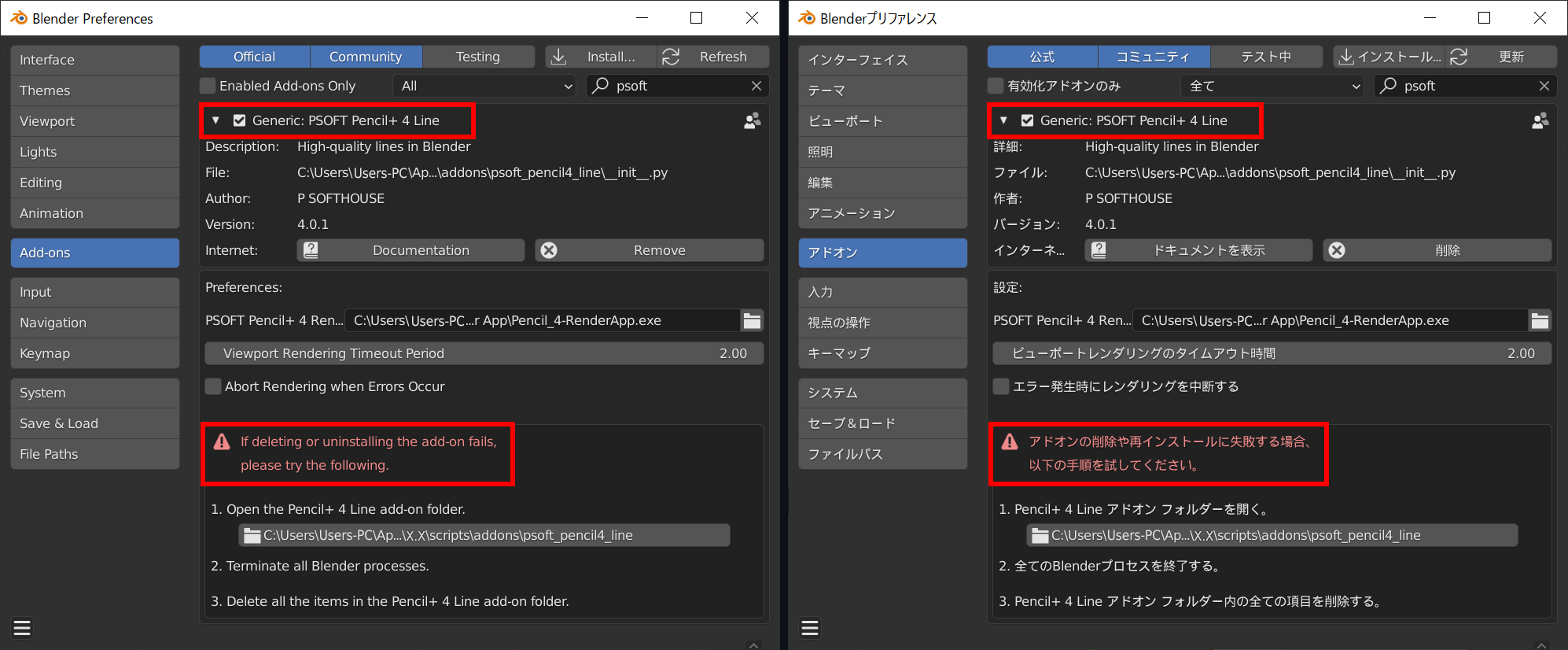
In some cases, the installation does not work properly if the add-on is already installed. If a previous version of the add-on is already installed, please uninstall it first before installing the new version. If you get an error when uninstalling the old add-on, please uninstall it by following the instructions at the bottom of its entry in the Preferences / Add-ons screen.
上書きインストールが正常に動作しない場合があります。インストール済みのアドオンを削除したのちに、新しいアドオンをインストールしてください。古いアドオンの削除に失敗する場合は、プリファレンス / アドオン 画面下部の手順に従って削除してください。
PSOFT Pencil+ 4 Render App 4.1.1 and up is required

Please download the latest version from the PSOFT website.
最新版をPSOFTウェブサイトからダウンロードしてください。
v4.1.6
[New features]
- Added support for Blender 5.0.
[Modifications]
- Fixed an issue where Lines might not render during the first render after setting up line output in the Compositor in Blender 4.5 and up.
- Minor fixes.
[機能追加]
- Blender 5.0 に対応
[修正点]
- Blender 4.5 以降において、コンポジターでライン出力をセットアップした初回のレンダリング時にラインが描画されない場合がある不具合を修正。
- 軽微な不具合修正
Notes on Updating / アップデート時のご注意
In some cases, the installation does not work properly if the add-on is already installed. If a previous version of the add-on is already installed, please uninstall it first before installing the new version. If you get an error when uninstalling the old add-on, please uninstall it by following the instructions at the bottom of its entry in the Preferences / Add-ons screen.
上書きインストールが正常に動作しない場合があります。インストール済みのアドオンを削除したのちに、新しいアドオンをインストールしてください。古いアドオンの削除に失敗する場合は、プリファレンス / アドオン 画面下部の手順に従って削除してください。
PSOFT Pencil+ 4 Render App 4.1.1 and up is required
Please download the latest version from the PSOFT website.
最新版をPSOFTウェブサイトからダウンロードしてください。
v4.1.5
[New features]
- Added support for Blender 4.5.
[Modifications]
- Fixed reduction computation so that overridden position information is correctly reflected when a library override is applied to an object referenced by Reduction Settings.
- Improved panel display and usability when a library override is applied to a Line node tree.
- Minor fixes.
[機能追加]
- Blender 4.5 に対応
[修正点]
- 減衰設定の参照オブジェクトがライブラリオーバーライドされている場合に、減衰計算にオーバーライドされた位置情報が正しく反映されるように修正
- ラインノードツリーをライブラリオーバーライドしたときのパネルの表示や操作性を改善
- 軽微な不具合修正
Notes on Updating / アップデート時のご注意
In some cases, the installation does not work properly if the add-on is already installed. If a previous version of the add-on is already installed, please uninstall it first before installing the new version. If you get an error when uninstalling the old add-on, please uninstall it by following the instructions at the bottom of its entry in the Preferences / Add-ons screen.
上書きインストールが正常に動作しない場合があります。インストール済みのアドオンを削除したのちに、新しいアドオンをインストールしてください。古いアドオンの削除に失敗する場合は、プリファレンス / アドオン 画面下部の手順に従って削除してください。
PSOFT Pencil+ 4 Render App 4.1.1 and up is required
Please download the latest version from the PSOFT website.
最新版をPSOFTウェブサイトからダウンロードしてください。
v4.1.4
[Modifications]
- Fixed a problem where viewport rendering did not work with Blender 4.4.
- Fixed the line drawing so that it applies the object's [Ray Visibility / Camera] setting when rendering with EEVEE in Blender 4.2 and up.
- Adjusted parts of the user interface display.
[修正点]
- Blender 4.4 でビューポートレンダリングが動作しない不具合を修正
- Blender 4.2 以降で EEVEE を使用してレンダリングしたとき、オブジェクトの [レイの可視性 / カメラ] 設定をライン描画に反映させるように修正
- 一部のGUI表示の調整
Notes on Updating / アップデート時のご注意
In some cases, the installation does not work properly if the add-on is already installed. If a previous version of the add-on is already installed, please uninstall it first before installing the new version. If you get an error when uninstalling the old add-on, please uninstall it by following the instructions at the bottom of its entry in the Preferences / Add-ons screen.
上書きインストールが正常に動作しない場合があります。インストール済みのアドオンを削除したのちに、新しいアドオンをインストールしてください。古いアドオンの削除に失敗する場合は、プリファレンス / アドオン 画面下部の手順に従って削除してください。
PSOFT Pencil+ 4 Render App 4.1.1 and up is required
Please download the latest version from the PSOFT website.
最新版をPSOFTウェブサイトからダウンロードしてください。
v4.1.3
[New features]
- Support Line drawing when a material slot link is set to an object.
[Modifications]
- Improved accuracy when using a sRGB image for a texture map.
- Fixed a bug that sometimes caused crashes when rendering started.
- Fixed a bug where the viewport line preview was sometimes not updated correctly.
- Minor fixes.
[機能追加]
- マテリアルスロットのリンクがオブジェクトに設定されている場合のライン描画対応
[修正点]
- テクスチャマップに sRGB の画像を使用した場合の精度の改善
- レンダリング開始時にクラッシュする場合がある不具合を修正
- ビューポートのライン プレビューが正しく更新されない場合がある不具合を修正
- 軽微な不具合修正
Notes on Updating / アップデート時のご注意
In some cases, the installation does not work properly if the add-on is already installed. If a previous version of the add-on is already installed, please uninstall it first before installing the new version. If you get an error when uninstalling the old add-on, please uninstall it by following the instructions at the bottom of its entry in the Preferences / Add-ons screen.
上書きインストールが正常に動作しない場合があります。インストール済みのアドオンを削除したのちに、新しいアドオンをインストールしてください。古いアドオンの削除に失敗する場合は、プリファレンス / アドオン 画面下部の手順に従って削除してください。
PSOFT Pencil+ 4 Render App 4.1.1 and up is required
Please download the latest version from the PSOFT website.
最新版をPSOFTウェブサイトからダウンロードしてください。
v4.1.2
[Modifications]
- Fixed a bug in version 4.1.1 where an error occurred and line drawing was not updated if rendering while displaying a shader editor where the editing target does not exist.
- Improved stability when rendering at high resolutions.
[修正点]
- 編集対象が存在しないシェーダーエディターを表示しながらレンダリングすると、エラーが発生してライン画像が更新されない バージョン 4.1.1 での不具合を修正
- レンダリング解像度が高い場合の動作安定性の改善
Notes on Updating / アップデート時のご注意
In some cases, the installation does not work properly if the add-on is already installed. If a previous version of the add-on is already installed, please uninstall it first before installing the new version. If you get an error when uninstalling the old add-on, please uninstall it by following the instructions at the bottom of its entry in the Preferences / Add-ons screen.
上書きインストールが正常に動作しない場合があります。インストール済みのアドオンを削除したのちに、新しいアドオンをインストールしてください。古いアドオンの削除に失敗する場合は、プリファレンス / アドオン 画面下部の手順に従って削除してください。
PSOFT Pencil+ 4 Render App 4.1.0 and up is required
Please download the latest version from the PSOFT website.
最新版をPSOFTウェブサイトからダウンロードしてください。
v4.1.1
[Modifications]
- Fixed an issue where lines stopped being drawn under specific conditions in scenes containing multiple view layers and curves or text objects.
- Handled a Blender issue where Blender freezes if rendering while specific shader nodes are shown.
- Minor fixes.
[修正点]
- 複数のビューレイヤーが存在し、カーブやテキストオブジェクトを含むシーンにおいて、特定の条件でラインが描画されなくなる不具合を修正
- 特定のシェーダーノードを表示しながらレンダリングするとフリーズするBlenderの問題に対応
- 軽微な不具合修正
Notes on Updating / アップデート時のご注意
In some cases, the installation does not work properly if the add-on is already installed. If a previous version of the add-on is already installed, please uninstall it first before installing the new version. If you get an error when uninstalling the old add-on, please uninstall it by following the instructions at the bottom of its entry in the Preferences / Add-ons screen.
上書きインストールが正常に動作しない場合があります。インストール済みのアドオンを削除したのちに、新しいアドオンをインストールしてください。古いアドオンの削除に失敗する場合は、プリファレンス / アドオン 画面下部の手順に従って削除してください。
PSOFT Pencil+ 4 Render App 4.1.0 and up is required
Please download the latest version from the PSOFT website.
最新版をPSOFTウェブサイトからダウンロードしてください。
v4.1.0
[New features]
- Added support for macOS.
- Added Brush preview and Stroke preview to the Line Node Editor.
- Added Brush Presets and Stroke Presets to the [Brush Detail] settings node.
- Added [Rotation] setting to the [Texture Map] node.
- Added [Clip] setting to [Wrap Mode] in the [Texture Map] node.
- Added the [Camera Area] setting to the Viewport line preview.
[Modifications]
- Improved the accuracy of the Viewport line preview and fixed bugs.
- Fixed a bug that occurs when setting [Attribute Override] for some parameters.
- Minor fixes.
[機能追加]
- macOS 対応
- ライン ノードエディターにブラシプレビューとストロークプレビュー表示を追加
- [ブラシ詳細設定]ノードにブラシプリセットとストロークプリセット機能を追加
- [テクスチャマップ]ノードに[回転]設定を追加
- [テクスチャマップ]ノードに[ラップモード]に[クリップ]を追加
- ビューポート ライン プレビューに[カメラ領域]設定を追加
[修正点]
- ビューポート ライン プレビューの精度改善と不具合の修正
- 一部のパラメーターに対して[属性オーバーライド]を設定したときに発生する不具合を修正
- 軽微な不具合修正
Notes on Updating / アップデート時のご注意
In some cases, the installation does not work properly if the add-on is already installed. If a previous version of the add-on is already installed, please uninstall it first before installing the new version. If you get an error when uninstalling the old add-on, please uninstall it by following the instructions at the bottom of its entry in the Preferences / Add-ons screen.
上書きインストールが正常に動作しない場合があります。インストール済みのアドオンを削除したのちに、新しいアドオンをインストールしてください。古いアドオンの削除に失敗する場合は、プリファレンス / アドオン 画面下部の手順に従って削除してください。
PSOFT Pencil+ 4 Render App 4.1.0 and up is required
Please download the latest version from the PSOFT website.
最新版をPSOFTウェブサイトからダウンロードしてください。
v4.0.8
[New features]
- Adds support for Blender 4.1.
[Modifications]
- Fixed a problem where the color of lines in the Viewport Preview was not displayed correctly in Blender 4.0 and up if the Color Management Display Device was set to something other than sRGB.
- Fixed a problem where Blender would sometimes freeze when the Viewport's Real-time Compositor was enabled.
- Fixed a problem where the location information of Reduction Settings' reference objects was sometimes not correctly reflected.
- Minor fixes.
[機能追加]
- Blender 4.1 に対応
[修正点]
- Blender 4.0 以降において、カラーマネジメントの表示デバイスがsRGB以外に設定されているときに、ビューポートプレビューのラインの色が正しく表示されない不具合を修正
- ビューポートのリアルタイムコンポジターを有効にしたときにフリーズする場合がある不具合を修正
- 減衰設定のオブジェクト参照の位置情報が正しく反映されない場合がある不具合を修正
- 軽微な不具合修正
Notes on Updating / アップデート時のご注意
In some cases, the installation does not work properly if the add-on is already installed. If a previous version of the add-on is already installed, please uninstall it first before installing the new version. If you get an error when uninstalling the old add-on, please uninstall it by following the instructions at the bottom of its entry in the Preferences / Add-ons screen.
上書きインストールが正常に動作しない場合があります。インストール済みのアドオンを削除したのちに、新しいアドオンをインストールしてください。古いアドオンの削除に失敗する場合は、プリファレンス / アドオン 画面下部の手順に従って削除してください。
PSOFT Pencil+ 4 Render App 4.0.1 and up is required
Please download the latest version from the PSOFT website.
最新版をPSOFTウェブサイトからダウンロードしてください。
v4.0.7
[Modifications]
- Fixed a problem where an error occurred when rendering specific scenes.
- Fixed a problem where node links were not properly reflected in the rendering when "Attribute Override" was used for some properties.
- Minor bug fixes.
[修正点]
- 特定のシーンにおいてレンダリング時にエラーが発生する場合がある不具合を修正
- 一部のプロパティに対して[属性オーバーライド]機能を使用したとき、ノードのリンク状態が正しくレンダリングに反映されない場合がある不具合を修正
- 軽微な不具合修正
Notes on Updating / アップデート時のご注意
In some cases, the installation does not work properly if the add-on is already installed. If a previous version of the add-on is already installed, please uninstall it first before installing the new version. If you get an error when uninstalling the old add-on, please uninstall it by following the instructions at the bottom of its entry in the Preferences / Add-ons screen.
上書きインストールが正常に動作しない場合があります。インストール済みのアドオンを削除したのちに、新しいアドオンをインストールしてください。古いアドオンの削除に失敗する場合は、プリファレンス / アドオン 画面下部の手順に従って削除してください。
PSOFT Pencil+ 4 Render App 4.0.1 and up is required
Please download the latest version from the PSOFT website.
最新版をPSOFTウェブサイトからダウンロードしてください。