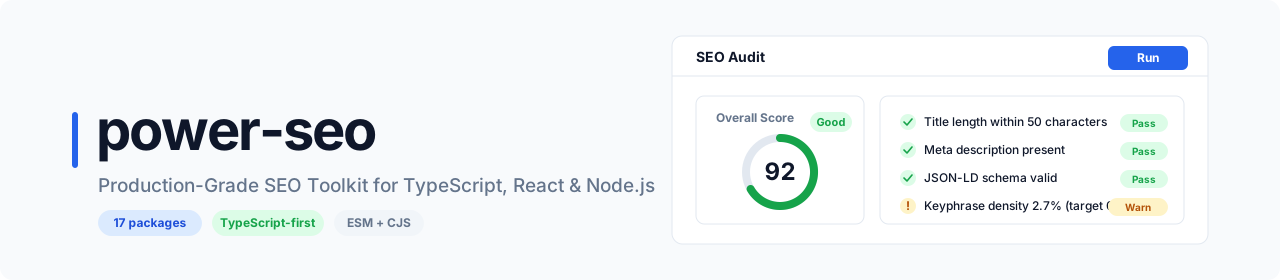





power-seo is a monorepo of 17 modular, TypeScript-first SEO packages for React, Next.js, Remix, and Node.js. Each @power-seo/<name> package is independently published and installable, so you take only what your project needs — from a single utility such as @power-seo/core to the full toolkit. Every package ships dual ESM + CJS output, complete .d.ts types, and is fully tree-shakeable.
All 17 packages are standalone
npm installtargets — from@power-seo/core(the zero-dependency foundation) to@power-seo/ai(LLM-agnostic SEO prompt builders). Use one, use several, or use them all.
| Without | With | |
|---|---|---|
| Meta tag management | Hand-written HTML or locked to a CMS plugin | Type-safe builders, native to Next.js App Router and Remix v2 |
| Structured data | Manual JSON with no validation | 23 typed JSON-LD builders + validateSchema() + React components |
| Content scoring | WordPress-only Yoast SEO plugin | Standalone Yoast-style engine that runs anywhere in TypeScript |
| SERP previews | Browser tools and paid dashboards | Pixel-accurate server-side truncation at 580px |
| SEO auditing | Screaming Frog or paid SaaS | Programmatic auditPage() + auditSite() returning a 0–100 score |
| Image SEO | Manual checklist, no automation | Alt text, above-the-fold lazy-loading, WebP/AVIF format analysis |
| Link graph | Unknown orphan pages, guessed equity | findOrphanPages() + equity scoring over the internal link graph |
| Redirect engine | Framework-specific config files per project | One engine with Next.js, Remix, and Express adapters |
| Sitemaps | String-built XML that spikes memory on large sites | Stream 50,000+ URLs at constant memory |
| AI integration | Custom LLM prompt logic per project | LLM-agnostic prompt builders + structured response parsers |
| Search Console | Custom OAuth boilerplate every project | Typed client — OAuth2, service accounts, URL inspection |
| Analytics tracking | Copy-pasted script tags, no consent handling | GA4, Clarity, PostHog, Plausible, Fathom + GDPR consent |
| TypeScript support | Scattered @types/ packages or none |
Full .d.ts across all 17 packages, zero extra installs |
| Bundle impact | All-or-nothing monolithic imports | "sideEffects": false on every package — tree-shake anything |
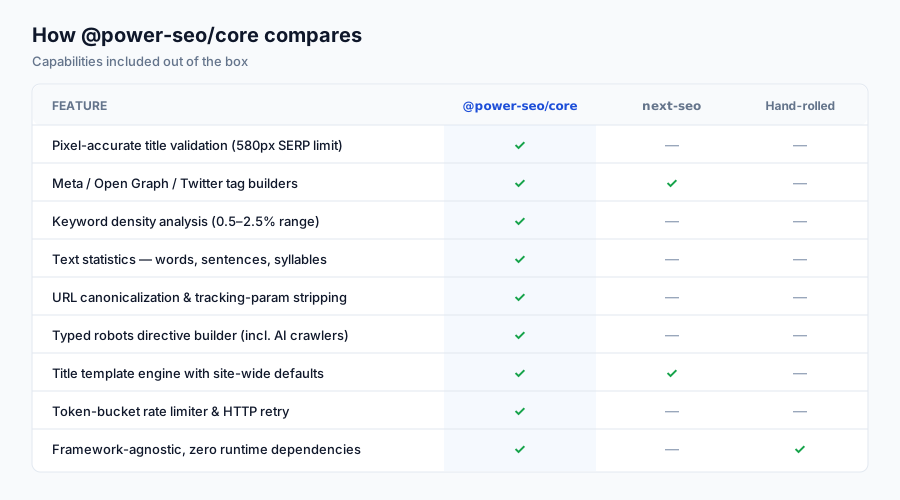
- 17 independent packages — install only what you need; no monolithic bundle, no unused code
- Next.js App Router native —
createMetadata()returns a properMetadataobject and derives Open Graph and Twitter fields from your top-leveltitle,description, andcanonical - Remix v2 native —
createMetaDescriptors()returns typedMetaDescriptor[]for the routemetaexport - Robots directive builder —
buildRobotsContent()supportsnoindex,nofollow,max-snippet,max-image-preview, andunavailable_after - JSON-LD structured data — 23 schema.org builder functions,
schemaGraph(),validateSchema(), plus React components - Yoast-style content analysis — score titles, meta descriptions, keyphrases, headings, word count, images, and links; includes E-E-A-T and search-intent checks
- Readability scoring — Flesch Reading Ease, Flesch-Kincaid, Gunning Fog, Coleman-Liau, and Automated Readability algorithms
- Pixel-accurate SERP previews — Google, Open Graph, and Twitter/X Card previews without a browser or canvas
- XML sitemaps — generate, stream, validate, and auto-split at the 50,000-URL spec limit, with image, video, and news support
- Redirect engine — 301/302 with exact, glob, and regex matching, chain resolution, an open-redirect guard, and Next.js / Remix / Express adapters
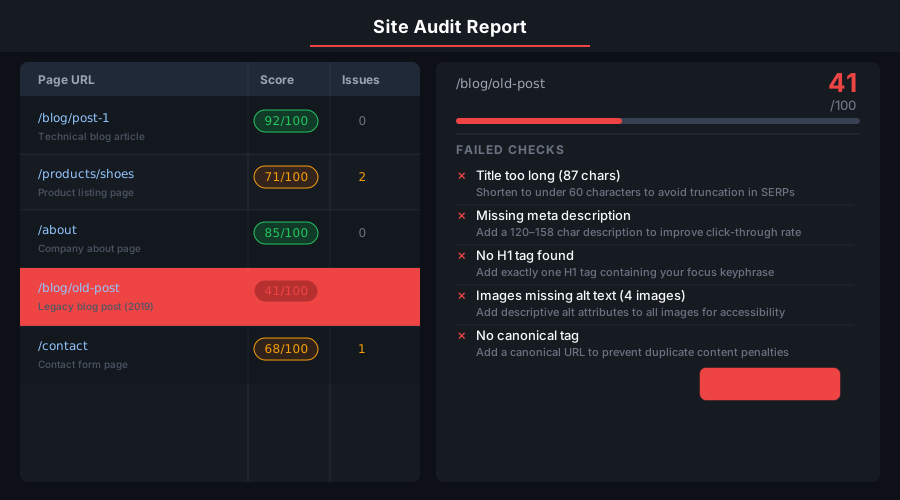
- Full SEO audit — 0–100 weighted scores across meta, content, structure, and performance categories
- Image SEO — alt text audit, above-the-fold lazy-loading checks, WebP/AVIF recommendations, and image sitemaps
- Link graph analysis — orphan page detection, keyword-based link suggestions, and equity scoring
- AI-assisted SEO — LLM-agnostic prompt builders and structured parsers for meta descriptions, titles, and content suggestions
- Google Search Console API — OAuth2 and service-account auth, search analytics queries, URL inspection, sitemap management
- Semrush + Ahrefs clients — domain overview, keyword data, and backlinks over a shared rate-limited HTTP client
- Analytics tracking — GA4, Clarity, PostHog, Plausible, and Fathom with GDPR consent management
- TypeScript-first — full
.d.tsdeclarations across all 17 packages; no@types/needed - Tree-shakeable —
"sideEffects": falseon every package; import only what you use - Dual ESM + CJS — every package ships both formats via tsup for any bundler or
require()usage - Edge runtime safe — no Node.js-specific APIs in core packages; runs on Cloudflare Workers, Vercel Edge, and Deno
The @power-seo Ecosystem
All 17 packages are independently installable — use only what you need.
| Package | Install | Description |
|---|---|---|
@power-seo/ai |
npm i @power-seo/ai |
LLM-agnostic prompt templates and response parsers for AI-assisted SEO |
@power-seo/analytics |
npm i @power-seo/analytics |
Merge Search Console data with audit results — trends and ranking insights |
@power-seo/audit |
npm i @power-seo/audit |
SEO site health auditing with meta, content, structure, and performance rules |
@power-seo/content-analysis |
npm i @power-seo/content-analysis |
Yoast-style SEO content analysis engine with scoring, checks, and React components |
@power-seo/core |
npm i @power-seo/core |
Framework-agnostic SEO analysis engines, types, validators, and utilities |
@power-seo/images |
npm i @power-seo/images |
Image SEO analysis — alt text quality, lazy loading, formats, image sitemaps |
@power-seo/integrations |
npm i @power-seo/integrations |
Semrush and Ahrefs API clients with a shared rate-limited HTTP client |
@power-seo/links |
npm i @power-seo/links |
Internal link graph analysis — orphan detection, suggestions, equity scoring |
@power-seo/meta |
npm i @power-seo/meta |
SSR meta tag helpers for Next.js App Router, Remix v2, and generic SSR |
@power-seo/preview |
npm i @power-seo/preview |
SERP, Open Graph, and Twitter Card preview generators with React components |
@power-seo/react |
npm i @power-seo/react |
React SEO components — meta tags, Open Graph, Twitter Card, breadcrumbs |
@power-seo/readability |
npm i @power-seo/readability |
Readability scoring — Flesch-Kincaid, Gunning Fog, Coleman-Liau, ARI |
@power-seo/redirects |
npm i @power-seo/redirects |
Redirect rule engine with Next.js, Remix, and Express adapters |
@power-seo/schema |
npm i @power-seo/schema |
Type-safe JSON-LD structured data — 23 schema.org builders plus React components |
@power-seo/search-console |
npm i @power-seo/search-console |
Google Search Console API client — OAuth2, service accounts, rate limiting, retry |
@power-seo/sitemap |
npm i @power-seo/sitemap |
XML sitemap generation, streaming, and validation with image, video, news support |
@power-seo/tracking |
npm i @power-seo/tracking |
Analytics script builders with consent management and React components |
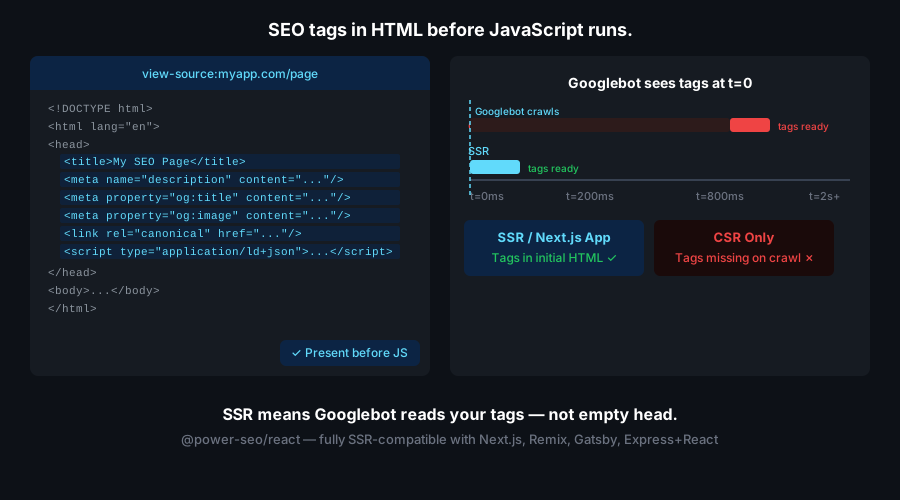
Install @power-seo/meta for the Metadata object and @power-seo/schema for JSON-LD. createMetadata() returns a native Next.js Metadata, deriving Open Graph and Twitter fields from your top-level title, description, and canonical, and merging advanced robots directives into metadata.other. Render structured data with toJsonLdString(), which escapes <, >, and & for safe inline output.
npm install @power-seo/meta @power-seo/schema// app/blog/[slug]/page.tsx
import { createMetadata } from '@power-seo/meta';
import { article, toJsonLdString } from '@power-seo/schema';
export function generateMetadata({ params }: { params: { slug: string } }) {
return createMetadata({
title: 'My Blog Post',
description: 'A great article about SEO.',
canonical: `https://example.com/blog/${params.slug}`,
openGraph: {
type: 'article',
images: [{ url: 'https://example.com/og.jpg', width: 1200, height: 630 }],
},
robots: { index: true, follow: true, maxSnippet: 150, maxImagePreview: 'large' },
});
}
export default function Page() {
const jsonLd = article({
headline: 'My Blog Post',
datePublished: '2026-01-15',
author: { name: 'Jane Doe', url: 'https://example.com/authors/jane-doe' },
});
return (
<>
<script
type="application/ld+json"
dangerouslySetInnerHTML={{ __html: toJsonLdString(jsonLd) }}
/>
<article>{/* page content */}</article>
</>
);
}createMetaDescriptors() returns a typed MetaDescriptor[] for the route meta export. Pass your title, description, canonical, and Open Graph config once, and the helper expands them into the descriptor array Remix expects.
npm install @power-seo/meta// app/routes/blog.$slug.tsx
import { createMetaDescriptors } from '@power-seo/meta';
export const meta = () =>
createMetaDescriptors({
title: 'My Blog Post',
description: 'A great article about SEO.',
canonical: 'https://example.com/blog/my-post',
openGraph: { type: 'article', images: [{ url: 'https://example.com/og.jpg' }] },
});
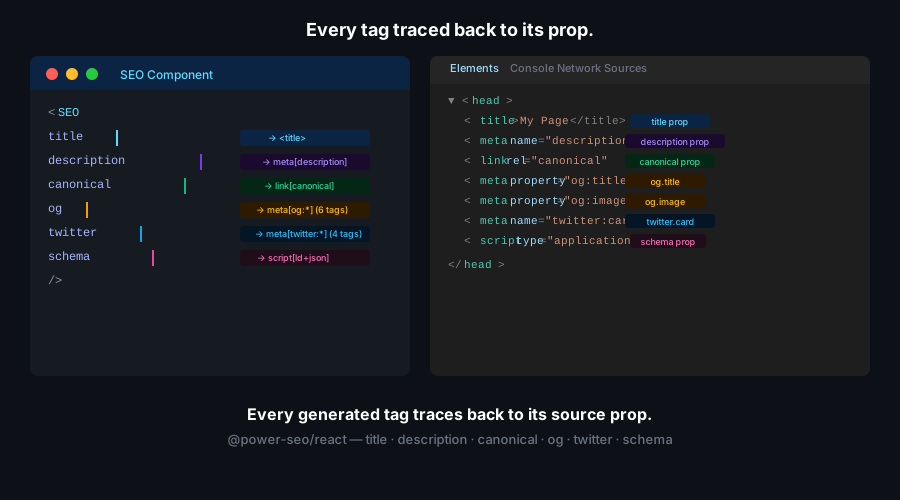
Wrap your app in DefaultSEO for site-wide defaults, then use SEO, Hreflang, and Breadcrumb per page. These components render meta tags directly to the document head — no react-helmet dependency. Breadcrumb also emits BreadcrumbList JSON-LD by default.
npm install @power-seo/react @power-seo/coreimport { DefaultSEO, SEO, Breadcrumb, Hreflang } from '@power-seo/react';
function App() {
return (
<DefaultSEO
titleTemplate="%s | My Site"
defaultTitle="My Site"
openGraph={{ type: 'website', siteName: 'My Site' }}
twitter={{ site: '@mysite', cardType: 'summary_large_image' }}
>
<Router>
<Routes />
</Router>
</DefaultSEO>
);
}
function BlogPage({ post }) {
return (
<>
<SEO
title={post.title}
description={post.excerpt}
canonical={`https://example.com/blog/${post.slug}`}
openGraph={{
type: 'article',
images: [{ url: post.coverImage, width: 1200, height: 630 }],
}}
/>
<Hreflang
alternates={[
{ hrefLang: 'en', href: `https://example.com/blog/${post.slug}` },
{ hrefLang: 'fr', href: `https://fr.example.com/blog/${post.slug}` },
]}
/>
<Breadcrumb
items={[
{ name: 'Home', url: 'https://example.com' },
{ name: 'Blog', url: 'https://example.com/blog' },
{ name: post.title },
]}
/>
<article>{/* content */}</article>
</>
);
}
Combine multiple schema.org types into a single @graph document with schemaGraph(), serialize with toJsonLdString(), and check for problems with validateSchema(), which returns { valid, issues }. Builders such as faqPage() and breadcrumbList() take plain arrays.
npm install @power-seo/schemaimport {
article,
faqPage,
breadcrumbList,
schemaGraph,
toJsonLdString,
validateSchema,
} from '@power-seo/schema';
// Combine multiple schemas into a single @graph document
const graph = schemaGraph([
article({
headline: 'My Blog Post',
datePublished: '2026-01-15',
author: { name: 'Jane Doe', url: 'https://example.com/authors/jane-doe' },
image: { url: 'https://example.com/og.jpg', width: 1200, height: 630 },
}),
faqPage([
{ question: 'What is SEO?', answer: 'Search engine optimization.' },
{ question: 'Does Next.js support JSON-LD?', answer: 'Yes, via script tags.' },
]),
breadcrumbList([
{ name: 'Home', url: 'https://example.com' },
{ name: 'Blog', url: 'https://example.com/blog' },
{ name: 'My Blog Post' },
]),
]);
const html = toJsonLdString(graph);
// Validate before publishing
const { valid, issues } = validateSchema(graph);// React — renders <script type="application/ld+json"> in one line
import { ArticleJsonLd, FAQJsonLd, BreadcrumbJsonLd } from '@power-seo/schema/react';
<ArticleJsonLd
headline="My Blog Post"
datePublished="2026-01-15"
author={{ name: 'Jane Doe', url: 'https://example.com/authors/jane-doe' }}
image={{ url: 'https://example.com/og.jpg', width: 1200, height: 630 }}
/>
<FAQJsonLd questions={[{ question: 'What is SEO?', answer: 'Search engine optimization.' }]} />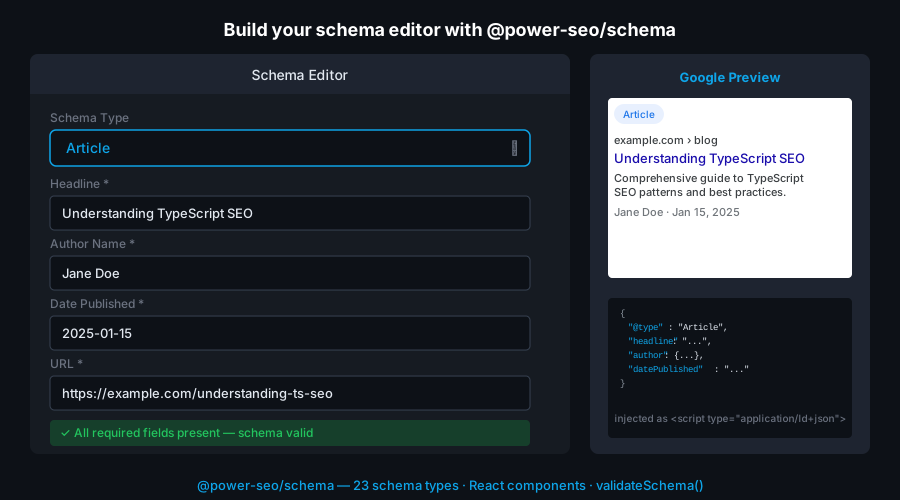
analyzeContent() runs the full check suite over your title, metaDescription, content HTML, and focusKeyphrase, returning a score, a maxScore, a per-check results array, and recommendations. Statuses on each result are 'good' | 'ok' | 'poor' | 'na'.
npm install @power-seo/content-analysisimport { analyzeContent } from '@power-seo/content-analysis';
const output = analyzeContent({
title: 'Best Coffee Shops in NYC',
metaDescription: 'Discover the top coffee shops in New York City.',
content: '<h1>Best Coffee Shops</h1><p>Your article HTML here...</p>',
focusKeyphrase: 'coffee shops nyc',
images: [{ src: '/hero.jpg', alt: 'Best coffee shops NYC' }],
internalLinks: ['/blog', '/about'],
externalLinks: ['https://maps.google.com'],
});
console.log(output.score); // e.g. 38
console.log(output.maxScore); // e.g. 55
console.log(output.results); // AnalysisResult[] — per-check breakdown
console.log(output.recommendations); // string[] of actionable suggestions// Real-time editor feedback
import { ContentAnalyzer } from '@power-seo/content-analysis/react';
<ContentAnalyzer input={editorInput} />;analyzeReadability() takes your content HTML and returns a flat object with an overall score, the raw fleschReadingEase and fleschKincaidGrade values, sentence and paragraph metrics, a per-check results array, and recommendations.
npm install @power-seo/readabilityimport { analyzeReadability } from '@power-seo/readability';
const result = analyzeReadability({
content: '<h1>My Article</h1><p>Your article HTML content here.</p>',
});
console.log(result.score); // overall readability score
console.log(result.fleschReadingEase); // 0–100 (higher = easier to read)
console.log(result.fleschKincaidGrade); // US grade level (lower = simpler)
console.log(result.results); // AnalysisResult[] — per-check status
console.log(result.recommendations); // ['Shorten long sentences...']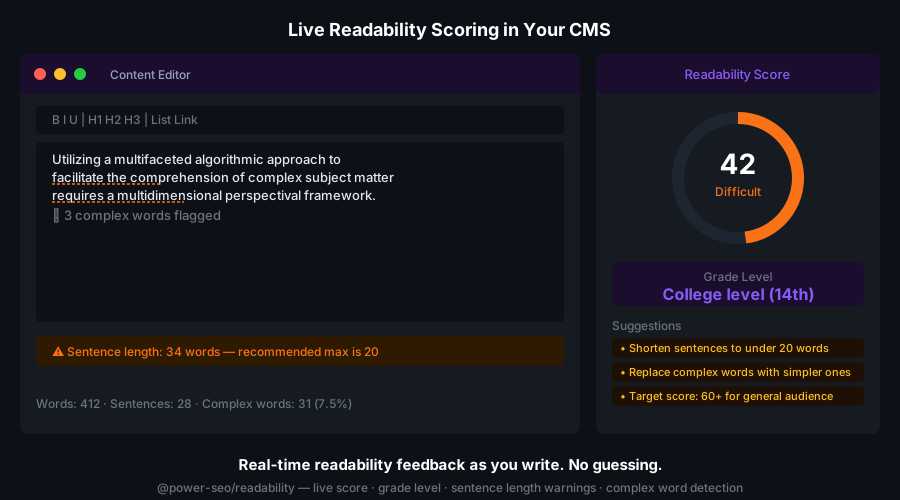
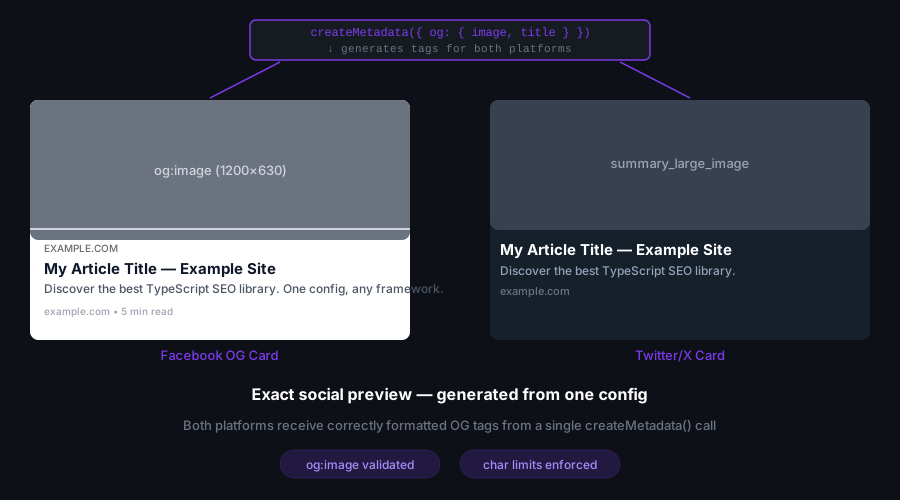
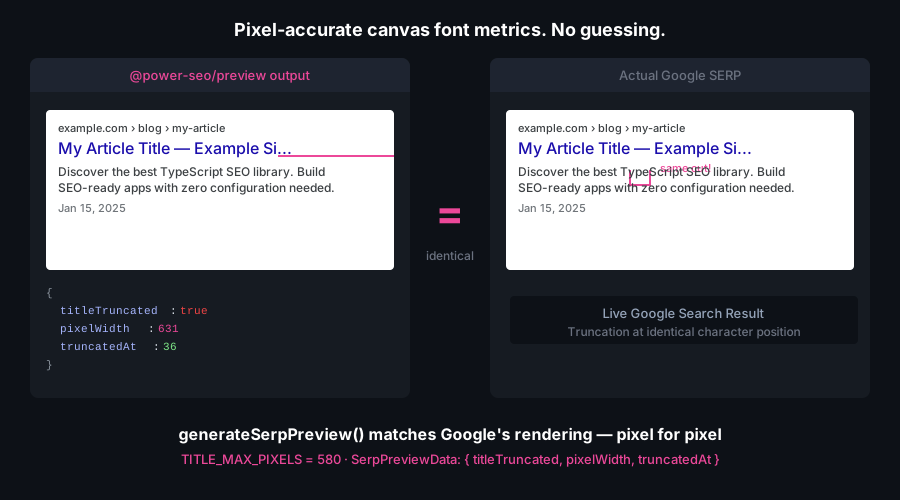
generateSerpPreview(), generateOgPreview(), and generateTwitterPreview() compute pixel-accurate previews server-side. The SERP preview truncates at 580px and reports titleTruncated; the Open Graph preview validates image dimensions and returns image.valid with an optional image.message.
npm install @power-seo/previewimport { generateSerpPreview, generateOgPreview, generateTwitterPreview } from '@power-seo/preview';
const serp = generateSerpPreview({
title: 'How to Add SEO to Next.js Apps',
description: 'A complete guide to meta tags, Open Graph, and JSON-LD in Next.js.',
url: 'https://example.com/blog/nextjs-seo',
siteTitle: 'My Blog',
});
console.log(serp.title); // 'How to Add SEO to Next.js Apps - My Blog'
console.log(serp.displayUrl); // 'example.com › blog › nextjs-seo'
console.log(serp.titleTruncated); // false (under 580px)
const og = generateOgPreview({
title: 'Next.js SEO Guide',
description: 'Everything you need for Next.js SEO.',
url: 'https://example.com/blog/nextjs-seo',
image: { url: 'https://example.com/og.jpg', width: 1200, height: 630 },
});
console.log(og.image?.valid); // true
console.log(og.image?.message); // undefined (dimensions are correct)// All-in-one tabbed preview panel (Google / Facebook / Twitter)
import { PreviewPanel } from '@power-seo/preview/react';
<PreviewPanel
title="How to Add SEO to Next.js Apps"
description="A complete guide to meta tags, Open Graph, and JSON-LD."
url="https://example.com/blog/nextjs-seo"
siteTitle="My Blog"
image={{ url: 'https://example.com/og.jpg', width: 1200, height: 630 }}
twitterSite="@myblog"
twitterCardType="summary_large_image"
/>;
generateSitemap(config) builds an XML string and requires a hostname. For large catalogs, streamSitemap(hostname, urls) yields chunks at constant memory, and splitSitemap(config) returns a sitemap index plus child sitemaps. For Next.js app/sitemap.ts, toNextSitemap() maps your URLs to the native sitemap entry format.
npm install @power-seo/sitemapimport {
generateSitemap,
streamSitemap,
splitSitemap,
validateSitemapUrl,
} from '@power-seo/sitemap';
// Basic sitemap — hostname is required
const xml = generateSitemap({
hostname: 'https://example.com',
urls: [
{ loc: '/', changefreq: 'daily', priority: 1.0 },
{ loc: '/blog/my-post', lastmod: '2026-01-15', priority: 0.7 },
{
loc: '/product/headphones',
images: [{ loc: 'https://example.com/headphones.jpg', caption: 'Wireless Headphones' }],
},
],
});
// Streaming — constant memory for 50,000+ URL catalogs
export async function GET() {
const urls = await fetchAllProductUrls();
const chunks = [...streamSitemap('https://example.com', urls)];
return new Response(chunks.join(''), { headers: { 'Content-Type': 'application/xml' } });
}
// Auto-split into index + child sitemaps
const { index, sitemaps } = splitSitemap({ hostname: 'https://example.com', urls: allUrls });// Next.js App Router — app/sitemap.ts
import { toNextSitemap } from '@power-seo/sitemap/next';
export default async function sitemap() {
const urls = await fetchAllUrls();
return toNextSitemap(urls);
}createRedirectEngine() builds a matcher supporting exact, glob (:param and *), and regex rules, resolves redirect chains, and blocks off-origin destinations unless you opt in with allowExternalRedirects. Call engine.match(url) to get a RedirectMatch with resolvedDestination and statusCode, or export rules to a framework with toNextRedirects().
npm install @power-seo/redirectsimport { createRedirectEngine, toNextRedirects } from '@power-seo/redirects';
const engine = createRedirectEngine({
rules: [
{ source: '/old-page', destination: '/new-page', statusCode: 301 },
{ source: '/blog/:slug', destination: '/articles/:slug', statusCode: 301 },
{ source: '/products/*', destination: '/shop/*', statusCode: 302 },
],
});
// Runtime matching (any framework)
const match = engine.match('/blog/my-post');
// { rule, resolvedDestination: '/articles/my-post', statusCode: 301 } | null
// Next.js next.config.js
async redirects() {
return toNextRedirects(rules);
}
auditPage(input) scores a single page across meta, content, structure, and performance categories and returns a weighted 0–100 score, a categories breakdown, a rules array, and recommendations. auditSite({ pages }) audits many pages and returns an aggregate score, totalPages, topIssues, and a per-category summary.
npm install @power-seo/auditimport { auditPage, auditSite } from '@power-seo/audit';
// Single page audit
const result = auditPage({
url: 'https://example.com/my-page',
title: 'My Page Title',
metaDescription: 'A page about something interesting.',
headings: ['h1:My Page Title', 'h2:Section One', 'h2:Section Two'],
focusKeyphrase: 'my keyword',
wordCount: 850,
internalLinks: ['/about', '/contact', '/blog'],
externalLinks: ['https://example.org'],
});
console.log(result.score); // 0–100 weighted score
console.log(result.categories); // { meta, content, structure, performance }
console.log(result.rules); // AuditRule[] — pass/warning/error per rule
console.log(result.recommendations); // string[] of actionable fixes
// Whole-site audit — pass { pages }
const siteResult = auditSite({ pages: [page1Input, page2Input, page3Input] });
console.log(siteResult.score); // aggregate score
console.log(siteResult.totalPages); // number of pages audited
console.log(siteResult.topIssues); // most common issues across all pages
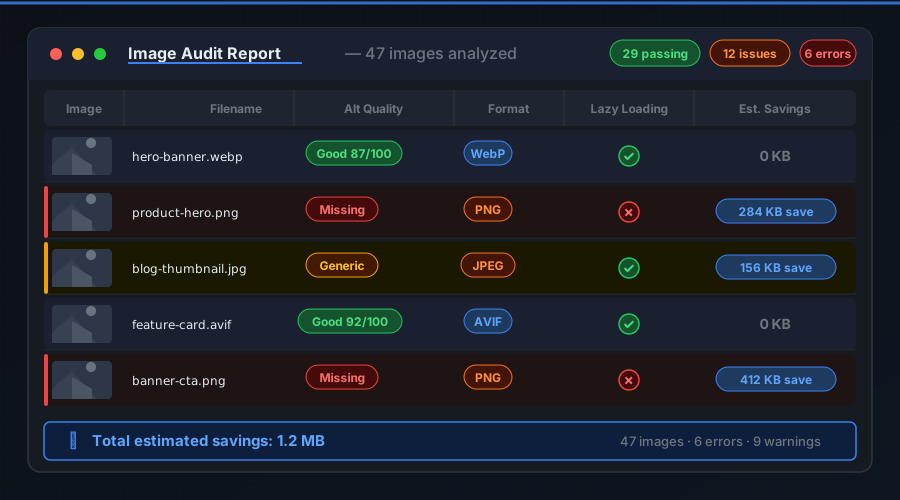
console.log(siteResult.summary); // per-category { score, passed, warnings, errors }The image functions take a plain ImageInfo[] array. analyzeAltText() returns a score, maxScore, issues, and a perImage breakdown; auditLazyLoading() flags above-the-fold images set to lazy load; analyzeImageFormats() recommends modern formats. generateImageSitemap() takes an array of { pageUrl, images } pages.
npm install @power-seo/imagesimport {
analyzeAltText,
auditLazyLoading,
analyzeImageFormats,
generateImageSitemap,
} from '@power-seo/images';
const images = [
{ src: '/hero.jpg', alt: '', loading: 'eager', isAboveFold: true, fileSize: 280_000 },
{
src: '/product.jpg',
alt: 'Wireless headphones',
loading: 'lazy',
isAboveFold: false,
fileSize: 520_000,
},
];
const altResult = analyzeAltText(images);
// { totalImages, score, maxScore, issues, perImage, recommendations }
const lazyResult = auditLazyLoading(images);
// { totalImages, issues, recommendations }
const formatResult = analyzeImageFormats(images);
// { totalImages, results, recommendations }
const sitemapXml = generateImageSitemap([
{ pageUrl: 'https://example.com/product/headphones', images },
]);
buildLinkGraph(pages) builds a graph from { url, links } records. findOrphanPages(graph) returns pages with no inbound links, suggestLinks(pages) proposes keyword-relevant internal links from page content, and analyzeLinkEquity(graph) scores every page by inbound authority.
npm install @power-seo/linksimport { buildLinkGraph, findOrphanPages, suggestLinks, analyzeLinkEquity } from '@power-seo/links';
const pages = [
{ url: '/home', content: '<p>Welcome</p>', links: ['/about', '/blog', '/products'] },
{ url: '/about', content: '<p>About us</p>', links: ['/home', '/contact'] },
{ url: '/blog', content: '<p>Latest posts</p>', links: ['/home'] },
{ url: '/hidden', content: '<p>Unlinked page</p>', links: [] }, // orphan — no inbound links
];
const graph = buildLinkGraph(pages);
const orphans = findOrphanPages(graph);
// [{ url: '/hidden', outboundCount: 0 }]
const suggestions = suggestLinks(pages);
// [{ from: '/blog', to: '/hidden', anchorText: 'Unlinked page', relevanceScore: 0.4 }]
const equity = analyzeLinkEquity(graph);
// [{ url: '/home', score: 1.0, inboundCount: 2 }, { url: '/about', score: 0.45, inboundCount: 1 }, ...]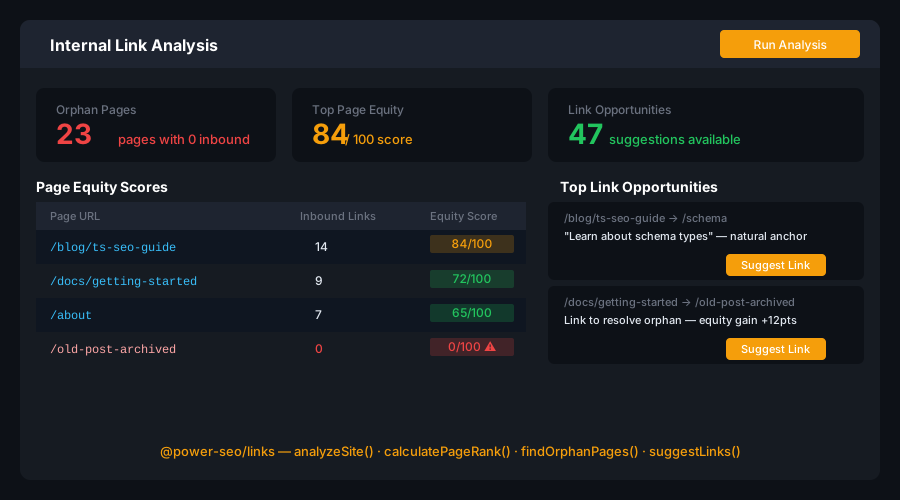
@power-seo/ai builds prompts and parses responses without binding to a provider. buildMetaDescriptionPrompt() and buildTitlePrompt() return a PromptTemplate with system and user strings; send the user prompt to any model. parseMetaDescriptionResponse() returns a single { description, charCount, ... }, and parseTitleResponse() returns a TitleResult[].
npm install @power-seo/aiimport {
buildMetaDescriptionPrompt,
buildTitlePrompt,
parseMetaDescriptionResponse,
parseTitleResponse,
} from '@power-seo/ai';
// Works with any LLM — OpenAI, Anthropic, Gemini, or any other
const prompt = buildMetaDescriptionPrompt({
title: 'Best Coffee Shops in NYC',
content: articleHtml,
focusKeyphrase: 'coffee shops nyc',
});
const response = await openai.chat.completions.create({
model: 'gpt-4o',
messages: [{ role: 'user', content: prompt.user }],
});
const meta = parseMetaDescriptionResponse(response.choices[0].message.content);
console.log(meta.description); // 'Discover the best coffee shops in NYC...'
console.log(meta.charCount); // 142
// Title generation — returns TitleResult[]
const titlePrompt = buildTitlePrompt({ content: articleHtml, focusKeyphrase: 'coffee shops nyc' });
const titles = parseTitleResponse(await llm(titlePrompt.user));
console.log(titles[0].title); // 'Best Coffee Shops in NYC: 2026 Guide'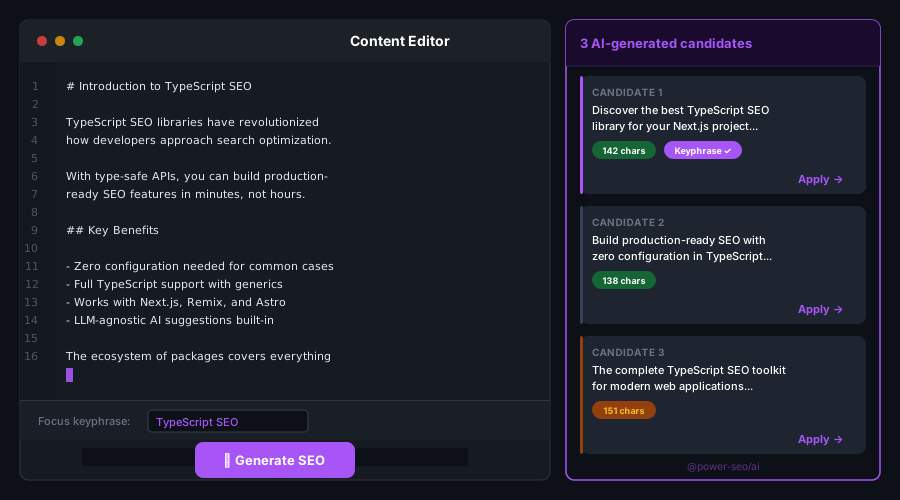
createTokenManager() wraps a token-fetching function (with caching and refresh), so pair it with getServiceAccountToken() for service-account auth. Pass the manager to createGSCClient({ siteUrl, tokenManager }), then call querySearchAnalytics(), inspectUrl(), and listSitemaps().
npm install @power-seo/search-consoleimport {
createGSCClient,
createTokenManager,
getServiceAccountToken,
querySearchAnalytics,
inspectUrl,
listSitemaps,
} from '@power-seo/search-console';
const credentials = {
clientEmail: process.env.GSC_CLIENT_EMAIL!,
privateKeyId: process.env.GSC_PRIVATE_KEY_ID!,
privateKey: process.env.GSC_PRIVATE_KEY!,
};
const client = createGSCClient({
siteUrl: 'https://example.com',
tokenManager: createTokenManager(() => getServiceAccountToken(credentials)),
});
// Fetch search analytics (clicks, impressions, CTR, position)
const analytics = await querySearchAnalytics(client, {
startDate: '2026-01-01',
endDate: '2026-01-31',
dimensions: ['query', 'page'],
rowLimit: 1000,
});
console.log(analytics.rows);
// URL inspection — get indexing status and coverage
const inspection = await inspectUrl(client, { inspectionUrl: 'https://example.com/blog/my-post' });
console.log(inspection.indexStatusResult.coverageState); // 'Submitted and indexed'
// List all submitted sitemaps
const sitemaps = await listSitemaps(client);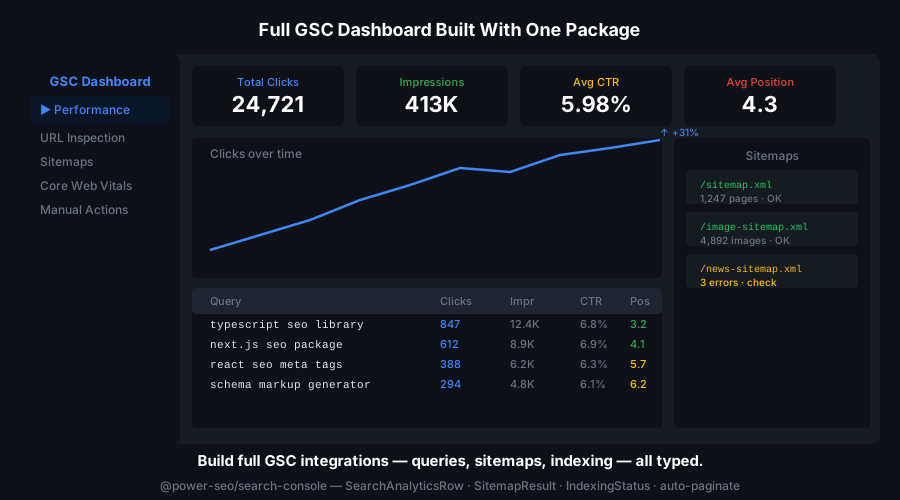
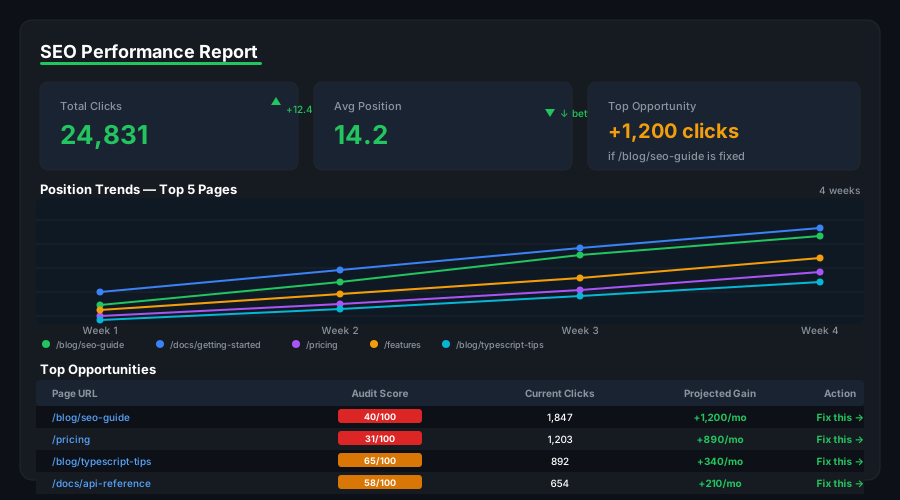
mergeGscWithAudit(gscData, auditResults) joins Search Console pages with audit scores by URL. trackPositionChanges(current, previous) reports rank movement between two query snapshots, and buildDashboardData() assembles a full dashboard structure.
npm install @power-seo/analyticsimport { mergeGscWithAudit, trackPositionChanges, buildDashboardData } from '@power-seo/analytics';
// Merge GSC data with audit results — positional arguments
const insights = mergeGscWithAudit(currentGscRows, latestAuditResults);
// insights[0] → { url, clicks, impressions, position, auditScore, topIssues }
// Track position changes — current first, then previous
const changes = trackPositionChanges(currentQueryRows, previousQueryRows);
// [{ query: 'coffee shops nyc', previousPosition: 8, currentPosition: 4, change: 4 }]
// Build a complete dashboard data structure
const dashboard = buildDashboardData({
gscPages: currentGscRows,
gscQueries: currentQueryRows,
auditResults: latestAuditResults,
});
createSemrushClient() and createAhrefsClient() return typed clients over a shared rate-limited HTTP client, so requests respect each API's limits. Query domain overviews, keyword metrics, and backlinks with a consistent interface.
npm install @power-seo/integrationsimport { createSemrushClient, createAhrefsClient } from '@power-seo/integrations';
// Semrush
const semrush = createSemrushClient({ apiKey: process.env.SEMRUSH_API_KEY! });
const overview = await semrush.getDomainOverview({ domain: 'example.com' });
// { organicKeywords, organicTraffic, domainRank, backlinks }
const keywords = await semrush.getKeywordData({ keyword: 'coffee shops nyc' });
// { volume, difficulty, cpc, trend }
// Ahrefs
const ahrefs = createAhrefsClient({ apiKey: process.env.AHREFS_API_KEY! });
const siteOverview = await ahrefs.getSiteOverview({ target: 'example.com' });
// { domainRating, urlRating, backlinks, refDomains, organicTraffic }
const backlinks = await ahrefs.getBacklinks({ target: 'example.com', limit: 100 });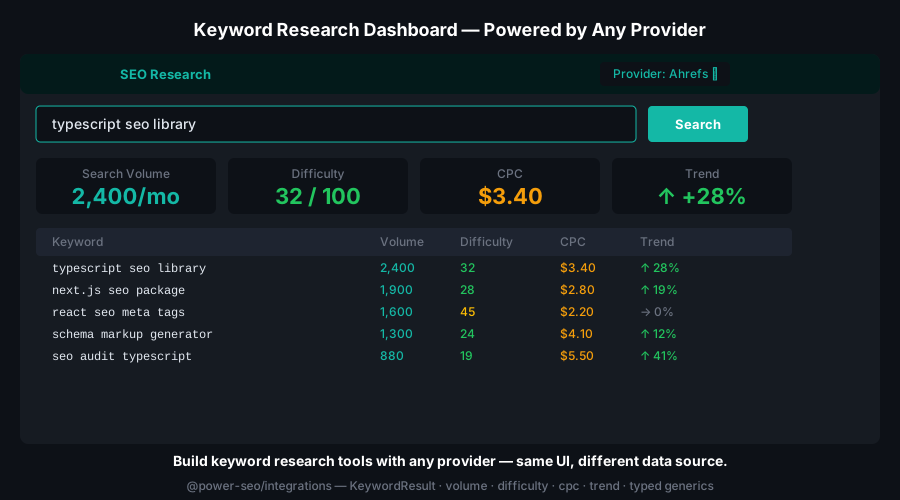
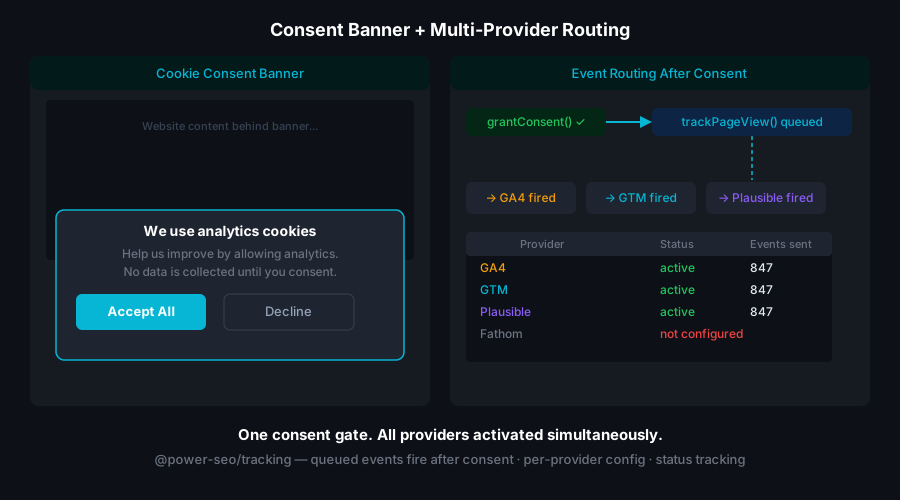
createConsentManager() tracks per-category consent; call grant() to opt a category in. Script builders such as buildGA4Script() return ScriptConfig[] where each entry exposes shouldLoad(consentState), so you only inject scripts the visitor has consented to.
npm install @power-seo/trackingimport { buildGA4Script, buildClarityScript, createConsentManager } from '@power-seo/tracking';
// GDPR consent management
const manager = createConsentManager({ necessary: true, analytics: false, marketing: false });
manager.grant('analytics');
// Conditional script loading — only fires when consent is granted
const ga4Scripts = buildGA4Script({ measurementId: 'G-XXXXXXXXXX' });
const clarityScripts = buildClarityScript({ projectId: 'abcde12345' });
const toLoad = ga4Scripts.filter((s) => s.shouldLoad(manager.getState()));import { AnalyticsScript, ConsentBanner } from '@power-seo/tracking/react';
function App() {
return (
<>
<ConsentBanner manager={manager} privacyPolicyUrl="/privacy" />
<AnalyticsScript scripts={ga4Scripts} consent={manager.getState()} />
<AnalyticsScript scripts={clarityScripts} consent={manager.getState()} />
</>
);
}
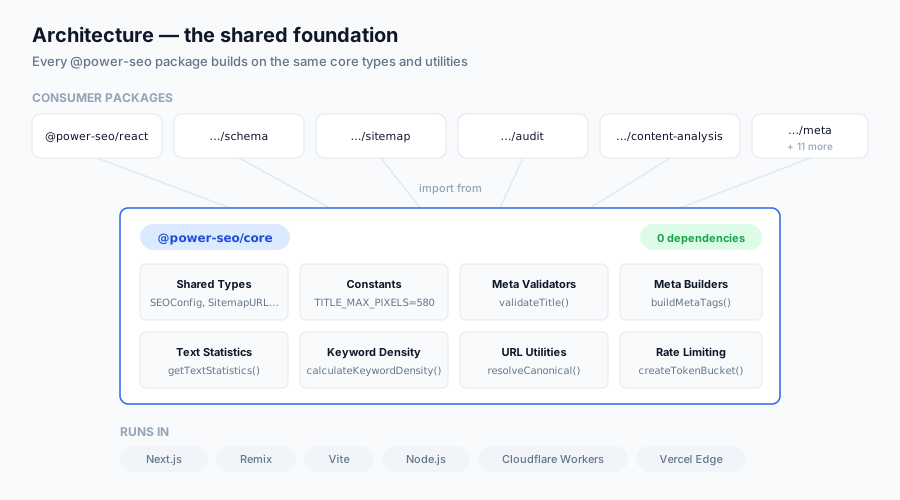
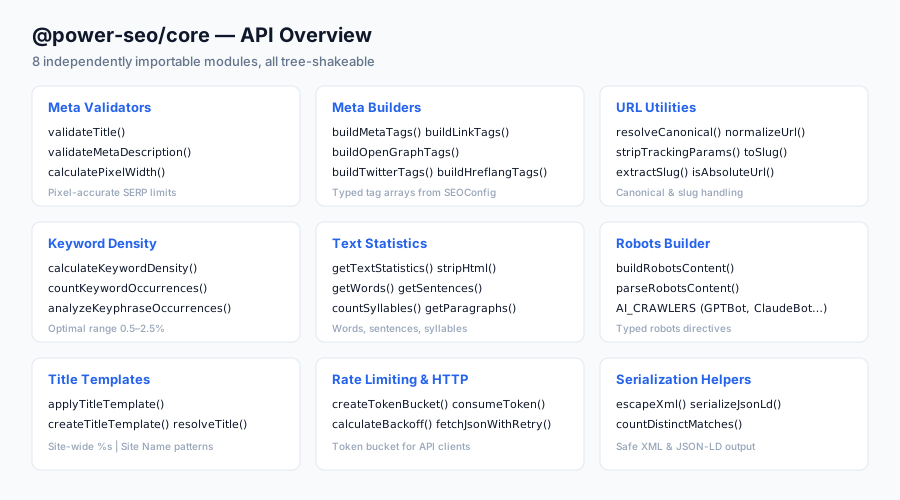
@power-seo/core is the zero-dependency foundation. validateTitle() and validateMetaDescription() report pixel width and character count; getTextStatistics() and calculateKeywordDensity() power content analysis; buildRobotsContent() produces a robots meta string; and createTitleTemplate() applies a site-wide title pattern.
npm install @power-seo/coreimport {
validateTitle,
validateMetaDescription,
toSlug,
resolveCanonical,
getTextStatistics,
calculateKeywordDensity,
buildRobotsContent,
createTitleTemplate,
} from '@power-seo/core';
// Pixel-accurate SERP validation — TITLE_MAX_PIXELS is 580
const title = validateTitle('Best Running Shoes for Beginners — 2026 Guide');
// { valid: true, severity: 'info', charCount: 46, pixelWidth: 316 }
const meta = validateMetaDescription('Discover expert-reviewed running shoes for beginners.');
// suggest expanding toward the recommended length range
// URL utilities
toSlug('My Blog Post Title! — 2026'); // → 'my-blog-post-title-2026'
resolveCanonical('https://example.com', '/blog/post'); // → 'https://example.com/blog/post'
// Text statistics from HTML
const stats = getTextStatistics('<h1>Hello</h1><p>This is a test sentence. And another one.</p>');
// { wordCount, sentenceCount, paragraphCount, syllableCount, ... }
// Keyword density
const density = calculateKeywordDensity('react seo', bodyHtml);
// { keyword, count, density, totalWords }
// Robots directives
buildRobotsContent({ index: false, follow: true, maxSnippet: 150 });
// → 'noindex, follow, max-snippet:150'
// Site-wide title template
const makeTitle = createTitleTemplate({ siteName: 'My Site', separator: '—' });
makeTitle('About Us'); // → 'About Us — My Site'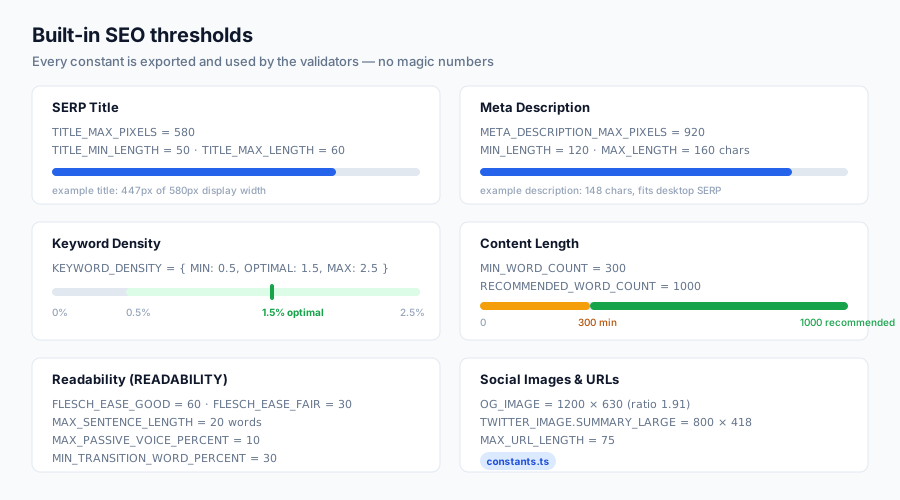
Install @power-seo/content-analysis + @power-seo/readability + @power-seo/schema + @power-seo/preview to build a Yoast-style SEO sidebar directly in your CMS editor — no WordPress required.
import { analyzeContent } from '@power-seo/content-analysis';
import { analyzeReadability } from '@power-seo/readability';
import { generateSerpPreview } from '@power-seo/preview';

// Run all checks before publishing
const contentScore = analyzeContent({ title, metaDescription, content, focusKeyphrase });
const readability = analyzeReadability({ content });
const serpPreview = generateSerpPreview({ title, description: metaDescription, url, siteTitle });

if (contentScore.score / contentScore.maxScore < 0.7) {
  console.warn('SEO score below 70% — review recommendations before publishing');
}
if (serpPreview.titleTruncated) {
  console.warn('Title will be cut off in Google results');
}Install @power-seo/schema + @power-seo/images + @power-seo/sitemap + @power-seo/audit to automate SEO quality across thousands of product pages.
import { product, validateSchema } from '@power-seo/schema';
import { generateSitemap } from '@power-seo/sitemap';

for (const p of products) {
  const schema = product({
    name: p.name,
    description: p.description,
    image: { url: p.imageUrl },
    offers: { price: p.price, priceCurrency: 'USD', availability: 'https://schema.org/InStock' },
    aggregateRating: { ratingValue: p.rating, reviewCount: p.reviewCount },
  });

  const { valid, issues } = validateSchema(schema);
  if (!valid) console.error(`Product ${p.id}: ${issues.map((i) => i.message).join(', ')}`);
}

const xml = generateSitemap({ hostname: 'https://shop.example.com', urls: productUrls });Block deploys when SEO checks fail. Install @power-seo/audit + @power-seo/content-analysis + @power-seo/readability.
import { auditPage } from '@power-seo/audit';
import { analyzeContent } from '@power-seo/content-analysis';
import { analyzeReadability } from '@power-seo/readability';

// Run in CI — exit 1 if quality thresholds are not met
const audit = auditPage({ url, title, metaDescription, headings, wordCount, focusKeyphrase });
const content = analyzeContent({ title, metaDescription, content, focusKeyphrase });
const readability = analyzeReadability({ content: bodyHtml });

const errors: string[] = [];
if (audit.score < 70) errors.push(`Audit score too low: ${audit.score}/100`);
if (content.score / content.maxScore < 0.6) errors.push('Content SEO score below 60%');
if (readability.score < 60) errors.push('Readability score too low — simplify content');

if (errors.length) {
  errors.forEach((e) => console.error('✗', e));
  process.exit(1);
}
console.log('✓ All SEO checks passed');Install @power-seo/search-console + @power-seo/analytics + @power-seo/integrations to build an automated SEO reporting pipeline.
import { createGSCClient, querySearchAnalytics } from '@power-seo/search-console';
import { buildDashboardData, trackPositionChanges } from '@power-seo/analytics';
import { createSemrushClient } from '@power-seo/integrations';

const gscClient = createGSCClient({ siteUrl: 'https://example.com', tokenManager });
const semrush = createSemrushClient({ apiKey: process.env.SEMRUSH_API_KEY! });

const [gsc, semrushData] = await Promise.all([
  querySearchAnalytics(gscClient, { startDate, endDate, dimensions: ['query', 'page'] }),
  semrush.getDomainOverview({ domain: 'example.com' }),
]);

const dashboard = buildDashboardData({ gscPages: gsc.rows, gscQueries: gsc.rows, auditResults });
const changes = trackPositionChanges(gsc.rows, lastWeekGsc);
// Email or Slack the weekly SEO reportInstall @power-seo/react + @power-seo/sitemap + @power-seo/redirects for hreflang, per-locale sitemaps, and locale-aware redirects.
import { SEO, Hreflang } from '@power-seo/react';
import { generateSitemap } from '@power-seo/sitemap';
import { createRedirectEngine } from '@power-seo/redirects';

// Per-page hreflang tags
<SEO title={post.title} description={post.excerpt} />
<Hreflang
  alternates={[
    { hrefLang: 'en', href: 'https://example.com/en/blog/post' },
    { hrefLang: 'fr', href: 'https://example.com/fr/blog/post' },
    { hrefLang: 'de', href: 'https://example.com/de/blog/post' },
  ]}
  xDefault="https://example.com/en/blog/post"
/>

// Locale-aware redirect engine
const engine = createRedirectEngine({
  rules: [
    { source: '/blog/:slug', destination: '/en/blog/:slug', statusCode: 301 },
    { source: '/fr/blog/:slug', destination: '/fr/articles/:slug', statusCode: 301 },
  ],
});

// Per-locale sitemap
const enSitemap = generateSitemap({ hostname: 'https://example.com', urls: enUrls });
const frSitemap = generateSitemap({ hostname: 'https://example.com', urls: frUrls });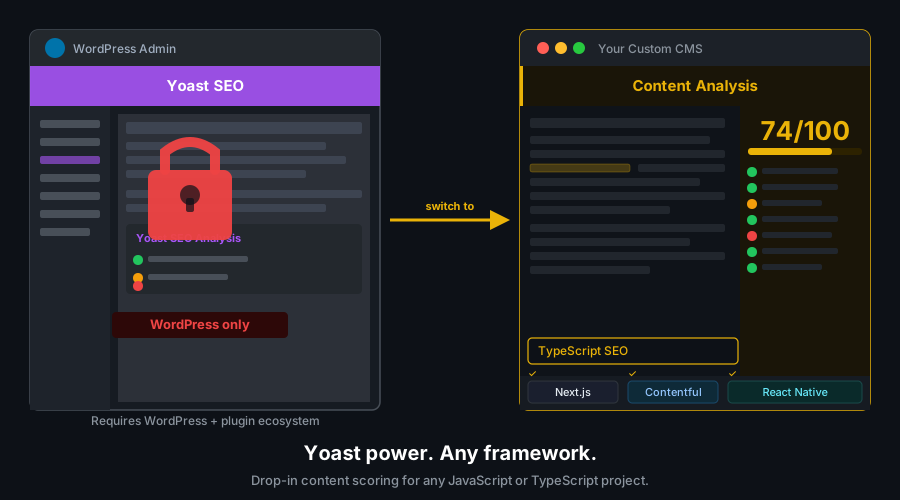
| Framework | Recommended Packages |
|---|---|
| Next.js 14+ (App Router) | All 17 packages |
| Next.js 13 (Pages Router) | @power-seo/react, @power-seo/schema, @power-seo/core |
| Remix v2 | @power-seo/meta, @power-seo/schema, @power-seo/redirects |
| Vite + React (SPA) | @power-seo/react, @power-seo/schema, @power-seo/content-analysis |
| Gatsby | @power-seo/react, @power-seo/schema, @power-seo/sitemap |
| Node.js / Express / Fastify | @power-seo/core, @power-seo/sitemap, @power-seo/audit, @power-seo/redirects |
| Cloudflare Workers / Vercel Edge | @power-seo/core, @power-seo/sitemap, @power-seo/redirects, @power-seo/schema |
| Headless CMS (any) | @power-seo/content-analysis, @power-seo/readability, @power-seo/preview, @power-seo/schema |
power-seo/ (Turborepo monorepo)
├── packages/                     # 17 independently published npm packages
│   ├── core/                     # Zero-dependency foundation — types, utils, constants
│   ├── react/                    # React components (peerDep: react >=18)
│   ├── meta/                     # SSR meta helpers (Next.js / Remix / generic)
│   ├── schema/                   # JSON-LD builders + React components
│   ├── content-analysis/         # Yoast-style scoring engine
│   ├── readability/              # Text readability algorithms
│   ├── preview/                  # SERP / OG / Twitter Card preview generators
│   ├── sitemap/                  # XML sitemap generation + streaming
│   ├── redirects/                # Redirect engine + Next.js / Remix / Express adapters
│   ├── links/                    # Link graph analysis
│   ├── audit/                    # Full SEO audit engine
│   ├── images/                   # Image SEO analysis
│   ├── ai/                       # LLM prompt templates + response parsers
│   ├── analytics/                # Analytics + GSC data merging + dashboard builder
│   ├── search-console/           # Google Search Console API client
│   ├── integrations/             # Semrush + Ahrefs API clients
│   └── tracking/                 # Analytics script builders + consent management
└── turbo.json                    # Turborepo pipeline config
Design principles:
- Modular by design — install only what you need; no coupling between feature packages
- Framework-agnostic core —
@power-seo/corehas zero runtime dependencies and runs in any JS environment - Dual ESM + CJS — all packages ship both formats via tsup for any bundler or
require()usage - Tree-shakeable —
"sideEffects": falseon every package; import exactly what you use - TypeScript-first — full
.d.tsdeclarations across all 17 packages; no separate@types/install - React optional — packages with React components declare
reactas apeerDependencyonly; builder functions work without React - Edge runtime safe — no Node.js-specific APIs (
fs,path,crypto) in the core package - Provenance-signed releases — every npm publish is signed via the GitHub Actions workflow
- Published to npm with provenance attestation — every release is built and signed by the verified
github.com/CyberCraftBD/power-seoGitHub Actions workflow, so you can trace each tarball back to its exact source commit - Zero third-party runtime dependencies — packages depend only on other
@power-seopackages, nothing else gets pulled in - Network access only when you call it — the
@power-seo/search-consoleand@power-seo/integrationsclients talk exclusively to the APIs you configure; every other package is pure computation with no telemetry - No install scripts (
postinstall,preinstall) - No
evalor dynamic code execution - Safe for SSR, Edge, and server environments
- Socket.dev security monitoring and CodeQL static analysis run on every package and pull request

Guides, API reference, and wiki pages are available on the GitHub Wiki.
- Installation & Setup — install power-seo for your framework
- Quick Start — get running in five minutes
- Package Selection — choose the right packages for your stack
- Architecture Overview — monorepo structure and design principles
- Troubleshooting — solutions to common issues
- GitHub Discussions — questions and best practices
- GitHub Issues — bug reports and feature requests
git clone https://github.com/CyberCraftBD/power-seo.git
cd power-seo
pnpm install
pnpm build| Command | Description |
|---|---|
pnpm build |
Build all packages (Turborepo cached) |
pnpm dev |
Watch mode for all packages |
pnpm test |
Run all tests with Vitest |
pnpm lint |
Lint all packages (ESLint v9) |
pnpm typecheck |
Type-check all packages |
pnpm format |
Format with Prettier |
pnpm clean |
Remove all build artifacts |
# Scope any command to a single package
pnpm --filter @power-seo/schema build
pnpm --filter @power-seo/schema test
pnpm --filter @power-seo/schema typecheckSEO toolkit, TypeScript SEO, React SEO, Next.js SEO, Remix SEO, JSON-LD, structured data, schema.org, XML sitemap, meta tags, Open Graph, Twitter Card, SERP preview, content analysis, Yoast alternative, readability scoring, SEO audit, redirect engine, Google Search Console, image SEO, hreflang, robots directives, tree-shakeable, monorepo.
About CyberCraft Bangladesh
CyberCraft Bangladesh is a Bangladesh-based enterprise-grade software development and Full Stack SEO service provider company specializing in ERP system development, AI-powered SaaS and business applications, full-stack SEO services, custom website development, and scalable eCommerce platforms. We design and develop intelligent, automation-driven SaaS and enterprise solutions that help startups, SMEs, NGOs, educational institutes, and large organizations streamline operations, enhance digital visibility, and accelerate growth through modern cloud-native technologies.




© 2026 CyberCraft Bangladesh · Released under the MIT License