
Automatically highlights the current code block/scope where your cursor is positioned in R files.
- Visual highlighting of function definitions, loops, conditionals, and other code blocks
- Header lines (function signatures, loop declarations) highlighted with higher opacity
- Block body highlighted with lower opacity for subtle visual feedback
- Last line of blocks clearly marked
- Progressive parent block selection support
Configuration:
positron-r-wizard.scope.blockHighlightColor: RGB color for block highlighting (default: "42,65,132")positron-r-wizard.scope.blockHighlightOpacity: Opacity for block body highlighting (default: 0.08)positron-r-wizard.scope.firstLastLineOpacity: Opacity for first/last line highlighting (default: 0.5)
The feature activates automatically when you open R files and move your cursor through different code blocks.
This extension provides a convenient way to toggle the R pipe operator used in Positron, switching between the magrittr pipe %>% and the native R pipe |>.
- Adds a toggle button to the Action Bar to quickly switch between pipe operators.
- Synchronizes a boolean setting
positron.r.useNativePipewith Positron's string settingpositron.r.pipe. - Changes are applied at the workspace level.
Automatically replaces all pipe operators in the current R file to match your workspace pipe setting.
- Command:
positron-r-wizard.formatPipes("R: Format Pipes") - Replaces all
%>%with|>(or vice versa) based on yourpositron.r.pipesetting. - Shows a count of replacements made.
Usage:
- Open an R file with pipe operators.
- Run the command via the command palette (Ctrl+Shift+P / Cmd+Shift+P).
- All pipes in the document will be replaced to match your workspace setting.
This extension provides enhanced syntax highlighting for the R language in Positron by integrating a heavily expanded and modernized TextMate grammar. It extends the default R grammar with improved support for:
- Built-in R functions (base, graphics, stats, utils, grDevices, methods)
- Namespace highlighting for pkg::fun, such as dplyr::select(), ggplot2::ggplot()
- $ accessor highlighting for lists, environments, S3 objects, such as df$column, list_obj$nested$element
- Syntax highlighting for glue string interpolation
- tidyverse-style operators and helper functions
- Backtick-quoted identifiers
- Raw strings (r"{ ... }", r"[...]", etc.)
- Expanded roxygen2 highlighting
- Markdown support inside roxygen comments
- More complete keyword and constant detection
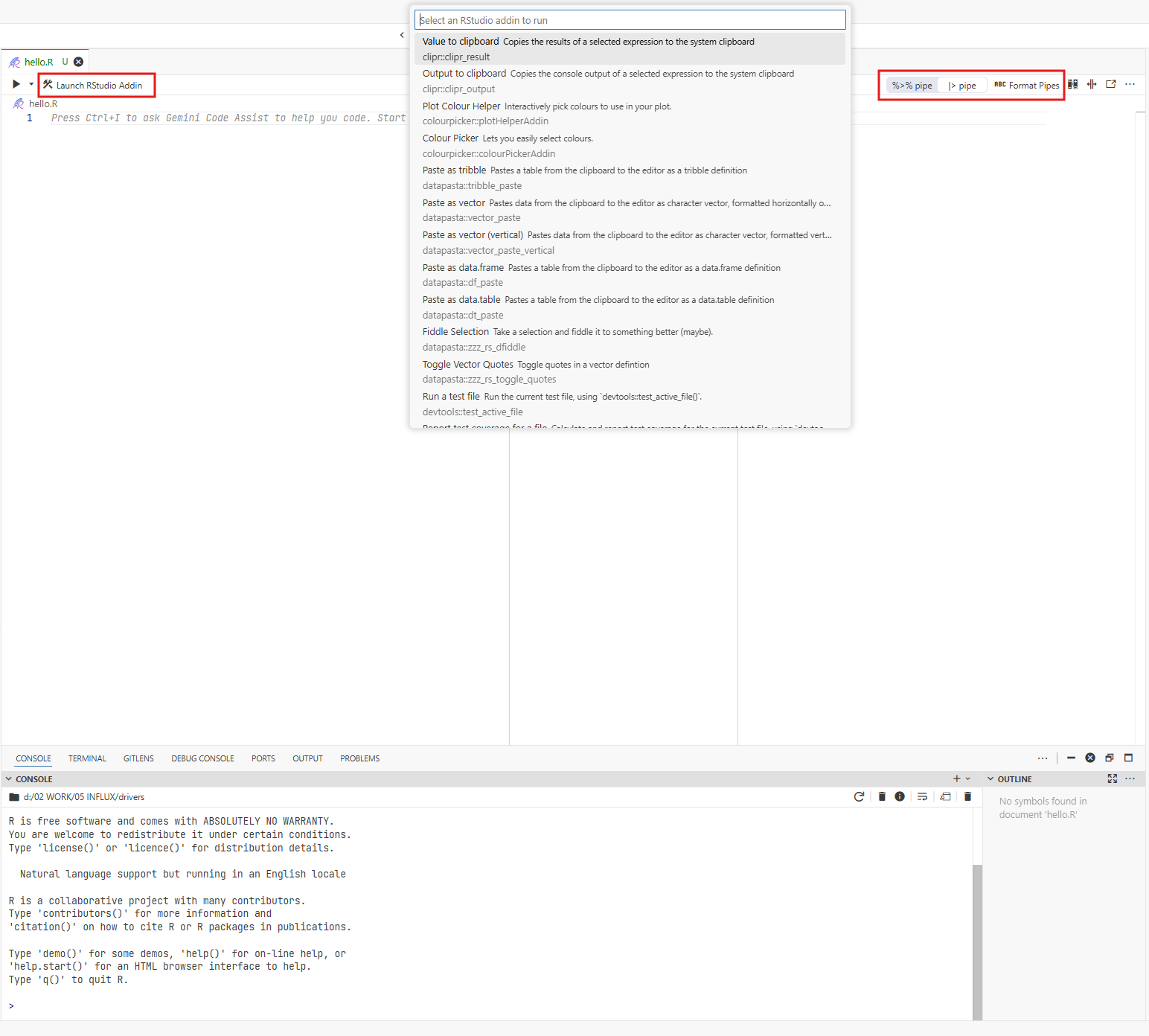
This extension also adds a command to list and launch installed R addins from Positron like in RStudio.
- Command:
r.launchAddinPicker - Available in the editor action bar for R files (click the tools icon).
Usage:
- Start an R session in Positron.
- Run the command (via the action bar button or the command palette).
- Select an addin from the quick pick list to execute it in the R session.
Note: The addin list is generated dynamically by running a small R snippet that inspects installed packages' rstudio/addins.dcf files and writes the result to a temporary JSON file.
- NA
This project is licensed under the terms in the LICENSE file.
Luong Nguyen Thanh, Thanh Nguyen Trung