
Action-driven UI toolkit for Bevy.
Instead of matching Interaction changes in every system, define action structs that execute with full World access — then attach them to UI elements as components.
Live Demo — try all widgets in your browser (WASM, ~20 MB per example)
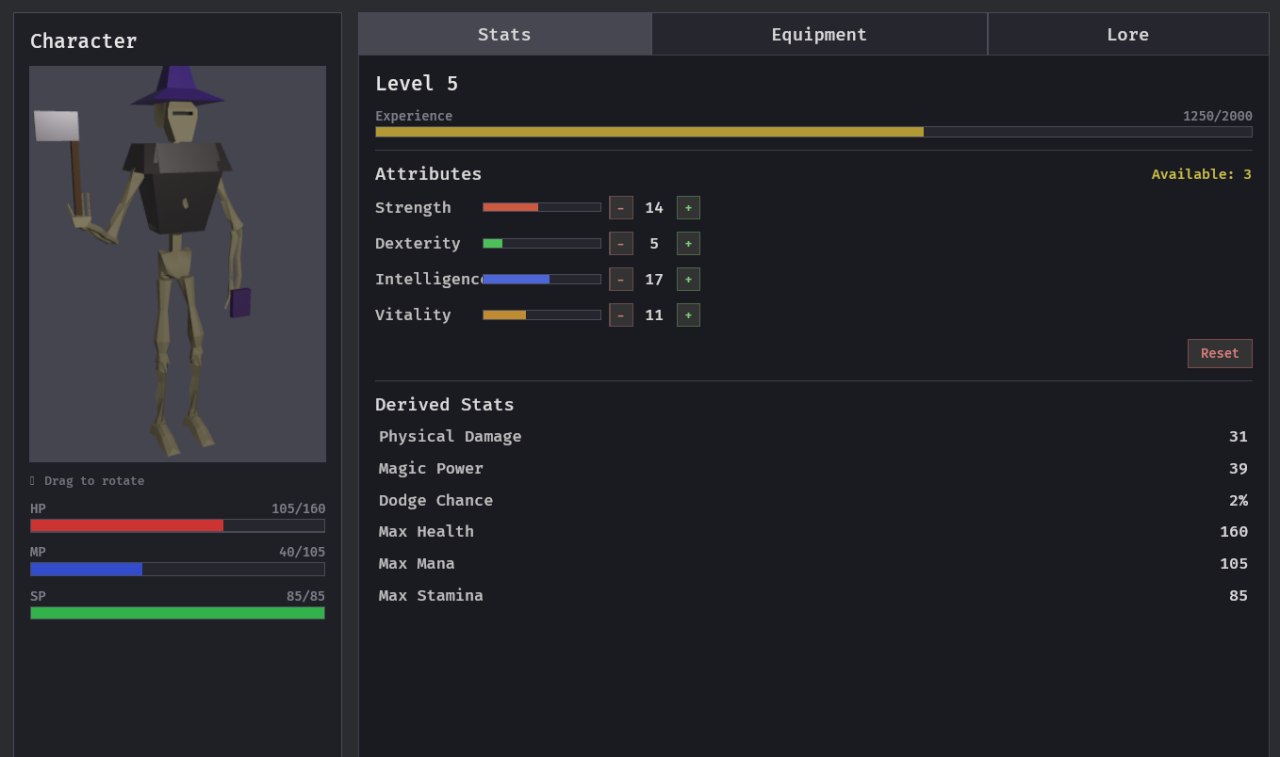
- Click / Right-click / Hover / Press — one component each, zero boilerplate
- Drag & drop — state machine with threshold, ghost visual, drop targets
- UiTheme — font + sizes + colors by role (
Title,Heading,Body,Label,Button) - Node presets —
row(),column(),centered(),fill(),padded()
- Rich tooltips — builder API with sections, stat diffs, key-value rows
- Tabs —
TabGroup/Tab/TabContentwith automatic visibility - Progress bars — health / mana / stamina presets, spawn helper
- Visual feedback —
InteractiveVisualauto-colors on hover/press/select/disable - Panels — styled containers with presets (
dark,overlay,sidebar) - Scroll views — scrollable containers with scrollbar (thumb drag + track click)
- List views — selectable item lists (
None/Singleselection) - Floating windows —
spawn_windowmovable/closable windows; title-bar drag, click-to-front z-order,Escapeto close, on-screen clamp - Slot grids —
spawn_slot_grid+Slot { container, index }+dragged_slot; container-agnostic drag&drop slots (inventories, chests) - Modals —
ModalQueue+ backdrop + ESC dismiss + focus trap - HyperText — inline clickable
[links|key]with glyph-level hit-testing - Dialogue — Morrowind-style dialogue box:
TopicRegistry+ topic panel, active-topic highlight, answer choices (mouse and number keys), in-placeSetDialogueChoices/AppendDialogueTextevents for topic-node flows, and a topic lock while a decision is pending - TopicContainer — generic topic expansion outside dialogue (works with HyperText links)
- Viewport3d — 3D render-to-texture preview inside UI (feature
viewport3d)
use bevy::prelude::*;
use bevy_ui_actions::prelude::*;

struct IncrementAction;

impl UiAction for IncrementAction {
    fn execute(&self, world: &mut World) {
        world.resource_mut::<Counter>().0 += 1;
    }
}

#[derive(Resource, Default)]
struct Counter(i32);

fn setup(mut commands: Commands) {
    commands.spawn(Camera2d);
    commands.spawn(Node { ..default() }).with_children(|parent| {
        parent.spawn_button("Click me", IncrementAction);
    });
}

fn main() {
    App::new()
        .add_plugins(DefaultPlugins)
        .add_plugins(UiActionsPlugin)
        .init_resource::<Counter>()
        .add_systems(Startup, setup)
        .run();
}use bevy_ui_actions::prelude::*;
// Mark elements
entity.insert((Draggable, OnDragStart::new(MyStartAction)));
target.insert((DropTarget, OnDrop::new(MyDropAction)));
// In your action, read DragState to know what was dragged where
impl UiAction for MyDropAction {
fn execute(&self, world: &mut World) {
let state = world.resource::<DragState>();
let dragged = state.dragging; // source entity
let target = state.drop_target; // target entity
}
}// Inline clickable links — glyph-level AABB hit-testing
root.spawn_hypertext(
&HyperTextConfig::default(),
"Visit the [Ancient Library|library] and speak to the [Iron Council|council].",
);
// Morrowind-style dialogue with topic registry
let mut registry = TopicRegistry::default();
registry.insert("library", TopicEntry::new("Ancient Library", "Founded three centuries ago..."));
commands.insert_resource(registry);
queue.show(
DialogueRequest::new("Welcome, traveler. Ask about the [library].")
.with_speaker("Archivist"),
);// Spawn a movable, focusable, closable window. `content` fills the body.
commands.spawn_window(
WindowConfig::new("Inventory", Vec2::new(100.0, 80.0))
.with_size(Val::Px(280.0), Val::Px(220.0)),
|c| {
c.ui_text(TextRole::Body, "Drag me by the title bar.");
},
);
// A non-closable window: no close button, ignored by Escape.
commands.spawn_window(
WindowConfig::new("Stats", Vec2::new(260.0, 170.0)).closable(false),
|c| { c.ui_text(TextRole::Body, "STR 10"); },
);Windows are modeless (all open windows stay interactive); clicking one raises it
via GlobalZIndex. Their z-band sits below the other overlays — see [ZLayer].
// 3D render-to-texture preview inside UI
let config = Viewport3dConfig {
    size: UVec2::new(256, 256),
    rotatable: true,
    ..default()
};
let handle = commands.spawn_viewport3d(&config, &mut images);

// Parent your 3D objects to the pivot
commands.entity(handle.pivot).with_children(|pivot| {
    pivot.spawn((
        Mesh3d(meshes.add(Cuboid::new(1.0, 1.0, 1.0))),
        MeshMaterial3d(materials.add(StandardMaterial::default())),
        Transform::IDENTITY,
        handle.render_layer.clone(),
    ));
});cargo run --example counter # Basic click actions
cargo run --example menu # State management + tooltips
cargo run --example drag_drop # Drag & drop with ghost
cargo run --example inventory_demo # Item movement between slots
cargo run --example progress_bar # HP/MP/SP bars
cargo run --example rich_tooltip # Stat comparison tooltips
cargo run --example right_click # Left + right click actions
cargo run --example selection # Grid selection with BorderStyle
cargo run --example tabs # Tab switching
cargo run --example scroll_view # Scrollable content
cargo run --example modal # Modal dialogs
cargo run --example window_manager # Floating windows: drag, focus, close
cargo run --example container_transfer # Two inventory windows + drag&drop slots
cargo run --example hypertext # Clickable inline links
cargo run --example dialogue # Morrowind-style dialogue + topics
cargo run --example viewport3d --features viewport3d # 3D preview
cargo run --example character_sheet -p bevy_ui_actions --features viewport3d # Full showcase| Feature | Description |
|---|---|
viewport3d |
3D render-to-texture widget (enables bevy_core_pipeline + bevy_pbr) |
| bevy_ui_actions | Bevy |
|---|---|
| 0.2.x | 0.16 |
| 0.1 | 0.16 |
MIT