
The CollapsiblePane is a reusable and customizable PySide6 widget that allows users to toggle the visibility of a content area with smooth animations—perfect for organizing UI sections. It mimics JavaFX’s TitledPane behavior and is designed to cleanly encapsulate widgets within collapsible sections.
Inspired by JavaFX's TitledPane.
- Expand/Collapse content with animation
- Fully customizable title bar and content styling
- Add or replace content widgets easily
- Clean, layout-friendly design
- Signal support for toggled state
import sys
from PySide6.QtWidgets import (
    QApplication, QMainWindow, QWidget, QVBoxLayout, QLabel, QLineEdit,
    QComboBox, QCheckBox, QRadioButton, QSlider, QProgressBar,
    QSpinBox, QDateEdit, QTextEdit, QPushButton
)
from PySide6.QtCore import Qt
from collapsiblepane import CollapsiblePane


class Window(QMainWindow):
    def __init__(self):
        super().__init__()
        self.setWindowTitle("CollapsiblePane – Full Customization Demo")
        self.resize(600, 700)

        # --- Collapsible Section ---
        section = CollapsiblePane("User Details", animation_duration=400)

        # --- Header customization ---
        section.set_header_style(
            background_color="#28a745",  # Green header
            text_color="#FFFFFF",         # White text for contrast
            border_color="#1c7c1c",      # Darker green border
            border_width=2,
            font_size=16,
            font_weight="bold",
            hover_color="#32cd32"        # Lighter green hover
        )

        # --- Chevron customization ---
        section.set_chevron_icons("▸", "▾")

        # --- Card content style ---
        section.set_card_style(
            background="#f0fdf4",  # Soft light green background
            border="#28a74533",    # Subtle green border
            radius=10,
            padding=12
        )

        # --- Item count badge ---
        section.set_item_count(23)
        section.set_item_badge_style(
            bg_color="#ffd6e0",     # Light pink
            text_color="#e91e63",   # Dark pink text
            border_color="#ff80ab", # Matching border
            border_radius=12,
            padding_vertical=4,
            padding_horizontal=12,
            font_size=12,
            font_weight="bold",
            shadow=True,
            min_width=40
        )

        # --- Title style ---
        section.set_title_style(color="#ffffff", font_weight="bold", italic=False)

        # --- Content text style ---
        section.set_content_text_style(color="#333333", font_size=14)

        # --- Content Widget ---
        content_widget = QWidget()
        content_layout = QVBoxLayout(content_widget)
        content_layout.setSpacing(8)

        # User input fields
        details_edit = QLineEdit()
        details_edit.setPlaceholderText("Details here...")
        content_layout.addWidget(details_edit)
        name_edit=QLineEdit()
        name_edit.setPlaceholderText("Name here...")
        content_layout.addWidget(name_edit)
        email_edit = QLineEdit()
        email_edit.setPlaceholderText("Email here...")
        content_layout.addWidget(email_edit)

        # Category selection
        content_layout.addWidget(QLabel("Select a category:"))
        combo = QComboBox()
        combo.addItems(["Developer", "Designer", "Security Researcher", "Engineer"])
        content_layout.addWidget(combo)

        # Preferences
        content_layout.addWidget(QCheckBox("Subscribe to newsletter"))
        content_layout.addWidget(QRadioButton("Light Mode"))
        content_layout.addWidget(QRadioButton("Dark Mode"))

        # Volume and progress
        content_layout.addWidget(QLabel("Volume:"))
        slider = QSlider(Qt.Horizontal)
        slider.setValue(40)
        content_layout.addWidget(slider)

        progress = QProgressBar()
        progress.setValue(70)
        content_layout.addWidget(progress)

        # Additional inputs
        content_layout.addWidget(QSpinBox())
        content_layout.addWidget(QDateEdit())

        # Bio
        content_layout.addWidget(QLabel("Bio:"))
        text_edit = QTextEdit()
        text_edit.setPlaceholderText("Tell us about yourself...")
        content_layout.addWidget(text_edit)

        # Submit button
        content_layout.addWidget(QPushButton("Submit"))

        # Set the content widget
        section.set_content_widget(content_widget)

        # Force collapsed initially
        section.set_collapsed(collapsed=True)

        # --- Layout Setup ---
        container = QWidget()
        main_layout = QVBoxLayout(container)
        main_layout.addWidget(section)

        toggle_button = QPushButton("Toggle Section")
        toggle_button.clicked.connect(lambda: section.toggle(not section._expanded))
        main_layout.addWidget(toggle_button)

        main_layout.addStretch()
        self.setCentralWidget(container)


if __name__ == "__main__":
    app = QApplication(sys.argv)
    window = Window()
    window.show()
sys.exit(app.exec())| Collapsed | Expanded |
|---|---|
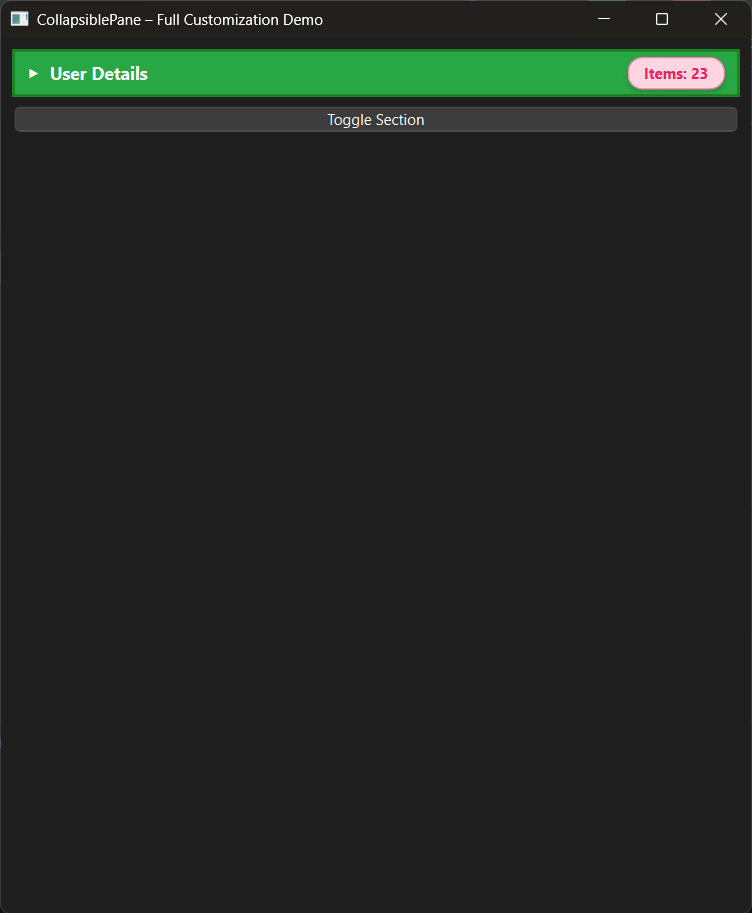 |
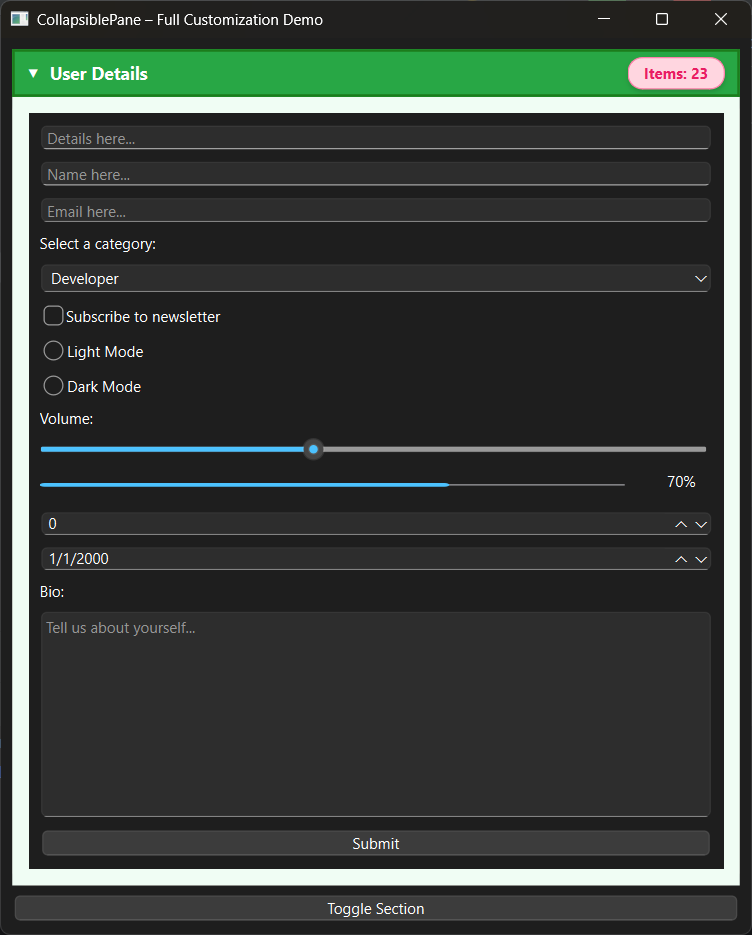 |
CollapsiblePane(title="", animation_duration=100)content_widget:QWidgetis_expanded:bool
clear_widget()set_content_style(background_color, border_color, ...)set_title_bar_style(background_color, foreground_color)
toggled(bool)— emits when pane expands or collapses
- Added full header customization (
set_header_style) - Added chevron icon customization (
set_chevron_icons) - Added card-style content area (
set_card_style) - Added item count badges with styling API
- Added title-level text customization
- Added content text styling
- Added programmatic expand/collapse methods
- Added
set_content_widget()API - Added initial collapsed state support
New Contributor:
For contributions please visit Github Repository