



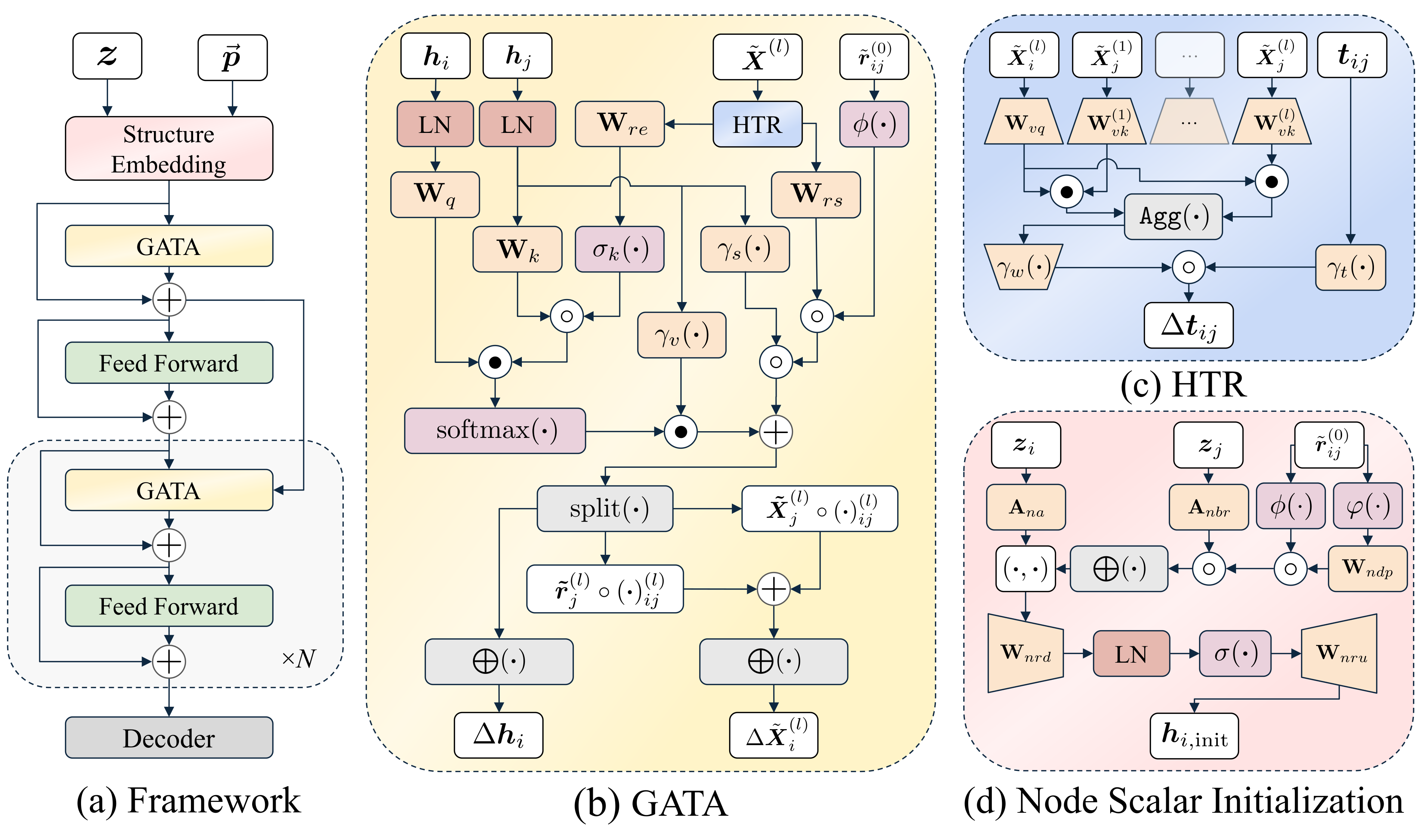
This is the official implementation of "GotenNet: Rethinking Efficient 3D Equivariant Graph Neural Networks" published at ICLR 2025.
GotenNet introduces a novel framework for modeling 3D molecular structures that achieves state-of-the-art performance while maintaining computational efficiency. Our approach balances expressiveness and efficiency through innovative tensor-based representations and attention mechanisms.
- 🔄 Effective Geometric Tensor Representations: Leverages geometric tensors without relying on irreducible representations or Clebsch-Gordan transforms
- 🧩 Unified Structural Embedding: Introduces geometry-aware tensor attention for improved molecular representation
- 📊 Hierarchical Tensor Refinement: Implements a flexible and efficient representation scheme
- 🏆 State-of-the-Art Performance: Achieves superior results on QM9, rMD17, MD22, and Molecule3D datasets
- 📈 Load Pre-trained Models: Easily load and use pre-trained model checkpoints by name, URL, or local path, with automatic download capabilities.
You can install it using pip:
-
Core Model Only: Installs only the essential dependencies required to use the
GotenNetmodel.pip install gotennet
-
Full Installation (Core + Training/Utilities): Installs core dependencies plus libraries needed for training, data handling, logging, etc.
pip install gotennet[full]
-
Clone the repository:
git clone https://github.com/sarpaykent/gotennet.git cd gotennet -
Create and activate a virtual environment (using conda or venv/uv):
# Using conda
conda create -n gotennet python=3.10
conda activate gotennet

# Or using venv/uv
uv venv --python 3.10
source .venv/bin/activate
-
Install the package: Choose the installation type based on your needs:
-
Core Model Only: Installs only the essential dependencies required to use the
GotenNetmodel.pip install . -
Full Installation (Core + Training/Utilities): Installs core dependencies plus libraries needed for training, data handling, logging, etc.
pip install .[full]
# Or for editable install:
# pip install -e .[full]
(Note:
uvcan be used as a faster alternative topipfor installation, e.g.,uv pip install .[full]) -
Once installed, you can import and use the GotenNet model directly in your Python code:
from gotennet import GotenNet

# --- Using the base GotenNet model ---
# Requires manual calculation of edge_index, edge_diff, edge_vec

# Example instantiation
model = GotenNet(
    n_atom_basis=256,
    n_interactions=4,
    # resf of the parameters
)

# Encoded representations can be computed with
h, X = model(atomic_numbers, edge_index, edge_diff, edge_vec)

# --- Using GotenNetWrapper (handles distance calculation) ---
# Expects a PyTorch Geometric Data object or similar dict
# with keys like 'z' (atomic_numbers), 'pos' (positions), 'batch'

# Example instantiation
from gotennet import GotenNetWrapper
wrapped_model = GotenNetWrapper(
    n_atom_basis=256,
    n_interactions=4,
    # rest of the parameters
)

# Encoded representations can be computed with
h, X = wrapped_model(data) You can easily load pre-trained GotenModel instances programmatically using the from_pretrained class method. This method can accept a model alias (which will be resolved to a download URL), a direct HTTPS URL to a checkpoint file, or a local file path. It handles automatic downloading and caching of checkpoints. Pre-trained model weights and aliases are hosted on the GotenNet Hugging Face Model Hub.
from gotennet.models import GotenModel

# Example 1: Load by model alias
# This will automatically download from a known location if not found locally.
# The format is {dataset}_{size}_{target}
model_by_alias = GotenModel.from_pretrained("QM9_small_homo")

# Example 2: Load from a direct URL
model_url = "https://huggingface.co/sarpaykent/GotenNet/resolve/main/pretrained/qm9/small/gotennet_homo.ckpt" # Replace with an actual URL
model_by_url = GotenModel.from_pretrained(model_url)

# Example 3: Load from a local file path
local_model_path = "/path/to/your/local_model.ckpt"
model_by_path = GotenModel.from_pretrained(local_model_path)

# After loading, the model is ready for inference:
predictions = model_by_alias(data_input)
For more advanced scenarios, if you only need to load the base GotenNet representation module from a local checkpoint (e.g., a checkpoint that only contains representation weights), you can use:
from gotennet import GotenNet, GotenNetWrapper

# Example: Load a GotenNet representation from a local file
representation_checkpoint_path = "/path/to/your/local_model.ckpt"
gotennet_model = GotenNet.load_from_checkpoint(representation_checkpoint_path)
# or
gotennet_wrapped = GotenNetWrapper.load_from_checkpoint(representation_checkpoint_path)After installation, you can use the train_gotennet command:
train_gotennetOr you can run the training script directly:
python gotennet/scripts/train.pyBoth methods use Hydra for configuration. You can reproduce U0 target prediction on the QM9 dataset with the following command:
train_gotennet experiment=qm9_u0.yamlTo evaluate a trained model, you can use the test_gotennet script. When you provide a checkpoint, the script can infer necessary configurations (like dataset and task details) directly from the checkpoint file. This script leverages the GotenModel.from_pretrained capabilities, allowing you to specify the model to test by its alias, a direct URL, or a local file path, handling automatic downloads.
Here's how you can use it:
# Option 1: Test by model alias (e.g., QM9_small_homo)
# The script will automatically download the checkpoint and infer configurations.
test_gotennet checkpoint=QM9_small_homo

# Option 2: Test with a direct checkpoint URL
# The script will automatically download the checkpoint and infer configurations.
test_gotennet checkpoint=https://huggingface.co/sarpaykent/GotenNet/resolve/main/pretrained/qm9/small/gotennet_homo.ckpt

# Option 3: Test with a local checkpoint file path
test_gotennet checkpoint=/path/to/your/local_model.ckpt
The script uses Hydra for any additional or overriding configurations if needed, but for straightforward evaluation of a checkpoint, only the checkpoint argument is typically required.
The project uses Hydra for configuration management. Configuration files are located in the configs/ directory.
Main configuration categories:
datamodule: Dataset configurations (md17, qm9, etc.)model: Model configurationstrainer: Training parameterscallbacks: Callback configurationslogger: Logging configurations
We welcome contributions to GotenNet! Please feel free to submit a Pull Request.
Please consider citing our work below if this project is helpful:
@inproceedings{aykent2025gotennet,
  author = {Aykent, Sarp and Xia, Tian},
  booktitle = {The Thirteenth International Conference on LearningRepresentations},
  year = {2025},
  title = {{GotenNet: Rethinking Efficient 3D Equivariant Graph Neural Networks}},
  url = {https://openreview.net/forum?id=5wxCQDtbMo},
  howpublished = {https://openreview.net/forum?id=5wxCQDtbMo},
}This project is licensed under the MIT License - see the LICENSE file for details.
GotenNet is proudly built on the innovative foundations provided by the projects below.