A Claude Code multiplexer in tmux.
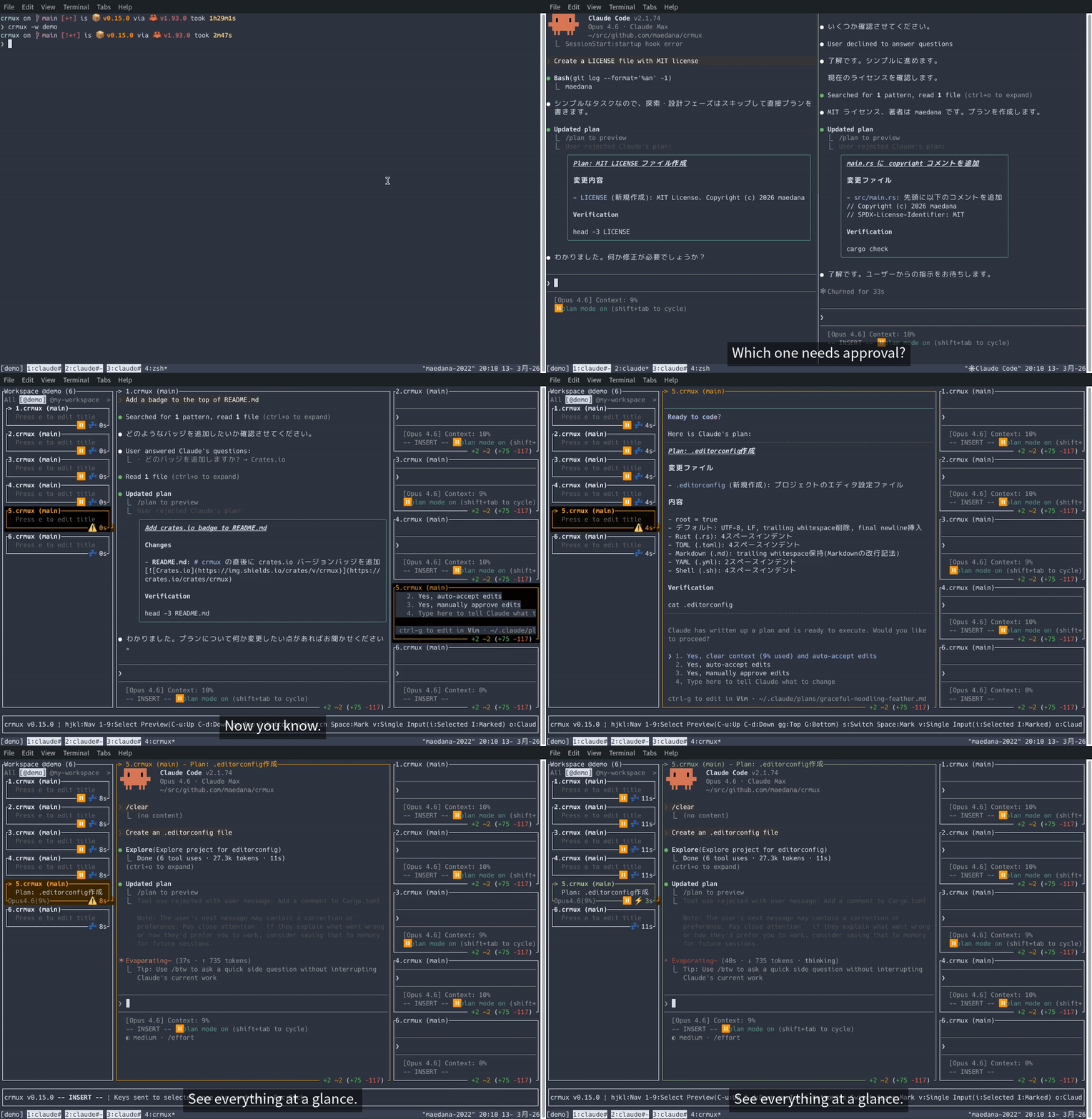
Juggling multiple Claude Code sessions in tmux? crmux gives you a single sidebar to see what every session is doing, preview their output, and send prompts — all without leaving tmux.
- See everything at a glance — all sessions with live status, permission mode, repo, branch, worktree, and visual alerts for approval requests and completions
- Just a tmux pane — nothing changes; your vim, shells, and tools stay as they are
- Scriptable — send prompts to idle sessions by repo name via RPC, no need to look up tmux pane IDs
- tmux
- Rust (latest stable version) -- only required when building from source
- (Optional) claudeye for overlay integration (
okey to toggle)
curl -sSL https://raw.githubusercontent.com/maedana/crmux/main/install.sh | shcargo install crmux --lockedAfter installation, make sure ~/.cargo/bin is in your PATH, then you can run:
crmuxgit clone https://github.com/maedana/crmux.git
cd crmux
cargo build --releasecrmux update # Update to the latest version
crmux update --check # Check for updates without installing
crmux update --force # Force re-download even if already up to dateNote:
crmux updatedownloads the latest binary from GitHub Releases. If you installed viacargo install, you may prefercargo install crmux --lockedto keep version tracking consistent.
Run inside a tmux session:
crmuxVim-like modal interface: navigate sessions in normal mode (h/j/k/l), press i to enter input mode and send keystrokes to the selected session, Esc to return. Press ? for the full keybinding list.
Configuring statusLine enables crmux to display model name, context window usage, auto-generated session titles, and other metadata in the sidebar. This is strongly recommended for the best experience.
Add the following to ~/.claude/settings.json:
{
  "statusLine": {
    "type": "command",
    "command": "crmux rpc status-update",
    "padding": 0
  }
}
Note: The
statusLinecommand's stdout is used as Claude Code's own status line display. Sincecrmux rpcproduces no output, Claude Code's status line will be blank with this setup. If you want both crmux sidebar info and Claude Code's status line, use a wrapper script instead.
Wrapper script example (ccstatus)
Create ~/.local/bin/ccstatus:
#!/bin/bash
input=$(cat)

# Notify crmux of status update (non-blocking)
echo "$input" | crmux rpc status-update &

MODEL=$(echo "$input" | jq -r '.model.display_name')
CONTEXT_SIZE=$(echo "$input" | jq -r '.context_window.context_window_size')
USAGE=$(echo "$input" | jq '.context_window.current_usage')

if [ "$USAGE" != "null" ]; then
    CURRENT_TOKENS=$(echo "$USAGE" | jq '.input_tokens + .cache_creation_input_tokens + .cache_read_input_tokens')
    PERCENT_USED=$((CURRENT_TOKENS * 100 / CONTEXT_SIZE))
    echo "[$MODEL] Context: ${PERCENT_USED}%"
else
    echo "[$MODEL] Context: 0%"
fi
{
"statusLine": {
"type": "command",
"command": "ccstatus",
"padding": 0
}
}Optional: SessionStart hook
Adding a SessionStart hook lets crmux receive session metadata immediately when Claude Code starts, rather than waiting for the first statusLine update. This is not required but can be useful if you want instant session detection.
{
  "hooks": {
    "SessionStart": [
      {
        "matcher": "",
        "hooks": [
          {
            "type": "command",
            "command": "crmux rpc session-start"
          }
        ]
      }
    ]
  }
}External tools can send text to Claude Code sessions via the send_text RPC method:
# Send to the currently selected pane
echo '{"text": "hello"}' | crmux rpc send-text

# Send to an idle session by project name (prefix match)
echo '{"text": "implement feature X", "project": "crmux"}' | crmux rpc send-text

# Paste text without pressing Enter
echo '{"text": "draft prompt", "project": "crmux", "no_execute": true}' | crmux rpc send-text
Parameters:
text(required): Text to sendproject(optional): Target an idle session whose project name starts with this valueno_execute(optional): Iftrue, paste text without pressing Enter
By combining get-plans and send-text RPCs, you can build custom workflows. scripts/crmux-plan-search is an example that incrementally searches plan files with fzf and sends the selected path to crmux. Claude Code stores all plan files in a single directory without per-project separation, but get-plans filters them by project so you can search within a specific repository.
Requirements: fzf, rg, jq
Install:
cp scripts/crmux-plan-search ~/.local/bin/Usage:
crmux-plan-search <project>- Priority job queue: enqueue tasks with priority levels and auto-dispatch to idle sessions
- Persistent usage/limit display: always show
/usageinfo (remaining requests, reset time) in the sidebar - Incremental search: quickly find and jump to sessions by filtering with search keywords
- Session bookmarks: save named groups of marked sessions as custom tabs alongside All/project tabs
- State persistence: persist job queue and other state across restarts (hash the tmux snapshot—windows, session IDs, panes—and restore previous state when the fingerprint matches on next launch)
Input mode uses tmux send-keys to forward keystrokes, which has inherent limitations:
- Modifier keys: Some modifier key combinations (e.g. Shift+Enter, Ctrl+Enter) cannot be accurately reproduced via tmux
send-keys - Terminal dependency: Terminals without Kitty keyboard protocol support (VTE-based terminals such as XFCE Terminal, GNOME Terminal) cannot distinguish some modified key events from their unmodified counterparts
- Paste on macOS:
Cmd+vis intercepted by the terminal emulator and never reaches crmux as a key event. Text paste works via bracketed paste, but image paste (used by Claude Code) cannot be forwarded. On Linux,Ctrl+vis forwarded as a key event, so image paste works through the target Claude Code session.
crmux was inspired by cmux, which motivated me to build this project. Much respect!
MIT