
One MCP entry. 10,000+ servers on demand.
Load only the tools you need. Switch instantly. No restarts.




In Japanese folklore, the Kitsune (狐) is a fox spirit of extraordinary intelligence and magical power. What makes it remarkable is how it grows: with age and wisdom, a Kitsune gains additional tails — each one representing a new ability it has mastered. It can shapeshift, take on any form it chooses, borrow the powers of others, and just as freely cast them off when the purpose is fulfilled. One fox. Many forms. Total fluidity.
This tool works the same way.
shapeshift("brave-search") — the fox takes on a new form, its tools appear natively.
shiftback() — it returns to its true shape, ready to become something else.
Each server it shapeshifts into is a new tail. Each capability borrowed and released cleanly. One entry in your config. Every server in the MCP ecosystem, on demand.
I am not Japanese, and I use this name with the highest respect for the mythology and culture it comes from. The parallel felt too precise to ignore — a spirit that shapeshifts between forms, gains new powers, and releases them at will. That is exactly what this tool does.
Every server you add to your config loads all its tools at startup — and keeps them there, all session long. Whether your agent uses them or not.
Five servers means 3,000–5,000 tokens of overhead on every request. Your agent sees 50+ tools and has to reason about all of them before it can act.
Kitsune MCP is one entry that replaces all of them.
shapeshift("brave-search", tools=["web_search"])  # only the tool you need
# task done — switch instantly:
shiftback()
shapeshift("supabase")                            # different server, no restart
shiftback()
shapeshift("@modelcontextprotocol/server-github") # and again
One config entry. Any server across 7 registries. Load only the tools the current task needs — 2 out of 20 if that's all you need. Your agent stays focused and your costs stay low.
Base overhead: 7 tools, ~650 tokens (measured). Each mounted server adds only what you actually load.
An agent that loads everything upfront burns tokens on tools it never calls — and makes worse decisions because it sees too many options at once. An agent that mounts on demand is leaner, faster, and more focused:
- Shapeshift into only what the current task needs — shiftback when done
shapeshift(server_id, tools=[...])to cherry-pick — load 2 tools from a server that has 20- Chain across multiple servers in one session without touching config or restarting
- Token overhead stays flat: ~650 base + only what you load
Kitsune MCP is designed around the real economics of an agent loop.
Beyond MCP Inspector's basic schema viewer, Kitsune MCP gives you a full development workflow inside your actual AI client:
| Need | Tool |
|---|---|
| Explore a server's tools and schemas | inspect(server_id) |
| Quality-score your server end-to-end | test(server_id) → score 0–100 |
| Benchmark tool latency | bench(server_id, tool, args) → p50, p95, min, max |
| Prototype endpoint-backed tools live | craft(name, description, params, url) |
| Test inside real Claude/Cursor workflows | shapeshift() → call tools natively → shiftback() |
| Compare two servers side by side | shapeshift into one, test, shiftback, shapeshift into the other |
No separate web UI. No isolated test environment. Test how your server actually behaves when an AI uses it.
kitsune-mcp |
kitsune-forge |
|
|---|---|---|
| Purpose | Adaptive agents, everyday mounting | MCP evaluation, benchmarking, crafting |
| Tools | 7 (shapeshift, shiftback, search, inspect, call, key, status) | All 17 |
| Token overhead | ~650 tokens | ~1,700 tokens |
| Use when | Agents mounting per task, minimal token budget | Discovering, testing, benchmarking, prototyping |
Token numbers are measured from actual registered schemas — see examples/benchmark.py.
Both modes from the same package:
{ "command": "kitsune-mcp" }                        ← lean (default)
{ "command": "kitsune-forge" }                      ← full suite
{ "command": "kitsune-mcp",
  "env": { "KITSUNE_TOOLS": "shapeshift,shiftback,key" } }  ← custom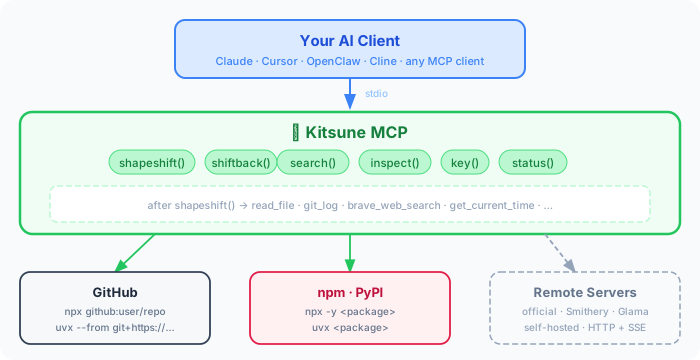
shapeshift() injects tools directly at runtime via FastMCP's live API. Token overhead stays flat regardless of how many servers you explore.
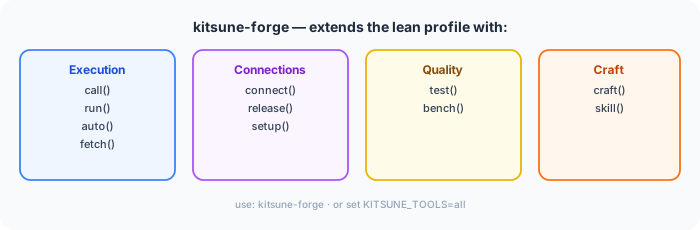
Need the full evaluation suite? kitsune-forge adds execution, connection management, benchmarking, and tool crafting:
pip install kitsune-mcpAdd to your MCP client config — once, globally:
{
  "mcpServers": {
    "kitsune": {
      "command": "kitsune-mcp"
    }
  }
}
Works with Claude Desktop, Claude Code, Cursor, Cline, OpenClaw, Continue.dev, Zed, and any MCP-compatible client. No API keys needed.
| Client | Global config file |
|---|---|
| Claude Desktop (macOS) | ~/Library/Application Support/Claude/claude_desktop_config.json |
| Claude Desktop (Windows) | %APPDATA%\Claude\claude_desktop_config.json |
| Claude Code | ~/.claude/mcp.json |
| Cursor / Windsurf | ~/.cursor/mcp.json |
| Cline / Continue.dev | VS Code settings / ~/.continue/config.json |
| OpenClaw | MCP config in OpenClaw settings |
Kitsune MCP searches across 7 registries in parallel — tens of thousands of servers, no single one required.
| Registry | Auth | registry= value |
|---|---|---|
| modelcontextprotocol/servers | None | official |
| registry.modelcontextprotocol.io | None | mcpregistry |
| Glama | None | glama |
| npm | None | npm |
| PyPI | None | pypi |
| GitHub repos | None | github:owner/repo |
| Smithery | Free API key | smithery |
Default search() fans out across all no-auth registries automatically. Add a SMITHERY_API_KEY to extend discovery with Smithery's hosted server catalog (HTTP servers, no local install required).
Kitsune MCP is a dynamic MCP proxy. It sits between your AI client and any number of other MCP servers, connecting to them on demand:
Your AI client
    │
    ▼
Kitsune MCP          ← the one entry in your config
    │
    ├── (on shapeshift) ──► filesystem server   (spawned subprocess)
    ├── (on shapeshift) ──► brave-search server (spawned subprocess)
    └── (on shapeshift) ──► remote HTTP server  (HTTP+SSE connection)
Nothing is copied. When you call a mounted tool, Kitsune MCP forwards the call to the original server via JSON-RPC and returns the result. The server's logic always runs on the server — Kitsune MCP only relays the schema and the call.
- Connects to the target server via the right transport (stdio subprocess, HTTP, WebSocket)
- Handshakes — sends MCP
initialize/notifications/initialized - Fetches
tools/list,resources/list,prompts/listfrom the server - Registers each tool as a native FastMCP tool — a proxy closure with the exact signature from the schema
- Notifies the AI client (
notifications/tools/list_changed) so the new tools appear immediately
The AI sees read_file, write_file, list_directory as if they were always there. There's no wrapper or call_tool("filesystem", ...) indirection — the tools are first-class.
shiftback() reverses all of it: deregisters the proxy closures, clears resources and prompts, notifies the client.
shapeshift() proxies all three MCP primitives, not just tools:
| Primitive | What gets proxied |
|---|---|
| Tools | Every tool from tools/list, registered with its exact parameter schema |
| Resources | Static resources from resources/list — readable via the MCP resources API |
| Prompts | Every prompt from prompts/list, with its argument signature |
Template URIs (e.g. file:///{path}) are skipped — they require parameter binding that adds complexity with little practical gain. Everything else is proxied.
| Server source | How it runs |
|---|---|
| npm package | npx <package> — spawned locally |
| pip package | uvx <package> — spawned locally |
| GitHub repo | npx github:user/repo or uvx --from git+https://... |
| Docker image | docker run --rm -i --memory 512m <image> |
| Smithery hosted | HTTP+SSE (requires SMITHERY_API_KEY) |
| WebSocket server | ws:// / wss:// |
inspect() connects to the server and fetches its schemas — but does not register anything. Zero tools added to context, zero tokens consumed by the AI.
Use it to:
- See exact parameter names and types before committing
- Check credential requirements upfront (avoid a cryptic error mid-task)
- Get the measured token cost of the mount so you can budget
- Verify the server actually starts and responds before a live session
inspect("mcp-server-brave-search")
# → CREDENTIALS
# →   ✗ missing  BRAVE_API_KEY — Brave Search API key
# →   Add to .env:  BRAVE_API_KEY=your-value
# → Token cost: ~99 tokens (measured)

# Add the key to .env — picked up immediately, no restart needed
# Then mount and use in the same session:
shapeshift("mcp-server-brave-search")
call("brave_web_search", arguments={"query": "MCP protocol 2025"})
Kitsune MCP introduces a trust model for servers you haven't personally audited.
Every shapeshift(), call(), and connect() result shows where the server comes from:
| Tier | Sources | Indicator |
|---|---|---|
| High | official (modelcontextprotocol/servers) |
✓ Source: official |
| Medium | mcpregistry, glama, smithery |
✓ Source: smithery |
| Community | npm, pypi, github |
⚠️ Source: npm (community — not verified) |
Before spawning any subprocess, Kitsune MCP validates the executable name:
- Blocks shell metacharacters (
&,;,|,`,$) — prevents injection via a crafted server ID - Blocks path traversal (
../) — prevents escaping to arbitrary binaries
Arguments are passed directly to asyncio.create_subprocess_exec (never a shell), so they are not subject to shell interpretation.
shapeshift() probes tool descriptions for unreferenced environment variable patterns. If a tool mentions BRAVE_API_KEY and that variable isn't set, you get a warning immediately — before you call anything:
⚠️  Credentials may be required — add to .env:
  BRAVE_API_KEY=your-value
  Or: key("BRAVE_API_KEY", "your-value")
- stdio servers run as separate OS processes — no shared memory with Kitsune MCP
- Docker servers run with
--rm -i --memory 512m --label kitsune-mcp=1 fetch()blocks private IPs, loopback, and non-HTTPS URLs (SSRF protection)- The process pool has a hard cap of 10 concurrent processes and evicts idle ones after 1 hour
One kitsune-mcp entry unlocks any of these on demand — no config changes, no restart:
| Category | Servers | Key needed | Lean tokens |
|---|---|---|---|
| Web search | Brave Search, Exa, Linkup, Parallel | Free API keys | ~150–993 |
| Web scraping | Firecrawl, ScrapeGraph AI | Free tiers | ~400 (lean) |
| Code & repos | GitHub (official, 26 tools) | Free GitHub token | ~500 (lean) |
| Productivity | Notion, Linear, Slack | Free workspace keys | ~400 (lean) |
| Maps, Calendar, Gmail, Drive | Free GCP key / OAuth | varies | |
| Memory | Mem0, knowledge graphs | Free tiers | ~300 |
| No key required | Filesystem, Git, weather, Yahoo Finance | — | ~300–1,000 |
The same pattern works for all of them:
shapeshift("brave")                                    # web search in 2 tools
call("brave_web_search", arguments={"query": "…"})

shapeshift("firecrawl-mcp", tools=["scrape","search"]) # scraping, lean (2 of 9 tools)
call("scrape", arguments={"url": "https://…"})

shapeshift("@modelcontextprotocol/server-github", tools=["create_issue","search_repositories"])
call("create_issue", arguments={"owner": "…", "repo": "…", "title": "…"})
Token cost scales with what you load, not what exists. A 26-tool GitHub server costs ~500 tokens if you only mount 3 tools. See .env.example for the full key catalog with lean mount hints.
Kitsune MCP re-reads .env on every call — which means adding a key instantly activates it. That convenience comes with a responsibility: .env is the single place all your API keys live. A few practices worth following:
- Add
.envto.gitignore— never commit real keys - Use project-level
.envfor project-specific keys;~/.kitsune/.envfor personal global keys - Prefer minimal OAuth scopes and fine-grained tokens (e.g. GitHub fine-grained tokens with per-repo permissions)
- Rotate keys that get exposed; Kitsune MCP picks up the new value immediately without restart
"Can't I just add more servers to mcp.json?" — Every configured server starts at launch and exposes all tools constantly. You can't add or remove mid-session without a restart. With 5+ servers you're burning thousands of tokens on every request for tools rarely needed. Kitsune MCP keeps the tool list minimal — shapeshift into what you need, shiftback when done.
"What about MCP Inspector?" — MCP Inspector is a standalone web UI that connects to one server and lets you inspect schemas and call tools manually. It's useful for basic debugging but isolated from real AI workflows. Kitsune MCP tests servers inside actual Claude or Cursor sessions — how an AI really uses them. It adds test() scoring, bench() latency numbers, side-by-side server comparison, and craft() for live endpoint prototyping. It also discovers and installs servers on demand; Inspector requires you to already have one running.
"What about mcp-dynamic-proxy?" — It hides tools behind call_tool("brave", "web_search", {...}) — always a wrapper. After shapeshift("mcp-server-brave-search"), Kitsune MCP gives you a real native brave_web_search with the actual schema. It also can't discover or install packages at runtime.
"Can FastMCP do this natively?"
| FastMCP native | Kitsune MCP | |
|---|---|---|
| Proxy a known HTTP/SSE server | ✅ | ✅ |
| Load tools at runtime | ✅ (write code) | ✅ shapeshift() |
| Search registries to discover servers | ❌ | ✅ npm · official · Glama · Smithery |
| Install npm / PyPI / GitHub packages on demand | ❌ | ✅ |
| Atomic shift back — retract all shapeshifted tools at once | ❌ | ✅ shiftback() |
| Persistent stdio process pool | ❌ | ✅ |
Zero boilerplate — works after pip install |
❌ | ✅ |
{
  "mcpServers": {
    "protean": { "command": "kitsune-mcp" }
  }
}{
"mcpServers": {
"kitsune": {
"command": "kitsune-mcp",
"env": { "SMITHERY_API_KEY": "your-key" }
}
}
}Get a free key at smithery.ai/account/api-keys. Without it, Kitsune MCP is fully functional via npm, PyPI, official registries, and GitHub.
Frictionless credentials — Kitsune MCP re-reads .env on every inspect(), shapeshift(), and call(). Add a key mid-session and it takes effect immediately — no restart:
# .env (CWD, ~/.env, or ~/.kitsune/.env — all checked, CWD wins)
BRAVE_API_KEY=your-key
GITHUB_TOKEN=ghp_...
Or use key() to write to .env and activate in one step:
key("BRAVE_API_KEY", "your-key") # writes to .env, active immediately
| Tool | Description |
|---|---|
shapeshift(server_id, tools) |
Load a server's tools live. tools=[...] for lean shapeshift. |
shiftback(kill) |
Remove shapeshifted tools. kill=True terminates the process immediately. |
search(query, registry) |
Search MCP servers across registries. |
inspect(server_id) |
Show tools, schemas, and live credential status (✓/✗ per key). |
call(tool_name, server_id, args) |
Call a tool. server_id optional when shapeshifted — current form used. |
key(env_var, value) |
Save an API key to .env and load it immediately. |
status() |
Show current form, active connections (PID + RAM), token stats. |
Everything above, plus:
| Tool | Description |
|---|---|
call(tool_name, server_id, args) |
Already in lean profile — listed here for completeness. |
run(package, tool, args) |
Run from npm/pip directly. uvx:pkg-name for Python. |
auto(task, tool, args) |
Search → pick best server → call in one step. |
fetch(url, intent) |
Fetch a URL, return compressed text (~17x smaller than raw HTML). |
craft(name, description, params, url) |
Register a custom tool backed by your HTTP endpoint. shiftback() removes it. |
connect(command, name) |
Start a persistent server. Accepts server_id or shell command. |
release(name) |
Kill a persistent connection by name. |
setup(name) |
Step-by-step setup wizard for a connected server. |
test(server_id, level) |
Quality-score a server 0–100. |
bench(server_id, tool, args) |
Benchmark tool latency — p50, p95, min, max. |
skill(qualified_name) |
Load a skill into context. Persisted across sessions. |
# Task 1: read some files
shapeshift("@modelcontextprotocol/server-filesystem", tools=["read_file"])
read_file(path="/tmp/data.csv")
shiftback()

# Task 2: search the web
shapeshift("mcp-server-brave-search")
brave_web_search(query="latest MCP servers 2025")
shiftback()

# Task 3: run a git query
shapeshift("@modelcontextprotocol/server-git", tools=["git_log"])
git_log(repo_path=".", max_count=5)
shiftback()
# Three different servers. One session. Zero config edits.
# Evaluate your server before publishing
inspect("my-server")               # review schemas and credentials
test("my-server")                  # quality score 0–100
bench("my-server", "my_tool", {})  # p50, p95 latency

# Prototype a tool backed by your local endpoint
craft(
    name="my_tool",
    description="Calls my ranking service",
    params={"query": {"type": "string"}},
    url="http://localhost:8080/rank"
)
my_tool(query="test")   # call it natively inside Claude
shiftback()
After shapeshift(), use call() immediately — no restart, no server_id needed:
shapeshift("@modelcontextprotocol/server-filesystem")
# → "In this session: call('tool_name', arguments={...})"

call("list_directory", arguments={"path": "/Users/me/project"})
call("read_file", arguments={"path": "/Users/me/project/README.md"})
shiftback()
search("web search")
shapeshift("mcp-server-brave-search")
key("BRAVE_API_KEY", "your-key")   # picked up immediately
call("brave_web_search", arguments={"query": "MCP protocol 2025"})
shiftback()
connect("uvx voice-mode", name="voice")
setup("voice")                      # shows missing env vars
key("DEEPGRAM_API_KEY", "your-key")
setup("voice")                      # confirms ready
shapeshift("voice-mode")
speak(text="Hello from Kitsune MCP!")
shiftback(kill=True)                    # terminates process, frees RAM
pip install kitsune-mcp        # from PyPI
# or
git clone https://github.com/kaiser-data/kitsune-mcp && pip install -e .
Requirements: Python 3.12+ · node/npx (for npm servers) · uvx from uv (for pip servers)
make dev     # install with dev dependencies
make test    # pytest
make lint    # ruff
Issues and PRs: github.com/kaiser-data/kitsune-mcp
MIT License · Python 3.12+ · Built on FastMCP


