


The personal AI project hub that runs while you work. North Star milestone tracking · live Claude exec sessions · entity corpus browser · mobile-ready terminal.
One command. Your whole AI workflow, visible from any device.
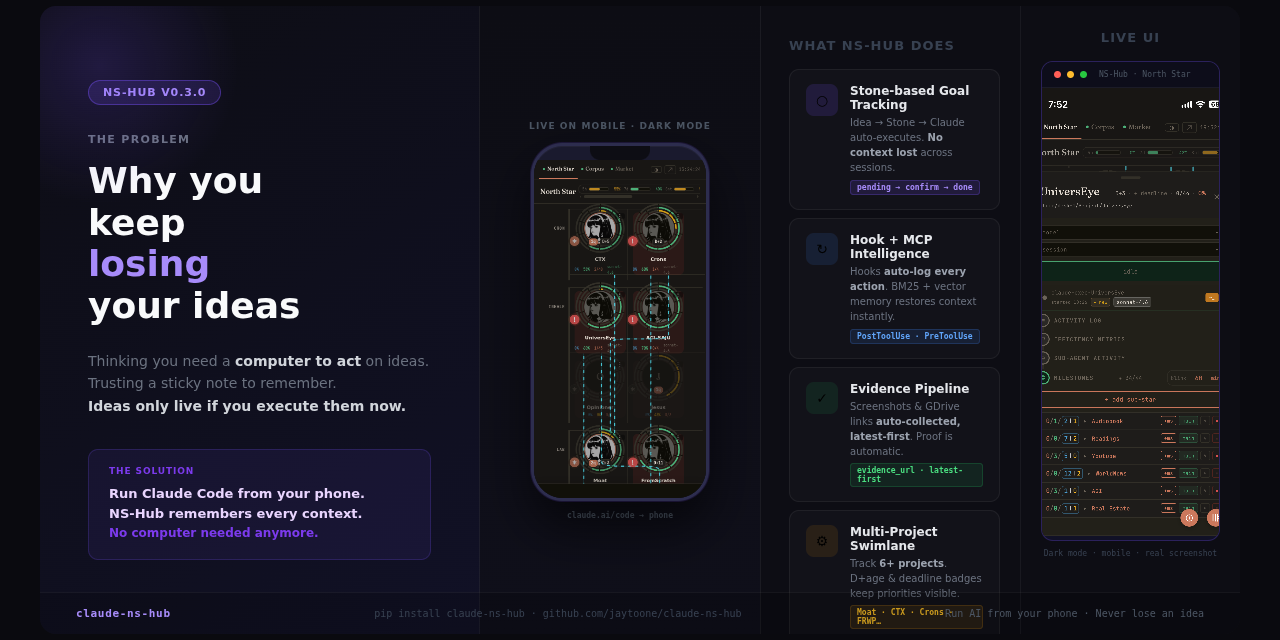
While Claude Code runs your tasks autonomously, you're flying blind — no idea what it just did, which session is live, or whether it's stuck. claude-ns-hub fixes that:
- See everything live: exec sessions, session IDs, idle/busy state — on your phone while you're away
- Queue work without interrupting Claude: tap a stone, queue it, it runs on next idle
- Resume any session: ↻ button resumes exact conversation context, never lose work
- One install, zero config: auto-discovers projects, spawns entity corpus, exposes to Tailscale
The engineers shipping the most with Claude Code are the ones who can monitor, queue, and intervene — without context-switching.
- Python 3.10+
- Claude Code CLI installed and authenticated (
claude --version) tmuxinstalled (brew install tmux/apt install tmux)- Tailscale (optional, for remote access)
pip install claude-ns-hub
hub                          # starts immediately on http://localhost:9001
# → All features auto-active: North Star, exec sessions, entity corpus,
#   Tailscale port-expose, anonymous usage telemetry (opt-out below).
That's it — no config file, no env vars, no separate daemon. Open the printed URL in any browser (phone or laptop, via Tailscale) and you're in.
The hub sends one anonymized hub_start event on startup (fields: ts, event, install_id=sha256(hostname)[:16], version, os). No PII, no code, no stone text is transmitted. Disable any time:
curl -X POST http://localhost:9001/api/hub/consent \
  -H 'Content-Type: application/json' \
-d '{"data_collection": false}'# 1. Start the hub
claude-ns-hub
# Hub starts at http://<your-ip>:9001
# North Star · CTX · Corpus · Market — all tabs, live
# 2. Inject the NS Hub protocol into your global Claude config (run once)
hub install-global
# Writes the stone lifecycle protocol to ~/.claude/CLAUDE.md
# Without this, exec sessions won't know how to update stone status
# 3. Add your first project
# In the hub UI: North Star tab → "+ node" button
# Set the project name and repo_path to your local project directory
# 4. Queue a stone and dispatch
# Click a project card → "+ milestone" → type your task
# Click "live" to start an exec session — Claude Code picks up the stone automaticallyThe hub launches Claude Code in a tmux session named claude-exec-<PROJECT>.
For this to work on a new machine:
# Verify Claude Code is authenticated
claude --version

# Install hub hooks into Claude Code's global settings (run once per machine)
hub install-global

# The hub will auto-create tmux sessions when you dispatch work
# Monitor live progress in the "session" pane of any project card| Feature | What it does |
|---|---|
| North Star swimlane | Visualize all projects + milestones on one screen |
| Live exec sessions | See claude-exec-MOAT running, its session ID, busy/idle state |
| Mobile terminal | ⌨_ button attaches browser terminal to the running Claude session — type from your phone |
| Session resume | ↻ rows resume exact prior conversation; ✦ starts fresh — your choice per stone |
| Entity corpus browser | Browse all local skills/agents/corpora; inline search |
| Drag-and-drop comments | Drop files into stone comments; upload auto-appended as links |
| PyPI installable | pip install claude-ns-hub && claude-ns-hub — done |
# Ubuntu / Debian / WSL
sudo apt install tmux

# macOS
brew install tmux

# Verify
tmux -V
The hub auto-creates a tmux session named claude-exec-<PROJECT> when you dispatch work. If tmux is missing, exec sessions will fail silently — install it first.
# Check if installed
claude --version

# If missing, install via npm
npm install -g @anthropic-ai/claude-code

# Then authenticate
claude login
The hub reads claude from your PATH. If you installed it via nvm or a custom path, set it in ~/.hub/config.yaml:
defaults:
claude_code_path: /full/path/to/claudeAdd the project manually via the UI (North Star → "+ node" → set repo_path) or use:
hub init <PROJECT_ID> --dir /path/to/your/project# Install hub hooks once per machine
hub install-global
# Verify hooks are registered in Claude settings
cat ~/.claude/settings.json | grep hubcurl http://localhost:9000/api/metrics?proj_id=MOAT
# → stones_completed, stones_queued, total_tokens per day# Disable entity corpus auto-spawn
ENTITY_CORPUS_DISABLED=1 claude-ns-hub
# Custom entity corpus path
ENTITY_CORPUS_SERVER=~/my-corpus/server.py claude-ns-hubMobile dark theme — full UI on iOS/Android. Tap a card to see exec session, queue stones, resume Claude:


North Star swimlane — all projects across lanes (Cron / HI-TECH / Vertical / SVTool), badge counts, live exec indicator, parent-child links:

Project detail card — North Star goal, progress bars, model/session selector, live exec session row with resume ID, milestone sub-star list:

Skill / Agent badge picker — assign /expert-research or any agent to a stone directly from the milestone row:

North Star swimlane (previous) — earlier view showing project card layout:

Stone and project data live in a local SQLite database (~/.hub/hub.db). The core tables:
-- milestones (stones)
CREATE TABLE milestones (
  id TEXT PRIMARY KEY,          -- e.g. "M1301"
  project TEXT,                 -- e.g. "MOAT"
  text TEXT,                    -- stone task description
  status TEXT,                  -- queued | in_progress | pending_confirmation | done | skipped
  done INTEGER DEFAULT 0,
  exec_start TEXT,              -- ISO timestamp
  exec_end TEXT,
  model_used TEXT,
  evidence_url TEXT,            -- GDrive link or external URL
  evidence_filename TEXT,
  append_message TEXT,          -- latest Claude summary
  created_at TEXT DEFAULT (datetime('now'))
);

-- projects
CREATE TABLE projects (
  id TEXT PRIMARY KEY,
  name TEXT,
  northstar_goal TEXT,
  cwd TEXT                      -- local working directory path
);
Migration: export via sqlite3 ~/.hub/hub.db .dump > backup.sql. Import on new machine with sqlite3 ~/.hub/hub.db < backup.sql. Stone history, evidence URLs, and session logs are fully portable — no vendor lock-in.
pip install claude-ns-hub — because you should know what Claude is doing right now.
Currently MIT. If commercial redistribution becomes an issue, we may adopt Elastic License v2 (ELv2) — source-available, free for personal/internal use, restricted for managed-service resale only. Community PRs and personal deployments will always remain free.