





🌐 English | Русский | Deutsch | Español | Português
🔒 Security: Policy | Assessment Report
Home Assistant custom integration for Klipsch Flexus soundbars — control via native local HTTP API, no cloud, no delays.
✅ Up to date as of v2.5.15 (2026-06-14) — 41 entities, all write commands verified live against 2026 firmware (HMAC-signed), controllable in standby. The badges above reflect the live release and last push.
A custom Lovelace dashboard driven entirely by the integration's entities — input, sound mode, night / dialog enhance, EQ presets, Dirac filter, tone (bass / mid / treble), surround channel levels and subwoofers — all controlled live over the local API.
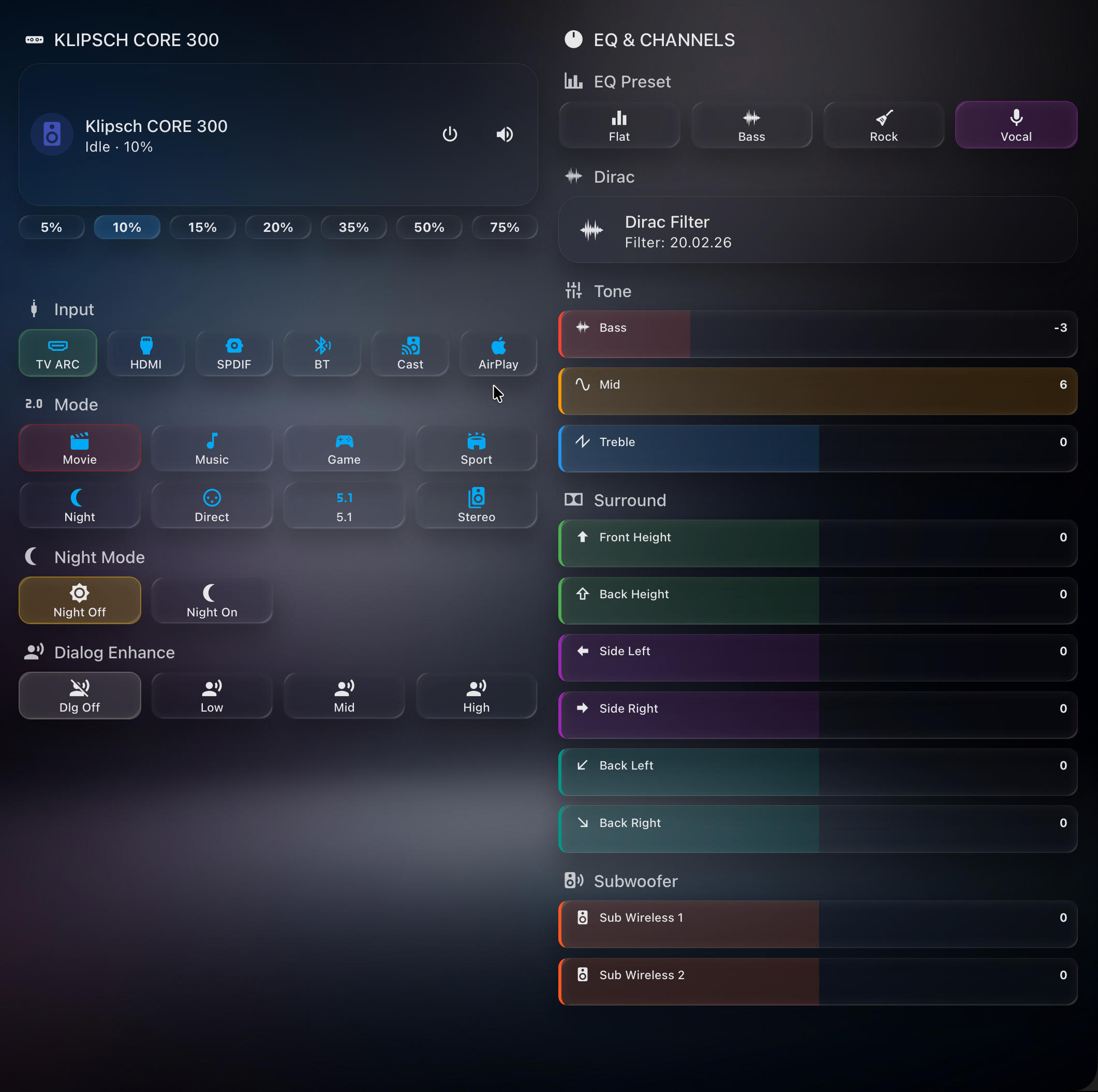
Required HACS components (all installable via HACS):
| Component | Repo | Used for |
|---|---|---|
| Klipsch Flexus | ilia-ae/klipsch_flexus | this integration — the entities |
| Mushroom | piitaya/lovelace-mushroom | media-player card |
| button-card | custom-cards/button-card | source / mode / EQ tiles with dynamic styling |
| card-mod | thomasloven/lovelace-card-mod | active-state highlighting (CSS) |
📋 Full dashboard YAML + colour scheme: docs/DASHBOARD.md
| Model | Channels | Features |
|---|---|---|
| Flexus CORE 300 | 5.1.2 | Dirac Live, Dolby Atmos, 13 drivers |
| Flexus CORE 200 | 3.1.2 | Dolby Atmos up-firing |
| Flexus CORE 100 | 2.1 | Virtual Dolby Atmos |
The soundbar must be fully set up first in the official Klipsch Connect Plus app — go through the entire onboarding at least once (Wi-Fi, firmware update, speaker pairing, Dirac calibration). On 2026 firmware this is also what provisions the write-auth credential the integration relies on, so a half-finished app setup leaves most commands unauthorized. This integration handles ongoing control only.
A 2026 soundbar firmware update (Device Version 1.1.3.x, e.g. 1.1.3.0x7cd294e, Cast build 20250512_0201_RC25) changed the local HTTP API in two ways:
setDatanow requiresPOSTwith a JSON body. The oldGET /api/setData?...returns405 Strict HTTP required!. Fixed in v2.4.1 — update the integration.- Most
setDatawrites are now authenticated (settings:/webserver/authMode = setData). Protected writes return401 ForbiddenwithWWW-Authenticate: HMAC_SHA256_AES256. Fixed in v2.5.0 — the integration now signs these writes automatically.
| Capability | Status |
|---|---|
All sensors / status reads (getData) |
✅ Works |
| Volume, Mute | ✅ Works |
| Input, Sound mode, Night / Dialog, Bass / Mid / Treble, EQ Preset, Dirac, Subwoofer & Surround levels, Power | ✅ Works (HMAC-signed, v2.5.0+) |
| LED, Lip-sync, Balance, Loudness, DND, Auto-standby + 4 more toggles | ✅ Works (signed; added v2.5.8–2.5.9) — also in standby |
You can see the live per-command status on your own device via Download diagnostics (the command_health section, added in v2.4.2).
✅ Solved in v2.5.0 — full control restored, no user action required. The HMAC_SHA256_AES256 request signing is now implemented. The per-device credential is derived automatically from the soundbar's MAC address, so there is nothing to configure — just update the integration. Since v2.5.9 the MAC is read deterministically from the device itself (settings:/system/primaryMacAddress), so resolution works on the first try for every unit (with the previous registry/ARP discovery kept as a fallback). Signed writes go to the device's HTTPS endpoint; volume/mute continue to work unsigned.
Requires the
cryptographypackage (declared in the manifest; bundled with Home Assistant, so it is already present).
📖 How we reverse-engineered it — the full investigation story (blutter, Frida, WireGuard-MITM, the security-theatre teardown): the field report (also in Russian).
Older firmware (pre-1.1.3) is unaffected and keeps full control via the legacy GET fallback.
- Volume — set level, step up/down, mute/unmute
- Power — turn on / standby
- Input source — TV ARC, HDMI, SPDIF, Bluetooth, Google Cast
- Sound mode — Movie, Music, Game, Sport, Night, Direct, Surround, Stereo
- Playback — play/pause, next/previous track
- Media info — title, artist, album, artwork, source app
| Channel | Description |
|---|---|
| Front Height | Dolby Atmos front height speaker |
| Back Height | Dolby Atmos rear height speaker |
| Side Left / Right | Surround side speakers |
| Back Left / Right | Surround rear speakers |
| Subwoofer Wireless 1 / 2 | Wireless subwoofer levels |
| Bass / Mid / Treble | Tone EQ controls |
- EQ Preset — Flat, Bass, Rock, Vocal
- Night Mode — reduces dynamic range for quiet listening
- Dialog Mode — boosts dialog clarity (3 levels)
- Dirac Live — room correction filter (auto-discovered from device)
- LED Brightness — front LED: Off / Dim / Bright
- Lip-sync Delay — manual A/V sync (0–300 ms)
- Balance — left/right balance (−10…+10)
- Idle Timeout — auto-standby idle time (0–3600 s)
- Auto Lip-sync — automatic A/V delay
- EQ Bypass — bypass the equaliser
- Auto Power — auto on/standby behaviour
- Loudness — low-volume loudness compensation
- Do Not Disturb — suppress notifications/sounds
- Auto Standby — drop to standby when idle
- UI Sounds, Extra Sound Modes, BLE Remote Auto-pair, Firmware Auto-update
All settings above are also writable while the soundbar is in standby (the device applies and persists them); the integration keeps the entities available and remembers the value you set rather than reverting it.
- Response Time — API poll duration in ms, request/failure counters
- Device Status — On / Standby / Offline with decoder, input, sound mode info
- Signing MAC — the MAC used to sign 2026-firmware writes (scheme, candidates, resolved state)
- Network Link — active wired/wireless interface, interface names, MAC sources
- Operating Mode / Speaker Test — read-only device state (surfaced, deliberately not controllable)
- Speaker Delays (wired/wireless sub, wireless surround) — read-only, auto-calibrated by the device
- Download diagnostics — full device state export (Settings > Devices > Klipsch Flexus > Download diagnostics)
Full UI translation in 7 languages: English, Russian, German, Spanish, French, Italian, Portuguese. All entity names, states, and configuration screens are translated.
- Open HACS > Integrations > search Klipsch Flexus
- Install and restart Home Assistant
- The soundbar should be automatically discovered — check notifications
- Or go to Settings > Devices & Services > Add Integration > Klipsch Flexus
- Copy
custom_components/klipsch_flexus/to your HAconfig/custom_components/directory - Restart Home Assistant
- Add the integration via Settings > Devices & Services
The soundbar is automatically discovered on your network via mDNS / Zeroconf (Google Cast protocol).
When powered on, Home Assistant will detect the soundbar and display a notification:
Klipsch Flexus CORE 300 found at
192.168.1.100. Do you want to add this soundbar?
How it works:
- Soundbar announces itself as
Flexus-Core-*via_googlecast._tcpmDNS service - Integration identifies the device by
md(model) andfn(friendly name) TXT records - AirCast proxy devices are automatically filtered out
If auto-discovery doesn't work (e.g. network isolation), you can always add the integration manually by entering the IP address.
| Parameter | Default | Description |
|---|---|---|
| Host | — | IP address of the soundbar (required) |
| Poll interval | 15 s (60 s in standby) | Configurable via Options (5–120 s); automatically reduced in standby |
Tip: Assign a static IP / DHCP reservation to the soundbar for reliable operation.
You can change the IP address later via Reconfigure (Settings > Devices > Klipsch Flexus > Reconfigure).
The soundbar exposes a local HTTP API on port 80:
GET /api/getData— read parametersPOST /api/setData— write parameters (JSON body; legacy GET fallback for older firmware)GET /api/getRows— list structured data (Dirac filters)
The Klipsch Flexus has a single-threaded HTTP server that processes one request at a time. The integration is built around this constraint:
| Mechanism | Description |
|---|---|
| Request serialization | All API calls go through asyncio.Lock — no concurrent requests |
| Retry with backoff | Transient errors retried 2x with 0.5 s delay |
| Adaptive timeouts | 8 s reads, 10 s writes, 15 s power commands |
| Graceful degradation | Failed reads fall back to last-known cached values |
| Optimistic updates | UI updates instantly, then verified via delayed poll; values applied in standby are cached so the standby poll never reverts them |
| Standby-aware polling | Power state probed first; in standby only 1 request instead of 20+, cached values preserved, poll interval slows to 60 s. Settings stay available and controllable in standby — the device applies writes and the integration remembers them |
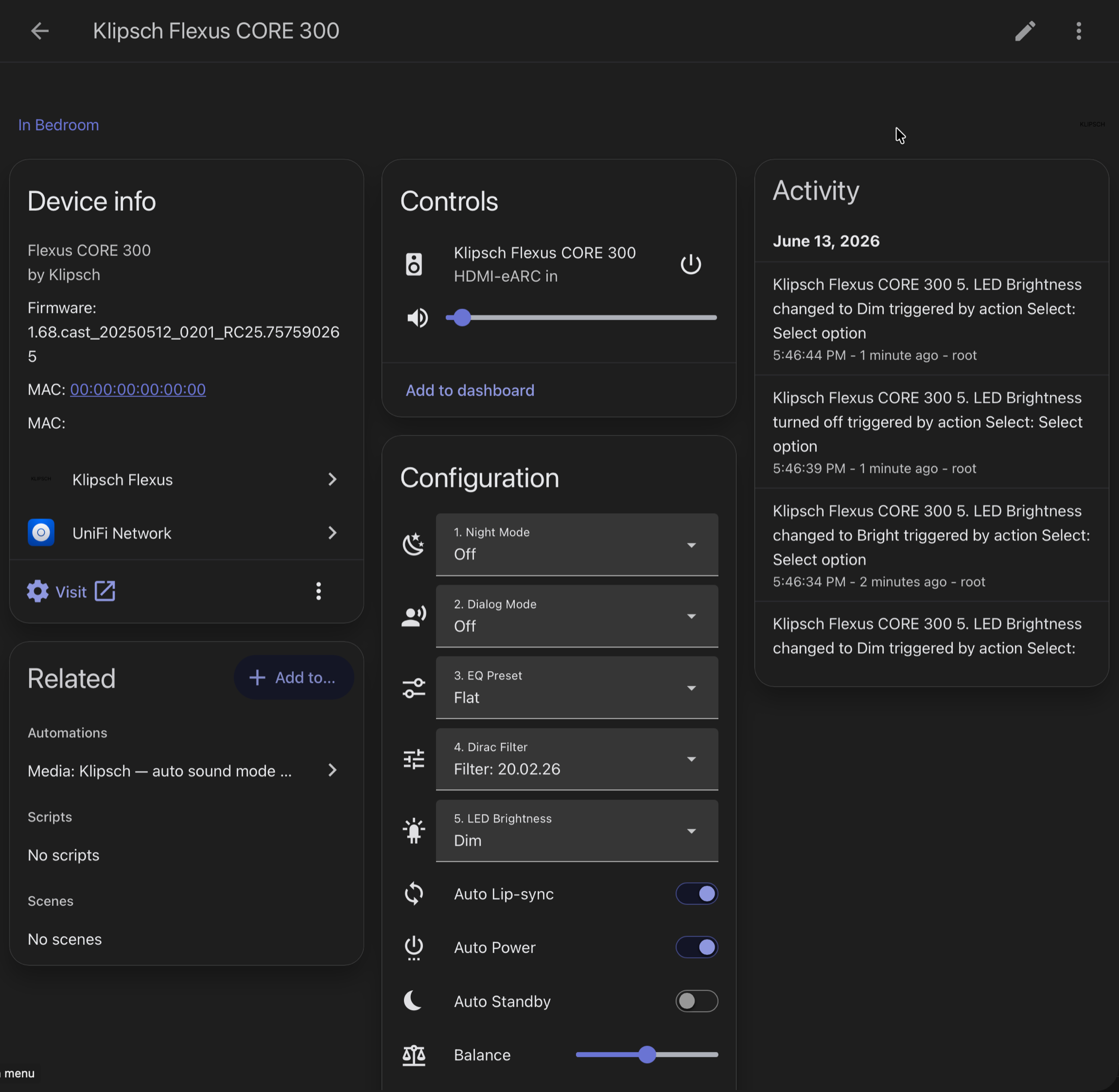
The integration's Home Assistant device page — Device info, Controls, Configuration (Night / Dialog / EQ / Dirac / LED + toggles) and the Activity log.
| Entity | Type | Category |
|---|---|---|
| Klipsch Flexus CORE 300 | Media Player | — |
| Night Mode / Dialog Mode / EQ Preset / Dirac Filter / LED Brightness | Select (x5) | Config |
| Back Height / Left / Right, Front Height, Side Left / Right | Number (x6) | Config |
| Subwoofer Wireless 1 / 2 | Number (x2) | Config |
| Bass / Mid / Treble | Number (x3) | Config |
| Lip-sync Delay, Balance, Idle Timeout | Number (x3) | Config |
| Auto Lip-sync, EQ Bypass, Auto Power, UI Sounds, Extra Sound Modes, BLE Remote Auto-pair, Firmware Auto-update | Switch (x7) | Config |
| Loudness, Do Not Disturb, Auto Standby | Switch (x3) | Config |
| Response Time, Device Status, Active Input, Active Sound Mode | Sensor (x4) | Diagnostic |
| Signing MAC, Network Link | Sensor (x2) | Diagnostic |
| Operating Mode, Speaker Test, Sub Wired/Wireless Delay, Surround Delay | Sensor (x5, read-only) | Diagnostic |
Total: 41 entities (1 media player + 5 selects + 14 numbers + 10 switches + 11 sensors)
| Problem | Solution |
|---|---|
| Cannot connect | Check that the soundbar is on the same network. Try: http://<IP>/api/getData?path=player:volume&roles=value |
| Entities unavailable | The Klipsch app may be polling simultaneously — close it and retry |
| Slow updates | Increase poll interval in Options (Settings > Devices > Klipsch Flexus > Configure) |
| Integration not loading | Check Home Assistant logs for import errors. Ensure you're on HA 2024.11+ |
- One soundbar per integration entry (add multiple as separate entries)
- No multi-room / wireless surround group management (use Klipsch Connect Plus app)
- AirPlay and Cast protocols are not used — only the native HTTP API
- Initial setup must be completed fully in the official Klipsch Connect Plus app — go through the whole onboarding at least once (this is what provisions the 2026 write-auth credential)
See SECURITY.md for security policy and best practices.
Network Security Notice: The soundbar speaks plain HTTP, and its local API is effectively unauthenticated on the LAN. Older firmware required no authentication at all; the 2026 firmware (1.1.3.x) signs most writes (HMAC_SHA256_AES256), but this is not a real security boundary — the credential is derived from the device's own MAC (which it discloses unauthenticated) plus a hardcoded, product-line-wide constant, so any host on the network can forge it. Reads stay open (see Firmware Compatibility). Keep it on a trusted / isolated network segment. See the Security Assessment Report (Section 12) for the full analysis.
MIT — see LICENSE.