All you need is just your arduino and Android Smartphone/Tablet.
No coding experience is required.


- Arduino UNO
- MG996R Servo
- Some Jumper Cables, M-M, M-F, F-F
- AA Battery X4
- AA 5V plugin
- Keyestudio 16x12 bit PWM Shield
- Breadboard
- Arduino-USB Cable
- HC-06 (ZS-040) Bluetooth
- LCD
- Computer with Arduino IDE
- Android Smartphone/Tablet
- Download .ino file from Latest Release and Connect your Arduino.
- Make Arduino Circuit (Follow Image Below)
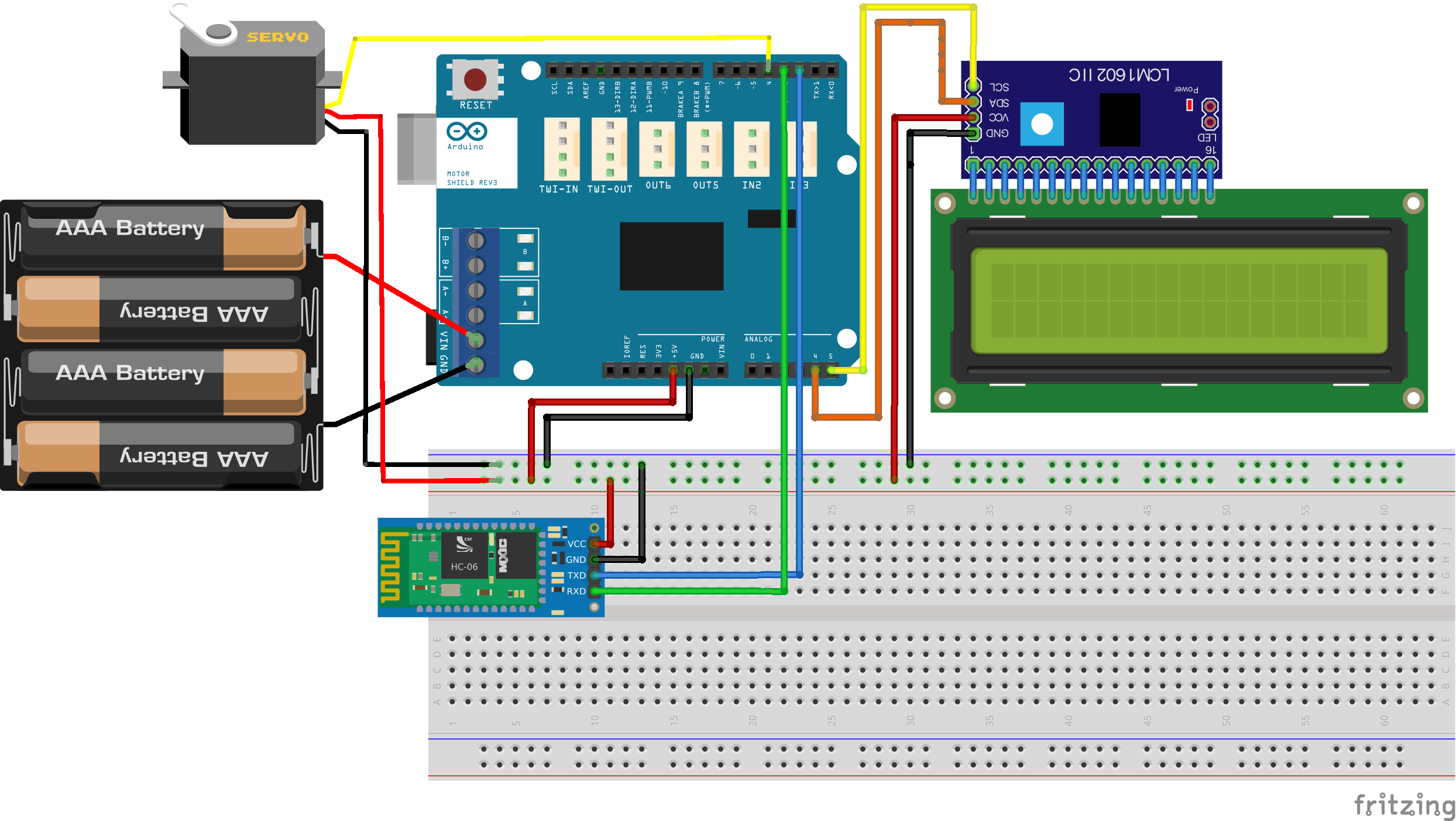
- Download .apk file from Latest Release from your Android Smartphone/Tablet
- Go to settings from your phone and enable Location & Bluetooth access of Cydial Connect.
- Connect Cydial Connect app and Arduino.
- Click Sync.
- That's it!
Q. When I open Cydial Connect app, I can't connect with my Cydial device.
A. Please double-check if you granted 'location' and 'bluetooth access' permission at the settings app, manually.