CLI toolkit for Claude Code developers - code quality, process management, and usage analytics.
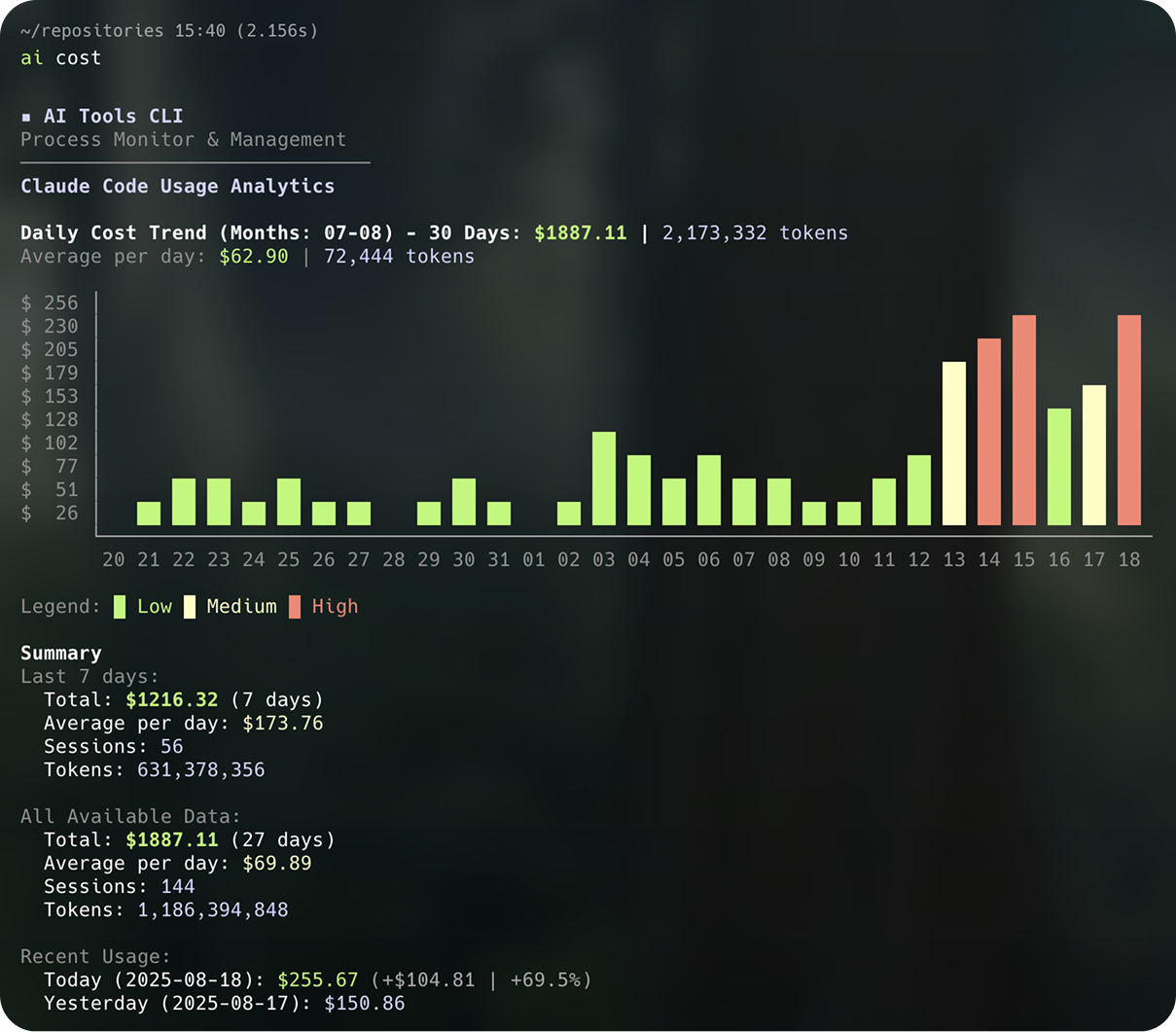
When you're in the flow with Claude Code, the last thing you need is:
- Stuck hooks - Git hooks hanging and blocking your AI assistant
- Zombie processes - Old sessions eating up CPU and memory
- Mystery costs - No idea how much you're spending on Claude API calls
- Bloated files - AI assistants struggle with files over 500 lines
AI Tools solves these with simple commands like ai cost, ai lines, and ai ps hooks.
- Process Management - Smart detection and cleanup of stuck hooks and runaway processes
- Code Quality - File line count checks and TypeScript/ESLint integration
- Claude Code Analytics - Track usage, costs, and token consumption with visual charts
- Hooks Management - View, initialize, and manage Claude Code hooks
- Auto-Updates - Stay current with automatic version checking
- Clean CLI Design - Professional interface without emoji, following international standards
# Using bun (faster)
bun install -g @dreamerhyde/aitools

# Using npm
npm install -g @dreamerhyde/aitools

# After installation, use either command:
ai lines         # Short alias (recommended)
aitools lines # Full commandbunx @dreamerhyde/aitools lines
npx @dreamerhyde/aitools linesgit clone https://github.com/dreamerhyde/aitools.git
cd aitools
bun install
bun run build# Check files exceeding line limit (default: 500 lines)
ai lines
ai lines -l 300 # Custom threshold
# Run TypeScript + ESLint checks
ai lint
ai lint init # Initialize ESLint configuration# List processes
ai ps # All AI-related processes
ai ps hooks # Hook-related processes only
ai ps port # Processes listening on network ports
# Terminate processes
ai ps kill # Interactive process selection
ai ps kill --port 3000 # Kill by port numberai hooks # View current hook configuration
ai hooks init # Initialize hooks for current project
ai hooks list # List all configured hooks in detail
# Hook subcommands for Claude Code integration
ai hooks lint # AI-readable lint output (for hooks)
ai hooks lines # AI-readable line check (for hooks)ai cost # 30-day cost chart and 7-day summary
ai cost detail # Detailed daily cost tableai tree # Display directory tree (respects .gitignore)
ai tree --depth 3 # Limit depth
ai init # Initialize AI Tools configuration
ai upgrade # Upgrade to latest version
ai upgrade --check # Check for updates only# Setup
bun install
# Development (3-stage workflow)
aid lines # Dev: run from source (instant feedback)
bun run build # Build: generate dist/cli.js
aib lines # Build test: verify bundle works
ai lines # Production: test global install
# Quality checks
bun run typecheck # TypeScript type checking
bun run lint # ESLint checking- Runtime: Bun for fast execution
- Language: TypeScript with strict typing
- CLI Framework: Commander.js
- UI Components: Chalk (colors), cli-table3 (formatting), Ora (spinners)
- Platform: Optimized for macOS
src/
├── cli.ts                   # Main entry point
├── cli/                     # Command setup modules
│   ├── process-command.ts   # Process commands (ps, kill, port, hooks)
│   ├── hooks-command.ts     # Hook management
│   ├── cost-command.ts      # Usage analytics
│   ├── lines-command.ts     # Line count checks
│   ├── lint-command.ts      # Code quality checks
│   ├── tree-command.ts      # Directory tree
│   └── basic-commands.ts    # Upgrade command
├── commands/                # Command implementations
├── utils/                   # Shared utilities
│   ├── process-monitor.ts   # Process detection
│   ├── ui.ts               # UI helpers
│   └── pricing-fetcher.ts  # Dynamic model pricing
└── types/                   # TypeScript definitions
Contributions welcome! This tool evolves with the AI development ecosystem.
- Follow existing code style
- Maintain English documentation
- No emoji in code or output
- Update README for new features
MIT