MaskingClothes
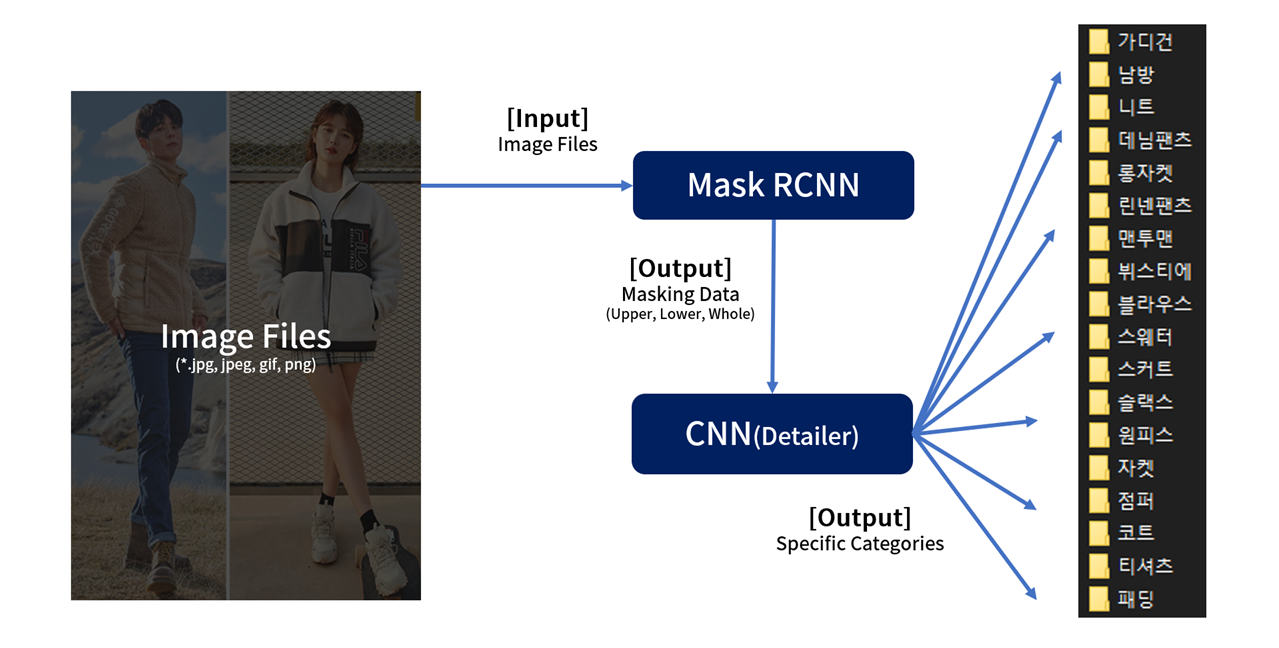
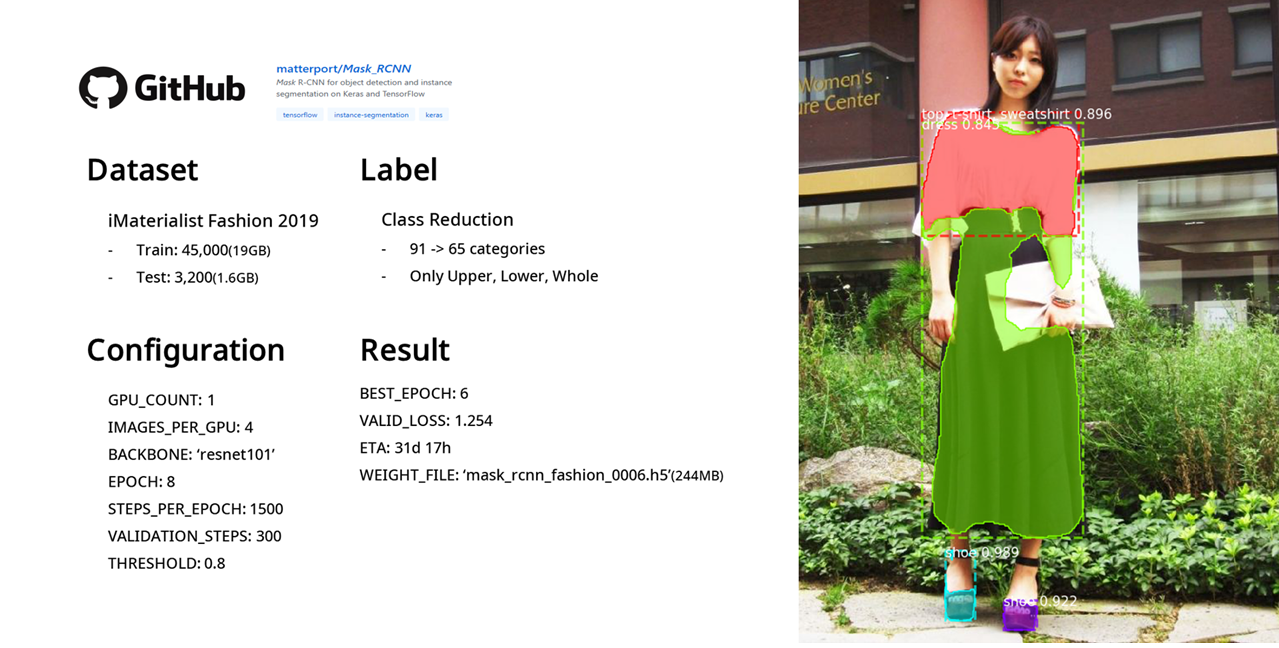
MaskingClothes is an OpenAPI that masks images and classifies upper, lower, whole items using Mask-RCNN(matterport).
model.train([train_dataset], [valid_dataset], [learning_rate], [epochs], [layers], [augmentation])start = time.time()
model.train(train_dataset, valid_dataset,
learning_rate=LR*2,
epochs=EPOCHS[0],
layers='heads',
augmentation=None)
history = model.keras_model.history.history
end = time.time()
print('Duration:', end-start, 'seconds\n')# Set Categories
categories = ["원피스", "블라우스", "코트", "롱자켓", "패딩", "티셔츠", "맨투맨", "니트", "자켓", "가디건",
"점퍼", "뷔스티", "스웨터", "남방", "스커트", "슬랙스", "린넨팬츠", "데님팬츠"]
num_cat = len(categories)# Construct CNN Model
model = Sequential()
model.add(Conv2D(32, (3, 3), input_shape=train_X.shape[1:], padding='same'))
model.add(Activation('relu'))
model.add(MaxPooling2D(pool_size=(2, 2)))
model.add(Dropout(0.25))
model.add(Conv2D(64, (3, 3), padding='same'))
model.add(Activation('relu'))
model.add(Conv2D(64, (3, 3)))
model.add(MaxPooling2D(pool_size=(2, 2)))
model.add(Dropout(0.25))
model.add(Flatten())
model.add(Dense(512))
model.add(Activation('relu'))
model.add(Dropout(0.5))
model.add(Dense(num_cat))
model.add(Activation('softmax'))
model.compile(loss='binary_crossentropy', optimizer='rmsprop', metrics=['accuracy'])If you just want to mask image, import MaskingClothes.
MaskingClothes/Source/label_descriptions.json   // Fashion Category
MaskingClothes/Source/mask_rcnn_fashion_0006.h5   // Weight File (Smart_Coordinator)
You can download source files(226.8Mb) at http://naver.me/xLvqecht
If you can't download, please contact [email protected] (Hyungkyu Choi)
def __init__(self, img_size=None, threshold=None, gpu_count=None, images_per_gpu=None):
    ...

    - img_size(default: 512)
    - threshold(default: 0.7)
    - gpu_count(default: 1)
    - images_per_gpu(default: 1)
def run(self, IMG_DIR):
...
return img, masked_image, label_type, label, score, complete
- IMG_DIR = directory of image (ex: Images/mask1.jpg)
- img = Original image (Image)
- masked_image = Result Image (list of Image)
- label_type = Upper, Lower, Whole (list)
- label = Specific category name (list)
- complete = Whether model detects items wellimport mask_clothes
model = mask_clothes.Model(img_size=512, threshold=0.7, gpu_count=1, images_per_gpu=1)
ROOT_DIR = 'Result/'
for x in range(1, 20):
img, masked_image, label_type, label, score, complete = model.run(IMG_DIR='Images/mask' + str(x) + '.jpg')
if complete is True:
for y in range(len(label)):
directory = ROOT_DIR + label_type[y] + '/' + str(x) + '_' + label[y] + '.jpeg'
masked_image[y].save(directory)import mask_clothes
model = mask_clothes.Model(img_size=512, threshold=0.7, gpu_count=1, images_per_gpu=1)
img, masked_image, label_type, label, score, complete = model.run(IMG_DIR='Images/mask1.jpg')
for x in masked_image:
x.show()We manually evaluated this model. So we should make a rule.
- Rule 1. When it classified an item as wrong,
FALSE - Rule 2. When it masked item below 50%,
FALSE
We checked whether image has both upper and lower or whole.
    upper = 0
    lower = 0
    whole = 0
    for x in r['class_ids']:
        t = x-1
        if t<5:
            upper += 1
        elif t<9:
            lower += 1
        elif t<13:
            whole += 1
    if whole>0 or (upper>0 and lower>0):
        data.append(r)
url_data.append(url)Using PEXELS images, we evaluated detailer.