SchedLock sits between your AI agents and Google Calendar, ensuring that every calendar modification passes through human review before execution. When an agent requests a calendar operation—creating an event, moving a meeting, or deleting an appointment—SchedLock captures the request, sends you a notification through your preferred channel, and waits for your explicit approval before touching your calendar.
This design acknowledges a fundamental reality of AI systems today: agents can misinterpret context, hallucinate details, or make decisions that seem reasonable in isolation but cause real problems for real schedules. SchedLock provides the checkpoint that lets you confidently grant AI tools calendar access while maintaining meaningful control over what actually gets written.
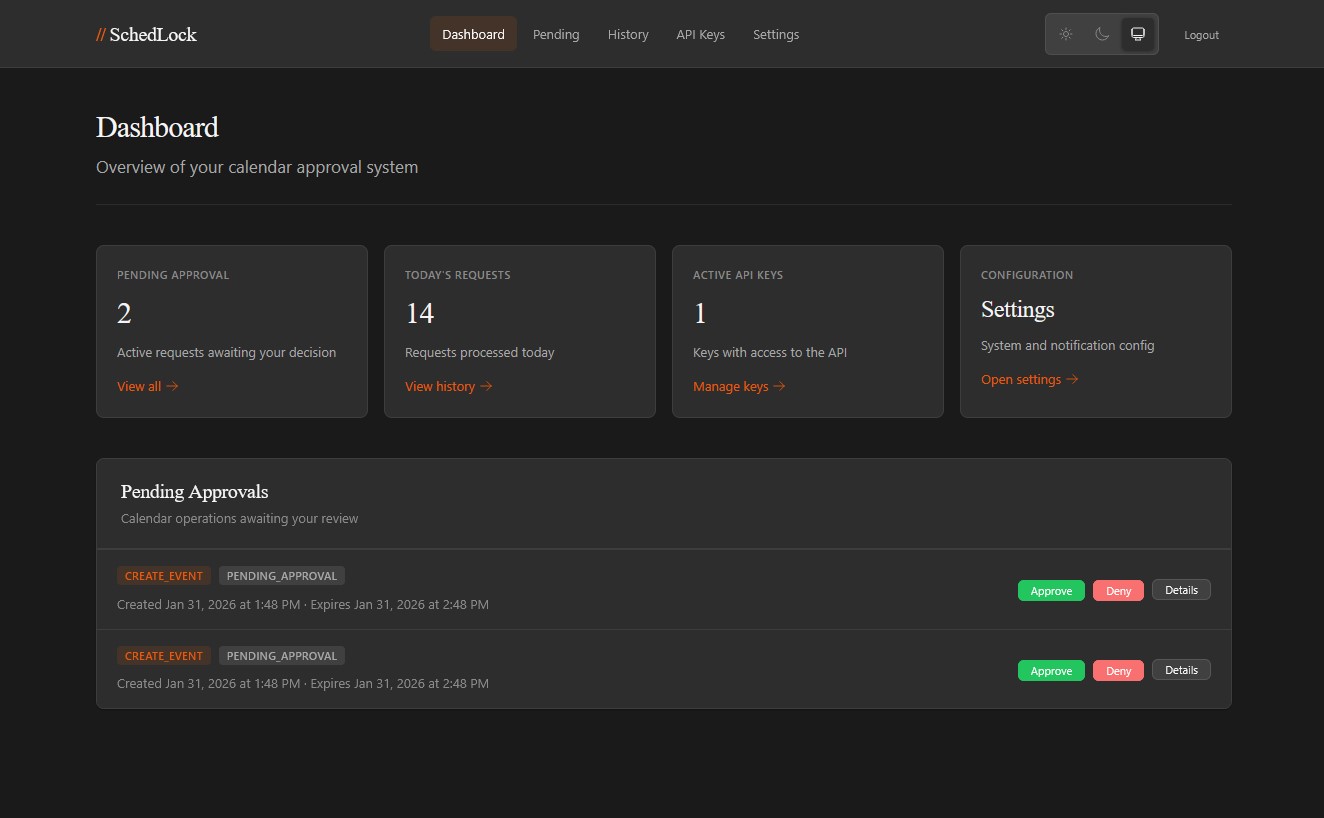
- REST API mirroring Google Calendar operations
- 3-tier API key authentication (read, write, admin)
- Human approval workflow for write operations
- Multi-provider notifications (ntfy, Pushover, Telegram, webhooks)
- Suggestion/change request capability
- Web UI for configuration and manual approvals
- Docker deployment with SQLite persistence
- Docker and Docker Compose
- Google Cloud project with Calendar API enabled (optional, can configure later)
- OAuth 2.0 credentials (for headless/desktop app)
-
Clone and start:
git clone https://github.com/dtorcivia/schedlock.git cd schedlock docker-compose up -d -
Complete the Setup Wizard:
- Open
http://localhost:8080in your browser - On first run, the setup wizard will guide you through:
- Setting an admin password
- Configuring the server base URL
- (Optional) Setting up Google OAuth credentials
- The wizard will automatically generate encryption keys and save configuration
- Open
-
Restart after setup:
docker-compose restart
-
Connect Google Calendar:
- Log in with your admin password
- Go to Settings → Connect Google Calendar
- Follow the OAuth flow
-
Create an API key:
- Go to API Keys in the web UI
- Create a "write" tier key for your AI agent
-
Set up agent SKILL.md
- Direct your agent to https://yoururl.tld/SKILL.md
- Provide agent with your api key
If you prefer to configure manually instead of using the setup wizard:
- Copy
.env.exampleto.env - Generate secrets:
# Generate server secret
openssl rand -base64 32

# Generate encryption key
openssl rand -base64 32

# Generate password hash
./schedlock hash-password "YourPassword"
- Configure
.envwith your secrets, Google OAuth credentials, and notification settings
Include your API key in the Authorization header:
Authorization: Bearer sk_write_xxxxxxxxxxxx# List calendars
GET /api/calendar/list
# List events
GET /api/calendar/{calendarId}/events?timeMin=2024-01-01T00:00:00Z
# Get event
GET /api/calendar/{calendarId}/events/{eventId}
# Free/busy query
GET /api/calendar/freebusy?timeMin=...&timeMax=...# Create event
POST /api/calendar/events/create
{
"calendarId": "primary",
"summary": "Team Meeting",
"start": "2024-01-15T10:00:00-05:00",
"end": "2024-01-15T11:00:00-05:00",
"location": "Conference Room A",
"attendees": ["alice@example.com"]
}
# Response
{
"request_id": "req_abc123",
"status": "pending_approval",
"expires_at": "2024-01-14T10:15:00Z"
}# List your requests
GET /api/requests
# Get request status
GET /api/requests/{requestId}
# Cancel pending request
POST /api/requests/{requestId}/cancel- Client submits write operation
- SchedLock stores request and sends notifications
- Human receives notification with approve/deny/suggest options
- On approval, operation executes against Google Calendar
- Webhook notifies client of result
| Environment Variable | Description | Required |
|---|---|---|
SCHEDLOCK_SERVER_SECRET |
HMAC key for API key hashing | Yes |
SCHEDLOCK_ENCRYPTION_KEY |
Encryption key for OAuth token storage | Yes |
SCHEDLOCK_AUTH_PASSWORD_HASH |
Admin password (Argon2id) | Yes |
SCHEDLOCK_ADMIN_PASSWORD |
Admin password (plaintext, dev only) | No |
SCHEDLOCK_GOOGLE_CLIENT_ID |
Google OAuth client ID | Yes |
SCHEDLOCK_GOOGLE_CLIENT_SECRET |
Google OAuth secret | Yes |
SCHEDLOCK_BASE_URL |
Public URL for callbacks | Yes |
SCHEDLOCK_NTFY_ENABLED |
Enable ntfy notifications | No |
SCHEDLOCK_PUSHOVER_ENABLED |
Enable Pushover notifications | No |
SCHEDLOCK_TELEGRAM_ENABLED |
Enable Telegram notifications | No |
SCHEDLOCK_WEBHOOK_ENABLED |
Enable generic webhook notifications | No |
See .env.example for full configuration options.
- Optional YAML config file:
/data/config.yaml(or setSCHEDLOCK_CONFIG_FILE). - Runtime settings saved in the web UI override config file/env for:
- Approval timeout and default action
- Retention enable/disable and retention windows
- Logging level/format
- Display timezone and formats
SCHEDLOCK_NTFY_ENABLED=true
SCHEDLOCK_NTFY_TOPIC=your-topic
SCHEDLOCK_NTFY_SERVER_URL=https://ntfy.shSCHEDLOCK_PUSHOVER_ENABLED=true
SCHEDLOCK_PUSHOVER_APP_TOKEN=your-app-token
SCHEDLOCK_PUSHOVER_USER_KEY=your-user-keySCHEDLOCK_TELEGRAM_ENABLED=true
SCHEDLOCK_TELEGRAM_BOT_TOKEN=123456:ABC...
SCHEDLOCK_TELEGRAM_CHAT_ID=your-chat-id
SCHEDLOCK_TELEGRAM_WEBHOOK_SECRET=your-secret-tokenFor custom integrations with home automation, monitoring systems, or services without native support:
SCHEDLOCK_WEBHOOK_ENABLED=true
SCHEDLOCK_WEBHOOK_URL=https://your-server.com/webhook
SCHEDLOCK_WEBHOOK_SECRET=your-hmac-secret
SCHEDLOCK_WEBHOOK_TIMEOUT=10
SchedLock sends JSON payloads to your webhook URL for each notification event:
{
  "event": "approval_request",
  "timestamp": "2024-01-15T10:30:00Z",
  "request_id": "req_abc123",
  "operation": "create_event",
  "summary": "Team Meeting",
  "expires_at": "2024-01-15T10:45:00Z",
  "urls": {
    "approve": "https://schedlock.example.com/api/callback/approve/token",
    "deny": "https://schedlock.example.com/api/callback/deny/token",
    "web": "https://schedlock.example.com/requests/req_abc123"
  },
  "details": {
    "title": "Team Meeting",
    "start_time": "2024-01-20T10:00:00-05:00",
    "end_time": "2024-01-20T11:00:00-05:00"
  }
}
If you provide a secret, each request includes an HMAC-SHA256 signature in the X-SchedLock-Signature header. Verify by computing HMAC-SHA256(secret, request_body) and comparing the hex-encoded result.
- API keys use HMAC-SHA256 hashing (not stored in plain text)
- OAuth tokens encrypted with AES-256-GCM
- Single-use decision tokens for approval callbacks
- Rate limiting per API key tier
- Rate limiting on web UI login (per IP)
- CSRF protection on web UI
- Secure session management
┌─────────────┐     ┌─────────────┐     ┌─────────────┐
│   Moltbot   │────▶│  SchedLock  │────▶│   Google    │
│  (AI Agent) │     │   (Proxy)   │     │  Calendar   │
└─────────────┘     └──────┬──────┘     └─────────────┘
                          │
                    ┌─────┴─────┐
                    ▼           ▼
              ┌─────────┐ ┌─────────┐
              │  Human  │ │  Web UI │
              │ (ntfy)  │ │ (Admin) │
              └─────────┘ └─────────┘
# Run locally
go run ./cmd/server

# Run tests
go test ./...

# Build binary
go build -o schedlock ./cmd/serverMIT License - see LICENSE file for details.