Repository navigation
GitHub Tutorial
Git is a version control system. It is used for tracking changes in source code during software development and enables coordination between software developers.
A version control system tracks the history of changes as people and teams collaborate on projects together. It records changes to a file or set of files over time so that developers can recall specific versions later. Developers can review project history to find out:
- Which changes were made?
- Who made the changes?
- When were the changes made?
- Why were changes needed?
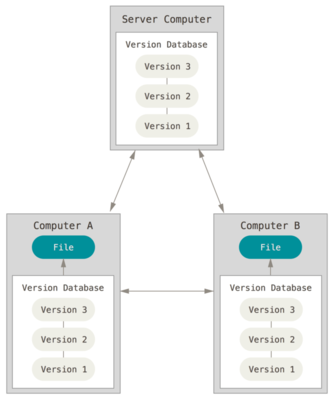
- If developers accidentally delete or change their code, using git can help them to get it back.
- Git lets developers share and exchange code with other developers easily.
- Git lets everybody track recent changes in a software project.
- Git lets developers backup their code easily to a remote server.
Watch: GitHub has always made it easy to "watch" a project, which means you're notified whenever there are any updates.
Stars: Stars are a new way to keep track of repositories that you find interesting. When you star a project you can keep track of it, but you won't be notified of every change.
Fork: A fork is a copy of a repository. Forking a repository allows you to freely experiment with changes without affecting the original project.
Pull requests: Pull requests let you tell others about changes you've pushed to a GitHub repository. Once a pull request is sent, interested parties can review the set of changes, discuss potential modifications, and even push follow-up commits if necessary.
Merge: Merging takes the changes from one branch (in the same repository or from a fork), and applies them into another.
Pull: Pull refers to when you are fetching in changes and merging them.
Branch: A branch is a parallel version of a repository. It is contained within the repository, but does not affect the primary or master branch allowing you to work freely without disrupting the "live" version. When you've made the changes you want to make, you can merge your branch back into the master branch to publish your changes.
Commit: A commit, or "revision", is an individual change to a file (or set of files).
Fetch: Fetching refers to getting the latest changes from an online repository without merging them in.
Status and Status Check: A status is a type of status check on GitHub. Status checks are external processes, such as continuous integration builds, which run for each commit you make in a repository.
- git init [repo name] = This command creates new repo.
- git clone [url] = This command clones a repo from an URL into a local directory.
- git add [filename] = This command adds a file to the staging area.
- git commit -m "[message]" = This command records changes to the local repository.
- git pull = This command gets the changes from the remote repo and updates the local repo.
- git status = This command prints the files that can be committed.
- git merge [branch] = This command merges the specified branch into current branch.
- git push = This command sends changes of master branch to remote repo.

- http://blog.robertelder.org/what-is-git/
- https://guides.github.com/introduction/git-handbook/
- https://danielkummer.github.io/git-flow-cheatsheet/
- https://www.edureka.co/blog/git-commands-with-example/#git%20init
- https://help.github.com/articles/github-glossary/
- https://services.github.com/on-demand/downloads/github-git-cheat-sheet.pdf
- https://git-scm.com/book/en/v2/Getting-Started-About-Version-Control