


A Python tool for searching, filtering, and organizing job listings from the AAS Job Register.
Author: Brendan Griffen (@brendangriffen)
Based on gully/AASjobRegister with extensive modifications.
- Fetch current job listings from the AAS Job Register
- Filter jobs by career type (Faculty, Postdoc, PhD, Engineering, Management, Other)
- Search job descriptions using custom keywords
- Generate interactive HTML tables viewable in your browser
- Visualize job deadlines on a timeline
- Track days remaining until application deadlines
- Create keyword frequency histograms
- Command-line interface with flexible options
- Python 3.7+
git clone https://github.com/bgriffen/easyaasjobs.git
cd easyaasjobs
pip install -e .
This installs the easyaasjobs command-line tool.
git clone https://github.com/bgriffen/easyaasjobs.git
cd easyaasjobs
pip install -r requirements.txt
python getastrojobs.pyAfter installation, use the easyaasjobs command:
# Run with default settings
easyaasjobs

# Force fetch fresh data from AAS website
easyaasjobs --fetch

# Run without opening browser
easyaasjobs --no-browser

# Run without generating plots
easyaasjobs --no-plot

# Use a custom config file
easyaasjobs --config myconfig.py

# Specify data directory
easyaasjobs --data-dir ./dataEdit getastrojobs.py to customize your search:
from easyaasjobs import Config, run_search

config = Config()

# Career Options - Select which job types you want to see
config.want_faculty_jobs = False
config.want_postdoc_job = True
config.want_phd = False
config.want_engineering_job = False
config.want_management_jobs = False
config.want_other_jobs = False

# Display/Output Options
config.open_results_in_browser = True
config.want_deadline_plot = True
config.select_over_keywords = True
config.filter_over_job_id = False
config.plot_keyword_hist = True

# Keywords to search for in job descriptions
config.keywords = [
    'theor',
    'computational',
    'galax',
    'data science',
    'simulations',
]

run_search(config)Use the package programmatically:
from easyaasjobs import Config, run_search

config = Config()
config.want_postdoc_job = True
config.keywords = ['computational', 'simulations']
run_search(config)-
Initial Query: Run with
select_over_keywords = Trueto get a broad view of jobs matching your interests. -
Review Results: The interactive browser table shows all matching jobs sorted by deadline. Note the
days_leftcolumn to prioritize upcoming deadlines. -
Refine Selection: After reviewing, note the job IDs (first column) of positions you want to track.
-
Track Specific Jobs: Add those job IDs and enable filtering:
config.filter_over_job_id = True
config.job_ids_filter = [51388, 51391, 51554, 51591, 51624]
-
Generate Reports: Re-run to create deadline plots for your shortlisted positions.
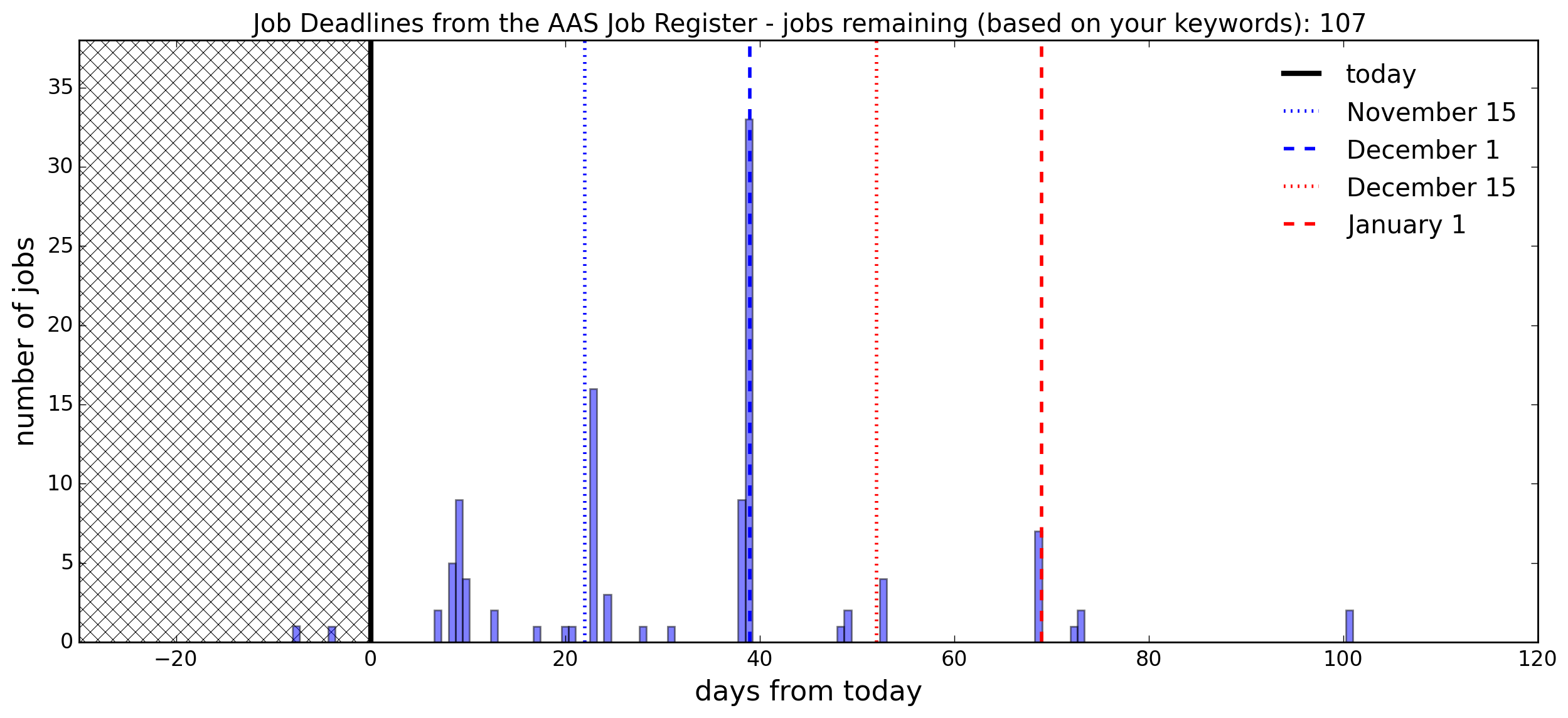
Shows job deadlines relative to today, with key dates marked (November 15, December 1, etc.). Past deadlines are shaded.
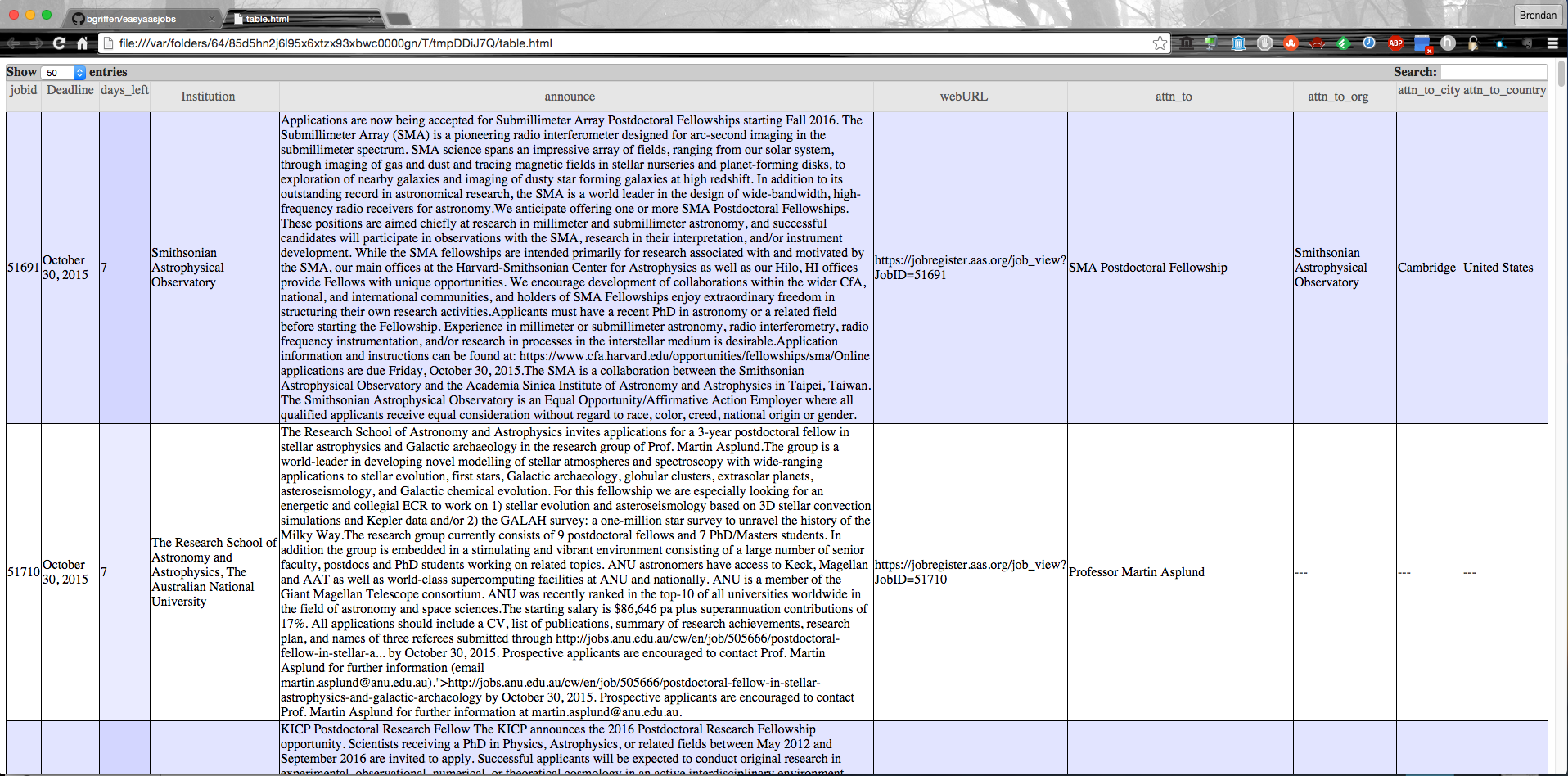
A searchable, sortable table that opens in your browser. The days_left column helps prioritize applications.
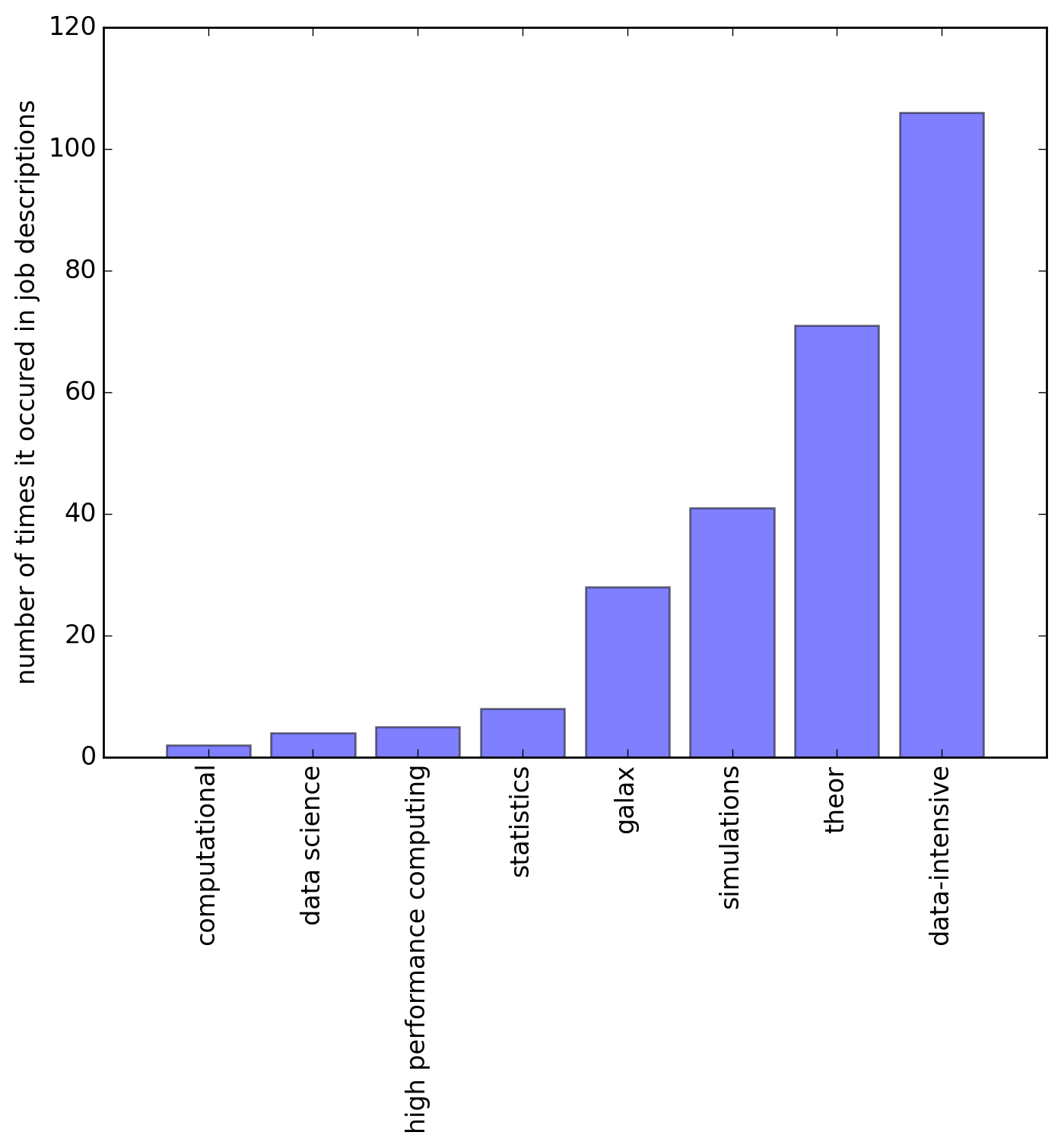
Shows how frequently each of your keywords appears across job descriptions.
| File | Description |
|---|---|
jobsforme.txt |
Complete job data with all fields |
abbriev.dat |
Abbreviated job data (excludes full announcements) |
announcements.txt |
Full text of job announcements |
jobs_left_timeline.png |
Deadline visualization |
keywords.png |
Keyword frequency histogram |
easyaasjobs/
├── easyaasjobs/          # Main package
│   ├── __init__.py       # Package exports
│   ├── cli.py            # Command-line interface
│   ├── config.py         # Configuration class
│   ├── jfind.py          # Web scraping module
│   └── jtools.py         # Analysis and visualization
├── getastrojobs.py       # Configuration script (edit this)
├── pyproject.toml        # Package metadata
├── requirements.txt      # Dependencies
├── .gitignore
└── README.md
The AAS website structure may have changed. Please open an issue on GitHub.
- Check your internet connection
- The AAS website may be temporarily unavailable
- Try running with
--fetchto get fresh data
Delete the generated data files or run with --fetch:
rm jobsforme.txt abbriev.dat announcements.txt
easyaasjobs
# or
easyaasjobs --fetchMIT License - see repository for details.
Contributions are welcome! Please feel free to submit issues or pull requests.