






CrossMacro is a cross-platform mouse and keyboard macro recorder and player with macro editor, text expansion, shortcuts, and scheduling.
- Linux support for Wayland and X11
- Windows support (Microsoft Store, winget, portable binary)
- macOS support
- Features
- Screenshots
- Quick Start
- Installation
- CLI Usage
- Troubleshooting
- Contributing
- Security
- Contributors
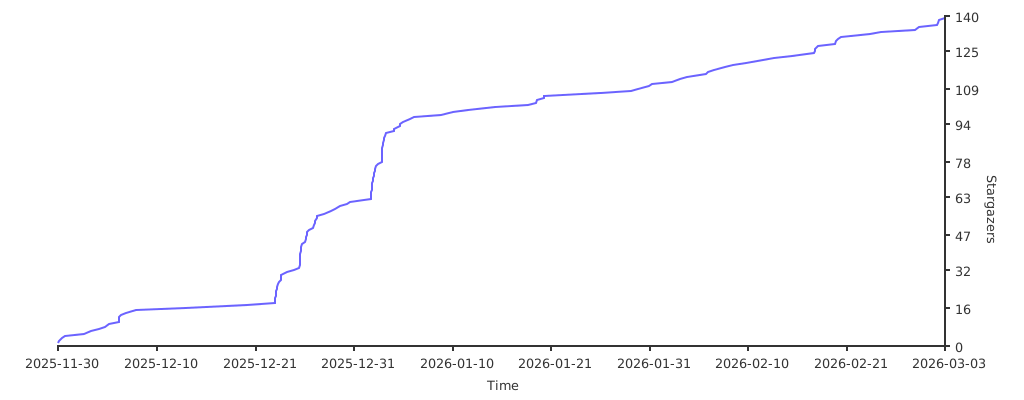
- Star History
- License
- Community
- Mouse event recording (clicks and movement)
- Keyboard event recording
- Macro playback with pause/resume
- Loop mode, repeat count, and repeat delay controls
- Playback speed control (
0.1xto10.0x) - Macro editor with undo/redo, coordinate capture, and action reordering
- Text expansion shortcuts (for example
:mail->email@example.com) - Shortcut-bound macro execution (keyboard key, mouse button, or key combo)
- Shortcut modes: toggle and run-while-held
- Shortcut loop controls: repeat count and repeat delay
- Scheduled task execution
- Save and load
.macrofiles - Optional system tray controls
- Theme support (Classic, Latte, Mocha, Dracula, Nord, Everforest, Gruvbox, Solarized, Crimson)
- Customizable global hotkeys:
F8start/stop recordingF9start/stop playbackF10pause/resume playback
- CLI and headless workflows
| Playback | Text Expansion | Shortcuts |
|---|---|---|
 |
 |
 |
| Scheduled Tasks | Editor | Settings |
 |
 |
 |
- Install CrossMacro.
- Launch the app.
- Press
F8to start/stop recording. - Press
F9to start/stop playback. - Press
F10to pause/resume playback. - Save your macro and optionally bind it to a shortcut.
Download page for all release binaries:
| Platform | Channel | Command / Link | Notes |
|---|---|---|---|
 |
Flathub | Storeflatpak install flathub io.github.alper_han.crossmacro |
Sandboxed install |
 |
.deb |
sudo apt install ./crossmacro*.deb |
Download from Releases |
 |
.rpm |
sudo dnf install ./crossmacro*.rpm |
Download from Releases |
 |
AUR | yay -S crossmacroparu -S crossmacro |
Community package |
 |
AppImage | Releases | One-time setup required |
 |
nixpkgs | nix profile install nixpkgs#crossmacro |
Unstable channel |
 |
flake | nix run github:alper-han/CrossMacro |
Run from repo |
 |
Store | Store | Managed updates |
 |
winget | winget install AlperHan.CrossMacro |
CLI install |
 |
Portable EXE | Releases | Self-contained |
 |
.dmg |
Releases | Drag to Apps |
AppImage users: Run the quick one-time setup in AppImage Setup before first launch.
After installing Linux packages (.deb, .rpm, AUR), run:
sudo usermod -aG crossmacro $USER
sudo systemctl enable --now crossmacro.service
# Reboot or re-login for group changesIf you use the AppImage build on Linux, complete this one-time setup before first launch:
# Add uinput rule
echo 'KERNEL=="uinput", GROUP="input", MODE="0660", OPTIONS+="static_node=uinput"' | sudo tee /etc/udev/rules.d/99-crossmacro.rules

# Reload udev rules
sudo udevadm control --reload-rules && sudo udevadm trigger

# Add your user to input group
sudo usermod -aG input $USER
Then reboot/re-login and run:
chmod +x CrossMacro-*.AppImage
./CrossMacro-*.AppImage
Note: adding a user to input grants direct access to input devices.
Nixpkgs (unstable)
nix profile install nixpkgs#crossmacroRun directly from this repo flake
nix run github:alper-han/CrossMacroUse as flake input in your own flake.nix
{
  inputs.crossmacro.url = "github:alper-han/CrossMacro";

  outputs = { self, crossmacro, ... }:
  let
    system = "x86_64-linux";
  in {
    packages.${system}.crossmacro = crossmacro.packages.${system}.default;
  };
}
NixOS module
{
  inputs.crossmacro.url = "github:alper-han/CrossMacro";

  outputs = { nixpkgs, crossmacro, ... }: {
    nixosConfigurations.myhost = nixpkgs.lib.nixosSystem {
      system = "x86_64-linux";
      modules = [
        crossmacro.nixosModules.default
        ({ ... }: {
          programs.crossmacro = {
            enable = true;
            users = [ "yourusername" ];
          };
        })
      ];
    };
  };
}
Windows notes
Update an existing winget install:
winget upgrade -e --id AlperHan.CrossMacroFor Store and fresh-install options, use the Quick Install Matrix above.
macOS notes
- Download
.dmgfrom Releases. - Drag CrossMacro to Applications.
- Launch and grant Accessibility permissions when prompted.
If Gatekeeper blocks first launch:
xattr -cr /Applications/CrossMacro.appcrossmacro --help
crossmacro --version
crossmacro play ./demo.macro --speed 1.25 --repeat 3
crossmacro macro validate ./demo.macro
crossmacro macro info ./demo.macro
crossmacro doctor --json
crossmacro settings get
crossmacro settings get playback.speed
crossmacro settings set playback.speed 1.25
crossmacro schedule list
crossmacro schedule run <task-guid>
crossmacro shortcut list
crossmacro shortcut run <shortcut-guid>
crossmacro record --output ./recorded.macro --duration 10
crossmacro run --step "move abs 800 400" --step "click left" --dry-run
crossmacro headlessDaemon not running (Linux)
systemctl status crossmacro.service
sudo systemctl start crossmacro.service
sudo systemctl enable crossmacro.service
Linux input permissions
groups | grep crossmacro
sudo usermod -aG crossmacro $USER
Reboot or re-login after group changes.
GNOME Wayland extension
GNOME Wayland needs a shell extension for absolute mouse position. Log out/in after first-time setup if prompted.
Wayland cursor positioning options
CrossMacro works on Wayland.
- Absolute cursor position is available on:
- Hyprland (IPC)
- KDE Plasma (D-Bus)
- GNOME (Shell Extension)
- On other compositors, CrossMacro automatically uses relative-position mode.
- You can force relative mode with Force Relative Coordinates.
- You can disable origin move at recording start with Skip Initial 0,0 Position.
Both absolute and relative modes support macro recording and playback.
Enable debug logging
sudo systemctl kill -s USR1 crossmacro.service
journalctl -u crossmacro.service -f
Send USR1 again to restore normal log level.
Polkit on minimal systems
which pkcheck
pkcheck --version
Install polkit to enable daemon mode on minimal systems.
Input capture conflicts (Linux)
Some applications can lock input devices exclusively. If capture/playback behaves inconsistently, pause conflicting tools (example: GPU Screen Recorder), test CrossMacro, then resume them.
- Contribution guide: CONTRIBUTING.md
- Issues (bugs/features): https://github.com/alper-han/CrossMacro/issues
- Discussions (questions/ideas): https://github.com/alper-han/CrossMacro/discussions
- Security policy: SECURITY.md
- Private vulnerability reporting: https://github.com/alper-han/CrossMacro/security/advisories/new
Thanks to everyone who contributes to CrossMacro.
Licensed under GPL-3.0. See LICENSE.


![@dependabot[bot]](https://avatars.githubusercontent.com/in/29110?s=64&v=4)


