Watch this video to learn more about what happens when you visit a website:
When you enter a website URL (like www.replit.com) in your browser, your computer first checks if it already knows the IP address (from cache). If not, it sends a DNS query to a DNS server to resolve the domain name into an IP address. This process may involve multiple DNS servers (recursive, root, TLD, and authoritative servers) to find the correct IP address for the domain.

The DNS server responds with the IP address associated with the domain name. This response is sent back to your computer, which stores (caches) the result for future use. Now, your computer knows the exact IP address of the server hosting the website you want to visit, allowing it to initiate a connection to that server.

- Layer: Transport Layer (Layer 4 in the OSI model)
- Purpose: Provides reliable, ordered, and error-checked delivery of data between applications running on hosts communicating via an IP network
- Layer: Application Layer (Layer 7 in the OSI model)
- Purpose: Defines how messages are formatted and transmitted, and how web servers and browsers should respond to various commands.
- How it works:
- Runs on top of TCP (usually on port 80 for HTTP, 443 for HTTPS).
- Used specifically for transferring web pages, images, and other resources on the World Wide Web.
- A client (browser) sends an HTTP request (like GET or POST), and the server responds with an HTTP response (like HTML, JSON, etc.).
- Analogy: Like the language and rules you use during the phone call (e.g., asking for information, saying hello/goodbye).
In short:
- TCP is like the delivery service ensuring your package arrives safely and in order.
- HTTP is like the instructions inside the package, telling you what to do with it.
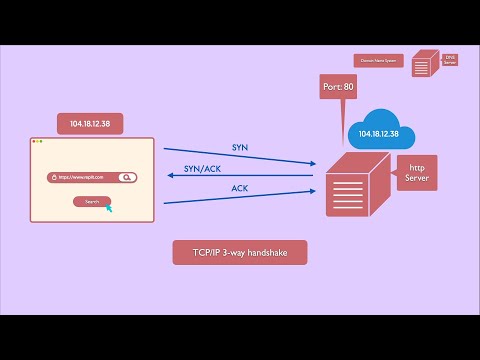
Your computer starts a Transmission Control Protocol (TCP) connection to the server's IP address (typically on port 80 for HTTP or 443 for HTTPS). The connection is established using the TCP 3-way handshake: your computer sends a SYN packet, the server replies with a SYN/ACK, and your computer responds with an ACK. This handshake ensures a reliable connection is set up before any data is transferred.

With the connection established, your browser sends an HTTP GET request to the server, asking for the web page and its resources (HTML, CSS, JavaScript, images, etc.). The server processes the request and sends back the requested files as HTTP responses. This step may involve multiple requests for different resources needed to render the page.

Your browser receives the HTML and other resources from the server. It parses the HTML, loads additional resources (like images and scripts), and renders the web page for you to interact with. The process may continue with further requests as you interact with the site (e.g., clicking links, submitting forms).

Rendering is the act of turning code (JavaScript, templates, data, etc.) into a visual web page (HTML, CSS, images, etc.) that the browser can display to the user.
-
Client Side Rendering (CSR) (HTML is generated dynamically by the browser using javascript after the initial load) CSR: The browser builds the page using JavaScript after the initial load.
The browser (client) downloads a minimal HTML file and JavaScript. The JavaScript runs in the browser and generates the HTML for the page dynamically. Rendering happens in the user's browser. Example: Single Page Applications (SPAs) built with React, Angular, or Vue.
-
Server Side Rendering (SSR) (HTML is generated at request time (every time a user requests a page)) SSR: HTML is generated on the server for every user request, allowing for dynamic content.
The server generates the complete HTML for the page before sending it to the browser. The browser receives a fully rendered HTML page and displays it immediately. Rendering happens on the server, before the page is sent to the client. Example: Traditional websites, or frameworks like Next.js (SSR mode).
-
Static Site Generation (SSG) / Server Side Generation ( HTML is generated at build time) SSG: HTML is generated once, ahead of time, and served as static files.
The HTML for each page is generated at build time (before any user requests). The server (or CDN) serves pre-built static HTML files to users. Rendering happens ahead of time, not per request. Example: Sites built with Gatsby, Hugo, or Next.js (SSG mode).