
Voice-first SMS and email for Even Realities G2 smart glasses.
Speak a message. Check it. Send it. Without reaching for your phone.
Architecture · Deployment · Configuration · API · Even Realities integration · Security
Important
VOX is self-hosted. Installing the app is not enough to use it.
There is no VOX service to sign up for. You run the server — on your own VPS, with your own Twilio, email and model-provider credentials — and the glasses app connects to it. An unpaired install shows a pairing screen and nothing else.
Because the Even Realities platform pins each build to a single domain in its
network whitelist (wildcards are not supported), you also build your own
.ehpk rather than installing someone else's. Installation
walks through the whole path: server → dashboard → build → pair.
VOX turns the G2 into a messenger you talk to. Tap the temple, say what you mean, and VOX writes it — then shows you exactly who it is going to and what it says, before anything is sent. Messages go out as SMS through your Twilio number or as email through your own account, so replies land in the inbox you already use and sent mail appears in your real Sent folder.
It runs entirely on infrastructure you own. There is no VOX-operated backend, no account to create, and no third party between you and the services you configure.
┌──────────────┐   BLE    ┌──────────────┐   HTTPS   ┌──────────────┐
│  G2 glasses  │◄────────►│  Even        │◄─────────►│  VOX server  │
│  576×288 HUD │          │  Realities   │           │  (your VPS)  │
│  1 touch pad │          │  phone app   │           │              │
└──────────────┘          └──────────────┘           └──────┬───────┘
                                                            │
                          ┌─────────────────────────────────┼───────────┐
                     ┌────▼────┐        ┌──────▼─────┐ ┌────▼────┐ ┌────▼────┐
                     │ Twilio  │        │ SMTP/IMAP  │ │ Whisper │ │  LLM    │
                     │  SMS    │        │ your inbox │ │  STT    │ │ rewrite │
                     └─────────┘        └────────────┘ └─────────┘ └─────────┘
Requires: Node 20+, a small VPS with a domain, and your own Twilio / email / model-provider credentials. License: MIT.
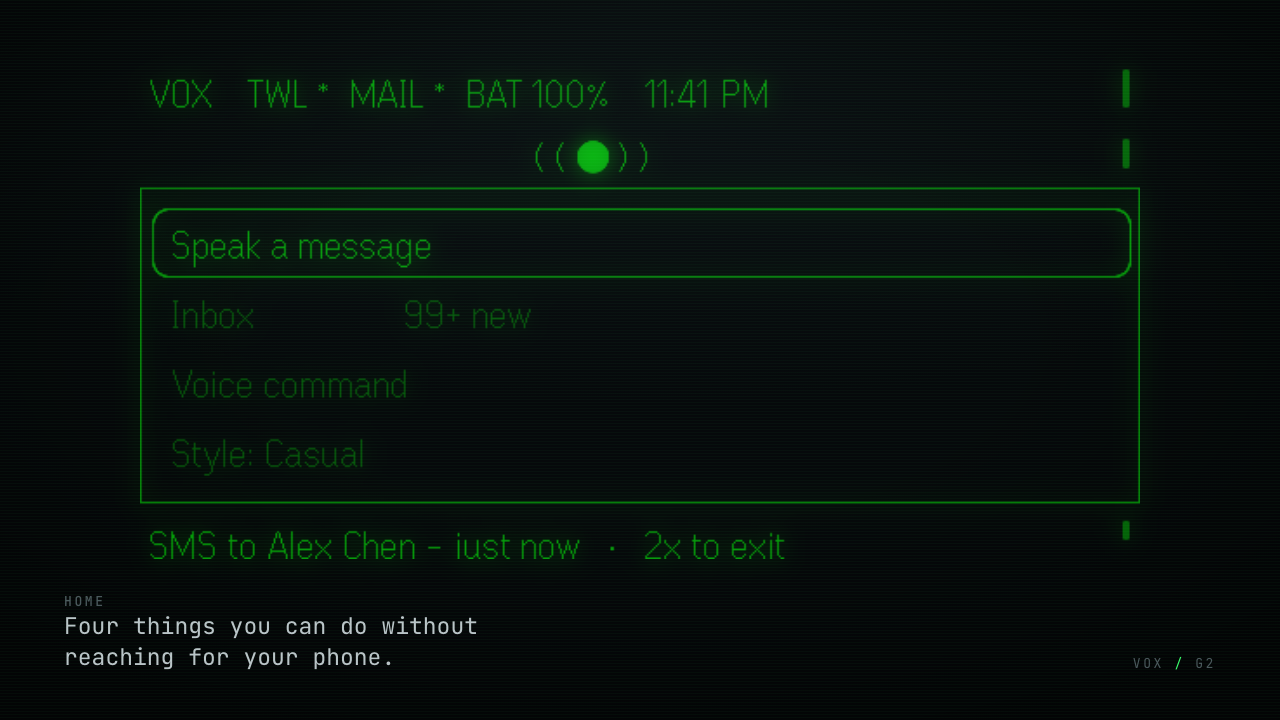
The G2 has one touch surface, so the entire app is three gestures — scroll to move the highlight, tap to activate, double tap to go back or, on home, to leave. Every screen names its actions along the bottom edge.
Four features, each one tap away. The breathing signal above the menu means VOX is awake and connected; the status bar carries Twilio, email and battery; the footer shows your last send. All of it arrives in a single API call, because cold start over a Bluetooth link has a latency budget.
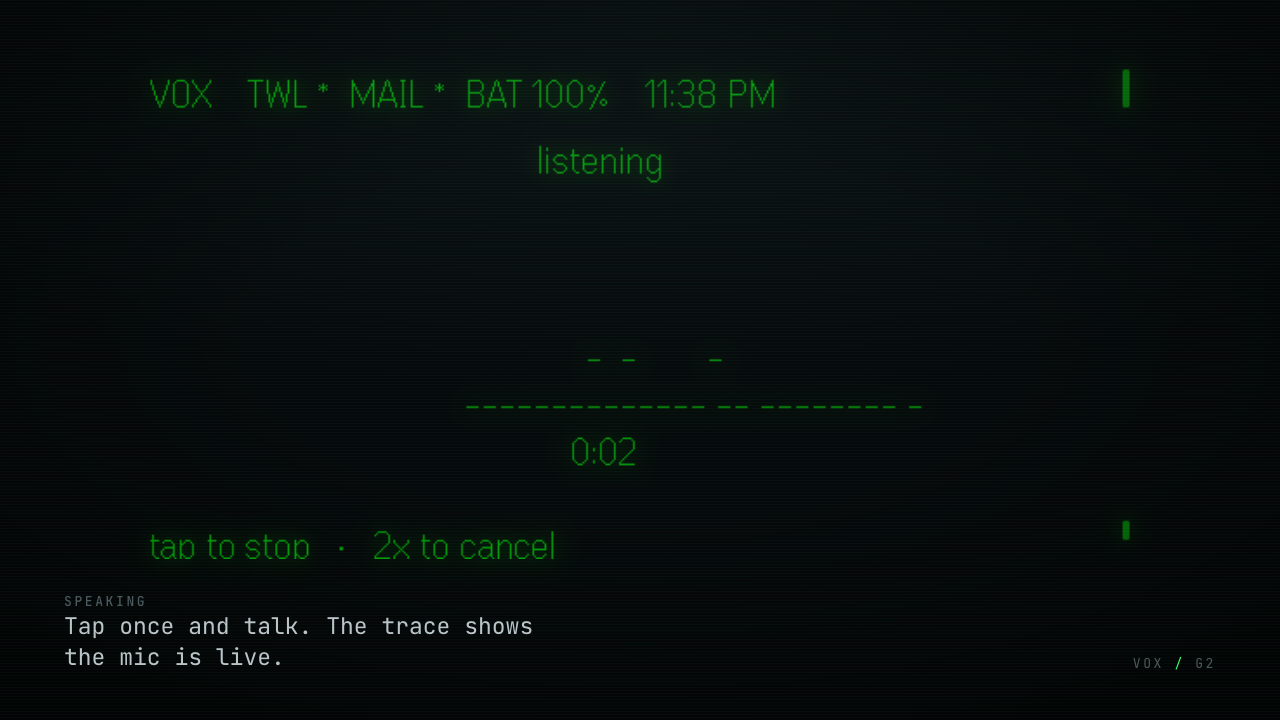
The microphone opens on the glasses input source explicitly, and a live four-row oscilloscope shows it is hearing you — one mark per column at that moment's amplitude, smoothed so it flows rather than strobes.
Recording ends when you tap, when you stop talking, or at your configured maximum. Audio streams to your server, where Whisper transcribes it.
If the microphone captured nothing, VOX says so. It does not invent a message — speech models produce confident, plausible text from silence, often in the wrong language, so the server refuses below an amplitude floor.
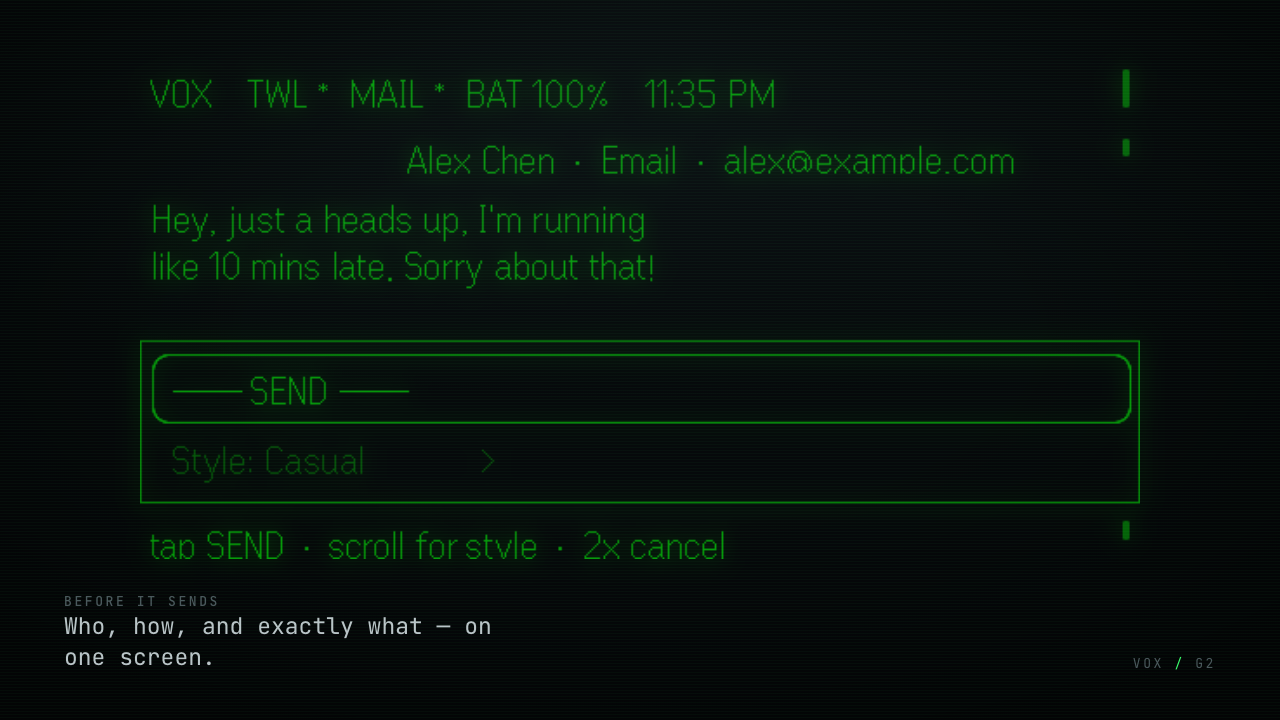
Nothing sends unattended. One header line answers the three things you must verify — who, how, and the real destination address — above the exact message body.
Meanwhile the server has parsed who you meant, decided whether this should be a text or an email, and generated seven rewrites. All of it in one round trip.
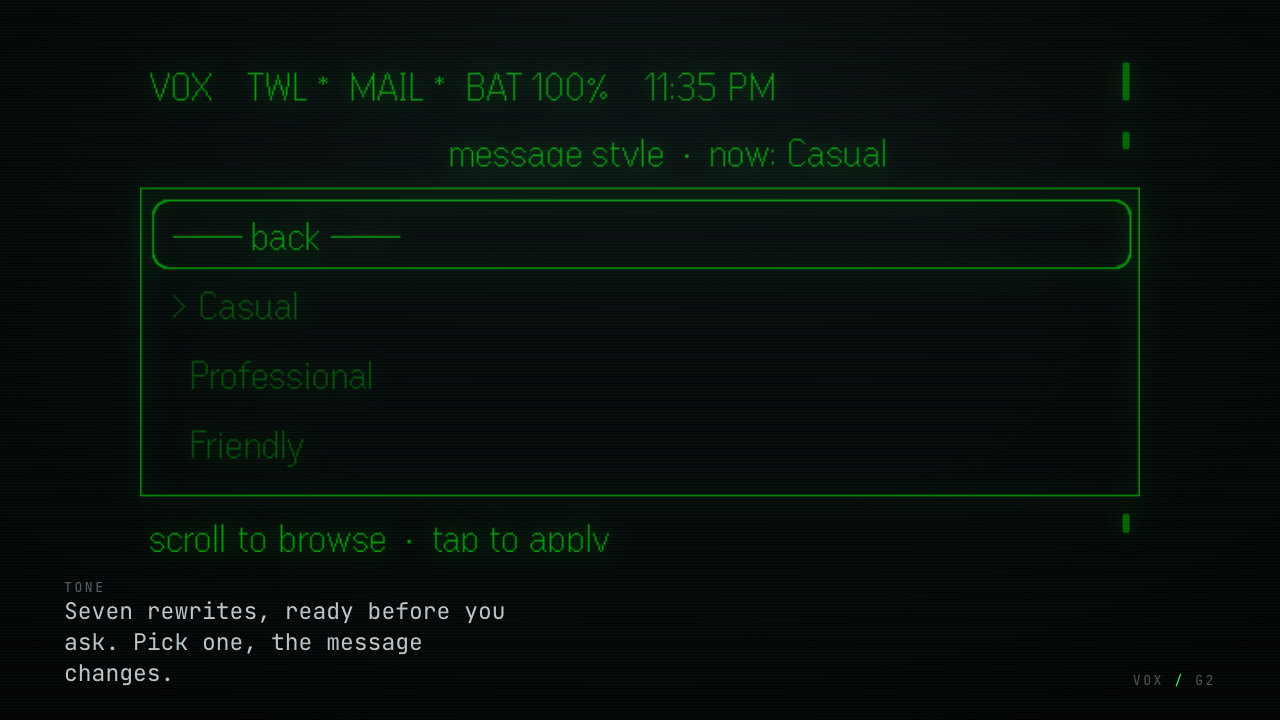
Seven styles: Casual, Professional, Friendly, Formal, Sarcastic, Grammar (your words, cleaned up) and Original (untouched). They were all generated while you were reading the first one, so applying one is instant and costs no extra round trip — it is a local lookup.
If the recipient has both a phone number and an email address, this same menu offers to switch channel.
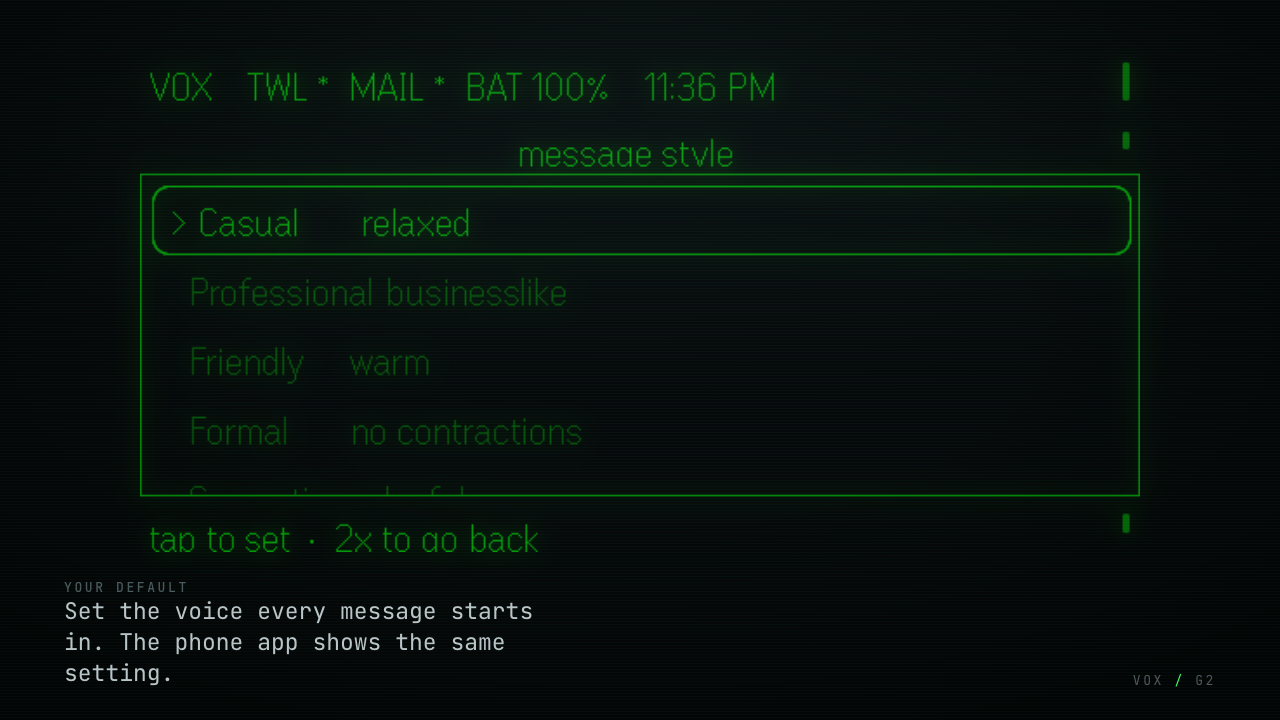
This sets the style new messages start in, saved to your server. Change it
on the glasses and the dashboard shows it; change it on the dashboard and the
glasses pick it up. Both surfaces read the same preferences row — there is
no synchronisation layer because there is nothing to synchronise.
Received SMS (Twilio webhook) and email (a persistent IMAP IDLE connection) appear in a HUD inbox, newest first, unread marked. Opening one and tapping reply starts a message with the recipient and channel already locked to that sender — you only have to speak.
Say what you want instead of navigating: "open inbox", "send Alex I'm running late", "save 415 555 0142 as Mom", "cancel". A classifier decides which one you meant. Compose, navigate, save-contact and cancel run on the glasses; search and settings direct you to the dashboard.
VOX ships one bundle that renders two surfaces. The same code that draws the HUD also renders a companion page inside the Even Realities app: service health, today's counts, your current message style, quick links and recent activity. Open dashboard signs you into the full web dashboard without typing anything, using a single-use token that expires in three minutes.
The dashboard — contacts, templates, integrations, history, diagnostics, preferences — is a React SPA served from the same domain, built mobile-first because that is where it is actually used.
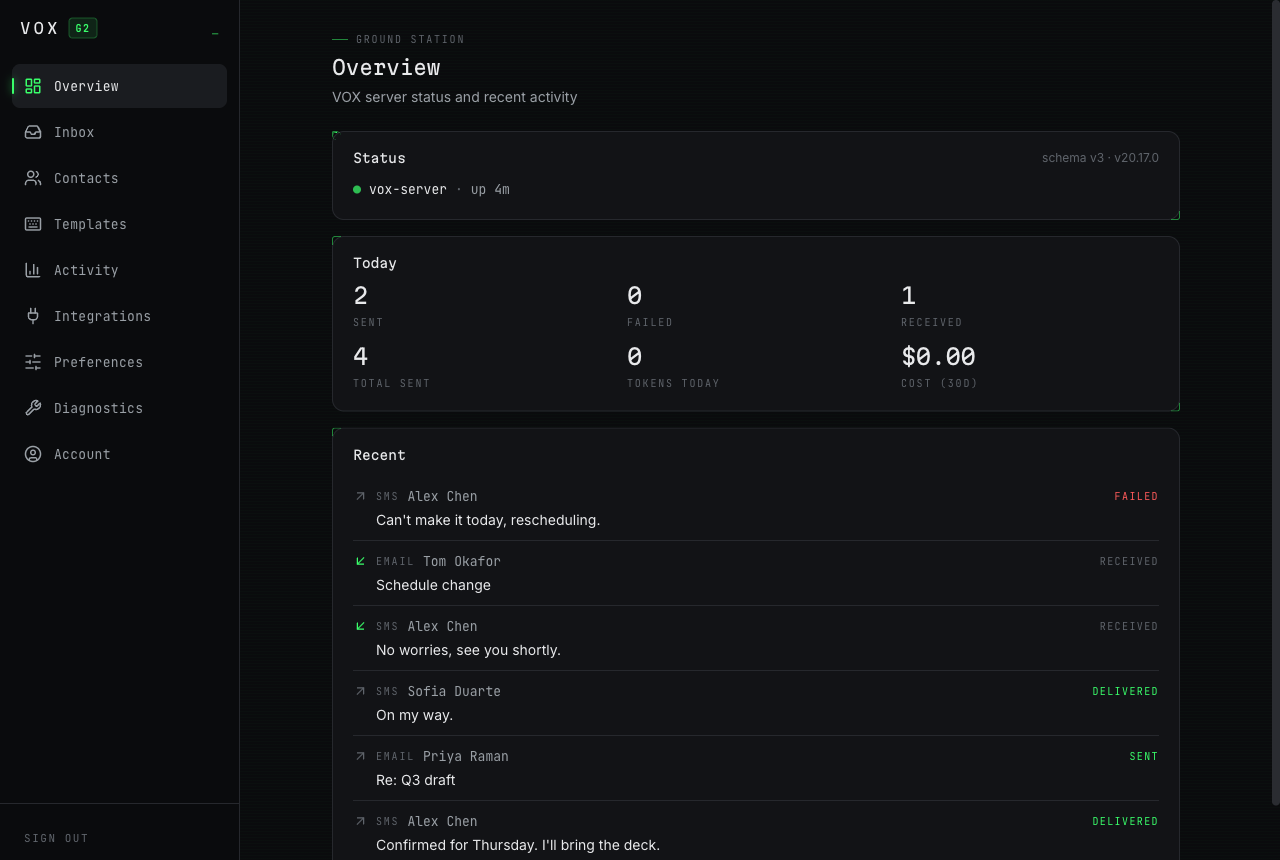
Seeded with fictional data. Every tab is walked through in docs/DASHBOARD.md.
It is not a separate product and needs no separate deployment: it is a
static bundle calling the same /api/* endpoints the glasses call, with
the same bearer secret. That is why a message style set on the glasses shows
up here immediately, and the reverse — both surfaces read one preferences
row, so there is nothing to synchronise.
 voice ──► Even Realities app ──► POST /api/compose ──► Whisper STT
                                        │                (RMS silence guard
                                        │                 runs before this)
                                        ├──► intent parse ─┐
                                        └──► 6 tone rewrites├─ one Promise.all
                                                            │  ≈2.4 s total
             HUD review screen ◄── {transcription, intent, variants[7]}
                     │
                     └─ SEND ──► POST /api/sms   ──► Twilio
                                 POST /api/email ──► your SMTP
                                        │
                                        └──► history + outbox (SQLite)

 inbound SMS   ──► Twilio webhook  ─┐
 inbound email ──► IMAP IDLE worker ─┴──► inbox ──► HUD inbox / SSE stream
Generating every variant up front is the central latency decision: tone switching on the glasses has to feel instant, and a second round trip over Bluetooth plus a model call would not be. Full reasoning in docs/ARCHITECTURE.md.
Complete, assuming a clean server. The exhaustive version — firewall rules, SSH hardening, backups, update procedure — is in docs/DEPLOYMENT.md.
Not using a VPS? VOX is a Node 20 + SQLite process, so a NAS or homelab box
works just as well. There is a Dockerfile and docker-compose.yml at the repo
root — the image builds the native modules for you, which is the usual snag on
Unraid or Synology — and tailscale serve gives you HTTPS with a real
certificate instead of Nginx and certbot. See
Alternative deployments.
The one catch is inbound SMS, which needs a publicly reachable webhook URL
(tailscale funnel); email works fine on a private tailnet.
| Requirement | Notes |
|---|---|
| VPS | 1 vCPU / 1 GB RAM / 25 GB. VOX idles around 70 MB. |
| OS | Ubuntu 24.04 LTS |
| Domain | An A record pointing at the VPS. Required — Twilio will not send webhooks to a bare IP and Let's Encrypt will not issue for one. |
| Twilio | A number capable of SMS. Optional if you only want email. |
| Email account | With SMTP and IMAP. Gmail/Outlook/iCloud need an app password, not your login password. |
| OpenAI key | Required for speech — Whisper is the only STT path. |
| Model provider | Anthropic, OpenAI, OpenRouter or Ollama Cloud, for the rewrites. OpenAI can serve both roles. |
ssh root@YOUR_VPS_IP
apt update && apt upgrade -y
apt install -y nginx certbot python3-certbot-nginx ufw fail2ban git build-essential

# Node 20 — better-sqlite3 and argon2 compile native modules against it
curl -fsSL https://deb.nodesource.com/setup_20.x | bash -
apt install -y nodejs && npm install -g pm2

ufw default deny incoming && ufw default allow outgoing
ufw allow 22/tcp && ufw allow 80/tcp && ufw allow 443/tcp && ufw --force enableCreate /etc/nginx/sites-available/vox (full file in
docs/DEPLOYMENT.md) proxying /api/ and /webhooks/
to 127.0.0.1:3000, serving /opt/vox-web at the root, then:
ln -sf /etc/nginx/sites-available/vox /etc/nginx/sites-enabled/vox
rm -f /etc/nginx/sites-enabled/default
nginx -t && systemctl reload nginx
certbot --nginx -d vox.example.com --agree-tos -m you@example.com --redirect
proxy_buffering offonlocation /api/is required —/api/inbox/streamis Server-Sent Events, and buffering would hold events until the buffer filled.
From your workstation, with a vox-vps entry in ~/.ssh/config:
git clone https://github.com/ablakateam/evenrealitiesG2.git vox && cd vox
cd server && npm ci && npm run build && bash deploy.sh
deploy.sh rsyncs the build, runs npm ci --omit=dev on the VPS so
native modules compile for the right architecture, and reloads pm2. On a first
run it generates MASTER_KEY and BOOTSTRAP_SECRET into /opt/vox/.env
(mode 600) and prints the bootstrap secret once.
Save that secret. It is how you first sign in, and the server keeps only an Argon2id hash of it.
ssh vox-vps 'pm2 save && pm2 startup systemd -u root --hp /root'
curl -s https://vox.example.com/api/healthcd ../web && npm ci && bash deploy.shOpen https://vox.example.com/, paste the bootstrap secret, and complete the
six-step wizard at /setup: Twilio → email → AI provider → contacts.
Credentials entered here are encrypted with MASTER_KEY and stored in the
database, which takes precedence over environment variables.
| Field | Value |
|---|---|
| A message comes in | https://vox.example.com/webhooks/twilio/inbound (POST) |
| Status callback | https://vox.example.com/webhooks/twilio/status (POST) |
TWILIO_WEBHOOK_BASE_URL must match this domain exactly — Twilio signs
each request against the full URL it called, and a mismatch fails every
inbound message with a 403 and no other symptom.
cd ../hud && npm ci
cp .env.example .env
#   VOX_DOMAIN=vox.example.com          ← your domain, for the network whitelist
bash pack.sh          # → hud/vox.ehpk
pack.sh builds a bundle with no credential in it. It clears
VITE_VOX_SECRET before invoking Vite, then greps the output to confirm the
secret is absent and refuses to pack if it is not. The app you install starts
unpaired and asks for a pairing link on first run.
VOX_DOMAIN is still required, and it is not a secret — it goes into
app.json's network whitelist. The Even Realities App blocks any request to a
domain the manifest does not list, and wildcards are not supported, so a
build can only talk to the one domain it was packed for. This is why every
self-hoster builds their own .ehpk rather than installing someone else's.
Upload vox.ehpk at hub.evenrealities.com,
then switch the build to the Beta track. Uploads default to Private, and a
Private build reports "test version expired" to invited testers with no
indication that the track is the cause.
Install from the Even Realities phone app → Even Hub → VOX.
The app has no idea where your server is until you tell it. Pairing is what delivers both halves — the address and a credential.
- Open your dashboard → Account → Pair your glasses → Create pairing
link. You get a code like
ABCD-2345, plus a QR of the full link. - Open VOX on your phone. An unpaired install shows the Connect VOX screen.
- Enter the code and tap Pair this device.
- On the glasses, tap once. The not paired yet card re-checks and drops you on the home screen.
The code alone is enough because a build can only ever reach one server — the
one in its network whitelist. That is a platform constraint, not a choice: the
Even Realities App blocks requests to any domain app.json does not list, and
wildcards are unsupported. Pasting the full link works too, and a link pointing
at a different server is rejected with a message saying so rather than failing
as an opaque network error.
Codes last ten minutes and are single use.
What the app stores is a per-device credential, not your account's shared secret. Each paired install is listed under Account and can be revoked on its own, and a device credential deliberately cannot mint further pairing codes — so a compromised install cannot enrol more devices.
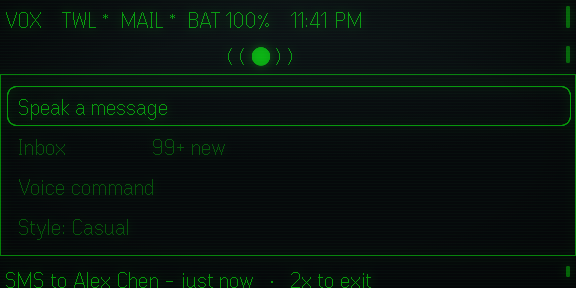
The home screen at the panel's true 576×288. The display is a see-through waveguide — content is green light projected over what you are looking at, not pixels on a screen.
cd server && npm run dev     # API on :3000
cd web    && npm run dev     # dashboard on :5173
cd hud    && npm run dev     # glasses bundle on :5173
npx @evenrealities/evenhub-simulator --automation-port 9898 http://localhost:5173
The simulator exposes an HTTP automation API — screenshot the display, send taps and scrolls, read the console. See CONTRIBUTING.md.
hud/       Glasses app + phone companion. One Vite bundle, two render
           targets; main.ts detects the context. Packs to a .ehpk.
server/    Node + Express + SQLite API. Compose pipeline, Twilio,
           SMTP/IMAP, auth, rate limiting. pm2 behind Nginx.
web/       React + Tailwind dashboard SPA. Static build served by Nginx.
docs/      Engineering documentation.
.githooks/ Pre-commit guard blocking credentials and PII.
There is no frontend/ or backend/ — the three deployable units are the
glasses app, the API and the dashboard, and the directories are named after
them.
| Document | Covers |
|---|---|
| ARCHITECTURE.md | Components, request flows, design decisions and why |
| DEPLOYMENT.md | Clean VPS → running system, plus operations |
| CONFIGURATION.md | Every variable and preference; DB-beats-env precedence |
| EVEN_REALITIES.md | SDK usage, platform constraints, hard-won quirks |
| GLASSES_UX.md | Every screen and state on the HUD, in text |
| DASHBOARD.md | The dashboard: pages, auth, mobile behaviour |
| API.md | Every endpoint, auth and rate limit |
| SECURITY.md | Threat model, what is implemented, known limitations |
| TROUBLESHOOTING.md | Symptom → cause → fix |
| CONTRIBUTING.md | Development loop, simulator automation, conventions |
- No credential is ever committed.
.envfiles are gitignored throughout and a pre-commit hook blocks known secret and PII patterns. - Credentials are encrypted at rest (AES-256-GCM); the shared secret is stored only as an Argon2id hash.
- Your data flows glasses → your server → the services you configured. Nothing routes through infrastructure belonging to the developer.
- Known limitation: the shared secret is inlined into the
.ehpkat build time. Acceptable for a Private/Beta build only you can download; it must be replaced with a real pairing flow before a public Production release.
Threat model and the full list of current gaps: docs/SECURITY.md.