





DenCT is an open-source, embeddable dental CBCT / CT DICOM viewer and guided implant planner for React + TypeScript. It reconstructs a panoramic (OPG) view along the dental arch, renders the jaw in true 3D, plans implants with nerve / sinus / neighbour safety clearances, and exports a 3D-printable surgical drill guide (STL) — entirely in the browser, with no upload.
▶ Try the live demo (loads an anonymized sample CBCT) · 📖 API reference · 🧪 Next.js example · 🌐 Docs: 🇬🇧 English · 🇩🇪 Deutsch · 🇪🇸 Español · 🇭🇺 Magyar
Viewing
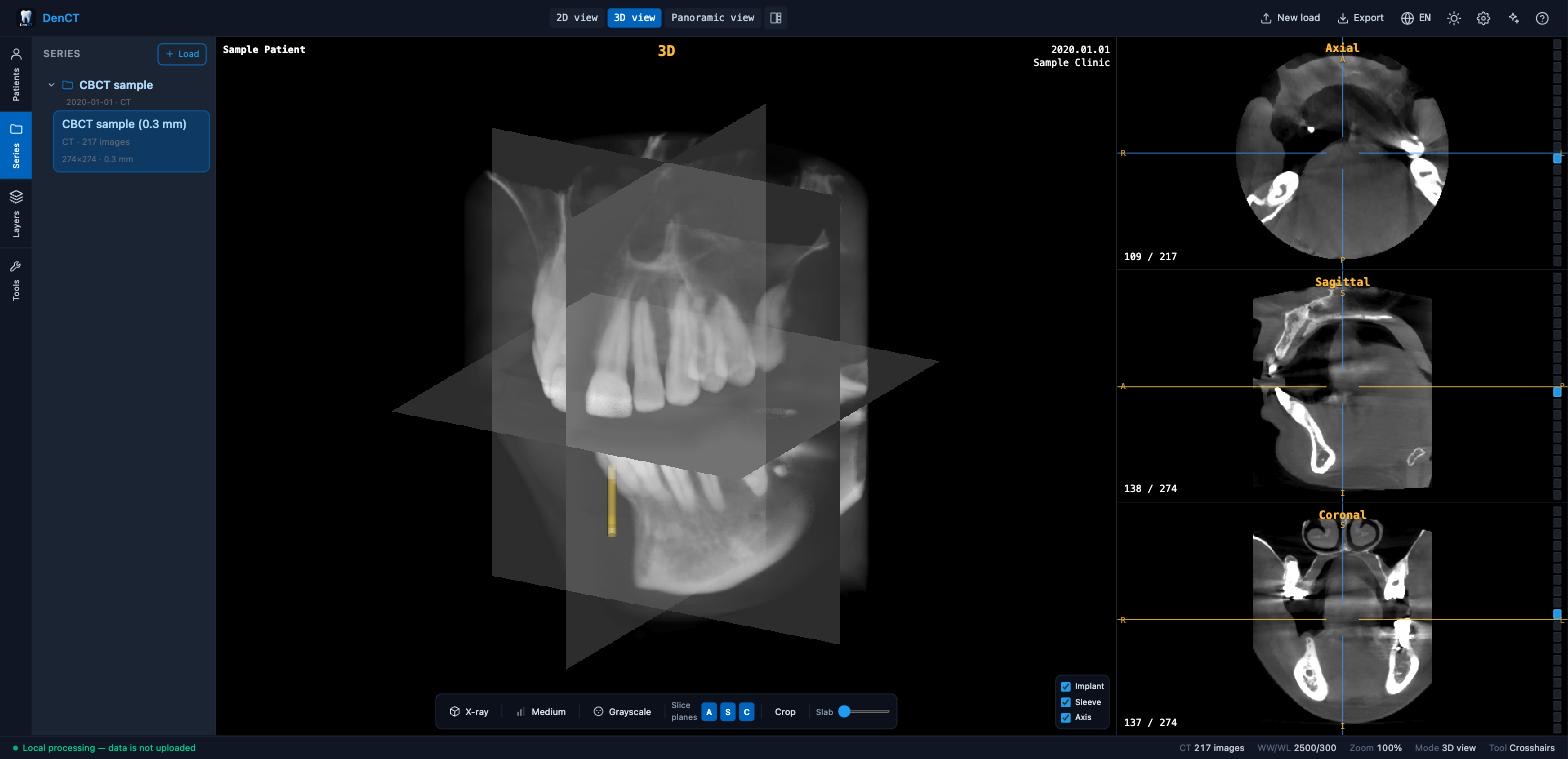
- 🩻 MPR (axial / sagittal / coronal) with linked crosshairs and window/level synced across every view
- 🧊 True-3D volume rendering — render presets incl. a translucent X-ray mode, colormaps, one-click Low / Medium / High quality, intersecting slice planes, crop box, mouse-wheel zoom
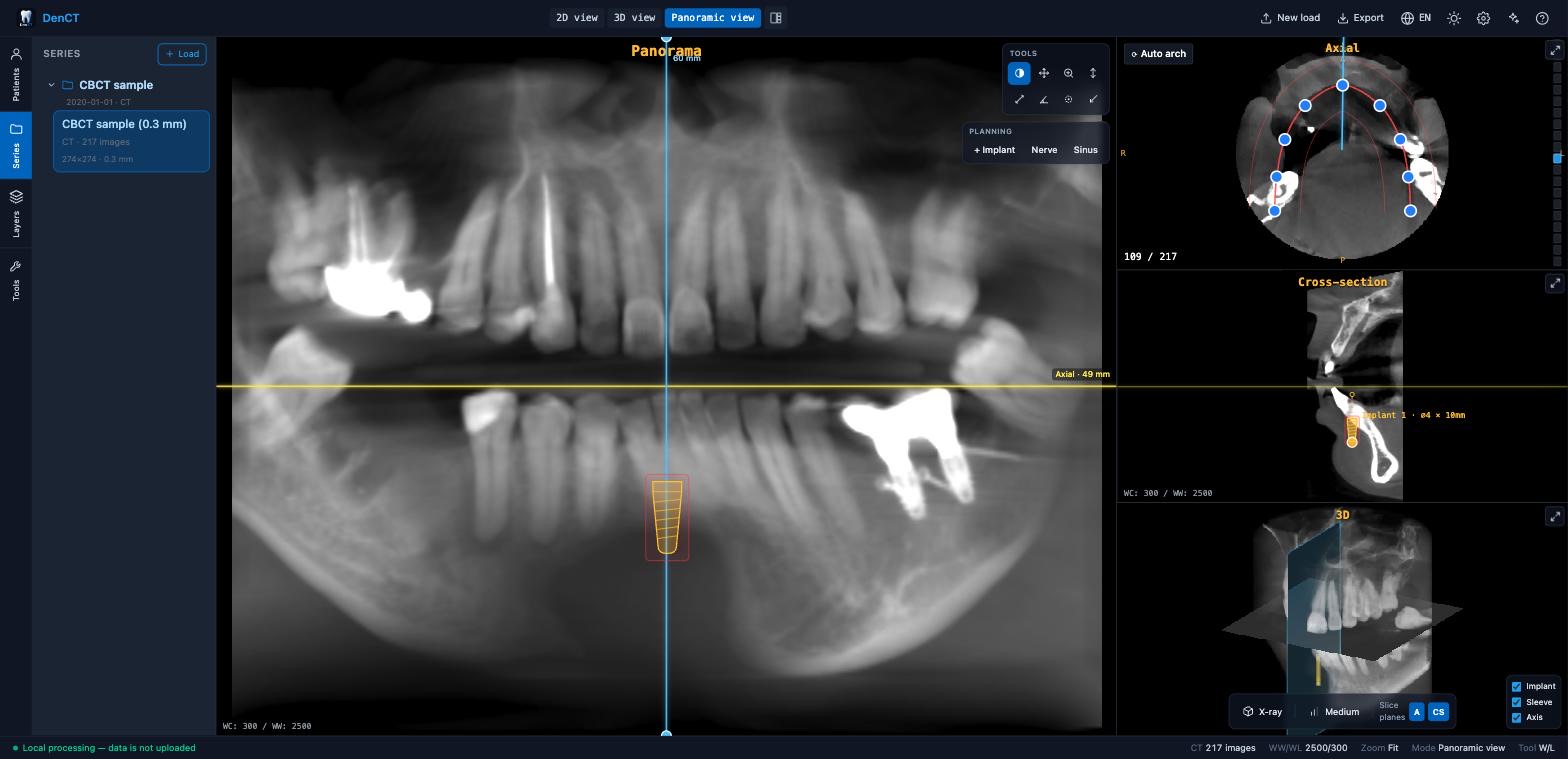
- 🦷 Panoramic (OPG) reconstruction along a draggable dental-arch curve — or let Auto arch estimate the arch from the scan — plus tiltable, perpendicular cross-sections
- 🔀 Panoramic layout with swappable panes: blow the cross-section or the 3D view up to the big slot and back; the 3D pane marks where the cross-section cuts
- 🗂️ Multi-study — DICOM folders,
.dcmfiles, GALILEOS and OneVolume / Morita exports in a series tree; each study keeps its own plan
Implant planning
- 🎯 Guided implant planning — true 3D implant bodies with drill sleeve and osteotomy axis, shown consistently in every view
⚠️ Safety clearances to the marked mandibular nerve, the maxillary sinus and neighbouring implants- 🦴 Bone quality at the implant site (Misch D1–D5, indicative — from uncalibrated CBCT gray values)
- 👑 Prosthetically-driven (backward) planning — Plan from crown derives an implant from a wax-up / tooth-setup mesh, detects upper vs lower jaw from bone density, and shows the screw-access channel on the cross-section
- 📏 Measurements — length, angle, ROI mean ± SD HU, HU probe, and an HU profile along a line; values appear in the layers list and the PDF
Surgical guide & export
- 🖨️ 3D-printable drill guide (STL) built with constructive solid geometry (
manifold-3d), with an optional metal-sleeve seat and shoulder drill stop - ✅ Pre-export guide checks — thin walls, narrow drill channels, fragile webs between bores, and a drill path that reaches the nerve or sinus past the implant apex
- 🧩 Surface-scan (STL / OBJ / PLY) import with 3-point landmark registration to the CBCT
- 🖼️ Image export (PNG / JPG) and a configurable PDF report; plan save / load as JSON
Integration & privacy
- 🔒 100% local — parsing, rendering and exports run in the browser; nothing is uploaded
- ⚛️ React 18 / 19 component with an imperative ref API, controlled props and callbacks, and a React-free
/coreof the geometry / safety math - 🌐 4 UI languages (EN / DE / ES / HU) · 🌓 self-scoped dark mode that never restyles the host page
The exported guide is for verification on a printed model — tissue fit needs a registered surface scan, and the sleeve seat must be checked against your own sleeve kit before any use.
- Embedding a CBCT viewer in dental practice-management, treatment-planning or quoting software
- Teaching and research on implant planning, panoramic reconstruction and guided surgery
- Prototyping surgical-guide workflows without a desktop planning suite
- A lightweight, private way to review a dental cone-beam CT scan in the browser
npm install dental-cbct-viewer react react-domRequirements: React 18 or 19 (peer dependency); a bundler that supports the exports field, ESM, Web Workers and WASM (Vite, webpack 5, Next.js, Rollup). The heavy imaging libraries (Cornerstone3D, vtk.js, jsPDF, dicom-parser) are regular dependencies and are installed for you.
⚠️ Cross-origin isolation. The DICOM decode workers useSharedArrayBuffer, so the host page must be served with:Cross-Origin-Opener-Policy: same-origin Cross-Origin-Embedder-Policy: require-corpWithout these headers, image decoding will not run.
Render DicomViewer and import the stylesheet once:
import { DicomViewer } from "dental-cbct-viewer";
import "dental-cbct-viewer/style.css";

export function Planner() {
  return (
    <div style={{ height: "100vh" }}>
      <DicomViewer lang="en" />
    </div>
  );
}
The viewer fills its parent, so give it a sized container. Dark mode is the default and is scoped to the viewer's own root — it never touches the host page's theme.
import { useRef } from "react";
import { DicomViewer, type DicomViewerHandle } from "dental-cbct-viewer";
import "dental-cbct-viewer/style.css";

function App() {
  const ref = useRef<DicomViewerHandle>(null);

  return (
    <>
      <button onClick={() => ref.current?.loadSample()}>Load sample</button>
      <button onClick={() => ref.current?.exportPdf()}>Export PDF</button>
      <DicomViewer
        ref={ref}
        initialLayout="1+3"
        onImplantsChange={(implants) => console.log(implants.length, "implants")}
        onPlanChange={(plan) => localStorage.setItem("plan", JSON.stringify(plan))}
      />
    </>
  );
}
Handle methods: getImplants, addImplant, updateImplant, removeImplant, getPlan, loadPlan, loadStudy(files), loadSample, setLayout, setActiveView, exportPdf, exportGuideStl.
Props: patientId, patientName, initialPlan, initialLayout, lang, onPlanChange, onImplantsChange, className, embedded.
Pure, React-free building blocks run in Node, tests or your own logic — the implant data model + system catalog and all the geometry/analysis math:
import {
  IMPLANT_SYSTEMS, getImplantSystem,   // implant catalog
  implantWorldAxis, evaluateImplant,   // geometry + nerve/sinus/neighbour safety
  classifyBone, sampleImplantBoneHU,   // Misch D1–D5 bone quality
} from "dental-cbct-viewer/core";
The heavy CSG kernel (drill-guide Boolean via manifold-3d) is loaded lazily, so importing /core for the geometry/safety helpers stays light.
- Vite: works out of the box (set the COOP/COEP headers in
server.headers/preview.headers). - Next.js / webpack 5: render the viewer in a client component (
"use client") — it reads the DOM on mount. Ensure the COOP/COEP headers above are set (e.g. vianext.config.jsheaders). Worker/WASM assets are pre-bundled into the package. A complete example lives inexamples/nextjs/.
- No network egress. The viewer never uploads scans or patient data — all parsing, rendering and exports happen in the browser. It contacts no analytics or third-party host; the only
fetchis for its own bundled sample asset. Exported PDF/PNG/STL/plan files are user-initiated downloads. - Untrusted input is bounded. Decompression enforces an output budget (gzip-bomb safe), the native-volume decoders validate geometry against hard caps before allocating, and plan JSON is parsed with a strict field allowlist (no prototype pollution).
- Content-Security-Policy. The hosted demo ships a strict CSP (
connect-src 'self',object-src 'none', nounsafe-evalfor scripts). When you embed the component, set an appropriate CSP on your host page — the library needsscript-src 'wasm-unsafe-eval'andworker-src blob:for the WASM decode workers, plus the COOP/COEP headers from Installation.
Issues and pull requests are welcome — see CONTRIBUTING.md. npm test runs the unit tests (Vitest) and npm run test:e2e the browser smoke tests (Playwright). If DenCT is useful to you, a ⭐ on GitHub helps others find it.
MIT © Zoltán Dul. Bundled Roboto font under Apache-2.0 (see LICENSE).
Medical disclaimer: research/demonstration software only — not a certified medical device and not for clinical diagnosis, treatment planning, precise measurement or implant workflows.