Build: Use node script to symlink local npm dependencies#79
Conversation


| [ 'packages/scripts', 'node_modules/@wordpress/scripts' ], | ||
| [ 'node_modules/@wordpress/scripts/bin/wp-scripts.js', 'node_modules/.bin/wp-scripts' ], | ||
| ]; | ||
| symlinksToCreate.forEach( ( [ srcPath, destPath ] ) => { |

There was a problem hiding this comment.
I guess there's no async version of this module? Otherwise seems like it'd be simple / advisable to write as a Promise.all
There was a problem hiding this comment.
From README of this npm package:
There intentionally isn't an asynchronoukks version. It's not clear that we need or want one. Before sending a patch to add an async version, please share your use case on the issue tracker.
They provide only sync version.

| "prebuild": "check-node-version --package", | ||
| "build": "node ./scripts/build.js", | ||
| "postinstall": "lerna bootstrap --hoist && ./scripts/create-symlinks.sh && npm run build", | ||
| "postinstall": "lerna bootstrap --hoist && node ./scripts/create-symlinks.js && npm run build", |

There was a problem hiding this comment.
Let's add a new script similar to the build script:
"build": "node ./scripts/build.js",
"create-symlinks": "node ./scripts/create-symlinks.js",
"postinstall": "lerna bootstrap --hoist && npm run create-symlinks && npm run build",
There was a problem hiding this comment.
I also added npm-run-all to simplify run scripts with 4f363b1.

|
Testing this using Hyper terminal on Windows 10: (Skip to the end of this comment to get to the good bits avoiding having to avoid reading the debug messages) Before this PR: C:\Users\Stephen\dev\@wordpress\packages>npm i
> undefined postinstall C:\Users\Stephen\dev\@wordpress\packages
> lerna bootstrap --hoist && ./scripts/create-symlinks.sh && npm run build
lerna info version 2.8.0
lerna info versioning independent
lerna info Bootstrapping 10 packages
lerna info lifecycle preinstall
lerna info Installing external dependencies
lerna info hoist Installing hoisted dependencies into root
lerna info hoist Pruning hoisted dependencies
lerna info hoist Finished pruning hoisted dependencies
lerna info hoist Finished installing in root
lerna info Symlinking packages and binaries
lerna info lifecycle postinstall
lerna info lifecycle prepublish
lerna info lifecycle prepare
lerna success Bootstrapped 10 packages
'.' is not recognized as an internal or external command,
operable program or batch file.
npm ERR! code ELIFECYCLE
npm ERR! errno 1
npm ERR! undefined postinstall: `lerna bootstrap --hoist && ./scripts/create-symlinks.sh && npm run build`
npm ERR! Exit status 1
npm ERR!
npm ERR! Failed at the undefined postinstall script.
npm ERR! This is probably not a problem with npm. There is likely additional logging output above.
npm ERR! A complete log of this run can be found in:
npm ERR! C:\Users\Stephen\AppData\Roaming\npm-cache\_logs\2018-02-09T22_56_36_088Z-debug.logThis PR: Fails with the C:\Users\Stephen\dev\@wordpress\packages>npm i
> undefined postinstall C:\Users\Stephen\dev\@wordpress\packages
> lerna bootstrap --hoist && ./scripts/create-symlinks.sh && npm run build
lerna info version 2.8.0
lerna info versioning independent
lerna info Bootstrapping 10 packages
lerna info lifecycle preinstall
lerna info Installing external dependencies
lerna info hoist Installing hoisted dependencies into root
lerna info hoist Pruning hoisted dependencies
lerna info hoist Finished pruning hoisted dependencies
lerna info hoist Finished installing in root
lerna info Symlinking packages and binaries
lerna info lifecycle postinstall
lerna info lifecycle prepublish
lerna info lifecycle prepare
lerna success Bootstrapped 10 packages
'.' is not recognized as an internal or external command,
operable program or batch file.
npm ERR! code ELIFECYCLE
npm ERR! errno 1
npm ERR! undefined postinstall: `lerna bootstrap --hoist && ./scripts/create-symlinks.sh && npm run build`
npm ERR! Exit status 1
npm ERR!
npm ERR! Failed at the undefined postinstall script.
npm ERR! This is probably not a problem with npm. There is likely additional logging output above.
npm ERR! A complete log of this run can be found in:
npm ERR! C:\Users\Stephen\AppData\Roaming\npm-cache\_logs\2018-02-09T22_56_36_088Z-debug.logThis PR with the change noted in the PR review here #79 (comment) > node ./scripts/create-symlinks.js
Creating symlinks…
fs.js:1014
return binding.symlink(preprocessSymlinkDestination(target, type, path),
^
Error: EPERM: operation not permitted, symlink 'C:\Users\Stephen\dev\@wordpress\packages\packages\browserslist-config' -> 'C:\Users\Stephen\dev\@wordpress\packages\node_modules\@wordpress\browserslist-config'
at Object.fs.symlinkSync (fs.js:1014:18)
at symlinkWindows (C:\Users\Stephen\dev\@wordpress\packages\node_modules\symlink-or-copy\index.js:120:16)
at symlinkOrCopySync (C:\Users\Stephen\dev\@wordpress\packages\node_modules\symlink-or-copy\index.js:63:5)
at symlinksToCreate.forEach (C:\Users\Stephen\dev\@wordpress\packages\scripts\create-symlinks.js:20:4)
at Array.forEach (<anonymous>)
at mkdirp (C:\Users\Stephen\dev\@wordpress\packages\scripts\create-symlinks.js:18:19)
at C:\Users\Stephen\dev\@wordpress\packages\node_modules\mkdirp\index.js:48:26
at FSReqWrap.oncomplete (fs.js:153:5)
npm ERR! code ELIFECYCLE
npm ERR! errno 1
npm ERR! @ create-symlinks: `node ./scripts/create-symlinks.js`
npm ERR! Exit status 1
npm ERR!
npm ERR! Failed at the @ create-symlinks script.
npm ERR! This is probably not a problem with npm. There is likely additional logging output above.
npm ERR! A complete log of this run can be found in:
npm ERR! C:\Users\Stephen\AppData\Roaming\npm-cache\_logs\2018-02-09T23_13_57_118Z-debug.logTurns out there is an issue upstream broccolijs/node-symlink-or-copy#35 that prevents Windows directories being symlinked broccolijs/node-symlink-or-copy#35 There is a pull request here that fixes the issue broccolijs/node-symlink-or-copy#36 Changing the installed version of the module to that PR: Results in: $ npm run create-symlinks
> @ create-symlinks C:\Users\Stephen\dev\@wordpress\packages
> node ./scripts/create-symlinks.js
Creating symlinks…
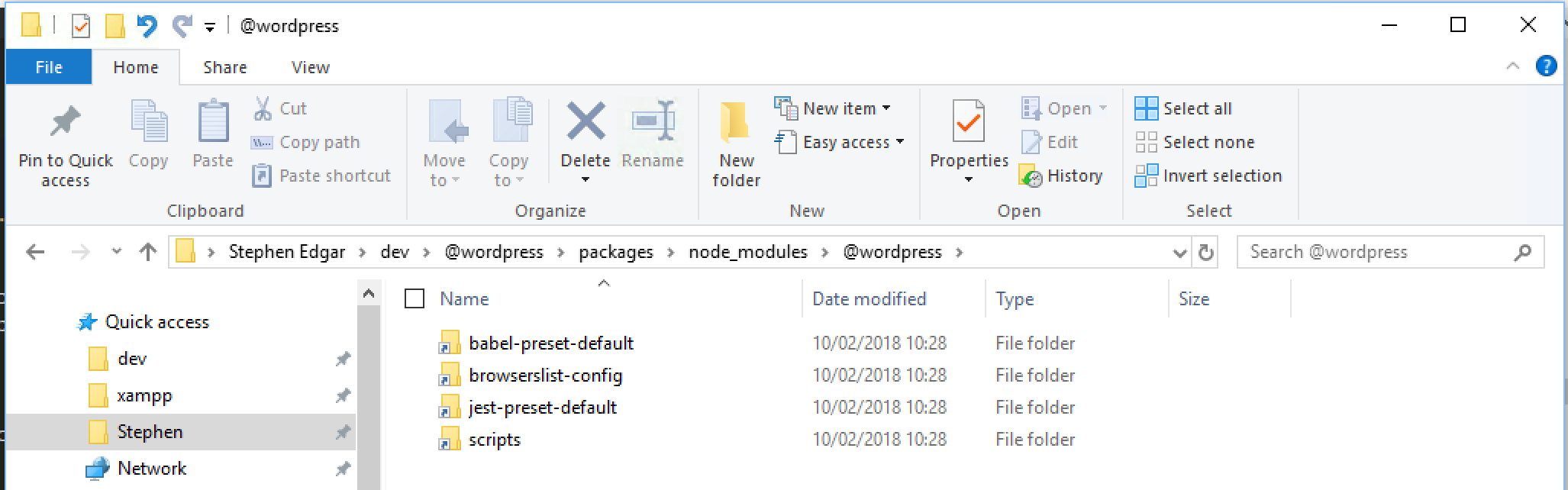
DONEUnfortunately, there is an issue with npm 5.x and installing the pull request branch of Once the upstream issue is merged we can update this PR and everything will work as we'd hoped, which is shown in this screenshot the correct modules symlinked in
|


|
@ntwb let's wait a few days until |
|
Agreed, waiting is fine, the issue is only related to Windows and I don't think there are many, if any Windows users currently using this repo, though maintaining compatibility for Windows users should be a continuing goal for this repo |


cbeba0d to
4a9ad37
Compare
|
@stefanpenner thanks for update and ping. I updated this PR. It is ready for another round of testing. |
Ready for another review with updated node-symlink-or-copy.

| "test:watch": "npm run test -- --watch", | ||
| "publish:dev": "npm run build-clean && npm run build && lerna publish --npm-tag next", | ||
| "publish:prod": "npm run build-clean && npm run build && lerna publish" | ||
| "publish:dev": "npm-run-all build-clean build && lerna publish --npm-tag next", |
There was a problem hiding this comment.
I know it's unrelated, but I felt tempted to refactor as I added npm-run-all 😃
There was a problem hiding this comment.
If build-clean is a preparation step for build, why not include in prebuild ?
There was a problem hiding this comment.
I think it makes sense to do it. I will give it a spin.
4f363b1 to
8862f36
Compare
|
This shouldn't affect your PR, but I have a follow up PR to node-symlink-or-copy to optimize the cases where directories are not linkable but files are. broccolijs/node-symlink-or-copy#37 I am amazed by how windows handles this... |
|
@stefanpenner, thanks for letting us know. Thanks for making windows platform more accessible for node devs :) |

4 participants


This PR addresses recommendation from @ntwb shared in #77:
I haven't tried Lerna symlink as it doesn't look promising in case of the root folder. I would expect that their author would mention it in the discussion we had before.
However
symlink-or-copyturned out to work pretty well with some tweaks to ensure it doesn't fail because of its limitations. This should be platform independent. This time we need to test on Windows to confirm :)Testing
Run
npm ion a fresh git clone andnpm test. Runnpm ia few more times and make sure it still works.It is also a good idea to run
npm run publish:devandnpm run publish:prodwithout publishing packages, just to make sure if everything works as expected.