

High-performance local MCP server that merges vector, lexical, and graph search into one retrieval engine for AI coding agents.




Quick Start • Features • Architecture • MCP Tools • Wiki • Install • CLI • Contributing
Stop guessing. Give your AI agents the precise codebase context they need to write production-grade code.
# 1. Install
pip install contextcode

# 2. Index your project (interactive config on first run)
cd /path/to/your/project
cctx index

# 3. Start the MCP server
cctx mcp
That's it. Your AI agent now has multi-stage retrieval across lexical, vector, and graph engines.
| Feature | Description |
|---|---|
| 🔍 Multi-Stage Search | Lexical (FTS5) + Vector (ChromaDB) + Graph expansion + CrossEncoder reranking |
| 🌲 AST-Aware Chunking | Tree-sitter parses 14 languages: Python, JS, TS, Go, Rust, Java, C/C++, C#, Dart, Bash, SQL, HCL, PowerShell, Markdown |
| 🧠 Graph Intelligence | Dead code detection, call tracing, architecture overview, community detection |
| 📖 Knowledge Wiki | LLM-maintained persistent wiki with OKF v0.1 compliance |
| 🔗 Cross-Service Linking | HTTP route detection and inter-service call graph edges |
| ⚡ GPU Embeddings | llama.cpp with Snowflake Arctic (Q8) for indexing, tiny model for queries |
| 🔄 Incremental Indexing | Content-hash-based — only re-indexes changed files |
| 🏗️ Pluggable Graph Store | Neo4j, AWS Neptune, DataStax Astra DB, and GraphRAG export adapters via a unified factory |
| 🕸️ Static Call Graphs | Cross-language call extraction + import resolution, hub detection, and blast-radius analysis |
| 📊 5-Signal Scoring | FTS + vector + name + signature + graph proximity composite ranking |
| 🚀 Runtime Trace Ingestion | OTLP-style spans augment the static call graph with live data |
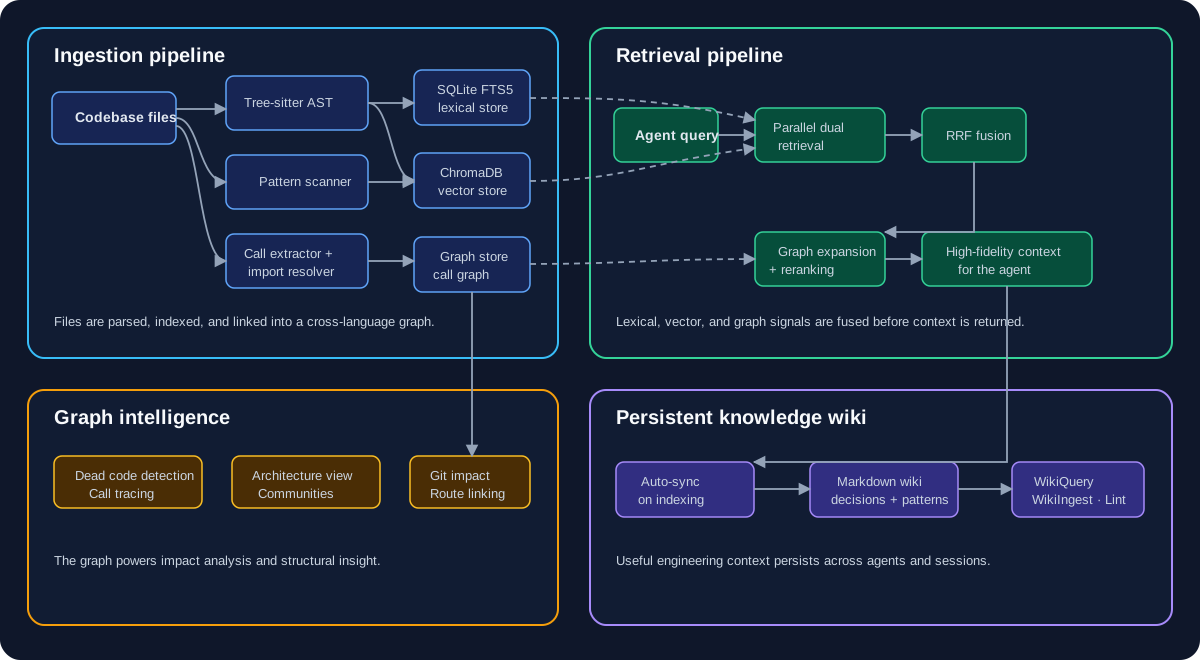
CodeContext registers 11 MCP tools for AI agents:
| Tool | Category | Description |
|---|---|---|
CodeContext |
Search | Multi-stage search: lexical + vector + graph expansion + reranking |
WikiQuery |
Wiki | Search the knowledge wiki for synthesized answers |
WikiLint |
Wiki | Health-check wiki for orphan pages, broken links, stale content |
QueryGraph |
Graph | Execute read-only Cypher queries against the knowledge graph |
DeadCodeScan |
Intelligence | Detect functions with zero callers (excluding entry points) |
TracePath |
Intelligence | BFS call tracing — who calls a function and what it calls (depth 1-5) |
GetArchitecture |
Intelligence | Architecture overview: languages, hotspots, entry points, modules |
DetectChanges |
Intelligence | Map git diff to affected symbols with blast radius and risk classification |
DetectCommunities |
Intelligence | Louvain community detection on the function call graph |
LinkRoutes |
Intelligence | Detect HTTP route handlers and create Route/HANDLES/HTTP_CALLS edges |
IngestTraces |
Intelligence | Ingest OTLP-style runtime traces to augment the static call graph |
Usage Examples
# Multi-stage code search
cctx tools search "how does authentication work" --top-k 5

# Trace function call chains
cctx tools trace process_payment --direction outbound --depth 3

# Detect dead code
cctx tools dead-code

# Execute Cypher query
cctx tools query-graph "MATCH (f:Function)-[:CALLS]->(g:Function) RETURN f.name, g.name LIMIT 10"

# Architecture overview
cctx tools architectureCodeContext includes an LLM Wiki integration compliant with the Open Knowledge Format (OKF) v0.1. Instead of re-deriving knowledge on every query, the LLM builds and maintains a persistent wiki of interlinked markdown pages.
.codecontext/wiki/
  index.md              # OKF-compliant catalog
  log.md                # Update history
  modules/              # Module documentation
  patterns/             # Recurring patterns
  decisions/            # Architecture Decision Records
  concepts/             # Conceptual explanations
Page types: overview, module, pattern, decision, entity, comparison, concept, source, custom
pip install contextcodeuv pip install contextcodegit clone https://github.com/VardhmanSurana/CodeContext.git
cd CodeContext
uv sync| Requirement | Purpose | Required? |
|---|---|---|
| Python 3.11+ | Runtime | ✅ Yes |
| CUDA 12.x/13.x | GPU embedding acceleration | ⚡ Recommended |
| Neo4j | Graph store (auto-starts if installed, unique constraints created on connect) | ⚡ Recommended |
| AWS Neptune / DataStax Astra | Alternative managed graph backends | ⬜ Optional |
# Start Neo4j (optional — CodeContext also auto-starts it when installed)
sudo systemctl start neo4j
export NEO4J_PASSWORD='your-local-password'
Configure an alternative backend in .codecontext.yaml:
storage:
  graph:
    type: neptune        # neo4j | neptune | datastax | graphrag
    uri: wss://your-neptune-endpoint:8182/gremlin
aws_region: us-east-1Add to your MCP client config:
{
  "mcpServers": {
    "codecontext": {
      "command": "cctx",
      "args": ["mcp"]
    }
  }
}
Supported clients: Codex, Claude Desktop, Cursor, Windsurf, Hermes, OpenCode, Antigravity
This repository includes a multi-client bundle at plugins/codecontext for
Codex, Claude Code, Antigravity, and OpenCode. It exposes the CodeContext MCP server plus the
codecontext and wiki-workflow skills. The bundle's MCP configurations are set for this source
checkout; adjust the repository path when using a different checkout, then index the target
project with cctx index before starting an agent.
| Command | Description |
|---|---|
cctx index |
Index the current project |
cctx index --rebuild |
Force full rebuild |
cctx index -v |
Verbose output |
cctx mcp |
Start MCP server |
cctx watch |
Watch for file changes + auto-reindex |
cctx wiki init |
Initialize wiki directory |
cctx wiki ingest |
Ingest a file into the wiki |
cctx wiki lint |
Wiki health check |
cctx tools search |
Search codebase from CLI |
cctx tools query-graph |
Execute Cypher query |
cctx tools trace |
Trace function call chains |
cctx tools dead-code |
Detect dead code |
cctx tools architecture |
Architecture overview |
cctx tools detect-changes |
Git diff impact mapping |
cctx tools communities |
Community detection |
cctx tools link-routes |
Detect HTTP routes |
cctx tools ingest-traces |
Ingest runtime traces |
cctx export |
Export index for team sharing |
cctx import |
Import teammate's index |
cctx graph migrate |
Migrate the graph store to a new backend |
cctx graph export |
Export graph to Mermaid, D3, or interactive PyVis HTML |
cctx graph viz |
Run interactive call-graph visualization web server |
cctx graph ingest |
Ingest custom JSON code graphs |
The cctx graph command group turns the indexed call graph into shareable and interactive artifacts.
Export to multiple formats:
# Interactive PyVis HTML (default) — open in a browser to explore
cctx graph export -f html -o graph.html

# Mermaid diagram for docs
cctx graph export -f mermaid -o graph.md

# D3 JSON for custom dashboards
cctx graph export -f d3 -o graph.json
Live visualization server:
cctx graph viz --port 8765
# Open http://localhost:8765 and filter by search term or node type
Ingest custom graphs (e.g. runtime traces from another tool) as JSON:
{
  "nodes": [{ "labels": ["Function"], "properties": { "name": "main", "file_path": "app.py" } }],
  "edges": [{ "type": "CALLS", "source_node_id": "...", "target_node_id": "..." }]
}
cctx graph ingest -f graph.json- Fork this repository
- Create a feature branch:
git checkout -b feat/my-feature - Make your changes and add tests
- Run the test suite:
pytest - Submit a Pull Request targeting
feat/codecontext
Please report bugs and feature requests via GitHub Issues.
MIT — Crafted with care by the Advanced Agentic Coding Team.