An Attendance Management System consisting of a Face Detection and Recognition model implemented utilising the concept of Multimodal Execution through Intel's OpenVino Runtime environment.
- OpenVino Runtime Environment
- .xml and .bin files of the models(obtained from omz_downloader, omz_converter or from native repository)
-
The runner script takes parameters from the .env file to make the process simpler for the user
-
The Env file has the following parameters
- input_image_path
- input_directory_path
- coordinates_file_path
- face_detection_model_path
- face_reidentification_model_path
- landmark_regression_model_path
- face_database_path
- face_gallary_crop_flag
-
Once the parameters are set in the env file you have to run runner.py by executing
python3 runner.py
- All the logs mentioning the details of all the Openvino modules will be displayed in the console and the final output would be printed in the Attendance.csv file
- input_image_path :
- This is the path of the input image which has the pictures of all the people whose attendance has to be marked
- input_directory_path :
- This is used for internal working of the module. Once the face detection model runs on the input image it creates seperate images that have to passed to the face recognition module and this is the directory where the intermediate results are stored
- As a user you don't have to add anything in this directory and this directory will be automatically deleted after each use.
- Input_Images directory has been used for this purpose in this repository
- coordinates_file_path :
- This is used for internal working of the module. Before savinf indivisual images to the input directory the coordinates of the bounding boxes for each face is stored in this file
- coordinates.txt file has been used for this purpose in this repository
- face_detection_model_path :
- Path of the Openvino face detection model
- face_reidentification_model_path :
- Path of the Openvino face reidentification model
- landmark_regression_model_path :
- Path of Openvino Landmark Regression model
- face_database_path :
- Path of the directory that stores the all the images of known identites that the face recognition model should recognize
- Face Database directory has been used for this purpose in this repository
- face_gallary_crop_flag :
- Discussed in the next section
- This repository should contain all the images of the known entities that the face recognition module should identify
- You can have multiple images of the same purpose. The more the number of images of an indivisual, the more is the accuracy of the face recognition module
- A naming scheme has to be strictly followed for naming all the image
<name of the person>-<number of images with starting index 0>- example : aditya-0.jpg, aditya-1.jpg, atharva-0.jpg
- The images have to very tighty croped for the face recognition module produce accurate results
- Manually cropping each image would be a tedious job, therefore I have implemented an automatic cropping utility
- Put the uncropped images in the face Database directory and set the face_gallary_crop_flag to 1. This will automatically crop the images in the Face Database beofre proceeding
- Note : You have to Manually set the face_gallary_crop_flag to 0 for the second run otherwise the cropping utility would recrop the already cropped images and this can generate inaccurate results.
The Openvino samples of Object Detection and Face Recognition were referenced during building this sample https://docs.openvino.ai/latest/omz_demos_object_detection_demo_python.html https://docs.openvino.ai/latest/omz_demos_face_recognition_demo_python.html https://docs.openvino.ai/latest/omz_models_model_face_detection_retail_0004.html https://docs.openvino.ai/latest/omz_demos_face_recognition_demo_python.html
The following models were used in the execution of the respective parts
Face detector based on SqueezeNet light (half-channels) as a backbone with a single SSD for indoor/outdoor scenes shot by a front-facing camera. The single SSD head from 1/16 scale feature map has nine clustered prior boxes.
On startup, the application reads command-line parameters and loads a model to OpenVINO Runtime plugin. Upon getting a image or video frame from the OpenCV VideoCapture, it performs inference and displays the results of the faces detected with their respective bounding boxes.
The Module Consists of 3 main parts and a main function:
-> An arguement parser function which parses the command line arguements for them to be sent as input to our model.
-> The draw detections function which draws the detection bounding boxes after face detection by our model.This also writes the data of the detected faces and the coordinates of the bounding boxes(xmin,ymin,xmax,ymax) in a .json file, which is passed onto our face recognition model as the input for the faces detected in-frame.The recognition model performs it's inference over this.
-> The print raw results function which prints the input image with their detected faces and corresponding bounding boxes.
1.Input: input_shape[1,3,300,300]~[B,C,H,W]
Image, name: data, shape: 1, 3, 300, 300 in the format B, C, H, W, where:
-> B - batch size
-> C - number of channels
-> H - image height
-> W - image width
Expected color order: BGR.
2.Output:output blob shape:[1,1,N,7]
The net outputs blob with shape: 1, 1, 200, 7 in the format 1, 1, N, 7, where N is the number of detected bounding boxes. Each detection has the format [image_id, label, conf, x_min, y_min, x_max, y_max], where:
-> image_id - ID of the image in the batch
-> label - predicted class ID (1 - face)
-> conf - confidence for the predicted class
-> (x_min, y_min) - coordinates of the top left bounding box corner
-> (x_max, y_max) - coordinates of the bottom right bounding box corner
In particular, this mscript uses 3 models to build a pipeline able to detect faces on videos, their keypoints (aka “landmarks”), and recognize persons using the provided faces database (the gallery). The following pretrained models were used:
-> face-detection-retail-0004 and face-detection-adas-0001, to detect faces and predict their bounding boxes;
-> landmarks-regression-retail-0009, to predict face keypoints;
-> face-reidentification-retail-0095, Sphereface, facenet-20180408-102900 or face-recognition-resnet100-arcface-onnx to recognize persons.
1.face-reidentification-retail-0095
a) Input: -> [B,C,H,W]~[1,3,128,128] -> BGR
b) Output: -> Shape [1,256,1,1]
2.face-detection-adas-0001
a) Input: -> [B,C,H,W]~[1,3,348,672]->BGR
b) Output: -> Shape=[1,1,200,7]~[1,1,N,7]; N=Number of detected boxes
-> Detection Format=[image_id, label, conf, x_min, y_min, x_max, y_max]
3.landmarks-regression-retail-0009
a) Input: ->[B,C,H,W]~[1,3,48,48] ->BGR
b) Output: ->Shape=[1,10,1,1]
4.face-detection-retail-0004
-> A Csv file in the same directory as the sample; this file contains the data of attendance,with the detected face's name and time of recognition.
Models used :
Face Detection Retail 004 ➖
It takes a Group image as input and detects all the faces present in the image.
After detecting the faces it creates a bounding box around the detected face and takes each bounding box as a single image and passes it to the next model.
Users need to maintain a database of group images in a directory to serve as an input for this model.
To utilise this case we need to upload multiple images of the same set of people(i.e a group)
The Database of group images is updated as the model detects faces and creates bounding boxes
Models used :
Landmark Regression Retail 0009 ➖
The model predicts the face key-points on the image for the face recognition model to differentiate and compare the landmarks on the faces, and recognize the person in the image.
This model takes input as a single cropped image from the Face Detection Retail 004 model and passes its output to the Face Recognition model.
For the Face Recognition Model 3 models from the OpenVino Runtime Environment can be used which gives better accuracy ➖
Face Reidentification Retail 0095 ➖ This model takes input from the Landmark Regression Retail 0009 and performs a Face Recognition task on it. This model is the core of this multimodal program where the final outcome is multiple faces identified by a model from a single source image.
SphereFace SphereFace face recognition model is another alternative for the Face identification from an image. This model was used during the development of this project to compare the results of different models and its accuracy.
Face Recognition Resnet100-arc face-onnx ➖ As the outcome of the Resnet model is identified to be one of the best practices by ML developers, the face recognition model built on a backend of ResNet100 was used to identify multiple faces from a single source of images. All the 3 face recognition models mentioned above need to maintain a specific database of individual images of a person so that the models can compare the face image with the image given by Landmark Regression Retail 0009 model and identify the person in the image. The labels for this model is the name of the images saved in the database.
For eg:- If we save an individual image of a person X with name X.jpeg then the Face Recognition model will identify that person with name X.
All Models used are the same as above The only difference in the above mentioned case is that in the face database we provide multiple images of a single person with different angles, this approach was observed to increase the accuracy of the model.
The format for naming multiple images: Before Cropping is c_- After Cropping is -
Note: The c_ is used to crop the face of the person from the image as required by the Face Recognition Model. For naming the single registered image the only change is we mention 0 at the place of
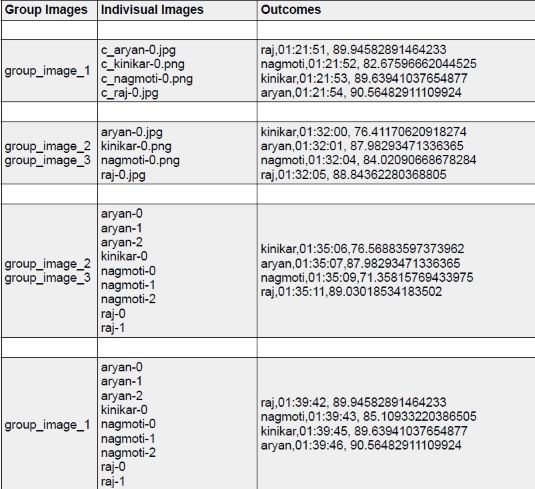
The Results for the images can be tabulated as follows:
Outcomes Format:Label Name,Time of Attendance,Accuracy of Detection