A paper (formerly spigot) plugin for Minecraft servers. Build with maven, documentation coming soon. Designed for Minecraft 1.21.4. (formerly 1.20.6)
This README file is valid only for the 1.21.4 version. For older versions, please view the commit history.
- Copyright notice
- Documentation introduction
- Upcoming features
- Item creation
- Event creation
- Configuration
- Integrations
- Dependents
- Plugin reloading
This project is under the GPU Affero GPL v3 license
Terms of use can be found here
Most dependencies are either optional or shaded, however MythicMobs is required if MineshaftRpg is used, due to its class being used for ItemStack serialisation
Currently, the only functionality of this plugin are custom item creation, event creation and Vault server economy.
This plugin contains many other API features used in other plugins, including loading and saving player data under multiple profiles, mathematical calculations and more.
Events can be triggered as MythicMobs mechanics via the integration.
A work in progress sidebar (disabled by default) is displayed to all players on the server. Customisation is not yet available. (Shelved idea)
Images representing examples of content included in the plugin may not be entirely accurate, as these were taken by a user with client mods and/or a resource pack altering the look of the game. Some of these were taken with older versions of the plugin.
The following features are not yet explained in the documentation
- MythicMobs compatibility (WIP)
- Currency command (requires permission)
- Permissions
- Heal command (OP only)
- PlayerSkills API (via MineshaftRpg) and Data API
- Placeholders (Placeholder API integration) (partially)
- Weapon cooldown
- Item subtypes (partially explained. WIP)
- Item stat priority list (descending)
Not all features in this list may be added
This is just a to-do list featuring my current ideas
List elements in italic will definitely be added
- W.I.P [important!] Completing the README file and adding all documentation
[important!] Working armour support(mostly implemented)- More configuration: item rarities, etc.
- W.I.P. Extendable weapons (lightsaber creation, etc.)
Customisable weapon cooldown(Mostly implemented)Player attributes: Strength, intelligence, etc.(Part of MineshaftRpg plugin)Ammunition feature for ranged weapons (with reloading)- Customisable sidebar (Shelved for now)
- More Placeholders (Partially implemented)
- Custom menus and shops
- BetonQuest integration (Partially implemented)
- BetonQuest quest tracker
- More MythicMobs features
FreeMinecraftModels integration with MythicMobs compatibilityUse BetterModels insteadCustom crafting system(Partially implemented.)- Add more customizability to the custom crafting system
Skills(Use MineshaftRpg instead)- W.I.P. Item customisation (replacing parts, etc.)
- In-built mob support (similar to MythicMobs or EliteMobs) Shelved for now in favour of more MythicMobs support
- Dungeons Likely as separate plugin
- More events (Working on it)
Replacing local events with events(Added, but untested)Works- NPCs Shelved, use Citizens or an alternative
- Better API and JavaDocs
- Make non right-click or left-click events handle cooldowns
Items are created via custom YAML files. These are placed in the Mineshaft/Items folder in the plugin directory of your server.
Items can have a multitude of different parameters, which are used to customize the item.
If your Items folder is empty, an example file example-item.yml will be placed in this folder.
name: Cleaver
rarity: exotic
item_category: weapon_melee
material: GOLDEN_SWORD
id: 1eeeb42e-250b-4466-8e03-9c6cccae0388
custom_model_data: 0
parent: 'null'
durability: 250
stack_size: 1
enchantment_glint: false
hide_attributes: true
subcategory: sword
stats:
  damage: 5
Not all parameters are required for the item to work
| Parameter | Description | Data Type | Note |
|---|---|---|---|
parent |
The name of the parent item. All values unspecified in the file will be set to those of the parent. A parent item may also have its own parent item. | String | |
name |
The custom name for the item | String | |
subcategory |
The displayed category of the item | String | Affects the item description and properties. List |
subcategory_override |
The subcategory string, which will be displayed instead of the subcategory. The subcategory is used if this is undefined. | String | Only affects the item description. Use any value you want |
material |
The Minecraft material for the item | Enum | 1.21 Material List |
rarity |
Rarity of the item | Enum | Rarity List |
item_category |
Category of the item | Enum | Category List |
custom_model_data |
Custom Model Data | Integer | |
durability |
The amount of times an item may be used before it breaks | Integer | |
stack_size |
The maximum stack size of any given item | Integer | Value between 1 and 99 |
hide_attributes |
Whether the default Minecraft attribute description will be hidden | boolean | Default is true. Only set to false for debugging. |
enchantment_glint |
WIP: do not set | boolean | |
stats |
List of item attributes | HashMap | |
id |
A unique id assigned by the plugin. This is used for the plugin to recognize the item. | UUID | Do not change or set manually. Two items having the same id will result in MAJOR bugs. Changing an item id results in previous items breaking. |
item_model |
The custom model for the item | String | |
tooltip |
Allows for setting the custom tooltip style. | String | Textures loaded from: /assets/<namespace>/textures/gui/sprites/tooltip/<id>_background and /assets/<namespace>/textures/gui/sprites/tooltip/<id>_frame where id is the specified style. |
| Value | Description |
|---|---|
weapon_melee |
Melee weapon |
weapon_ranged |
Ranged weapon |
armour_helmet |
Helmet (Equip in head slot) |
armour_chestplate |
Chestplate (Equip in chest slot) |
armour_leggings |
Leggings (Equip in leg slot) |
armour_boots |
Boots (Equip in foot slot) |
tool_axe |
Axe |
tool_pickaxe |
Pickaxe |
tool_shovel |
Shovel |
tool_hoe |
Hoe |
tool_misc |
Another tool |
item_consumable |
Consumable item (One time use) |
item_generic |
Generic item (no category) |
slot_item |
An item placed in a slot in another item |
other |
Other (Unspecified) |
Custom subcategories do not yet exist...
For now use subcategory override
Properties have no function unless MineshaftRpg is used.
| Value | Description | Properties |
|---|---|---|
| Tools: | ||
tool |
Generic tool | |
axe |
Axe | |
pickaxe |
Pickaxe | |
hoe |
Hoe | |
drill |
Drill | |
pipe |
Pipe | |
| Weapons | ||
weapon |
Uncategorized | |
| Simple | ||
club |
Club | Light |
dagger |
Dagger | Finesse, Light |
great_club |
Great-Club | Heavy |
hand_axe |
Hand Axe | |
hammer |
Hammer | |
mace |
Mace | |
staff |
Staff | |
spear |
Spear | |
| Martial | ||
great_axe |
Great-Axe | Heavy |
scimitar |
Scimitar | |
shortsword |
Short-Sword | Light, Finesse |
longsword |
Long-Sword | |
glaive |
Glaive | Heavy |
mattock |
Mattock | Heavy |
sword |
Sword (Generic) | |
| Ranged, Simple | ||
light_crossbow |
Light Crossbow | |
shortbow |
Short-Bow | |
slingshot |
Slingshot | Light |
| Ranged, Martial | ||
heavy_crossbow |
Heavy Crossbow | Heavy |
longbow |
Longbow | |
| Lightweapons | ||
lightsaber |
Lightsabre | |
electrostaff |
Electro-Staff | |
| Vibroweapons | ||
vibroweapon |
Vibroweapon (Generic) | |
| Guns/Blasters | ||
gun |
Gun | |
blaster |
Blaster | |
blaster_pistol |
Blaster Pistol | |
blaster_rifle |
Blaster Rifle | |
rifle |
Rifle | |
lasgun |
Lasgun | |
| Armour | ||
helmet |
Helmet | |
hat |
Hat | |
hood |
Hood | |
tunic |
Tunic | |
chestplate |
Chestplate | |
trousers |
Trousers | |
leggings |
Leggings | |
boots |
Boots | |
| Other | ||
wand |
Wand | |
medkit |
Medical Kit | |
consumable |
Consumable | |
default |
None |
| Value | Rarity | Text Colour | Description |
|---|---|---|---|
standard |
Standard items with no rarity | ||
common |
Common | white | |
uncommon |
Uncommon | green | |
rare |
Rare | blue | |
exotic |
Exotic | magenta/purple | |
legendary |
Legendary | orange/gold |
The stat property is used to add custom attributes to an item.
These attributes are applied to the player when the item is equipped
See below for a list of custom attributes
Example Below is an example of a stat section of am item *For a full example of an item YAML file click here*z
stats:
  damage: 5
  speed: 10
  armour: 32
health: 17| Value | Stat | Description | Notes |
|---|---|---|---|
damage |
Attack damage | Increases damage dealt via ranged and melee | WIP -> extremely glitchy when using ranged weapons |
ranged_damage |
Ranged attack damage | Increases ranged damage | WIP -> currently only applies to beam events triggered using this weapon |
health |
Health | Increases maximum health when equipped | |
speed |
Speed | Will increase movement speed when implemented | Stat is applied to items, however functionality has not yet been implemented |
reach |
Reach | Affects block and entity interaction reach distance | |
mining_reach |
Block Interaction Reach | Affects block interaction reach distance | |
attack_reach |
Entity Interaction Reach | Affects entity interaction reach distance | |
attack_speed |
Attack Speed | The attack speed of an item. | Work in progress. Do not use on armour |
armour |
Armour | The default Minecraft armour stat | |
armour_class |
Armour Class (WIP) | Reduces damage taken (excluding certain sources like drowning) | Armour Class scalability will be modified |
maximum_added_dex_modifier |
Maximum added dexterity modifier | Modifies the maximum MineshaftRpg dexterity bonus added to armour class | Set to -1 for infinite. Only works in conjunction with MineshaftRpg (WIP). Does nothing on its own |
Placed under ranged_stats: in the YAML file, e.g.:
ranged_stats:
firing_speed: 2.5| Value | Stat | Description | Notes |
|---|---|---|---|
firing_speed |
Override beam event firing speed | The number of shots, which can be made per second. | |
firing_range |
Override beam event firing range | The distance in blocks the projectiles will fly before being destroyed. |
Can only be used by ranged weapons.
shots specifies the number of shots that can be made per ammunition item used.
ammunition_types specifies the names of the items used as ammunition.
ammunition:
  shots: 16
  ammunition_types:
  - ammunition_power_cell
The weapon is reloaded with the reload hardcoded event and ammunition is consumed with the use_ammo or use_ammunition hardcoded event.
The weapon is by default sheathed and can be unsheathed with an event, for example a lightsaber of swiss-army knife.
The custom model data is set to the custom model data specified in extendable when the weapon is unsheathed.
extendable:
  custom_model_data: 12
The weapon is extended and sheathed with the toggle_sheathe hardcoded event.
The food property is used only for consumables.
If an item has a food property, it may be eaten by a player.
Example Below is an example of a food section of an item For a full example of an item YAML file click here
food:
  nutrition: 5
  saturation: 0.5
  always_edible: true
  potion_effects:
    speed:
      duration: 200
      amplifier: 1
      ambient: true
      particles: false
icon: true| Value | Stat | Description | Data Type | Notes |
|---|---|---|---|---|
nutrition |
Nutrition | The amount of health icons healed by the food | Integer | |
saturation |
Saturation | Saturation healed by the food | Double | |
saturation |
Saturation | Saturation healed by the food | Double | |
always_edible |
Always Edible | Whether an item can be eaten when your health bar is full | Boolean | |
potion effects |
REMOVED IN 1.21.4 |
Potion effects given to the player when the item is consumed | Complex | |
eat_seconds |
REMOVED IN 1.21.4 |
Time in seconds it takes to consume an item | Double | |
eat_seconds |
REMOVED IN 1.21.4 |
Time in seconds it takes to consume an item | Double |
New in the version for paper 1.21.4
consumable:
  consume_seconds: 1.0
  animation: EAT
  has_consume_particles: true
  potion_effects:
    potion-effect-name:
      duration: 200
      amplifier: 1
      ambient: true
      particles: true
      icon: true
probability: 0.5| Value | Stat | Description | Data Type | Notes |
|---|---|---|---|---|
consume_seconds |
Consumption Time | The time in seconds taken to consume the item | Double | |
consume_seconds |
Consumption Time | The time in seconds taken to consume the item | Double | |
animation |
Animation | The animation played during consumption | Enum | Animation list |
has_consume_particles |
Consumption Particles | Whether particles are played during consumption | Boolean | |
potion_effects |
Potion effects | Potion effects given to the player when the item is consumed | Complex |
| Value | Stat | Description | Data Type | Notes |
|---|---|---|---|---|
potion-effect-name |
Potion effect name | Replace with the potion effect type name | Enum | 1.21 effect list |
duration |
Duration | Duration in ticks of the effect | Integer | |
amplifier |
Amplifier | Level of the effect - starting with 0 | Integer | |
ambient |
Ambient | Whether the displayed particles are ambient | Boolean | |
particles |
Show particles | Whether the effect particles are displayed | Boolean | |
icon |
Show icon | Whether the effect icon is displayed | Boolean |
This section controls the potion effect which are applied when the item is consumed Adding "clear" as seen below clears the potion effects
The probability parameter is the chance of the effect being applied when the item is consumed.
potion_effects:
  potion-effect-name:
    duration: 200
    amplifier: 1
    ambient: true
    particles: false
    icon: true
probability: 0.5potion_effects:
clear:armour:
type: MEDIUM_ARMOUR
colour:
r: 255
g: 255
b: 255| Value | Name | Description | Data Type | Notes |
|---|---|---|---|---|
colour |
Colour | The colour of the armour (leather only) in RGB format | Complex (RGB) | |
type |
Armour Type | The armour type | Enum | Applied as a description |
equip_sound |
Equip Sound | The equipping sound | String | |
model |
Model | The armour model | String | |
damage_on_hurt |
Damage on hurt | Whether the armour durability is lowered when the player takes damage | Boolean | |
cold_protection |
Cold Protection | Coming soon... | Boolean |
Optional value. Works in conjunction with MineshaftRpg. Does nothing on its own
| Type | Name |
|---|---|
NONE |
None (default) |
CLOTHES |
Clothes |
LIGHT_ARMOUR |
Light Armour |
MEDIUM_ARMOUR |
Medium Armour |
HEAVY_ARMOUR |
Heavy Armour |
Allows to modify tool properties or set any other item as a tool
tool:
  damage_per_block: 1
  mining_speed: 2
  block_rules:
    incorrect_for_wooden_tool:
    correct_for_drops: false
  mineable_pickaxe:
    correct_for_drops: true
mining_speed: 2| Value | Description | Data Type |
|---|---|---|
damage_per_block |
The damage done to the tool per block mined | Integer |
mining_speed |
The default mining speed | Double |
block_rules |
A list of specific block mining rules | Complex |
| Tool Type | Value |
|---|---|
| Wooden | 2 |
| Stone | 4 |
| Iron | 6 |
| Diamond | 8 |
| Gold | 10 |
Block rules allow to define which blocks can be mined
block_rules:
  block_tag:
    correct_for_drops: true
mining_speed: 3| Value | Description | Data Type | Notes |
|---|---|---|---|
block_tag |
The name of the block tag containing the blocks corresponding to the rule | Integer | Vanilla Tag List |
correct_for_drops |
Whether item drops will be obtained from blocks in this list | Boolean | |
mining_speed |
The mining speed of blocks in this list | Double |
Work in progress. Has not been tested and is not complete.
Item Slots (or sockets) are an option of changing different properties or parts of an item without changing the item itself.
It allows to set inventory slots in an item, which can be filled with specially declared items.
Item categories are not hardcoded, but are handled dynamically by comparing strings (text variables). An item can be set to be placed in multiple item slot types.
Below is an example of the item slot declaration section
slots:
  example_name:
    type: slot_type
    param: dye
The example_name text should be replaced with the name of the slot. An item cannot have multiple slots with the same name.
The type section holds the type of the slot. This can be any text value.
The param section, is the component of the item, which is affected by the given value.
Work in progress. Coming soon....
Work in progress. Coming soon....
Allows for items to be repaired on an anvil, regaining the specified durability.
repair-materials:
iron_ingot: 115Current implementation works, custom recipe declaration coming soon.
Allows for items to be crafted using a hardcoded recipe and specified materials.
Examples:
craft-materials:
  c1: iron_ingot
  c2: stick
hardcoded-recipe: shortsword| Event | Description | Pattern | ||||||||||||||||||
|---|---|---|---|---|---|---|---|---|---|---|---|---|---|---|---|---|---|---|---|---|
sword |
The minecraft sword recipe. Alias: shortsword |
|
||||||||||||||||||
longsword |
A custom sword recipe |
|
||||||||||||||||||
pickaxe |
|
|||||||||||||||||||
axe |
Has two interchangeable patterns |
|
||||||||||||||||||
shovel |
|
|||||||||||||||||||
hoe |
Has two interchangeable patterns |
|
||||||||||||||||||
helmet_simple |
|
|||||||||||||||||||
chestplate_simple |
|
|||||||||||||||||||
leggings_simple |
|
|||||||||||||||||||
boots_simple |
|
Currently, do not work! Items yield nothing when smelted.
Work in progress coming soon...
craft-materials:
  melting: diamond
hardcoded-recipe: helmet_simple
When melting an item, the obtained number of items is based upon the durability, with the maximum equal to the number of c1 items used in the hardcoded recipe.
The type of item obtained is based upon the craft-material with the melting tag.
This section controls what events are triggered when the player executes a certain action. This includes the item being right or left-clicked.
action:
  right_click:
- blaster-shotCustom events must not be named using any of the following names. These are reserved for hardcoded features.
These can be specified to be executed as usual events, though they can only be executed after a certain action is used.
| Event | Action Type | Description |
|---|---|---|
parry |
Any | Implements weapon blocking similar to sword blocking in old Minecraft. Works not just for swords. Does not work that well for non right-click actions |
power_attack |
Any | Charges up the weapon for a strong attack |
wand |
Any | Opens the spell casting menu |
use_ammo,use_ammunition |
Right-Click | Consumes the item's ammunition (e.g. on shot) |
reload |
Any | Reloads the weapon, if it is a ranged weapon, consuming an ammunition item |
toggle_sheathe |
Any | Toggles whether the weapon is sheathed if it has the extendable property |
| Value | Description | Data Type |
|---|---|---|
right_click |
A list of events triggered when the player right-clicks with the item in their hand | String List |
left_click |
A list of events triggered when the player left-clicks with the item in their hand | String list |
The specific event filename (excluding the .yml or .yaml extension) is used to access the event.
Custom items can be obtained using the /getitem command. This command is by default accessible to players with operator permissions.
Usage: /getitem <item name>
The item name is replaced by the name of the file the item is saved in (excluding the file extension), not the custom name of the item.
Examples:
/getitem example-item grants the player the item with the name example-item.
This may be saved in the file example-item.yml or example-item.yaml
/getitem diamond-sword grants the player the item with the name diamond-sword
Custom events are created via YAML configuration files, similarly to custom items. These can be executed using a command or bound to an item, using the item configuration file. These files are placed in the Mineshaft/Events folder in the server plugin directory.
They can have many different parameters, which control what happens when the item is executed.
If your Events folder is empty, an example file called example-event.yml will be created.
Each event is placed in a separate YAML file. The event can be bound to an item (in the item's YAML file) or executed in game for debugging purposes.
parent: 'null'
event_type: BEAM
colour: '208010010'
fly_distance: 40
speed: 5
particle_type: DUST
particle_size: 1
offset:
  x: 0
  y: 1.5
  z: 0
on_hit:
  entity:
    1:
      event_type: ENTITY_DAMAGE
      damage: 10
      damage_type: FREEZE
This event will fire a red coloured beam. If it hits a mob, it will damage it for 8 damage.
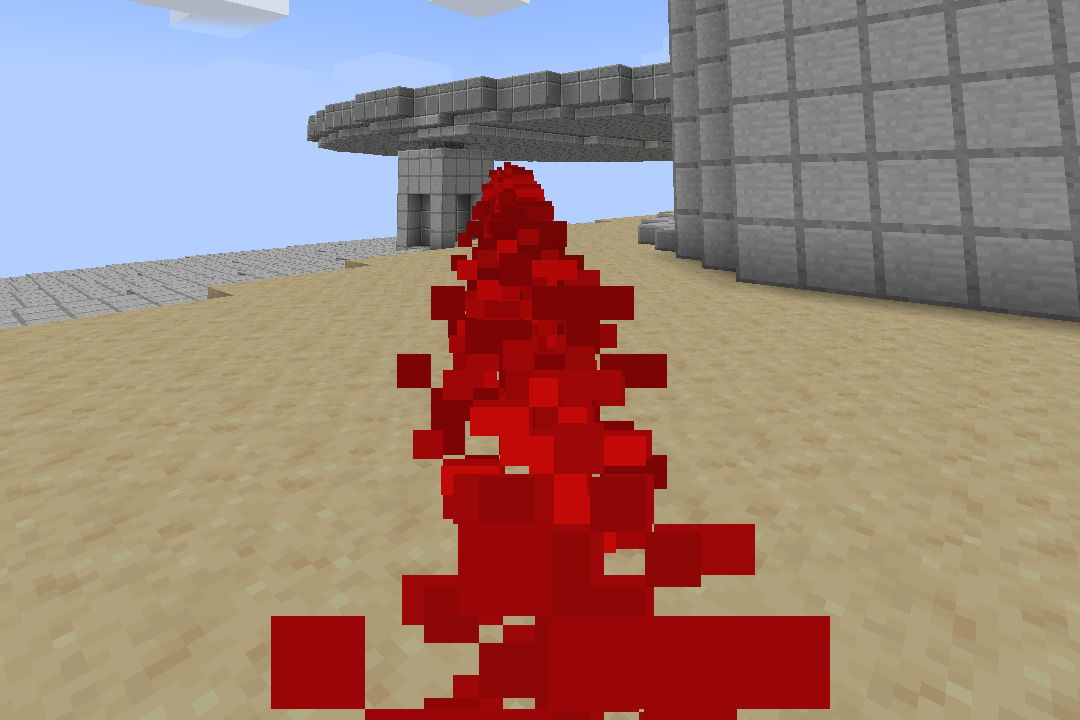 The event shown above being triggered by a player
The following parameters are available for all events. Each event type has unique parameters only available for its type.
| Value | Description | Data Type |
|---|---|---|
parent |
The parent event. Currently WIP | String |
event_type |
The event type. Specifies what happens when the event is triggered. | Enum |
offset |
The offset of the event. These values are added to the location where the event is executed | Complex |
sound |
The sound which plays when the event triggers | String |
| Event Type | Description |
|---|---|
BEAM |
Shoots a beam from the target location |
PLAYER_VECTOR_DASH |
Makes the player dash forwards |
PLAYER_VECTOR_LEAP |
Makes the player leap in the direction they are facing |
ENTITY_PREPARE_STRONG_ATTACK |
Makes the next attack stronger |
ENTITY_EXECUTE_STRONG_ATTACK |
Executes a stronger attack |
ENTITY_DAMAGE |
Inflicts damage upon an entity or player |
ENTITY_DISARM |
Disarms the target entity |
ENTITY_KNOCKBACK |
Knocks back the target entity |
The beam event fires off a beam in the direction in which the entity that executed it is facing. It supports multiple unique parameters. Not all parameters have to be filled in for the event to work
| Value | Description | Data Type |
|---|---|---|
colour |
The colour of the beam particles in RGB format (format: RRRGGGBBB) | String |
particle_type |
The particle making up the beam | Enum |
particle_size |
The size of the beam particles. Only applies to certain particles | Integer |
fly_distance |
The maximum distance the beam can fly. Only applies to certain particles | Integer |
speed |
The speed of the beam in blocks per tick | Integer |
offset |
The offset from the cast location as a 3D vector | Vector |
on_hit |
The local event, which occurs after a collision | Complex |
Completely redone to support inline event declaration
On hit example:
on_hit:
  player:
    1:
      event_type: PLAYER_VECTOR_LEAP
  entity:
    2:
      event_type: ENTITY_DAMAGE
      damage: 10
      damage_type: FREEZE
block:Includes the PLAYER_VECTOR_DASH and PLAYER_VECTOR_LEAP.
parent: 'null'
event_type: PLAYER_VECTOR_DASH
vector_bounds:
  y_min: 0
  y_max: 0.25
  planar_min: -1
planar_max: -1parent: 'null'
event_type: PLAYER_VECTOR_LEAP
vector_bounds:
y_min: 5
y_max: 0.9
planar_min: 0.0
planar_max: 2.0Takes bounds parameter. Not all bounds have to be defined. Both minimum and maximum of a bound have to be defined for them to be taken into account.
Making a value negative leads to it being ignored and treats it as undefinded.
Optionally, the legacy: "true" or "is_legacy_event: "true" flag can be used to create automatic bounds. However, this is deprecated and may eventually be removed.
Using this is not recommended. If you do this, you are doing it at your own risk.
parent: 'null'
event_type: PLAYER_VECTOR_DASH
legacy: trueWork in progress. Has not been tested.
The next attack dealt after this attack is modified according to the parameters.
The particles are shown and the sound is played when the attack is triggered.
parent: 'null'
event_type: ENTITY_PREPARE_STRONG_ATTACK
damage_multiplier: 2.0
knockback_power: 1.2
attack_sound: block.stone.hit
particles: false
The EXECUTE_STRONG_ATTACK event type has the same definition and the strong attack has the same execution, but the player attacks immediately and if the attack is not successful,
the attack is not triggered the next time the player attacks
parent: 'null'
event_type: ENTITY_EXECUTE_STRONG_ATTACK
damage_multiplier: 3.0
knockback_power: 1.5
attack_sound: block.stone.hit
particles: true`Damage type is the damage type.
Damage is the amount of damage inflicted
parent: 'null'
event_type: ENTITY_DAMAGE
damage: 5
damage_type: FREEZEWork in progress. Has not been tested.
parent: 'null'
event_type: ENTITY_DISARM
use_disarm_roll: true
use_knockback: false
use_facing_item_vector: true
base_strength: 1
use_knockback determines whether the entity is knocked back or not. Only works if the event was executed by a caster.
use_facing_item_vector determines whether the entity is disarmed based upon the casters directions. If there is no caster this has no effect.
use_disarm_roll determines whether a randomised method is used to check if the target is disarmed.
base_strength affects the initial roll if the use_disarm_roll is used.
Work in progress. Has not been tested.
Damage type is the damage type.
Damage is the amount of damage inflicted
parent: 'null'
event_type: ENTITY_KNOCKBACK
knockback_multiplier: 1.0
limit_vertical_knockback: true
knockback_multiplier determines how far the target is knocked back.
limit_vertical_knockback determines the vertical knockback is limited so that the target does not fly upwards.
Functionality of the plugin can be modified via the config.yml file in the plugin folder. The currency name parameter does not yet work.
The materials section does not yet do anything.
# Whether vault compatibility is enabled
enable-vault: true

# Whether items have a cooldown animation
enable-cooldown-animation: true
# Whether the sidebar is enabled
enable-sidebar: false

# Whether the item rarity description will be italic
italic-item-rarity: true
# Singular and plural form of the currency name
currency-singular: Credit
currency-plural: Credits

# Controls what crafting stations the un-smelting recipes are added to
# Un-smelting recipes are specified in item creation
add-unsmelting-recipes-to-furnace: false
add-unsmelting-recipes-to-smoker: false
add-unsmelting-recipes-to-blast-furnace: true
add-unsmelting-recipes-to-campfire: false

# Whether nuggets are used in cases where a whole ingot would not be given
use-smelting-nuggets: true

# Default unsmelting time in ticks
default-unsmelting-time: 200;

# Material Registry
# Used alongside use-smelting-nuggets
# Usage: <item>:
#          <material>: <number>
#
# Where item is the main material name,
# the number represents how many of the material constitute to the item
# and the material is the material
materials:
  iron_ingot:
    iron_nugget: 9
  gold_ingot:
gold_nugget: 9The MythicMobs integration allows you to trigger events directly from a MythicMobs file in the form of MythicMobs skills.
The section can be directly appended to the Skills section of a MythicMob or the Skills section of a MythicMob skill. More information on the MythicMobs API is available on their wiki
Below is an example of a MythicMobs skill, which containing MineshaftAPI event.
BlasterBeam:
  Cooldown: 1.5
  Skills:
  - targetedmineshaftevent{e=blaster-shot;d=4;o=13} @Target
  - sound{s=minecraft:blaster.blasterrifle;v=5.0} @self
The @Target parameter after the skill just specifies the target and is an inbuilt MythicMobs function.
For entity targeters, please refer to the MythicMobs wiki page
Currently there are two types of MythicMobs events: mineshaftevent and targetedmineshaftevent
Another feature is setting the armour class of enemies.
The mineshaft event takes a location as a target the entity is aiming at. This allows the entity to aim at a block rather than a player or entity.
Syntax:
mineshaftevent{e=event-name;d=damage} or
mineshaftevent{event=event-name;damage=damage}
Where damage is the amount of damage dealth if the event damages an entity (this only works with certain events) and event-name is the name of the event.
Examples:
mineshaftevent{event=loud-bang}
mineshaftevent{e=laser-shot;d=10} @TargetLocation
mineshaftevent{event=smoke-bomb;d=1} @self
The targeted mineshaft event is incredibly similar, however instead of a location, it takes the target as an entity.
With events fired in a direction, like the beam event, this fires them in the direction of the target.
To stop the MythicMobs having too accurate aim, an optional parameter offset has been added. The offset (in degrees on an axis, distributed uniformly (WIP)) determines the maximum amount of degrees the beam is rotated away from the target, allowing the mob to miss its shot (by a maximum margin of your choice).
Syntax:
targetedmineshaftevent{e=event-name;d=damage;o=offset} or
targetedmineshaftevent{event=event-name;damage=damage;offset=offset}
Where damage is the amount of damage dealt if the event damages an entity (this only works with certain events, which do this), event-name is the name of the event and offset is the offset (explained above).
Examples:
mineshaftevent{event=loud-bang}
mineshaftevent{e=direct-shot;d=22} @lastAttacker
mineshaftevent{e=laser-shot;d=10;offset=2} @Target
mineshaftevent{event=grenade-throw;o=25} @NearestPlayer
SetArmourClass:
Skills:
  - mineshaftarmourclass{v=10} @Self
  - mineshaftarmourclass{value=10} @Self
The v (or value) parameter sets the armour class value. Leaving it unset sets it to 0.
The aliases mineshaftarmourclass, mythic_armour_class, mineshaftarmour and mineshaft_armour can be used for this event.
Regardless of the target, this event is triggered on the caster.
Description coming soon...
| Placeholder | Description | Data Type |
|---|---|---|
profile_name |
The current profile name | String |
coins |
Number of coins owned | Double |
test |
A debug placeholder | String |
Some placeholders require the presence of MineshaftRpg to fully work:
| Placeholder | Description | Data Type |
|---|---|---|
level |
Current level ('1' unless MineshaftRpg is used) | Integer |
xp |
Current xp ('0' unless MineshaftRpg is used) | Integer |
culture |
Current culture | String |
A plugin based off the old RpgPlugin. Contains multiple features like character creation, ability scores, skills, levelling etc.
The plugin can be reloaded via the /mineshaft command, which is automatically available to operators.
Usage:
/mineshaft reload [all|items|events|configs]
Examples:
/mineshaft reload and /mineshaft reload all reloads the whole plugin
/mineshaft reload item and /mineshaft reload items reloads custom items
/mineshaft reload event and /mineshaft reload events reloads events
/mineshaft reload config and /mineshaft reload configs reloads the configuration