This project is an implememntation of the SCHC standard defined in RFC 8724, RFC 9011, and RFC 9441. The implementation is on the end device or node side. SCHC_Node.cpp works over RAKWireless 4631 hardware platform. You can learn more about the RAK4631 platform here.
RAK4631 is a WisBlock Core module for RAK WisBlock. It extends the WisBlock series with a powerful Nordic nRF52840 MCU that supports Bluetooth 5.0 (Bluetooth Low Energy) and the newest LoRa transceiver from Semtech, the SX1262.
The RAK4631 will not work without a WisBlock Base board. The WisBlock Base provides a USB connection for programming the RAK4631. It also provides a power source and various interfaces to RAK4631 so that it can be connected to other WisBlock modules via different module slots.
To illustrate, RAK4631 can be connected to RAK5005-O WisBlock Base, as shown in Figure 1.

Figure 1: RAK4631 core board with RAK5005 base board.
The WisBlock Starter Kit is a bundle of WisBlock Base RAK19007 and WisBlock Core RAK4631, RAK11310 or RAK11200. You can buy and select the components of the bundle in the following link:
https://store.rakwireless.com/products/wisblock-starter-kit
Remember choose the below options:
- Product: RAK19007 + RAK4631 LoRaWAN and LoRa Nordic nRF52840 BLE Core with Arduino
- Frequency: Select your frequency band according to your location in the following link:
https://www.thethingsnetwork.org/docs/lorawan/frequencies-by-country/
This SCHC implementation supports the ACK-on-Error mode over uplink defined in RFC 8724 and RFC 9011.
- RFC 8724: SCHC: Generic Framework for Static Context Header Compression and Fragmentation
- RFC 9011: Static Context Header Compression and Fragmentation (SCHC) over LoRaWAN
- RFC 9441: Static Context Header Compression (SCHC) Compound Acknowledgement (ACK)
To deploy SCHC Node on a RAK4631 development board you must have the following tools installed:
- Visual Studio Code
- PlatformIO para VSCode (VSCode extension)
- Board Support Package for RAK4631
Install Visual Studio Code which is a great and open source tool, and you can download it here:
https://code.visualstudio.com/
PlatformIO is a cross-platform, cross-architecture, multiple framework for embedded systems engineers and for software developers who write applications for embedded products. PlatformIO is used to deploy code in RAKWireless boards and it is used in VSCode through an extension. To install PlatformIO in VSCode and add support to RAKWireless boards follow the below steps:
- Step 1:
- Open VSCode Package Manager.
- Search for the official platformio ide extension.
- Install PlatformIO IDE (see Figure 2).
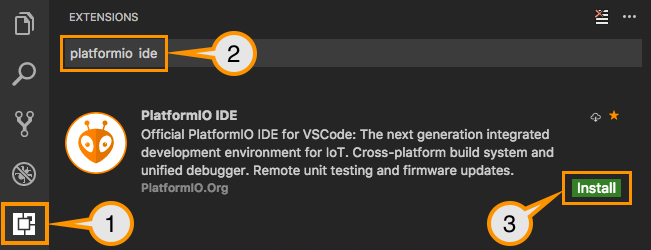
Figure 2: PlatformIO install process description.
- Step 2: After installing PlatformIO, you can see the PlatformIO icon (the ant icon). Open it and wait for initialisation process.
- Step 3: In the new window, select Quick Access > PIO Home > Platforms > Embedded. Search Nordic nRF52 and install it.
-
Step 4: Close VSCode.
-
Step 5: PlatformIO needs to be update with RAKWireless Boards Support Package. For this, you need download the patch file called RAK_PATCH. Download RAK_PATCH.zip from the below link:
https://raw.githubusercontent.com/RAKWireless/WisBlock/master/PlatformIO/RAK_PATCH.zip
- Step 6: Save the RAK_PATH.zip in the PlatformIO installation folder (depending on the operating system):
| PlatformIO installation folder paths | |
|---|---|
| Windows | %USER%\.platformio\ |
| Linux | ~/.platformio/ |
| MacOS | /Users/{Your_User_id}/. platformio/ |
-
Step 7: Unzip the contents of RAK_PATCH.zip into folder RAK_PATCH in your PlatformIO installation folder.
-
Step 8: Open a terminal (e.g. Window terminal or PowerShell for Window). Go to the RAK_PATCH folder into PlatformIO installation folder. Execute the below comand:
| Windows | python.exe .\rak_patch.py |
| Linux | python ./rak_patch.py |
NOTE: This script update the PlatformIO with the RAK4631 board.
To deploy code in RAK4631 you must create your workspace with SCHC node code. Follow the below steps:
- Step 1: Open VSCode.
- Step 2: Select the Clone Git Repository. Use the below url to download SCHC node code:
https://github.com/RodrigoMunozLara/SCHC_Node.cpp.git
Note: We assume you have configured Git source control in VS Code. If you haven't done so yet, click here.