Warning
ALPHA SOFTWARE: KlipperFleet is currently in alpha. It has only been tested on specific (listed below) CAN bus, STM32 Serial/DFU devices, as well as Linux Process.
Non-Raspberry Pi and Fluidd Users: Be advised these are unsupported at the moment, but on the roadmap for integration and testing later.
Kalico Users: Kalico is supported! KlipperFleet auto-detects Kalico when it's installed in ~/klipper (the standard Kalico setup). No extra configuration needed.
Contributions and bug reports are highly appreciated!
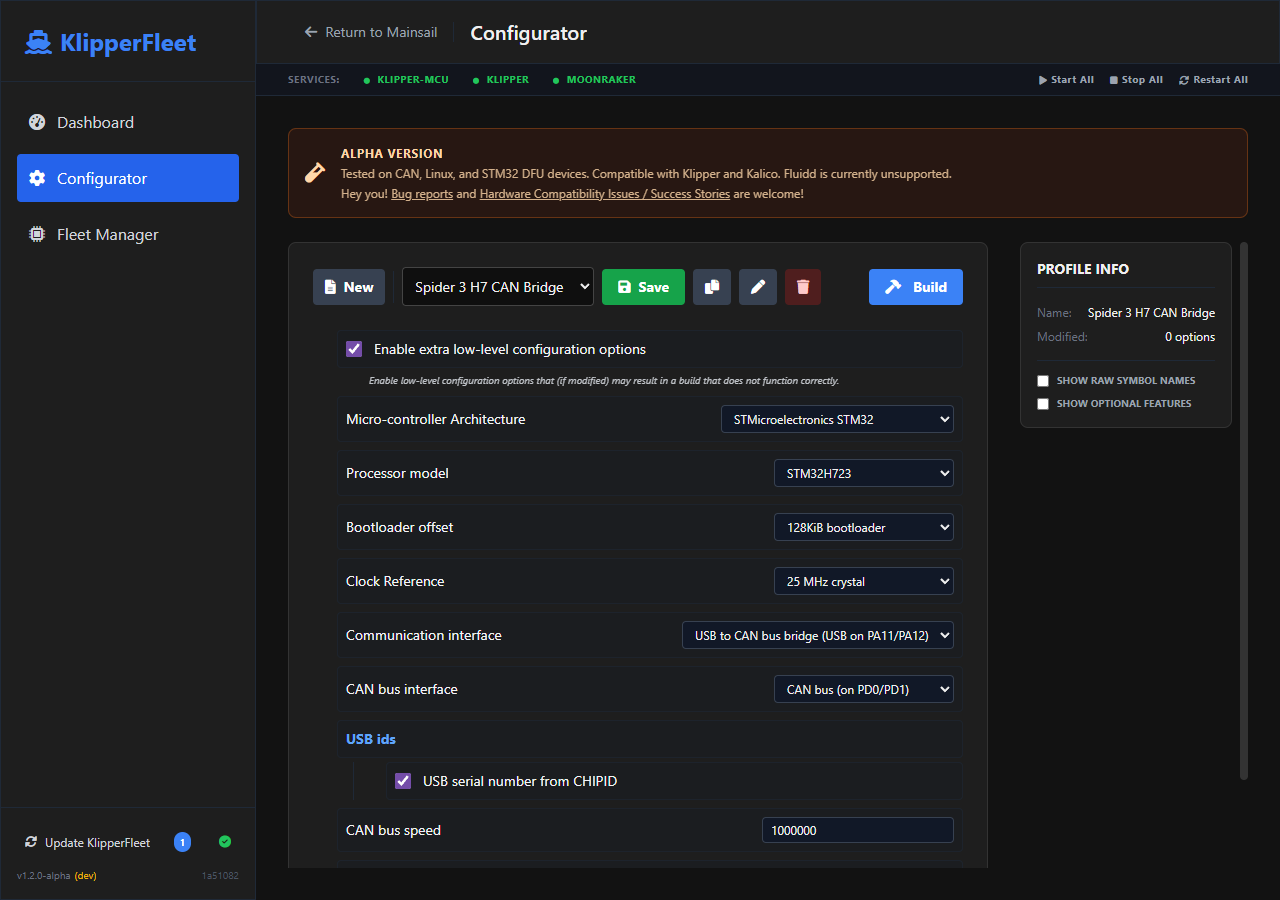
KlipperFleet is a "one-stop-shop" for managing Klipper (and Kalico) firmware across your entire fleet of MCUs on a single printer. It provides a modern web interface (integrated into Mainsail) to configure, build, and flash firmware without ever touching the command line.
- Dynamic Web Configurator: Replaces
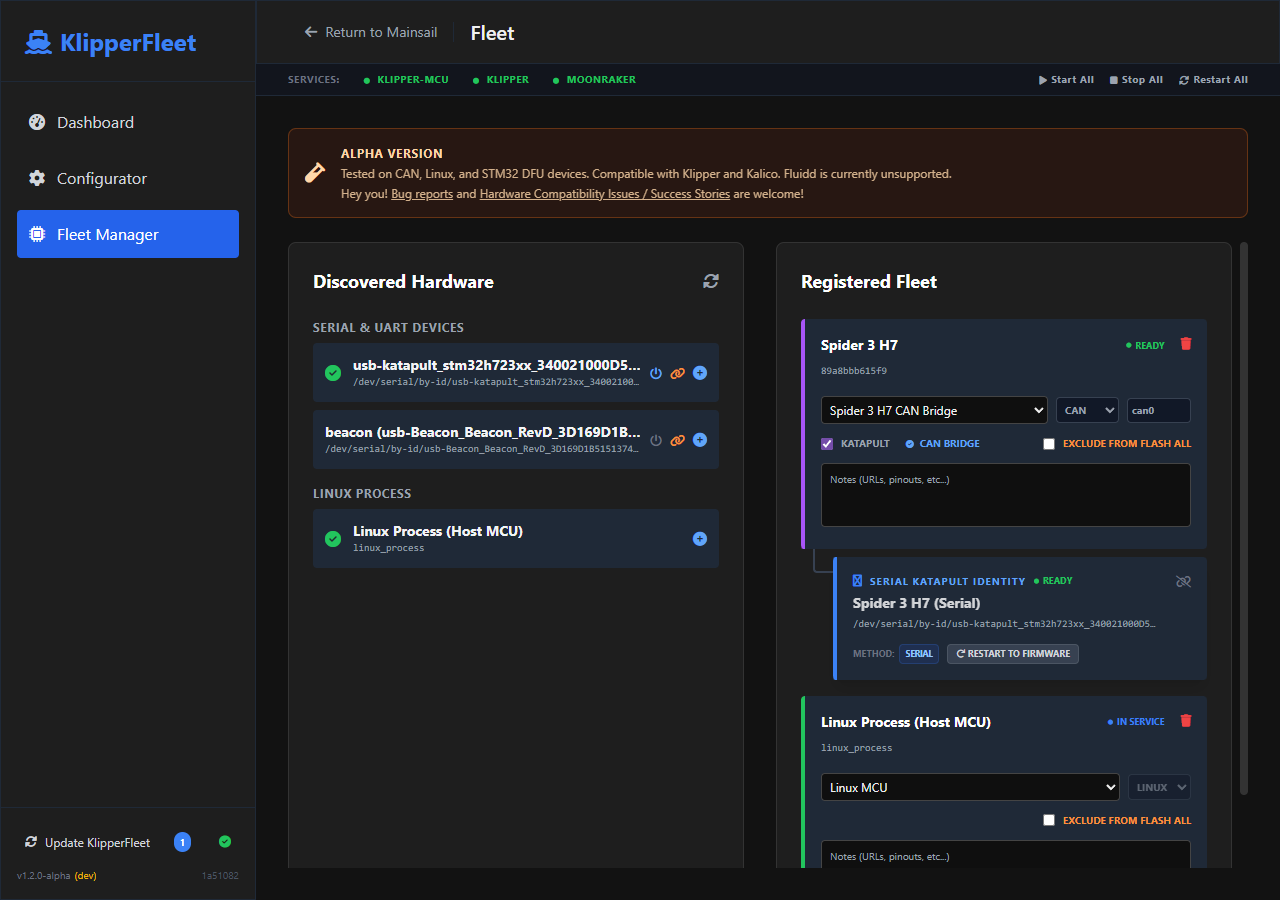
make menuconfigwith a reactive web form that parses Klipper's source code in real-time. - Fleet Management: Register all your MCUs (Serial, CAN, or DFU), assign them profiles, and manage them from a single dashboard. DFU IDs can be "attached" to Serial devices, allowing KlipperFleet to track the MCU across reboots and automatically identify it when it enters the bootloader.
- Smart Sequencing: Automatically handles CAN bridge hosts by flashing downstream nodes first, then the bridge host last.
- UART Support: Detects and manages MCUs connected via Raspberry Pi UART (GPIO).
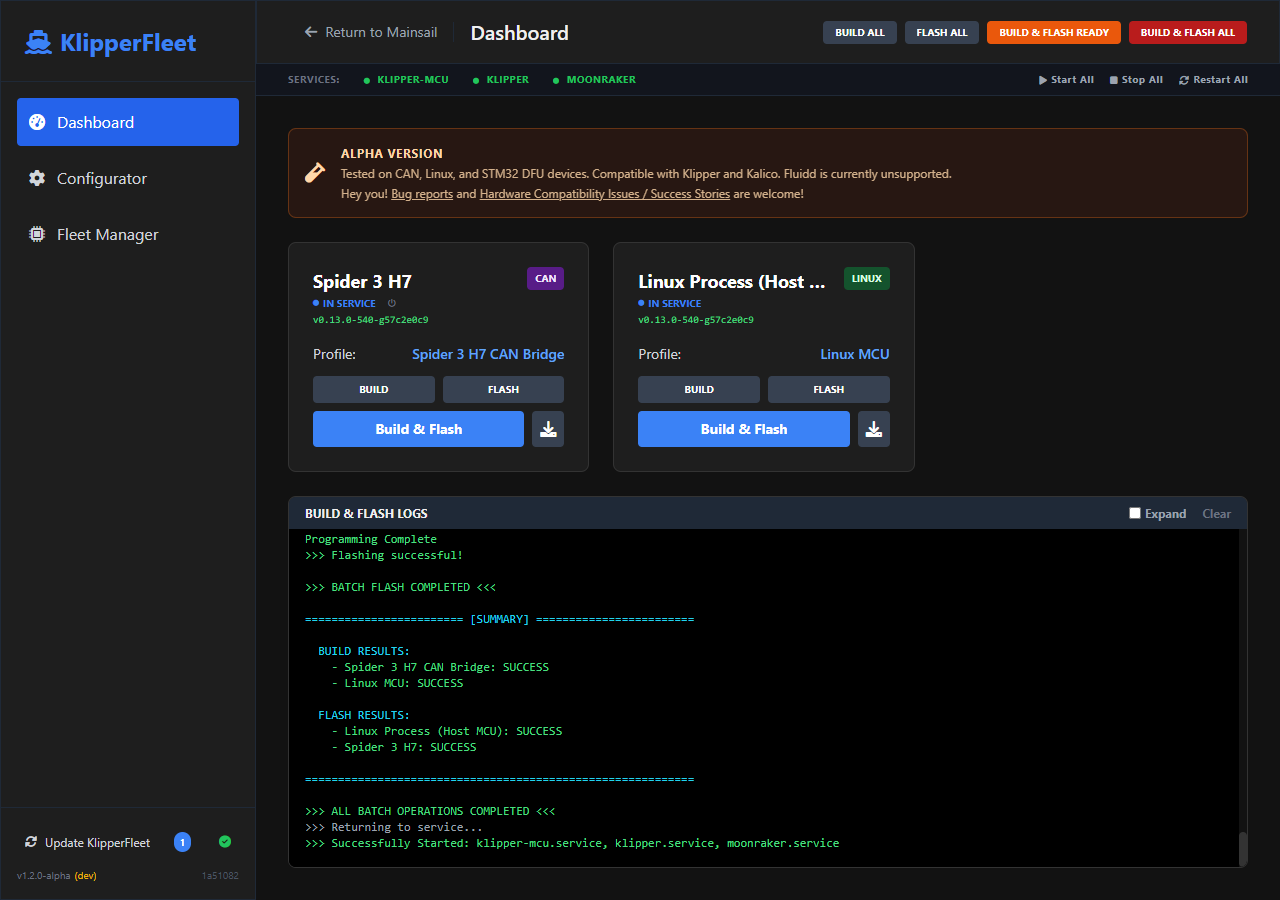
- One-Click Batch Operations: Build firmware for your entire fleet, flash all ready devices, or perform a full "Build & Flash All" with a single click.
- Automatic Katapult/DFU Reboot: Intelligent detection of Klipper vs. Katapult/DFU modes. If a device is in service, KlipperFleet can automatically reboot it into the appropriate bootloader for flashing.
- Service Management: Automatically stops and starts Klipper/Moonraker services during flashing to ensure exclusive access to the bus.
- Integrated Flashing: Flash firmware via Serial, CAN (Katapult), or DFU directly from the browser with real-time log streaming.
- Mainsail Integration: Designed to look and feel like a native part of the Mainsail ecosystem.
Important
KlipperFleet is in Alpha. While the core logic is robust, hardware-specific quirks exist. The following configurations have been verified. All other hardware should be considered UNTESTED, and if you run into issues, please open an issue in github so it can be resolved.
- Host MCUs: Raspberry Pi (Linux Process)
- CAN Nodes: Spider 3 H7, BTT MMBCAN v1
- DFU/USB: Spider 3 (F446) - Tested with 32KiB bootloader
- Bridges: Spider 3 H7 (H723) Katapult CAN Bridge mode
- CANbus: 1Mbit (Katapult & Klipper)
- USB: DFU (Standard STM32 Bootloader)
- Serial: 1200bps "Magic Baud" DFU entry

KlipperFleet expects the following projects to be installed in your home directory:
- Klipper: Located at
~/klipper. Used for source code and Kconfig definitions. - Katapult: Located at
~/katapult. Used for flashing viaflashtool.py.
The system also requires:
- can-utils: For managing CAN interfaces.
- Python 3.9+: With
venvsupport. - Sudo Access: The service needs passwordless sudo for
systemctl(service management) andip link(CAN management).
Run this one-liner on your Raspberry Pi:
wget -qO - https://raw.githubusercontent.com/JohnBaumb/KlipperFleet/main/install.sh | sudo bashIf you prefer to clone manually:
cd ~
git clone https://github.com/JohnBaumb/KlipperFleet.git
cd KlipperFleet
sudo chmod +x install.sh
sudo ./install.shTo enable one-click updates and integrate KlipperFleet into your Mainsail sidebar, add the following to your moonraker.conf:
[update_manager klipperfleet]
type: git_repo
path: ~/KlipperFleet
origin: https://github.com/JohnBaumb/KlipperFleet.git
primary_branch: main
managed_services: klipperfleet
install_script: install.sh
is_system_service: False
The installer automatically integrates KlipperFleet into your Mainsail navigation by modifying .theme/navi.json.
Tip
The .theme folder is hidden. To see it in the Mainsail file manager, you must enable Show Hidden Files in the Mainsail settings.
If the entry does not appear, you can manually add it to .theme/navi.json:
[
  {
    "title": "KlipperFleet",
    "href": "http://<your-pi-ip>:8321",
    "target": "_self",
    "icon": "M20,21V19L17,16H13V13H16V11H13V8H16V6H13V3H11V6H8V8H11V11H8V13H11V16H7L4,19V21H20Z",
    "position": 86
  }
]- Configurator: Go to the Configurator tab, select a profile name, and configure your MCU settings. Click Save.
- Fleet Manager: Go to the Fleet Manager tab and click the Scan icon. Add your discovered devices to the fleet and assign them the profiles you created.
- Tip: Use the Attach () button to link a discovered DFU ID to an existing Serial device. This allows KlipperFleet to track the device across reboots and automatically identify it when it enters the bootloader for flashing.
- Dashboard:
- Build All: Compiles firmware for every profile assigned to a device in your fleet.
- Flash Ready: Flashes all devices currently in Katapult mode.
- Flash All: Automatically reboots all "In Service" devices into Katapult and flashes them.
- Build & Flash All: The "One-Click" solution to update your entire printer's firmware in one go.
- Backend: FastAPI (Python 3)
- Kconfig Engine:
kconfiglib - Frontend: Vue.js 3, Tailwind CSS
- Flashing: Katapult (
flashtool.py)
KlipperFleet stores its data in ~/printer_data/config/klipperfleet/:
profiles/: Saved Kconfig.configfiles.artifacts/: Compiled.binand.elffirmware files.fleet.json: Registry of your devices and their assigned profiles.
KlipperFleet is under active development. Here are some of the major features currently in the works:
- Safety & Robustness:
- Architecture Verification: Automatic safety checks to verify MCU architecture before flashing.
- Enhanced DFU Handling: Improved robustness for STM32 DFU mode entry and exit (currently in testing).
- Bridge Recovery: Intelligent interface recovery and status detection for CAN bridge hosts.
- kconfiglib: Switch to using klipper's kconfiglib instead of the official kconfiglib to ensure accuracy during builds.
- User Experience:
- One-Click UI Updates: Integration with Moonraker's update manager for updates directly from the KlipperFleet dashboard.
- Custom Modal System: Replacing browser prompts with a native-feeling UI for a smoother experience.
- Ecosystem Expansion: Eventual Additions.
- Fluidd Integration: Seamless integration and UI parity for Fluidd users.
GPLv3