





PAR Scrape is a versatile web scraping tool with options for Selenium or Playwright, featuring AI-powered data extraction and formatting.


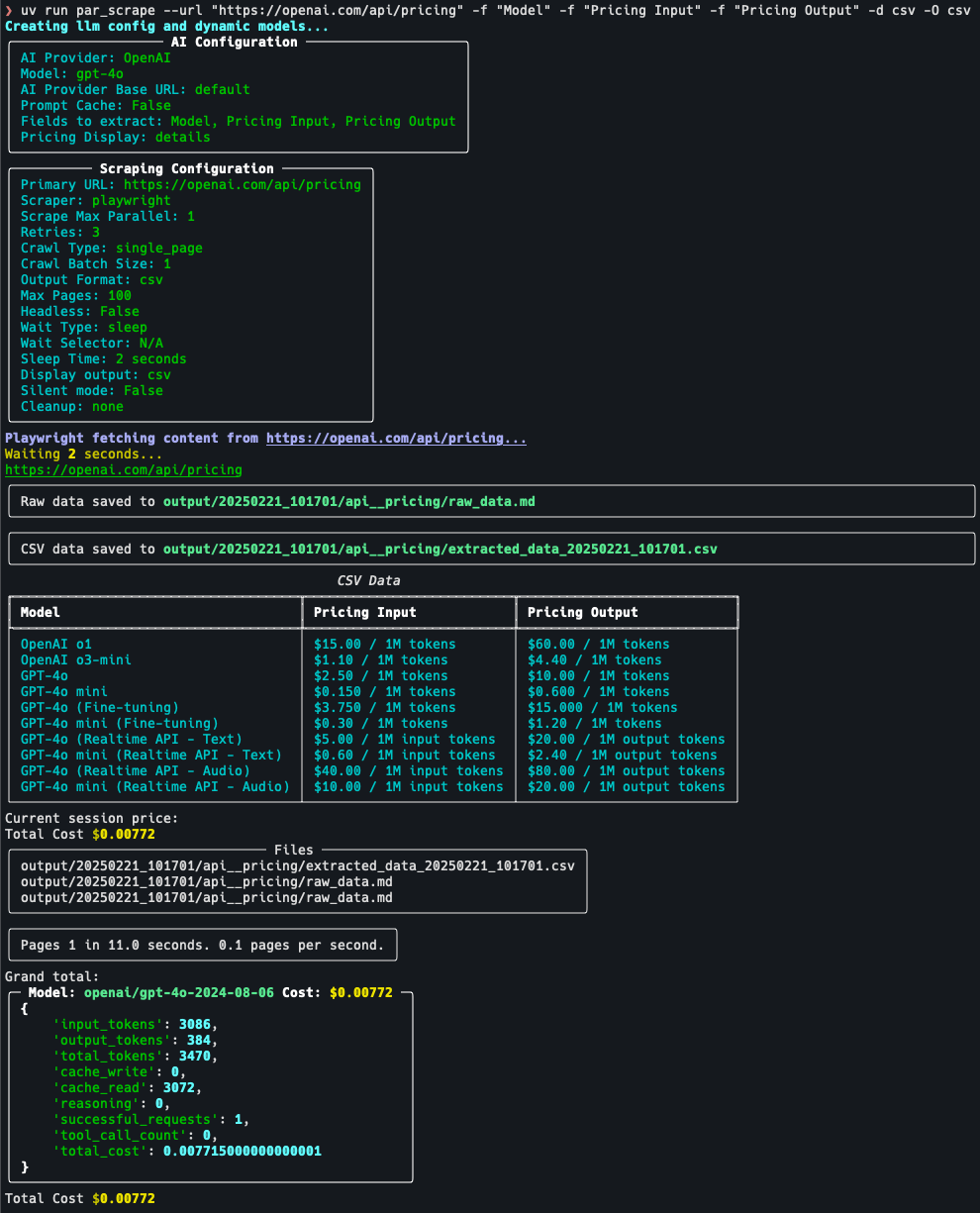
- Web scraping using Selenium or Playwright
- AI-powered data extraction and formatting
- Supports multiple output formats (JSON, Excel, CSV, Markdown)
- Customizable field extraction
- Token usage and cost estimation
- Selenium silent mode on windows still shows message about websocket. There is no simple way to get rid of this.
- Providers other than OpenAI are hit-and-miss depending on provider / model / data being extracted.
To install PAR Scrape, make sure you have Python 3.11.
uv is recommended
curl -LsSf https://astral.sh/uv/install.sh | shpowershell -ExecutionPolicy ByPass -c "irm https://astral.sh/uv/install.ps1 | iex"Then, follow these steps:
-
Clone the repository:
git clone https://github.com/paulrobello/par_scrape.git cd par_scrape -
Install the package dependencies using uv:
uv sync
To install PAR Scrape from PyPI, run any of the following commands:
uv tool install par_scrapepipx install par_scrapeTo use playwright as a scraper, you must install it and its browsers using the following commands:
uv tool install playwright
playwright install chromiumTo use PAR Scrape, you can run it from the command line with various options. Here's a basic example: Ensure you have the AI provider api key in your environment. The key names for supported providers are as follows:
- OpenAI:
OPENAI_API_KEY - Anthropic:
ANTHROPIC_API_KEY - Groq:
GROQ_API_KEY - Google:
GOOGLE_API_KEY - Ollama:
Not needed
You can also store your key in the file ~/.par_scrape.env as follows:
OPENAI_API_KEY=your_api_key
ANTHROPIC_API_KEY=your_api_key
GROQ_API_KEY=your_api_key
GOOGLE_API_KEY=your_api_key
uv run par_scrape --url "https://openai.com/api/pricing/" --fields "Model" --fields "Pricing Input" --fields "Pricing Output" --scraper selenium --model gpt-4o-mini --display-output mdpar_scrape --url "https://openai.com/api/pricing/" --fields "Title" "Number of Points" "Creator" "Time Posted" "Number of Comments" --scraper selenium --model gpt-4o-mini --display-output md--url,-u: The URL to scrape or path to a local file (default: "https://openai.com/api/pricing/")--fields,-f: Fields to extract from the webpage (default: ["Model", "Pricing Input", "Pricing Output"])--scraper,-s: Scraper to use: 'selenium' or 'playwright' (default: "playwright")--headless,-h: Run in headless mode (for Selenium) (default: False)--wait-type,-w: Method to use for page content load waiting [none|pause|sleep|idle|selector|text] (default: sleep).--wait-selector,-i: Selector or text to use for page content load waiting.--sleep-time,-t: Time to sleep (in seconds) before scrolling and closing browser (default: 5)--ai-provider,-a: AI provider to use for processing (default: "OpenAI")--model,-m: AI model to use for processing. If not specified, a default model will be used based on the provider.--display-output,-d: Display output in terminal (md, csv, or json)--output-folder,-o: Specify the location of the output folder (default: "./output")--silent,-q: Run in silent mode, suppressing output (default: False)--run-name,-n: Specify a name for this run--version,-v: Show the version and exit--pricing: Enable pricing summary display (default: False)--cleanup,-c: How to handle cleanup of output folder (choices: none, before, after, both) (default: none)--extraction-prompt,-e: Path to alternate extraction prompt file--ai-base-url,-b: Override the base URL for the AI provider.
- Basic usage with default options:
par_scrape --url "https://openai.com/api/pricing/" -f "Model" -f "Pricing Input" -f "Pricing Output" --pricing -w text -i gpt-4o- Using Playwright and displaying JSON output:
par_scrape --url "https://openai.com/api/pricing/" -f "Title" -f "Description" -f "Price" --scraper playwright -d json --pricing -w text -i gpt-4o- Specifying a custom model and output folder:
par_scrape --url "https://openai.com/api/pricing/" -f "Title" -f "Description" -f "Price" --model gpt-4 --output-folder ./custom_output --pricing -w text -i gpt-4o- Running in silent mode with a custom run name:
par_scrape --url "https://openai.com/api/pricing/" -f "Title" -f "Description" -f "Price" --silent --run-name my_custom_run --pricing -w text -i gpt-4o- Using the cleanup option to remove the output folder after scraping:
par_scrape --url "https://openai.com/api/pricing/" -f "Title" -f "Description" -f "Price" --cleanup --pricing- Using the pause option to wait for user input before scrolling:
par_scrape --url "https://openai.com/api/pricing/" -f "Title" -f "Description" -f "Price" --pause --pricing- Version 0.4.6:
- Minor bug fixes.
- Updating pricing data.
- Added support for Amazon Bedrock
- Removed some unnecessary dependencies.
- Code cleanup.
- Version 0.4.5:
- Added new option --wait-type that allows you to specify the type of wait to use such as pause, sleep, idle, text or selector.
- Removed --pause option as it is no longer needed with --wait-type option.
- Playwright scraping now honors the headless mode.
- Playwright is now the default scraper as it is much faster.
- Version 0.4.4:
- Better Playwright scraping.
- Version 0.4.3:
- Added option to override the base URL for the AI provider.
- Version 0.4.2:
- The url parameter can now point to a local rawData_*.md file for easier testing of different models without having to re-fetch the data.
- Added ability to specify file with extraction prompt.
- Tweaked extraction prompt to work with Groq and Anthropic. Google still does not work.
- Remove need for ~/.par-scrape-config.json
- Version 0.4.1:
- Minor bug fixes for pricing summary.
- Default model for google changed to "gemini-1.5-pro-exp-0827" which is free and usually works well.
- Version 0.4.0:
- Added support for Anthropic, Google, Groq, and Ollama. (Not well tested with any providers other than OpenAI)
- Add flag for displaying pricing summary. Defaults to False.
- Added pricing data for Anthropic.
- Better error handling for llm calls.
- Updated cleanup flag to handle both before and after cleanup. Removed --remove-output-folder flag.
- Version 0.3.1:
- Add pause and sleep-time options to control the browser and scraping delays.
- Default headless mode to False so you can interact with the browser.
- Version 0.3.0:
- Fixed location of config.json file.
Contributions are welcome! Please feel free to submit a Pull Request.
This project is licensed under the MIT License - see the LICENSE file for details.
Paul Robello - probello@gmail.com