A VS Code extension that integrates TrendAI's security scanning capabilities directly into your development environment. Scan for vulnerabilities, malware, secrets, and Infrastructure-as-Code (IaC) misconfigurations without leaving your editor.
Disclaimer: This is an unofficial community project and is not officially supported by TrendAI. Use at your own discretion.



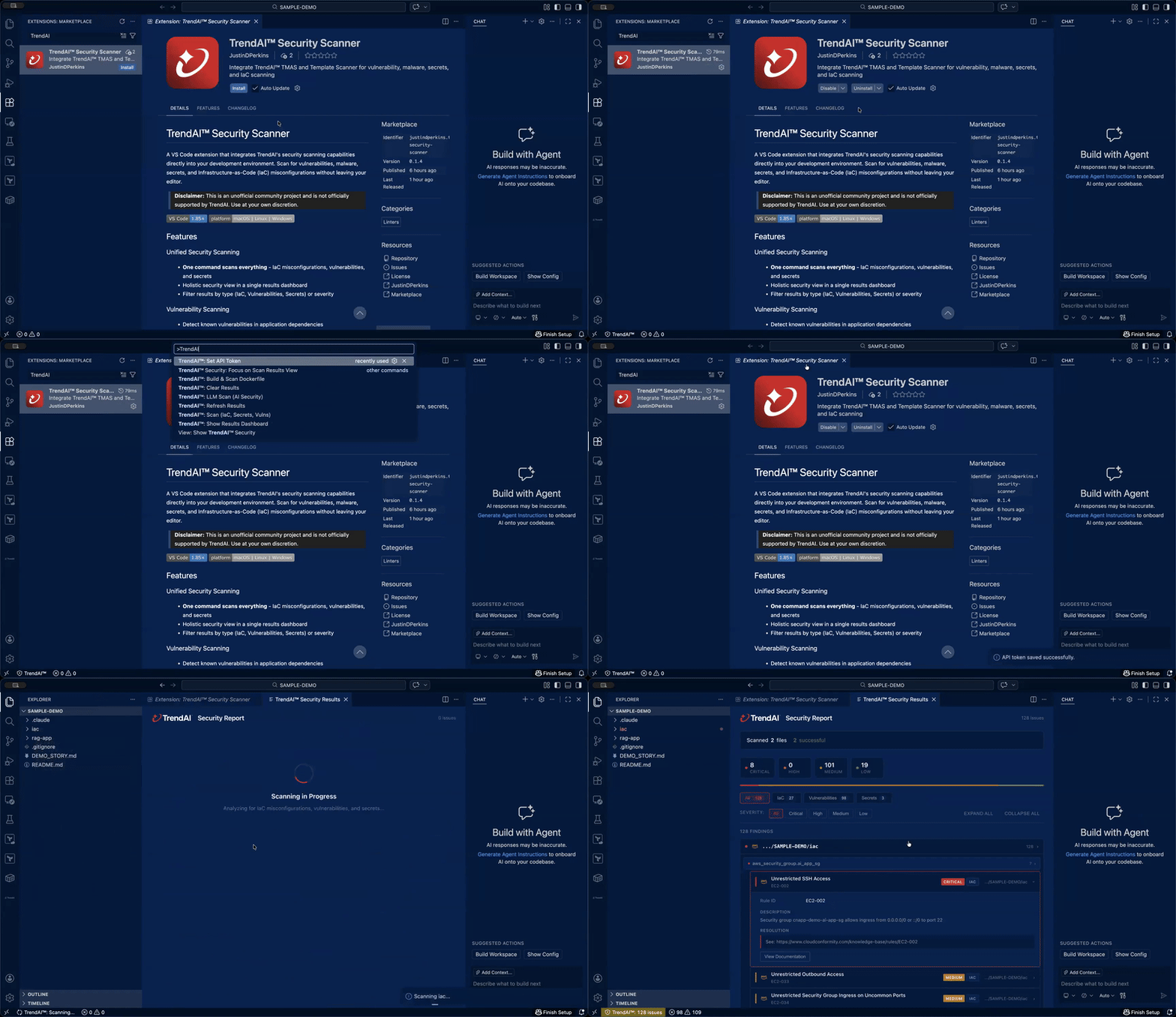
- One command scans everything - IaC misconfigurations, vulnerabilities, and secrets
- Holistic security view in a single results dashboard
- Filter results by type (IaC, Vulnerabilities, Secrets) or severity
- Detect known vulnerabilities in application dependencies
- View CVSS scores and NVD references
- Get remediation guidance with fix versions
- Identify exposed API keys, credentials, and tokens
- Pinpoint exact line and column locations
- Quick actions to add files to .gitignore
- Terraform - Single files, projects, and plan JSON
- CloudFormation - YAML and JSON templates
- Compliance mapping (PCI-DSS, SOC2, etc.)
- Provider-specific rules for AWS, Azure, GCP
- Build and scan Dockerfiles in one step
- Automatic image export and analysis
- Full vulnerability, malware, and secrets detection
- Test AI/LLM endpoints for prompt injection vulnerabilities
- Supports Ollama, LM Studio, OpenAI, Azure OpenAI, and custom endpoints
- Automated model discovery and attack objective testing
- Install from the VS Code Marketplace or Extensions panel
- Search for "TrendAI Security Scanner"
- Click Install
Or install from VSIX:
code --install-extension trendai-security-scanner-0.1.0.vsix-
Set your API Token
- Run command:
TrendAI™: Set API Token - Enter your Vision One API token
- Run command:
-
Scan your project
- Right-click a folder in Explorer →
TrendAI™: Scan (IaC, Secrets, Vulns) - Or use Command Palette (Ctrl/Cmd+Shift+P) →
TrendAI™: Scan (IaC, Secrets, Vulns)
- Right-click a folder in Explorer →
-
View results
- Results appear in the interactive dashboard
- Filter by type: All | IaC | Vulnerabilities | Secrets
- Filter by severity: Critical | High | Medium | Low
| Command | Description |
|---|---|
Scan (IaC, Secrets, Vulns) |
Unified scan for IaC misconfigurations, vulnerabilities, and secrets |
LLM Scan (AI Security) |
Scan LLM/AI endpoints for prompt injection vulnerabilities |
Build & Scan Dockerfile |
Build Docker image and scan for security issues |
Set API Token |
Configure your Vision One API token |
Show Results Dashboard |
Display interactive results panel |
Refresh Results |
Refresh the results tree view |
Clear Results |
Clear all scan results |
| Context | Action |
|---|---|
| Right-click folder | Scans that folder recursively |
| Right-click file | Scans the file's parent folder |
| Command palette | Scans entire workspace (prompts for selection if multi-root) |
IaC Templates
- Terraform HCL (
.tf) - Terraform Plan JSON
- CloudFormation YAML (
.yaml,.yml) - CloudFormation JSON (
.json)
Dependency Files
package.json,package-lock.jsonrequirements.txt,Pipfile,poetry.lockgo.mod,go.sumpom.xml,build.gradle- And many more...
Docker
- Dockerfiles for build & scan workflow
Access settings via File > Preferences > Settings and search for "trendai".
| Setting | Default | Description |
|---|---|---|
trendai.visionOneRegion |
api.xdr.trendmicro.com |
Vision One API endpoint |
trendai.tmasPath |
(auto) | Custom path to TMAS binary |
trendai.tmasRegion |
us-east-1 |
TMAS cloud features region |
trendai.scanOnSave |
false |
Auto-scan IaC files on save |
trendai.severityThreshold |
medium |
Minimum severity to report |
trendai.enableVulnerabilities |
true |
Enable vulnerability scanning |
trendai.enableMalware |
true |
Enable malware scanning (containers only) |
trendai.enableSecrets |
true |
Enable secrets scanning |
| Region | Endpoint |
|---|---|
| United States | api.xdr.trendmicro.com |
| United States (Government) | api.usgov.xdr.trendmicro.com |
| Australia | api.au.xdr.trendmicro.com |
| Germany | api.eu.xdr.trendmicro.com |
| India | api.in.xdr.trendmicro.com |
| Japan | api.xdr.trendmicro.co.jp |
| Singapore | api.sg.xdr.trendmicro.com |
| United Arab Emirates | api.mea.xdr.trendmicro.com |
| United Kingdom | api.uk.xdr.trendmicro.com |
The interactive results panel includes:
- Overview Summary - Severity breakdown at a glance
- Type Tabs - Filter by All | IaC | Vulnerabilities | Secrets
- Severity Filters - Focus on Critical, High, Medium, or Low issues
- File Grouping - Findings organized by file and resource
- Expandable Details - Full descriptions, remediation guidance, and links
- Scan Summary - Shows success/failure counts when errors occur
- Error Display - Clear error messages with troubleshooting suggestions
The extension provides detailed error feedback:
| Error Code | Description |
|---|---|
AUTH_001 |
API token not configured |
AUTH_002 |
Invalid or expired API token |
API_001 |
Rate limit exceeded |
API_002 |
Server error (try again later) |
SCAN_001 |
TMAS binary not found |
NET_001 |
Request timeout |
Errors are displayed in:
- The results dashboard (with full context)
- VS Code notifications (with suggestions)
- Output panel (
TrendAI™ Security) for detailed logs
- VS Code 1.85.0 or later
- Vision One API token (Get one here)
- Internet connectivity
- Docker daemon running
dockerCLI in PATH
The extension automatically downloads the TMAS binary for your platform:
- macOS (ARM64, x86_64)
- Linux (ARM64, x86_64)
- Windows (ARM64, x86_64)
To use a custom binary, set trendai.tmasPath in settings.
- Check
trendai.tmasPathsetting - Ensure network access for auto-download
- Verify platform compatibility
- Run
TrendAI™: Set API Tokento reconfigure - Verify token has correct permissions
- Check selected region matches your account
- Check the Output panel (
TrendAI™ Security) for errors - Verify file types are supported
- Ensure severity threshold isn't filtering results
- Check the results dashboard for detailed error information
- Look for error codes in the Output panel
- Verify network connectivity to Vision One API
- API tokens are stored in VS Code's secure storage
- Tokens are never logged or displayed
- IaC template scans upload files to Vision One API for cloud-based analysis
- Vulnerability and secrets scans process data locally with TMAS
See LICENSE for details.
Made with security in mind by Justin Perkins