

UE4GitPlugin is a simple Git Source Control Plugin for Unreal Engine.
Developped and contributted by Sébastien Rombauts 2014-2017 (sebastien.rombauts@gmail.com)

It has been integrated by default in UE4.7 in "beta version".
This is a developement fork to be able to develop a "v2" of the plugin alongside the existing git plugin inside currents version of the engine. For now, you need to install it into your Project Plugins folder, and it will overwrite (replace) the default "Git (beta version)" Source Control Provider with the "Git (dev)" plugin.
Have a look at the Git Plugin Tutorial on the Wiki.
Written and contributed by Sebastien Rombauts (sebastien.rombauts@gmail.com)
Source Control Login screen to create a new workspace/a new repository :

History menu entry to look a the changelog of an asset :

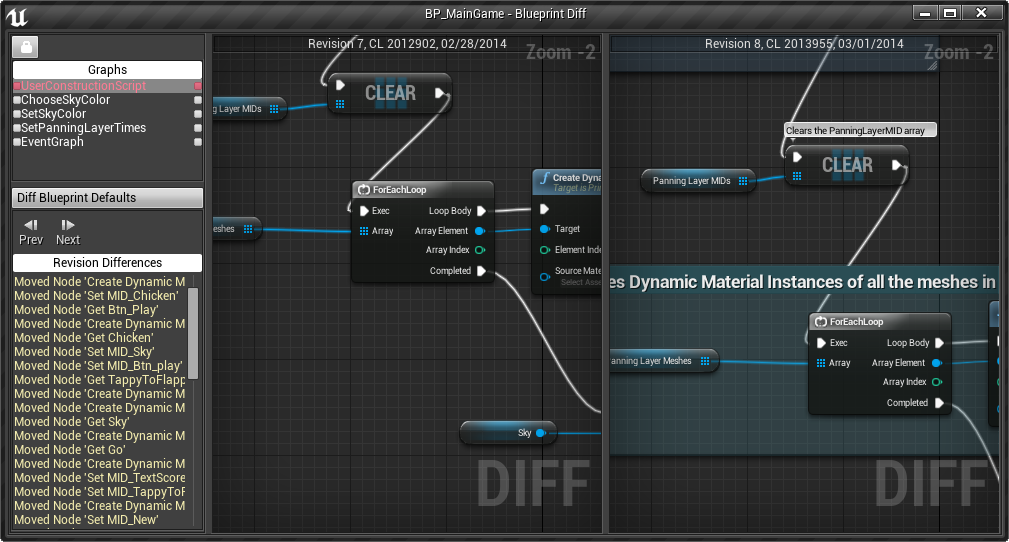
Visual Diffing of different revision of a Blueprint :
- initialize a new Git local repository ('git init') to manage your UE4 Game Project
- can also create an appropriate .gitignore file as part of initialization
- can also create a .gitattributes file to enable Git LFS (Large File System) as part of initialization
- can also make the initial commit, with custom multi-line message
- display status icons to show modified/added/deleted/untracked files
- show history of a file
- visual diff of a blueprint against depot or between previous versions of a file
- revert modifications of a file (works best with UE4.15 "Content Hot-Reload" experimental option)
- add, delete, rename a file
- checkin/commit a file (cannot handle atomically more than 50 files)
- migrate an asset between two projects if both are using Git
- solve a merge conflict on a blueprint
- show current branch name in status text
- Configure remote origin URL ('git remote add origin url')
- Sync to Pull (rebase) the current branch if there is no local modified files
- Git LFS (Github, Gitlab, Bitbucket), git-annex, git-fat and git-media are working with Git 2.10+
- Windows, Mac and Linux
- Push is not in the current Editor workflow
- Branch/Merge are not in the current Editor workflow
- Amend a commit is not in the current Editor workflow
- Revert All (using either "Stash" or "reset --hard")
- Configure user name & email ('git config user.name' & git config user.email')
- Authentication is not managed if needed for Sync (Pull)
- Rebase/cherry-pick conflicts not working (only merge-conflicts)
- the Editor does not show deleted files (only when deleted externaly?)
- the Editor does not show missing files
- missing localisation for git specific messages
- displaying states of 'Engine' assets (also needs management of 'out of tree' files)
- renaming a Blueprint in Editor leaves a redirector file, AND modify too much the asset to enable git to track its history through renaming
- standard Editor commit dialog asks if user wants to "Keep Files Checked Out" => no use for Git or Mercurial CanCheckOut()==false
Windows:
Quick demo of the Git Plugin on Unreal Engine 4.12 (preview)
Under Windows 64bits, you should install the standard standalone Git for Windows (now comming with Git LFS 2 with File Locking) with default parameters, usually in "C:\Program Files\Git\bin\git.exe".
Then you have to configure your name and e-mail that will appear in each of your commits:
git config --global user.name "Sébastien Rombauts"
git config --global user.email sebastien.rombauts@gmail.com
This alternate "Git development plugin" needs to be installed into a subfolder or your Game Project "Plugins" directory (that is, you cannot install it into the Engine Plugins directory):
<YourGameProject>/Plugins
You will obviously only be able to use the plugin within this project.
See also the Plugins official Documentation
Load your Game Project, then open:
File->Connect To Source Control... -> Git: Accept Settings
The Git Plugin is able to create (initialize) a new local Git Repository with your project Assets and Sources files.
See also the Source Control official Documentation
Copyright (c) 2014-2017 Sébastien Rombauts (sebastien.rombauts@gmail.com)
Distributed under the MIT License (MIT) (See accompanying file LICENSE.txt or copy at http://opensource.org/licenses/MIT)
The most efficient way to help and contribute to this wrapper project is to use the tools provided by GitHub:
- please fill bug reports and feature requests here: https://github.com/SRombauts/UE4GitPlugin/issues
- fork the repository, make some small changes and submit them with independent pull-requests
You can also email me directly, I will answer any questions and requests.
The source code follow the UnreaEngine official Coding Standard :
- CamelCase naming convention, with a prefix letter to differentiate classes ('F'), interfaces ('I'), templates ('T')
- files (.cpp/.h) are named like the class they contains
- Doxygen comments, documentation is located with declaration, on headers
- Use portable common features of C++11 like nullptr, auto, range based for, override keyword
- Braces on their own line
- Tabs to indent code, with a width of 4 characters