Give Zana new views, new tools, and new workflows. A plugin is a TypeScript package that can contribute interface elements, server logic, and agent capabilities independently. A task board might add a project tab, background sync, and tools that let an agent update tasks from a Thread.

Download the PNG · Editable artwork and implementation references
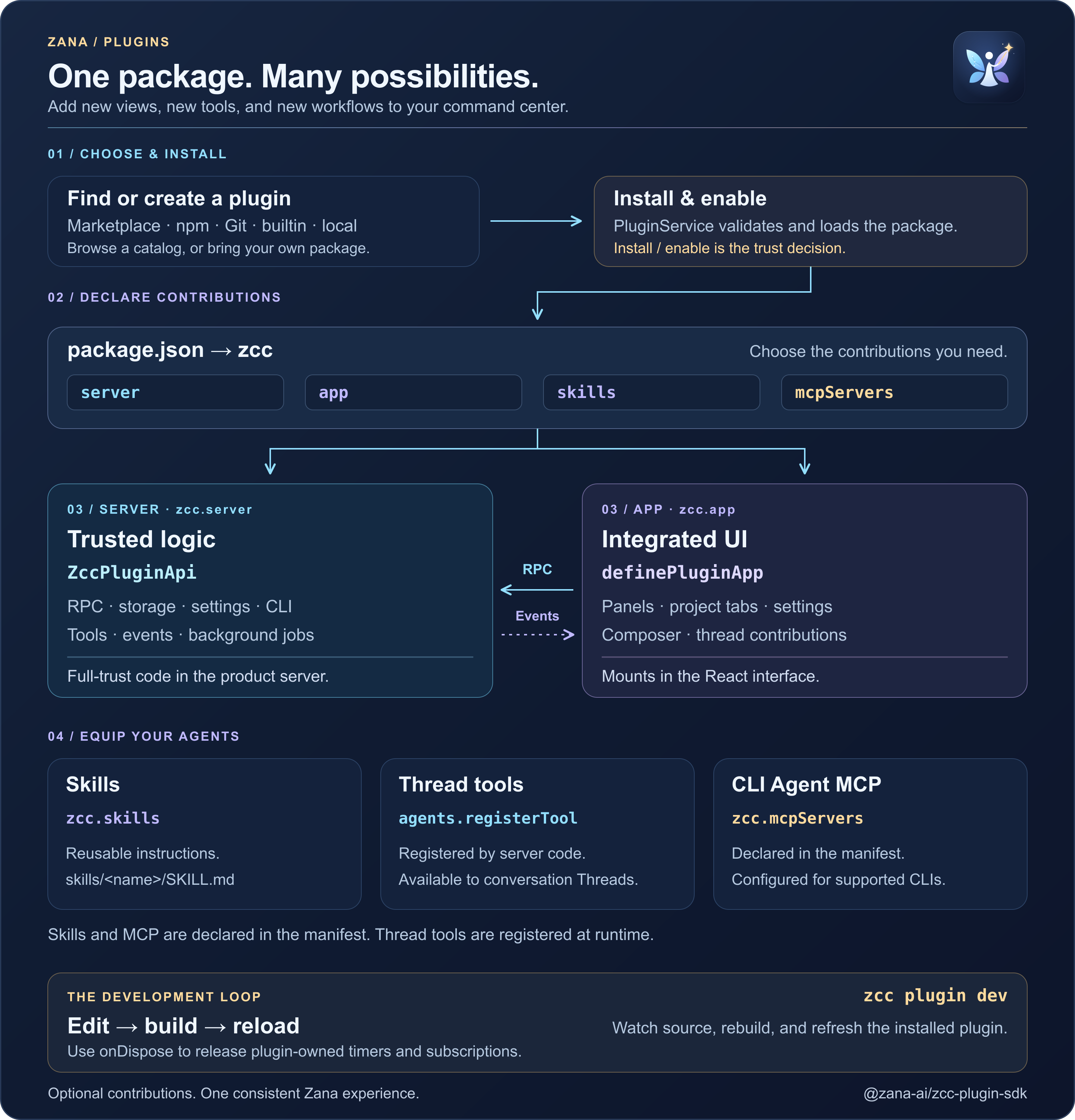
The zcc block in package.json declares what Zana should load. Include the
contributions your plugin needs; a plugin does not have to provide a panel.
| Contribution | Declaration | What it does |
|---|---|---|
| Server logic | zcc.server |
Loads a factory inside the product server. ZccPluginApi provides RPC methods, storage, settings, CLI commands, agent tools, and background work. |
| Interface | zcc.app |
Loads a UI bundle. definePluginApp registers panels, project tabs, settings, composer actions, and other slots in Zana’s React interface. |
| Skills | zcc.skills |
Lists skill directory roots. Each skills/<name>/SKILL.md supplies reusable agent instructions. The default is ["skills"]; [] opts out. |
| CLI MCP servers | zcc.mcpServers |
Declares MCP integrations for supported CLI / PTY sessions. The host namespaces each server as plugin:<id>:<name>. |
Conversation Threads receive tools registered by server code with
zcc.agents.registerTool; they do not read the zcc.mcpServers map. A plugin
supporting both surfaces can provide both. Server code can also add session
instructions with agents.contributeInstructions and extra skill roots with
agents.contributeSkills.
When you click a button in a plugin panel, the UI can call a server method
through callPluginRpc. The server handles the method registered with
zcc.rpc.method, performs the operation, and returns a result. It can publish
realtime events to refresh subscribed views. The interface remains a client;
trusted services validate requests and confine paths.
Plugins can also share services. A consumer declares zcc.requires, and the
host loads its dependencies first. The experimental zcc.services API lets
the consumer call a service another plugin provides. See the
service contract
before building a dependency between plugins.
Install from Plugins → Browse, a marketplace entry, or a path:, git:,
npm:, or builtin: source. Marketplace entries point to packages; browsing
or refreshing the catalog does not execute plugin code. Install records the
resolved npm version or Git commit, while a local path stays connected to its
working directory.
Bundled plugin IDs are reserved by the app's registry. Install them with
zcc plugin install <name> or builtin:<name>; a Git, npm, or catalog package
cannot claim one of those IDs, even if its listing uses a different name.
PluginService validates the manifest and compatible engine versions, then
loads the enabled contributions. Install and enable are trust decisions:
plugin server code runs full-trust, in-process on apps/server. It is not a
sandboxed Electron guest. The host does not pass daemon tokens or signing keys
through the plugin API.
The installer uses npm --ignore-scripts for npm packages and rejects native
addons. UI error boundaries contain rendering failures. These controls do not
turn server plugins into a sandbox. The zcc.extra field holds opaque metadata;
the host does not execute it. There is no runtime registerMcpServer API.
Use zcc plugin dev for the local edit → build → reload loop. It watches
source changes, rebuilds the app bundle, and reloads the installed plugin.
Path installs load their server entry from source; published packages declare
their built entry points.
For local overrides of bundled plugins, enable Settings → Development → Bundled plugin development. This saved switch applies immediately
and also enables bundled source watching. Disabling it stops watching and blocks
further overrides while keeping currently loaded plugins running. The saved
choice takes precedence over the startup default from
ZCC_MANAGED_DEV_BUILTIN_PLUGIN_HOT_RELOAD=1. Neither option permits Git or npm packages to
replace bundled identities. Ordinary plugins with their own IDs need no flag.
Official plugins registered in builtin-registry.ts ship with Zana, including
the optional plugins you install from Browse. Their code updates with a Zana
release. Merging a plugin change or refreshing a marketplace listing does not
update that code on existing users' machines.
At startup Zana reconciles installed bundled plugins with the current app
bundle, including version and entry points. Plugin storage, settings, disabled
state, and uninstall choices remain in place. zcc plugin update <id> does not
install a separate release of a bundled plugin.
Independent Git and npm plugins use their recorded sources. Never-checked or
overdue sources are checked at startup, then every six hours, with at most four
source checks running together. Checks save their timestamp, compatible candidate,
incompatible release reasons, and source failures across restarts. They do not
execute candidate code or activate it. Apply a candidate from its installed row,
use Update all independent plugins in the Plugins menu, or run
zcc plugin update --all.
npm ranges and dist-tags follow their recorded selector and registry; exact versions remain pinned. Git branches and default HEAD can advance; exact commits and named tags remain pinned. A moved or missing installed release tag requires an explicit reinstall. Updates install the exact checked npm version and integrity or Git commit, preserving configuration and disabled state. Reload reuses the installed artifact.
Catalog Git subdirectories and tag prefixes are recorded at installation, so an installed plugin can still update when its catalog is removed or edited. Direct Git sources support the same monorepo options, for example:
zcc plugin install 'git:https://example.com/team/plugins.git@semver:^1.0.0#subdir=plugins%2Fnotes&tagPrefix=notes-'Older catalog Git installs that lack recorded subdirectory metadata show a reinstall notice instead of guessing their update source.
Applying an update is an explicit action. To update an existing remote install,
use Update or zcc plugin update <id> instead of installing it again.
Independent managed updates stop the previous plugin before taking a private, SQLite-safe snapshot of its database, KV storage (including named schedule keys), settings and secret files. For a running plugin, the candidate must start and remain healthy for the activation window before the update commits. Disabled or safe-mode-suspended plugins keep that state without running candidate code. A failure during activation restores the previous code and owned state, and its failure reason remains visible in Plugins. Interrupted activation or restoration is recovered before plugins run at the next server startup. A snapshot or teardown failure prevents candidate activation; an unsafe teardown or damaged recovery requires attention or a restart.
Updates defer while a plugin has an active call or an open provider session. Close those sessions and retry; an update does not terminate an active agent turn. New plugin calls are rejected during activation and can be retried after it completes. Completed backups and unused managed generations are removed; pending recovery backups are retained. Snapshots are limited to 256 MiB and 1,024 entries per plugin.
Recovery covers the plugin-owned local state above. External API effects and
arbitrary files written by full-trust plugin code are outside this recovery.
Local path authoring continues to use explicit reload or zcc plugin dev.
A catalog's Official label alone does not make its plugins part of the app bundle. See the plugin release process for publishing guidance.
Older independent installations that occupy a bundled ID retain their current code and data. Their remote updates are blocked and Plugins shows migration guidance. Back up and migrate their data before switching to bundled code; Zana does not assume a newer independent version has a compatible data schema.
| Action | What happens |
|---|---|
| Enable | Loads the server factory and makes the plugin’s declared contributions available. |
| Reload | Loads a fresh server generation and refreshes the UI bundle. After a successful replacement, the old instance is disposed. |
| Disable | Disposes the live instance and removes its active contributions; the package remains installed. |
| Needs configuration | Keeps configuration UI available so you can finish setup. A missing required plugin can also cause this status. |
Register cleanup with zcc.onDispose for timers, subscriptions, and resources
your plugin owns. The SDK invokes those hooks when it disposes the instance.
- Authoring:
extensions-authoring.md - Quickstart:
extensions-quickstart.md - SDK:
extensions-sdk-reference.md
Open Plugin Guide from the Plugins hub. It auto-installs on first launch. The guide is an annotated wireframe map of every surface a plugin can own — sidebar, project tab, composer, thread chrome, settings, skills, CLI, and more — with Copy for agent text and links into installed plugin pages. Use it while authoring; the matching APIs are in the SDK reference.
Ids live in apps/server/src/plugins/builtin-registry.ts. Core must not hardcode
them elsewhere.
Auto-install builtins (autoInstall: true):
| Package | Role |
|---|---|
plugins/docs |
Library (sidebar page + project tab), library-curator skill |
slack-bridge-2ff2 |
Zana for Slack — Project channels, private agent conversations, and optional report-inbox access |
provider-claude-code |
Claude Code thread provider |
provider-codex |
Codex thread provider |
provider-pi |
Pi thread provider |
provider-acp |
ACP thread provider (Cursor and OpenCode) |
design-docs |
Design Docs — specs, RFCs and ADRs with diagrams, mockups and review comments |
salesforce |
Salesforce DX inner loop and platform SDK for other plugins |
custom-instructions |
Project custom instructions |
memory |
Durable global and project memory |
ask-user-question |
Agent questions that surface in the Inbox |
plugin-guide |
Plugin Guide — annotated SDK surface map under Plugins |
storage-retention |
Opt-in machine storage reports and thread retention (installed, disabled by default) |
Official store plugins (autoInstall: false — install from Plugins → Browse
or zcc plugin install <name>):
| Package | Role |
|---|---|
tasks |
Workflow / task board |
github |
GitHub developer tools |
automations |
Automations |
workflows |
Workflows |
side-chat |
Side chat |
inline-vis |
Inline visualizations |
provider-retry |
Provider retry |
monaco-editor |
Thread code editor (does not replace Explorer) |
pdf-preview |
Thread PDF viewer |
keep-awake |
Host keep-awake |
browser-automation |
Opt-in DevBrowser desktop and local headless sessions |
secrets |
Host secrets |
connect |
Host connect |
The registered plugins above ship in the application bundle. Optional plugins remain available offline without being auto-installed.
First-party Browse listings are authored under repo-root
marketplace/entries/ (one JSON file per plugin).
node marketplace/scripts/build.mjs writes the pointer feed the website serves
at /marketplace/v1/marketplace.json. The desktop app seeds that public feed
automatically at start (Official, not removable). Override or disable with
ZCC_OFFICIAL_MARKETPLACE_URL (off / 0 skips it). See
marketplace/README.md.
Public community plugins are seeded automatically from
salesforce/zana-marketplace
at app start, alongside the first-party and Salesforce-internal catalogs.
The public catalog requires no Salesforce account or corporate VPN/SSO.
zcc marketplace install <plugin-id>@zana-communityThis default catalog is Official (not removable). Discovery runs in the background; if the repository is unreachable, startup continues and an existing cache remains available. Installed plugins, settings, and custom catalogs are preserved. Authoring and PR flow live in that repository's README.
Override or disable this catalog independently with
ZCC_COMMUNITY_MARKETPLACE_SOURCE (off / 0 skips it).
Salesforce-internal plugins remain seeded automatically from
chatbots/zana-internal-marketplace
on git.soma. Salesforce controls access through its existing Git authentication
and employee access policies. Adding the public catalog does not grant access
to the internal repository or replace an existing internal catalog.
The internal catalog is Official (not removable). Discovery is bounded and non-interactive; if Git access is unavailable, it is skipped silently while the public catalog remains usable. An existing internal cache stays available.
zcc marketplace install <plugin-id>@internalZCC_INTERNAL_MARKETPLACE_SOURCE continues to override or disable only the
internal catalog (off / 0 skips it). The public and internal variables are
independent.
zcc plugin new hello --app
cd zcc-plugin-hello
zcc plugin install .
zcc plugin dev
zcc plugin ls
zcc plugin enable <id>
zcc plugin reload <id>
zcc marketplace add https://<PUBLIC_BASE_URL>/marketplace/v1/marketplace.json
zcc plugin install tasks
A one-release shim still reads legacy extension.json directories.