Problem being solved
Working through several jobs in the review console results in a lot of repetitive mouse movement, especially on a large display. For example, here's a 27" 1440p display:

I understand the reasoning for the current layout of the submit button (to support an arbitrary number of actions on smaller displays, with the Submit button always being visible):

However, the layout does not seem ideal for repetitive actions.
Proposed solution
We could introduce keyboard shortcuts to enable a faster, less mouse-movement workflow. I imagine we should support at least:
- Submit
- Skip
- View Policy
- Ignore
Ideally, we'd also support:
- Custom actions (with user-defined shortcuts? Or number-based, e.g. Ctrl+1, Ctrl+2, etc. in order)
- Move (including submenu, or at least using arrow keys in the menu)
- Policy
- Reason (jump to the field)
Design-wise, we should expose the shortcuts either by default (best for learnability!), or at least on hover via tooltip.
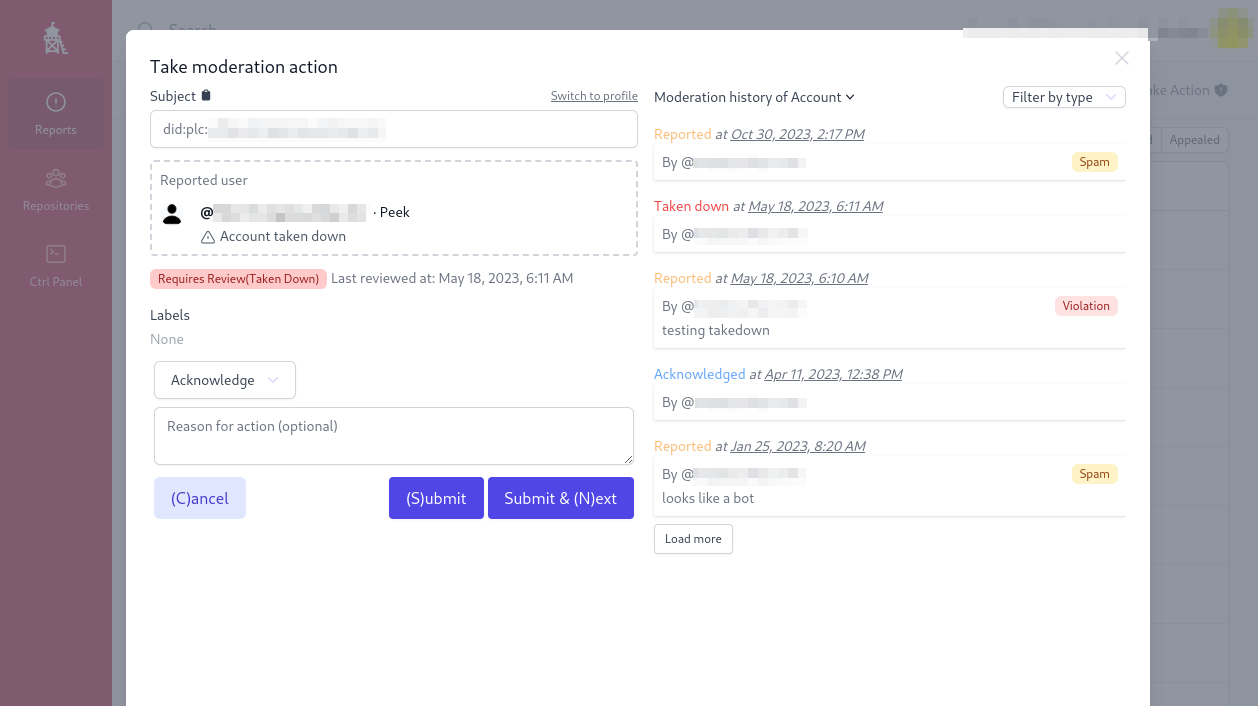
Here's an example of Ozone with keyboard shortcuts for Cancel, Submit, and Submit & Next:
Alternatives considered
There are browser extensions that users can use to add keyboard shortcuts to web pages, but that seems brittle and non-ideal as an official solution/recommendation.
Anything else
No response
Screenshots
No response
Checklist
Problem being solved
Working through several jobs in the review console results in a lot of repetitive mouse movement, especially on a large display. For example, here's a 27" 1440p display:
I understand the reasoning for the current layout of the submit button (to support an arbitrary number of actions on smaller displays, with the Submit button always being visible):
However, the layout does not seem ideal for repetitive actions.
Proposed solution
We could introduce keyboard shortcuts to enable a faster, less mouse-movement workflow. I imagine we should support at least:
Ideally, we'd also support:
Design-wise, we should expose the shortcuts either by default (best for learnability!), or at least on hover via tooltip.
Here's an example of Ozone with keyboard shortcuts for Cancel, Submit, and Submit & Next:
Alternatives considered
There are browser extensions that users can use to add keyboard shortcuts to web pages, but that seems brittle and non-ideal as an official solution/recommendation.
Anything else
No response
Screenshots
No response
Checklist