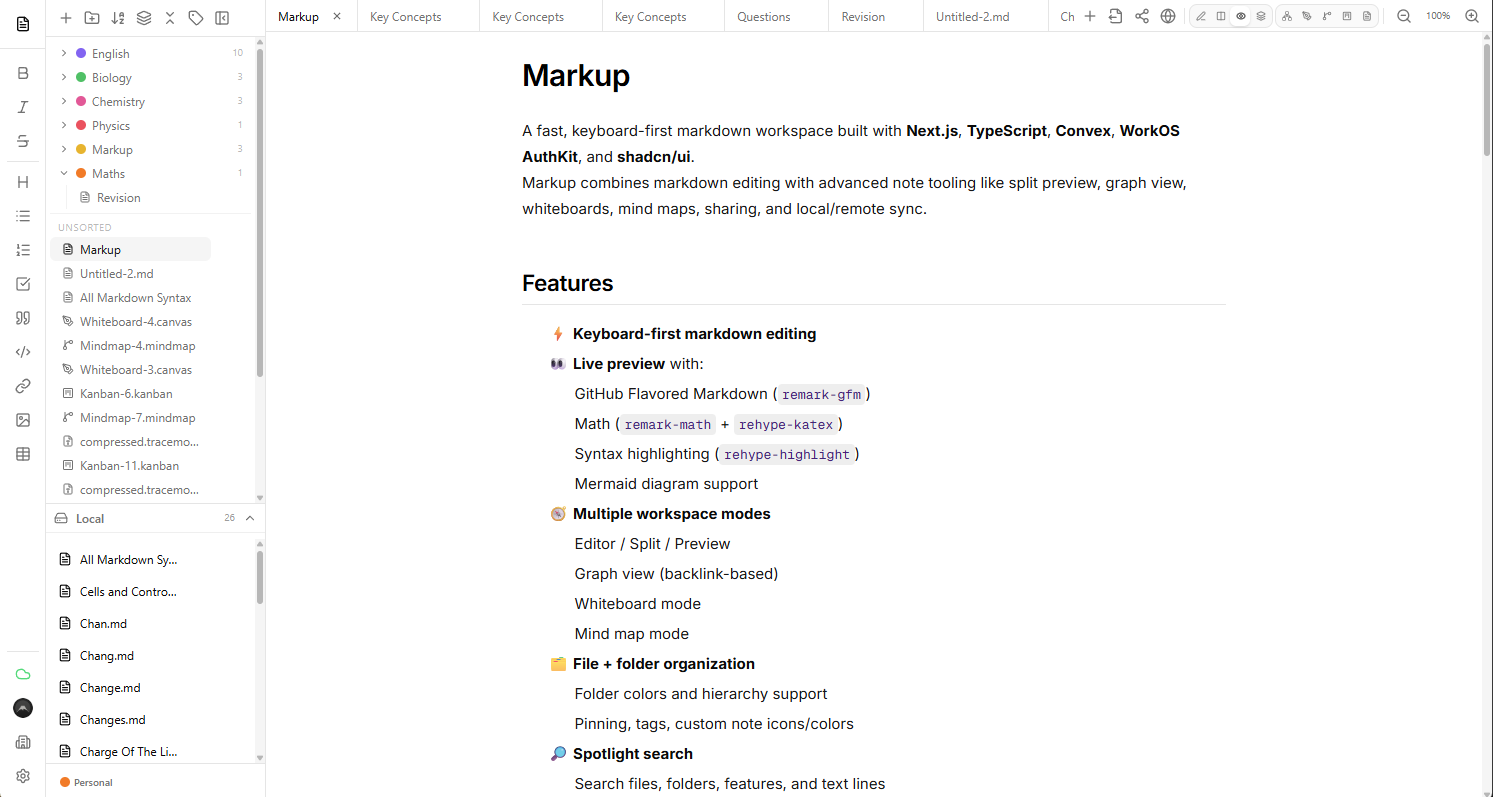
A fast, keyboard-first markdown workspace built with Next.js, TypeScript, Prisma, PostgreSQL, WorkOS AuthKit, and shadcn/ui. Markup combines markdown editing with advanced note tooling like split preview, graph view, whiteboards, mind maps, sharing, and local/remote sync.
-
⚡ Keyboard-first markdown editing
-
👀 Live preview with:
- GitHub Flavored Markdown (
remark-gfm) - Math (
remark-math+rehype-katex) - Syntax highlighting (
rehype-highlight) - Mermaid diagram support
- GitHub Flavored Markdown (
-
🧭 Multiple workspace modes
- Editor / Split / Preview
- Graph view (backlink-based)
- Whiteboard mode
- Mind map mode
-
🗂️ File + folder organization
- Folder colors and hierarchy support
- Pinning, tags, custom note icons/colors
-
🔎 Spotlight search
- Search files, folders, features, and text lines
-
☁️ Cloud sync
- PostgreSQL + Prisma powered sync
- Workspace + tabs synced per authenticated user
- Offline-aware syncing/hydration strategy
-
🔐 Authentication with WorkOS AuthKit
-
🔗 Shared notes viewer
- Public/private share modes with read-only rendering
-
🖥️ Desktop support via Tauri
- Local filesystem sync (
.md,.canvas,.mindmap)
- Local filesystem sync (
-
🎨 Modern UI
- shadcn/ui + Radix primitives + Tailwind CSS
- Framework: Next.js (App Router)
- Language: TypeScript
- UI: shadcn/ui, Radix UI, Tailwind CSS, Lucide icons
- State: Zustand
- Database: PostgreSQL
- ORM: Prisma
- Auth: WorkOS AuthKit
- Desktop: Tauri (optional target)
- Editor/Rendering: CodeMirror, React Markdown ecosystem, KaTeX, Mermaid, d3-force
.
├── prisma/                    # Prisma schema + migrations
├── src/
│   ├── app/                  # Next.js app router
│   ├── components/
│   │   ├── editor/           # Editor + markdown preview
│   │   ├── shell/            # Main app shell, views, spotlight, graph, whiteboard
│   │   └── ui/               # shadcn/radix UI components
│   └── lib/                  # Store, sync logic, utilities
├── scripts/                  # Build scripts (including Tauri helpers)
├── public/
│   └── app.png               # README preview image
├── components.json           # shadcn/ui config
└── package.json- Node.js 18+ (recommended: latest LTS)
- npm (or compatible package manager)
- A PostgreSQL database
- WorkOS app credentials
- (Optional) Tauri v2 toolchain for desktop builds
Create a .env.local file in the project root.
# PostgreSQL / Prisma
DATABASE_URL=postgresql://user:password@localhost:5432/markup

# Select "convex" or "postgres"
NEXT_PUBLIC_DB_PROVIDER=

# WorkOS AuthKit
WORKOS_CLIENT_ID=...
WORKOS_API_KEY=...
WORKOS_COOKIE_PASSWORD=...
NEXT_PUBLIC_WORKOS_REDIRECT_URI=...
You may also need additional WorkOS/AuthKit callback/session variables depending on your WorkOS setup. If unsure, follow the WorkOS AuthKit for Next.js setup documentation and mirror the values used in your WorkOS dashboard.
-
Install dependencies
npm install
-
Generate the Prisma client
npx prisma generate
-
Run database migrations
npx prisma migrate dev
-
Run the development server
npm run dev
-
Open the app:
http://localhost:3000
From package.json:
npm run dev– run Next.js development servernpm run build– build production appnpm run start– run production Next.js servernpm run lint– run ESLintnpm run tauri:dev– run Tauri development buildnpm run tauri:build– build desktop app via Taurinpm run build:tauri– run custom Tauri build script
The database includes key models for:
- users – WorkOS identity mapping
- tabs – note/whiteboard/mindmap documents
- workspaces – persisted UI state, settings, folders, open tabs, profile selection
- shares – public/private shared note access
Workspace settings include typography/editor behavior, markdown rendering settings, appearance/theme configuration, and sidebar/editor preferences.
-
App state is hydrated from PostgreSQL when authenticated.
-
Local edits can continue while offline and are flushed when connectivity returns.
-
In Tauri mode, notes can sync to a local folder with format-aware extensions:
.md.canvas.mindmap
Edit the version.json file to the next release version and run:
npm run sync-changesDeploy as a standard Next.js application (e.g. Vercel), with:
- PostgreSQL database configured
- Prisma migrations applied
- All required environment variables configured
Use the Tauri build scripts after setting up the Rust/Tauri toolchain.
The Docker build can check for newer releases and surface an in-app notification. When an update is available, pull the latest image (or rebuild) and restart the container.
You can customize the update check URLs by setting these build args:
NEXT_PUBLIC_DOCKER_UPDATE_URL=https://raw.githubusercontent.com/pphilfre/markup/main/version.json
NEXT_PUBLIC_DOCKER_UPDATE_DOCS_URL=https://github.com/pphilfre/markup#docker-updatesBuilt by Freddie Philpot
- GitHub: https://github.com/pphilfre
- Website: https://freddiephilpot.dev