Network Example
The following diagram shows how the system could be configured on an internal network:
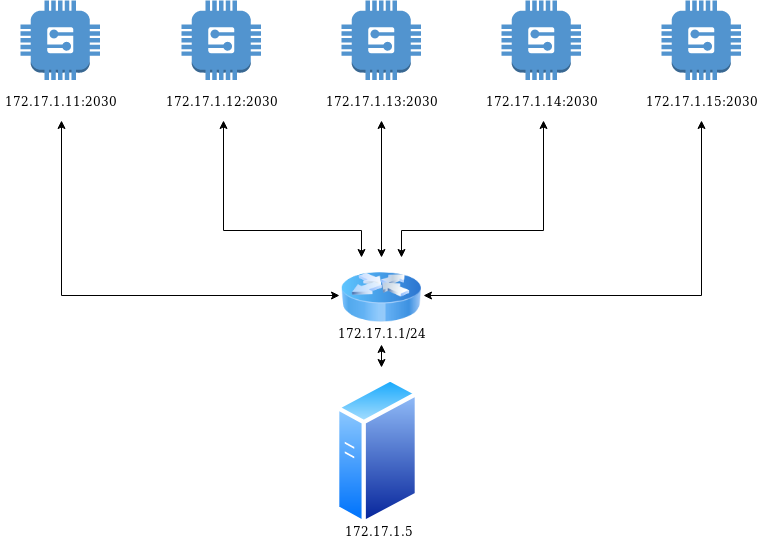
The server and the nodes are on the same internal network, so all of them can be seen by the server (172.17.1.5).
The server and nodes have an user named dtc, in charge of executing the command.
The configuration command that should be run in this case is the following:
    go run github.com/niclabs/dtcconfig rsa \
    -t 3 \
    -n 172.17.1.11:2030,172.17.1.12:2030,172.17.1.13:2030,172.17.1.14:2030,172.17.1.15:2030 \
    -H 172.17.1.5 \
    -d /home/dtc/dtc.sqlite3
    -l /home/dtc/dtc.log
then the files should be copied on each node:
- Copy
node_1/config.yamlto/etc/dtcnode/config.yamlin machine172.17.1.11 - Copy
node_2/config.yamlto/etc/dtcnode/config.yamlin machine172.17.1.12 - Copy
node_3/config.yamlto/etc/dtcnode/config.yamlin machine172.17.1.13 - Copy
node_4/config.yamlto/etc/dtcnode/config.yamlin machine172.17.1.14 - Copy
node_5/config.yamlto/etc/dtcnode/config.yamlin machine172.17.1.15
and the program dtcnode should be executed on each machine. You can also set it as a systemd service if you want.