Convert any URL to clean markdown with metadata — built for LLM context windows.


Geomark is a CLI and Node.js library that fetches any web page, strips the noise (nav, footer, ads, cookie banners), and returns clean markdown plus structured metadata. Includes token estimation for LLM developers building RAG pipelines.
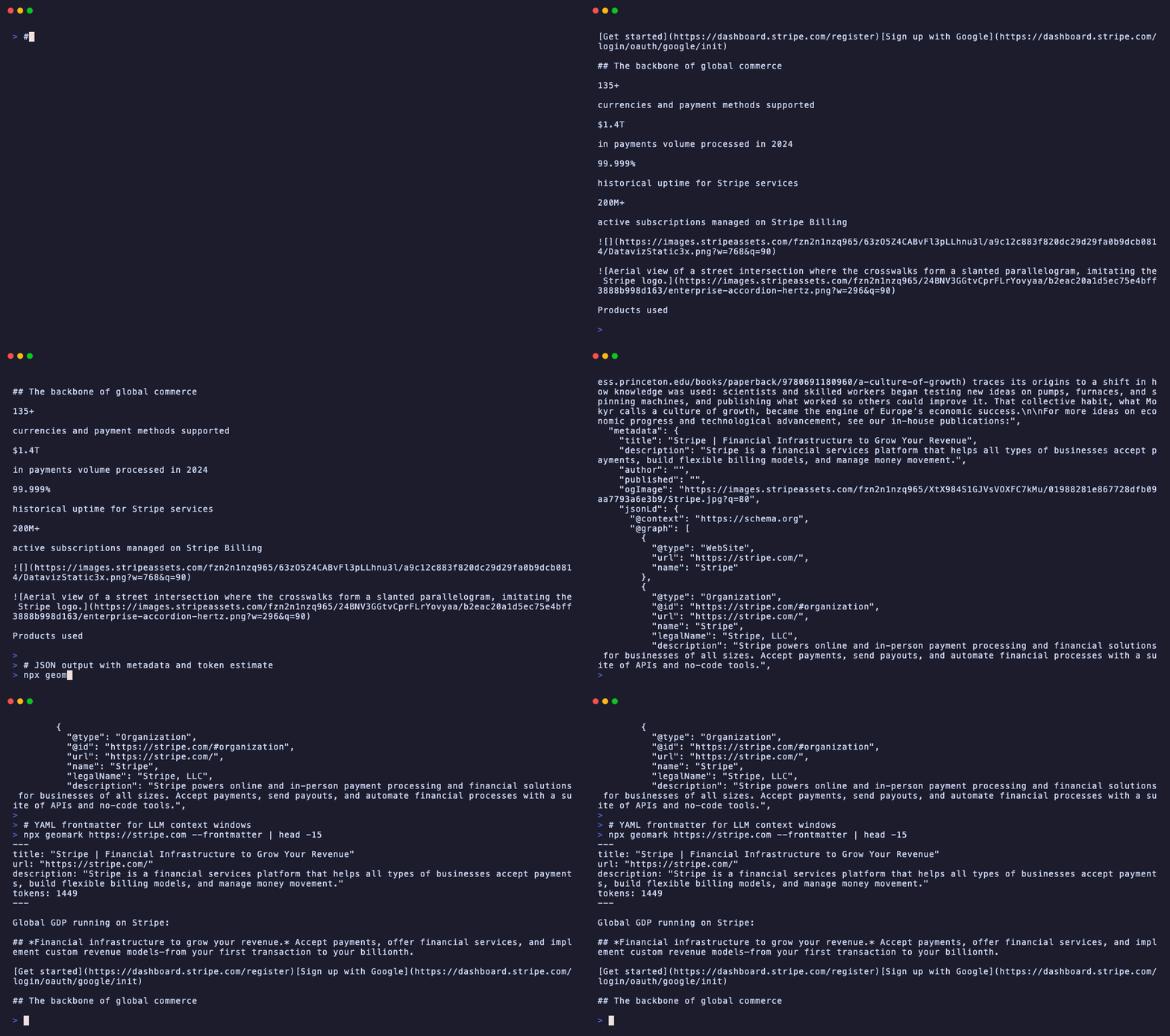
# Install globally
npm install -g @glincker/geomark

# Or use with npx (no installation)
npx @glincker/geomark https://example.com/blog/post# Convert a URL to markdown (stdout)
geomark https://example.com/blog/post
# Save to file
geomark https://example.com/blog/post -o article.md
# Get JSON with metadata + token count
geomark https://example.com/blog/post --json
# Include YAML frontmatter
geomark https://example.com/blog/post --frontmatter
# Pipe from stdin
echo "https://example.com" | geomark$ geomark https://example.com/blog/intro-to-geo# Introduction to Generative Engine Optimization
Generative Engine Optimization (GEO) is the practice of optimizing
web content for AI-powered search engines and large language models...
## Why GEO Matters
According to recent studies, 40% of Gen Z now uses TikTok and AI
chatbots instead of Google for search...
## Getting Started
1. Add structured data (JSON-LD) to your pages
2. Create an llms.txt file
3. Ensure your content is server-side rendered$ geomark https://example.com/blog/intro-to-geo --json{
"url": "https://example.com/blog/intro-to-geo",
"title": "Introduction to Generative Engine Optimization",
"markdown": "# Introduction to Generative Engine Optimization\n\n...",
"metadata": {
"title": "Introduction to Generative Engine Optimization",
"description": "Learn how to optimize your website for AI search engines",
"author": "Jane Smith",
"published": "2026-01-15T00:00:00Z",
"ogImage": "https://example.com/images/geo-intro.png",
"jsonLd": { "@type": "Article", "headline": "..." },
"canonical": "https://example.com/blog/intro-to-geo",
"lang": "en",
"siteName": "Example Blog",
"ogType": "article",
"openGraph": { "title": "...", "description": "...", "image": "..." }
},
"tokens": 1847,
"wordCount": 1423,
"readingTime": 6,
"fetchedAt": "2026-02-07T14:30:00.000Z"
}$ geomark https://example.com/blog/intro-to-geo --frontmatter---
title: "Introduction to Generative Engine Optimization"
url: "https://example.com/blog/intro-to-geo"
author: "Jane Smith"
published: "2026-01-15T00:00:00Z"
description: "Learn how to optimize your website for AI search engines"
tokens: 1847
---
# Introduction to Generative Engine Optimization
Generative Engine Optimization (GEO) is the practice of...| Flag | Short | Description |
|---|---|---|
--json |
-j |
Output as JSON with full metadata |
--frontmatter |
-f |
Include YAML frontmatter in markdown |
--output <file> |
-o |
Save to file instead of stdout |
--timeout <ms> |
Request timeout in milliseconds (default: 10000) | |
--help |
-h |
Show help message |
--version |
-v |
Show version |
Use Geomark in your Node.js projects:
import { geomark } from '@glincker/geomark';

const result = await geomark('https://example.com/blog/post');

console.log(result.title);       // "Introduction to GEO"
console.log(result.markdown);    // Clean markdown content
console.log(result.tokens);      // ~1847 estimated tokens
console.log(result.wordCount);   // 1423 words
console.log(result.readingTime); // 6 minutes
console.log(result.metadata); // OG tags, JSON-LD, author, etc.const result = await geomark('https://example.com', {
timeout: 15000, // Request timeout in ms (default: 10000)
includeMetadata: true, // Extract OG tags, JSON-LD, etc. (default: true)
estimateTokens: true, // Calculate token count (default: true)
userAgent: 'MyBot/1.0', // Custom user agent
});Use the extraction pipeline step-by-step:
import {
  fetchUrl,
  extractContent,
  extractMetadata,
  htmlToMarkdown,
  generateFrontmatter,
  estimateTokens,
  countWords,
  estimateReadingTime,
} from '@glincker/geomark';

// Step 1: Fetch HTML
const { html, finalUrl } = await fetchUrl('https://example.com');

// Step 2: Extract readable content (strips nav, footer, ads)
const article = extractContent(html, finalUrl);
// { title: "...", content: "<article>...</article>" }

// Step 3: Extract metadata (OG tags, JSON-LD, meta tags)
const metadata = extractMetadata(html);
// { title, description, author, published, jsonLd, ... }

// Step 4: Convert to markdown
const markdown = htmlToMarkdown(article.content);

// Step 5: Token estimation
const tokens = estimateTokens(markdown);    // ~1847
const words = countWords(markdown);          // 1423
const readTime = estimateReadingTime(words); // 6 min

// Optional: Generate YAML frontmatter
const frontmatter = generateFrontmatter({
  title: article.title,
  url: finalUrl,
  tokens,
});Geomark uses a multi-step extraction pipeline:
- Fetch — HTTP GET with SSRF protection, timeouts, and redirect following
- Extract — Mozilla Readability strips navigation, sidebars, footers, ads, and cookie banners to isolate the main content
- Metadata — Cheerio extracts Open Graph tags, JSON-LD, meta tags, canonical URLs, and language
- Convert — Turndown converts clean HTML to markdown with ATX headings, fenced code blocks, and inlined links
- Estimate — Token count approximation using character + word heuristics (~4 chars/token)
Turndown is configured to produce clean, LLM-friendly markdown:
- ATX-style headings (
#,##,###) - Fenced code blocks (triple backtick)
- Inlined links
[text](url) - Tracking pixels and beacons removed
- Script/style/noscript tags stripped
- Excessive blank lines collapsed
Feed web content into your retrieval-augmented generation pipeline:
import { geomark } from '@glincker/geomark';

const urls = ['https://docs.example.com/api', 'https://blog.example.com/tutorial'];

for (const url of urls) {
  const { markdown, tokens, metadata } = await geomark(url);
  await vectorStore.upsert({
    content: markdown,
    metadata: { url, title: metadata.title, tokens },
  });
}Build a search index from web pages:
const result = await geomark('https://example.com/docs');
await searchIndex.add({
  title: result.title,
  content: result.markdown,
  description: result.metadata.description,
  author: result.metadata.author,
});# Process multiple URLs from a file
cat urls.txt | xargs -I {} geomark {} --json >> results.jsonl- SSRF Protection: Blocks requests to private/internal IP ranges (127.x, 10.x, 172.16-31.x, 192.168.x, localhost, ::1)
- Timeout: Configurable request timeout (default 10s) prevents hanging on slow sites
- No JavaScript Execution: Uses Readability + linkedom (not a headless browser) — no XSS risk
- Safe HTML Parsing: cheerio for metadata, Turndown for conversion — no DOM execution
Geomark is one part of the GeoKit toolkit:
- geo-audit — Audit your site's AI-readiness (score 0-100)
- geo-seo — Generate the files that improve your score
- geomark — Convert URLs to clean markdown for LLM context
Contributions are welcome! Please see CONTRIBUTING.md for guidelines.
MIT License - see LICENSE for details.
- Website: geo.glincker.com
- GitHub: github.com/glincker/geokit
- Issues: github.com/glincker/geokit/issues
- npm: npmjs.com/package/@glincker/geomark
Made by Glincker | geo.glincker.com