
Build, debug, and deploy AI pipelines - without leaving your IDE.


- Install the RocketRide extension from the VS Code Marketplace
- Click the RocketRide icon in the Activity Bar
- Create a
.pipefile - it opens automatically in the visual canvas builder - Wire up nodes by connecting input and output lanes, then hit Play to run
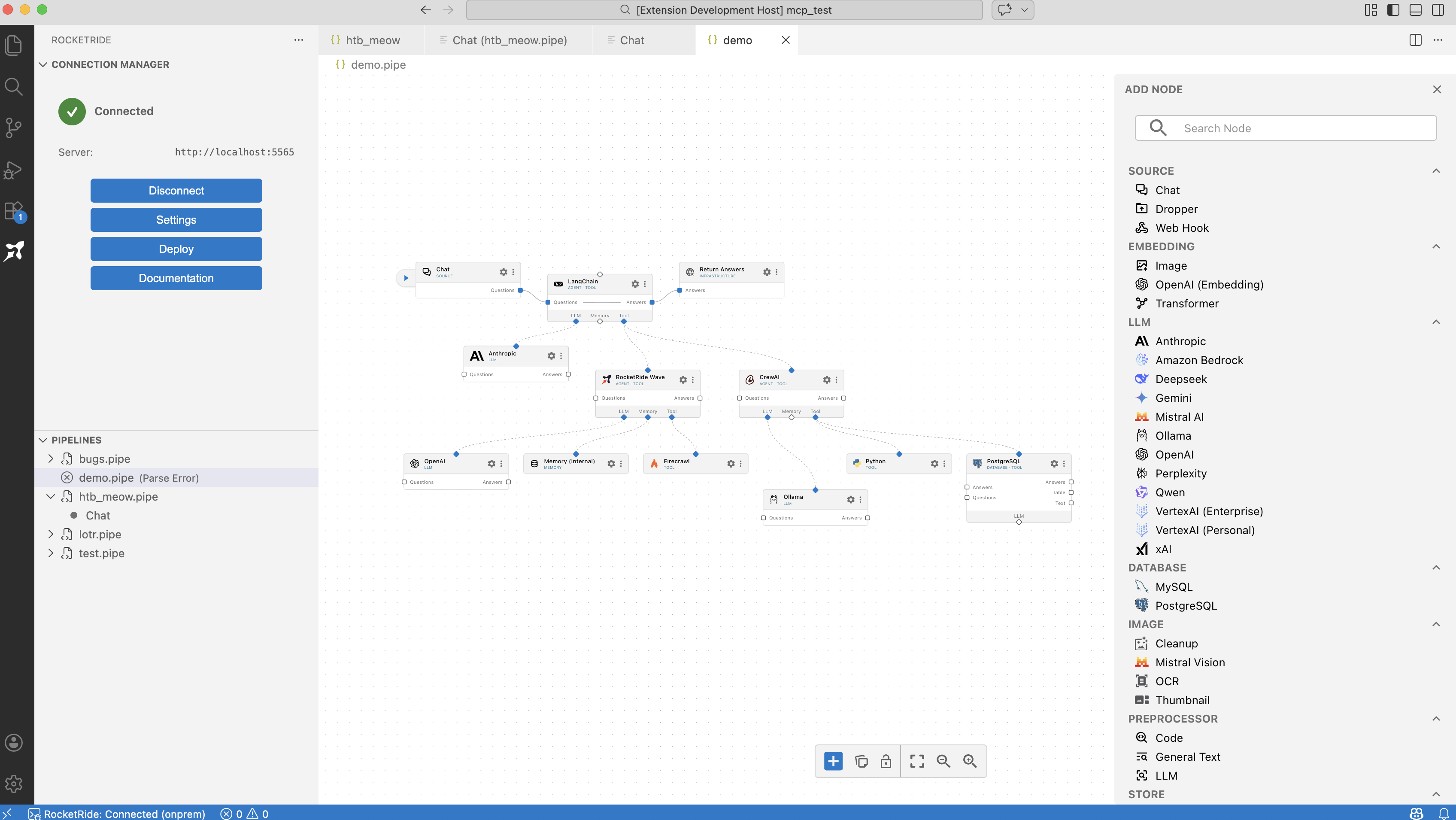
RocketRide is an open-source, developer-native AI pipeline platform. It lets you build, debug, and deploy production AI workflows without leaving your IDE - using a visual drag-and-drop canvas or code-first with TypeScript and Python SDKs.
You build your .pipe - and you run it against the fastest AI runtime available.
- 50+ ready-to-use nodes - 13 LLM providers, 8 vector databases, OCR, NER, PII anonymization, and more
- High-performance C++ engine - production-grade speed and reliability
- Deploy anywhere - locally, on-premises, or self-hosted with Docker
- MIT licensed - fully open-source, OSI-compliant
- Visual canvas builder - Drag, drop, and wire up AI workflows directly in VS Code. Create
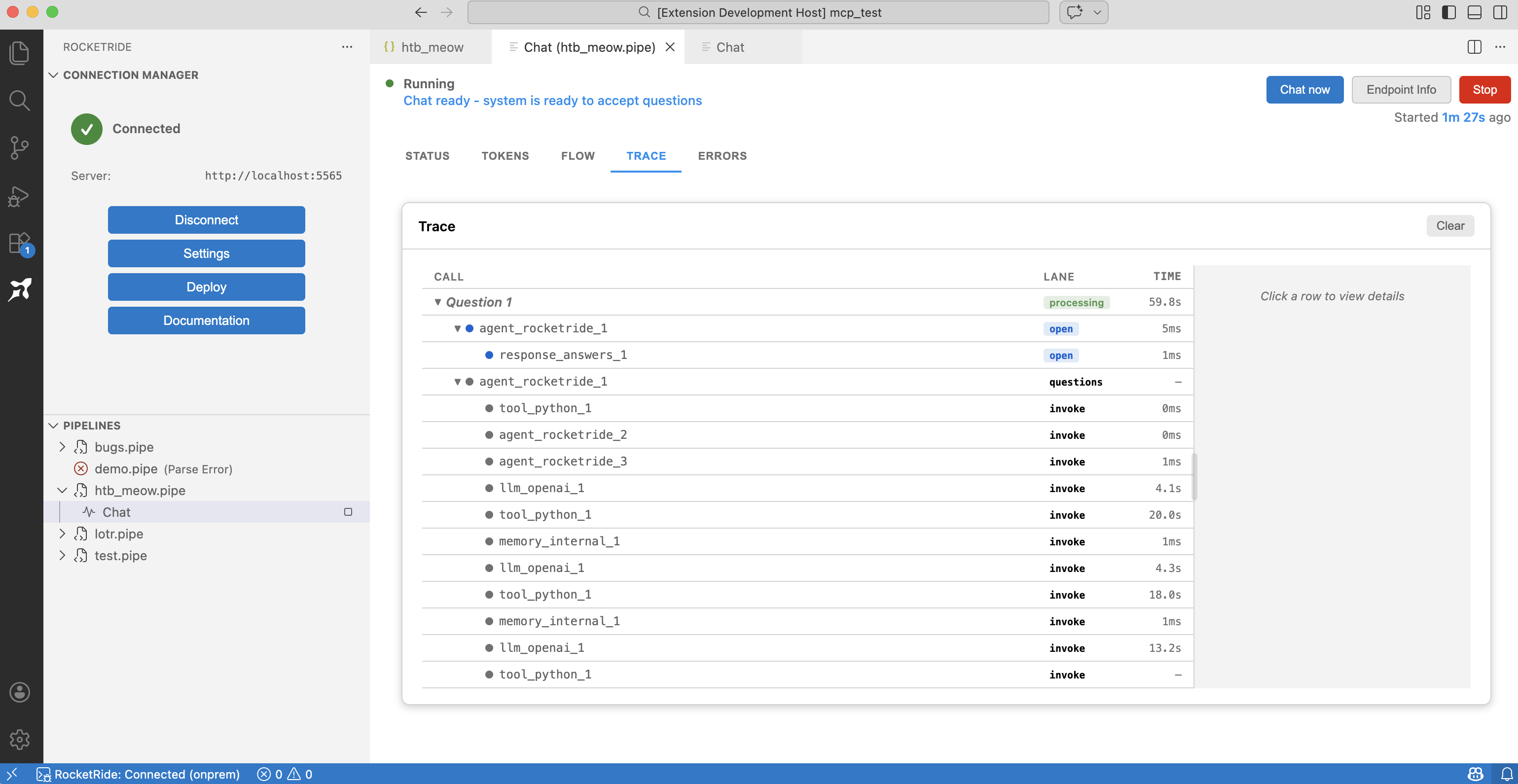
.pipefiles to get started. - Debugging & live traces - Monitor running pipelines in real time with execution traces, token usage, and memory stats — see exactly what your agents are doing at every step.
- Connection manager - Connect to a local engine (one click, no setup) or your own on-premises server.
- SDKs for TypeScript, Python & MCP - Embed pipelines in your apps or expose them as tools for AI assistants.
Need inspiration? Check out our example pipelines:
| Setting | Type | Default | Description |
|---|---|---|---|
rocketride.connectionMode |
string |
"local" |
Connection mode: "local" (your machine), "onprem" (your own hosted server), or "cloud" (coming soon) |
rocketride.hostUrl |
string |
"http://localhost:5565" |
Host URL for RocketRide service. Host and port will be parsed from this URL. |
rocketride.defaultPipelinePath |
string |
"${workspaceFolder}/pipelines" |
Default directory path for creating new pipeline files |
rocketride.local.engineVersion |
string |
"latest" |
Engine version to download. "latest" for newest stable, "prerelease" for newest prerelease, or a specific tag like "server-v3.1.1". |
rocketride.engineArgs |
string[] |
[] |
Additional arguments passed to the engine subprocess |
rocketride.autoConnect |
boolean |
true |
Automatically connect to RocketRide server when extension activates |
rocketride.pipelineRestartBehavior |
string |
"prompt" |
Behavior when a .pipe file changes while the pipeline is running: "auto", "manual", or "prompt" |
rocketride.oauth2RootUrl |
string |
"https://oauth2.rocketride.ai" |
Root OAuth2 URL for the refresh path passed to the services OAuth2 endpoint |
rocketride.integrations.copilot |
boolean |
false |
Enable RocketRide integration with GitHub Copilot |
rocketride.integrations.claudeCode |
boolean |
false |
Enable RocketRide integration with Claude Code |
rocketride.integrations.cursor |
boolean |
false |
Enable RocketRide integration with Cursor |
rocketride.integrations.windsurf |
boolean |
false |
Enable RocketRide integration with Windsurf |
| Command | Description |
|---|---|
RocketRide: Connect to Server |
Connect to the RocketRide engine |
RocketRide: Disconnect from Server |
Disconnect from the engine |
RocketRide: Reconnect to Server |
Reconnect to the engine |
RocketRide: Open RocketRide Settings |
Open extension settings |
RocketRide: Open Status Page |
View server and pipeline status |
RocketRide Pipeline: Create New Pipeline |
Create a new .pipe file |
RocketRide Pipeline: Run |
Run the selected pipeline |
RocketRide Pipeline: Stop Pipeline |
Stop a running pipeline |
RocketRide: Open as Text |
Open a .pipe file as raw JSON |
RocketRide: Welcome |
Open the welcome page |
MIT - see LICENSE.