In this document we will do quick Recap about what we learned the last week :).. Javascript Basics, Git and GitHub, and other topics that we all went through..
[git push URL] will upload the added and committed changes from local Git repository to the online GitHub URL repository.
after cloning a project we can create branches from the master copy that we have cloned using these codes :
after commting changes on your local Git branch, you can [git push origin branch_name] to upload the branch.
Git and GitHub are very easy to use if you understand how they work, there are many thing you can do using Git and GitHub together.
-
the simple guide - no deep shit!.... is a very useful article to understand Git and Github https://rogerdudler.github.io/git-guide/
-
Simple Git workflow.... is a very useful article to understand Git and Github workflow https://www.atlassian.com/git/articles/simple-git-workflow-is-simple
-
A Complete list of all Git Commands
-
CHIP AND DALE Wild workshop
-
How to use .gitignore
-
        {
        let myFirstName = "Alexander";
        console.log("My name is "+ myFirstName + " the Great!");
        }

        // results: My name Alexander the Grea!
in the example above we can replace the [let] command with [const] or [var], what are the differences between them? you can check that by checking this-link out.
-
         {
         let myFirstName = "Alexander";
         console.log("My name is "+ myFirstName + " the Great!");
         }

         {
         let myFirstName = "Cleopatra";
         console.log("My name is "+ myFirstName + " the Wicked!");
         }

         // results: My name Alexander the Grea!
         // and: My name is Cleopatra the Wicked!
-
         let myFirstName = "Alexander";
         console.log("My name is "+ myFirstName + " the Great!");


         let myFirstName = "Cleopatra";
         console.log("My name is "+ myFirstName + " the Wicked!");


         // results: Uncaught SyntaxError:
         // Identifier 'myFirstName' has already been declared
-
if (true) { let message = "Hello!"; alert(message); // results: Hello! } alert(message); // results: message is not defined -
         for (let i = 0; i < 3; i++) {
             alert(i); // results: 0, then 1, then 2
             }
         alert(i); // results: Error, no such variable
-
        {
          let listOfNumbers = [2, 3, 5, 7, 11];
        console.log(listOfNumbers[2]);
        // → 5
        console.log(listOfNumbers[0]);
        // → 2
        console.log(listOfNumbers[2 - 1]);
        // → 3
        }

        {
          let sequence = [1, 2, 3];
          sequence.push(4);
          sequence.push(5);
          console.log(sequence);
          // → [1, 2, 3, 4, 5]
          console.log(sequence.pop());
          // → 5
          console.log(sequence);
          // → [1, 2, 3, 4]
        }
objects and arrays are sort of categorising your elements, if you still feel missing the basics you can check this-link out to follow up :)..
-
{ let object1 = {value: 10}; let object2 = object1; let object3 = {value: 10}; console.log(object1 == object2); // → true console.log(object1 == object3); // → false object1.value = 15; console.log(object2.value); // → 15 console.log(object3.value); // → 10 } -
{ let anObject = {left: 1, right: 2}; console.log(anObject.left); // → 1 delete anObject.left; console.log(anObject.left); // → undefined console.log("left" in anObject); // → false console.log("right" in anObject); // → true } -
{ console.log(Object.keys({x: 0, y: 0, z: 2})); // → ["x", "y", "z"] } // or console.log(Object({x: 0, y: 0, z: 2})); // → Object { x: 0, y: 0, z: 2 } -
         {
         let objectA = {a: 1, b: 2};
         Object.assign(objectA, {b: 3, c: 4});
         console.log(objectA);
         // → {a: 1, b: 3, c: 4}
         }
           {
             function helloWorld(){
                 console.log("Hello,");
                 console.log("World!");
             }
           }
           helloWorld();
           // → Hello,
           // → World!
to know more about functions basics you can check this-link out to follow up :)..
-
         function showMessage() {
           let innerVariable = "Hello!";
           alert(innerVariable);
         }
         showMessage(); // Hello!

         alert(innerVariable); // <-- Error!
-
         let outerVariable = 'John';
         function showMessage() {
           let message = 'Hello, ' + outerVariable;
           alert(message);
         }
         showMessage(); // Hello, John
-
         let userName = 'John';
         function showMessage() {
           userName = "Bob"; //
           let message = 'Hello, ' + userName;
           alert(message);
         }
         alert(userName);
         // John before the function call
         showMessage();
         alert(userName);
         // Bob, the value was modified by the function
-
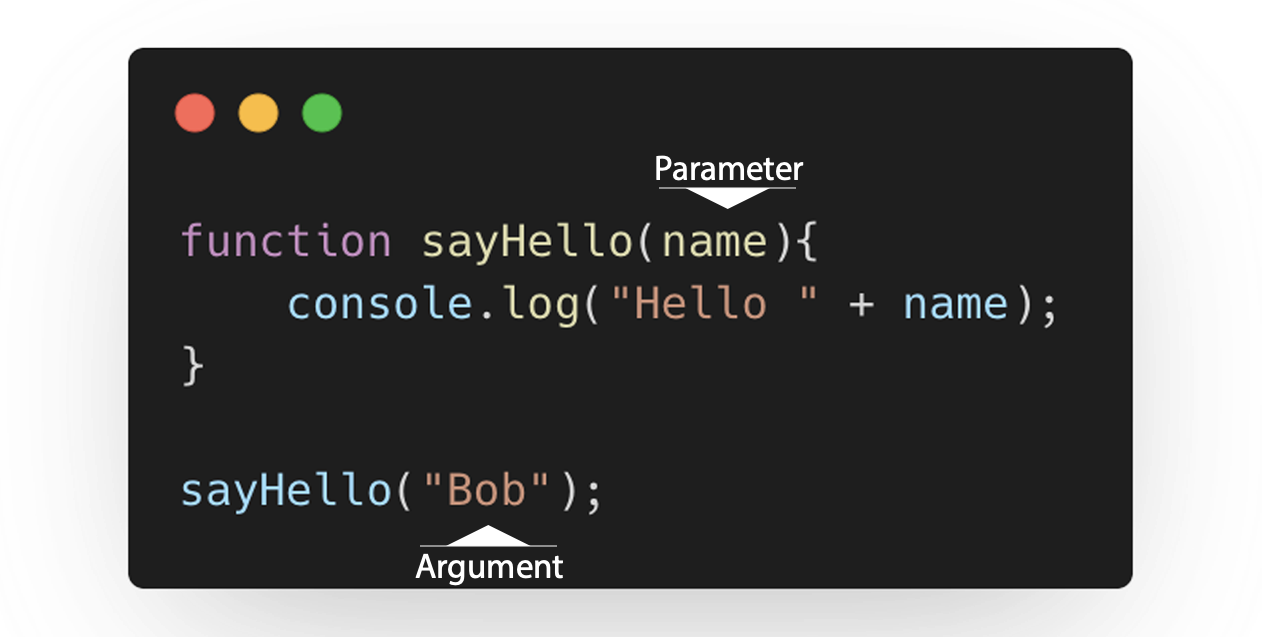
         function add(x, y) {
            return x + y;
         }
         add(100,200);
In this example, the x and y are the parameters of the add() function, and the values that we passed to the add() function 100 and 200 are the arguments.
-
         function functionName(firstParameter = today()) {
           console.log(firstParameter);
         }

         function today() {
           return (new Date()).toLocaleDateString("en-US");
         }
         functionName();
-
         function add(x = 1, y = x, z = x + y) {
             return x + y + z;
         }
         console.log(add()); // 4
-
         function add(x = 1, y = x, z = x + y) {
             return x + y + z;
         }
         console.log(add()); // 4
-
         function add(x, y = 1, z = 2) {
             console.log( arguments.length );
             return x + y + z;
         }

         add(10); // 1
         add(10, 20); // 2
         add(10, 20, 30); // 3
The value of the arguments object inside the function is the number of actual arguments that you pass into. See this example:.
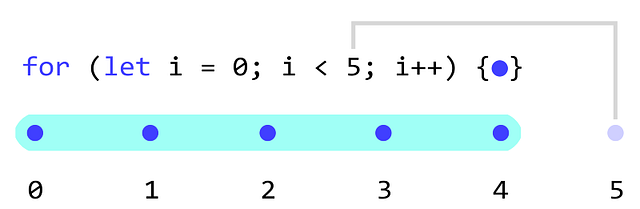
           for (let i = 0; i < 5; i++) {
              console.log(i);
           }

           // Results:
           0
           1
           2
           3
           4
For loop counters are 0-index based. Let’s skip the middle statement and try breaking out of the loop using our own condition (i > 1):
           for (let i = 0;; i++) {
               console.log("loop, i = " + i);
               if (i > 1)
                   break;
           };
           // Results:
           "loop, i = 0"
           "loop, i = 1"
           "loop, i = 2"
-
         {
         for (let i = 0; i < 3; i++) console.log("loop");
         }
         // results:
         // “loop.”
         // “loop.”
         // “loop.”
-
         let string = 'text';
         for (let value of string)
           console.log( value );
         // results:
         // 't'
         // 'e'
         // 'x'
         // 't'
-
         let array = [0, 1, 2];
         for (let value of array)
           console.log( value );
         // results:
         // 0
         // 1
         // 2
JavaScript is a text-based programming language used both on the client-side and server-side that allows you to make web pages interactive..
- The Modern JavaScript Tutorial https://javascript.info/intro
- What can JavaScript do? https://www.w3schools.com/js/js_examples.asp
- The Complete Guide to Loops in JavaScript https://morioh.com/p/b8bf0ec1d5d7
- Variable scope, closure https://javascript.info/closure
- Data Structures: Objects and Arrays https://eloquentjavascript.net/04_data.html
- The && and || Operators in JavaScript https://mariusschulz.com/blog/the-and-and-or-operators-in-javascript
Still some un-categorise-able notes I share randomly with you:
- we can review our hard challenges with the Speaker on Wednesdays between 4 and 5 pm, we also have to split in groups and orgnize it.
- Each of us bring one bag of coffee on Monday.
- Reviewing the quests only for the big challenges will happen with Wilfredoo, or share the solution.
- we can do our own workshop, where we share our knowledge together, whatever you think you can bring.
- we audio speaker to hear the Guest calls.
- thanks for your attention! Good luck...