


Embed an S3-compatible object store — wire protocol, admin JSON API, and admin console SPA — directly inside your own NestJS application, configured in code.
📚 Read the full documentation → — getting started, guides, API reference, concepts & operations.
import { Module } from '@nestjs/common';
import { OpenBucketModule } from '@openbucket/nestjs';

@Module({
  imports: [
    OpenBucketModule.forRoot({
      dataDir: '/var/lib/openbucket',
      mountPath: '/storage', // S3 endpoint = http://your-host/storage
      rootCredentials: {
        accessKeyId: process.env.OB_ACCESS_KEY!,
        secretAccessKey: process.env.OB_SECRET_KEY!,
      },
      admin: {
        username: 'admin',
        passwordHash: process.env.OB_ADMIN_HASH!, // argon2id
        jwtSecret: process.env.OB_JWT_SECRET!,
        serveUi: true, // admin console at /storage/admin
      },
    }),
  ],
})
export class AppModule {}
Point any S3 client at http://your-host/storage (path-style) with the root
credentials. The admin console is at http://your-host/storage/admin.
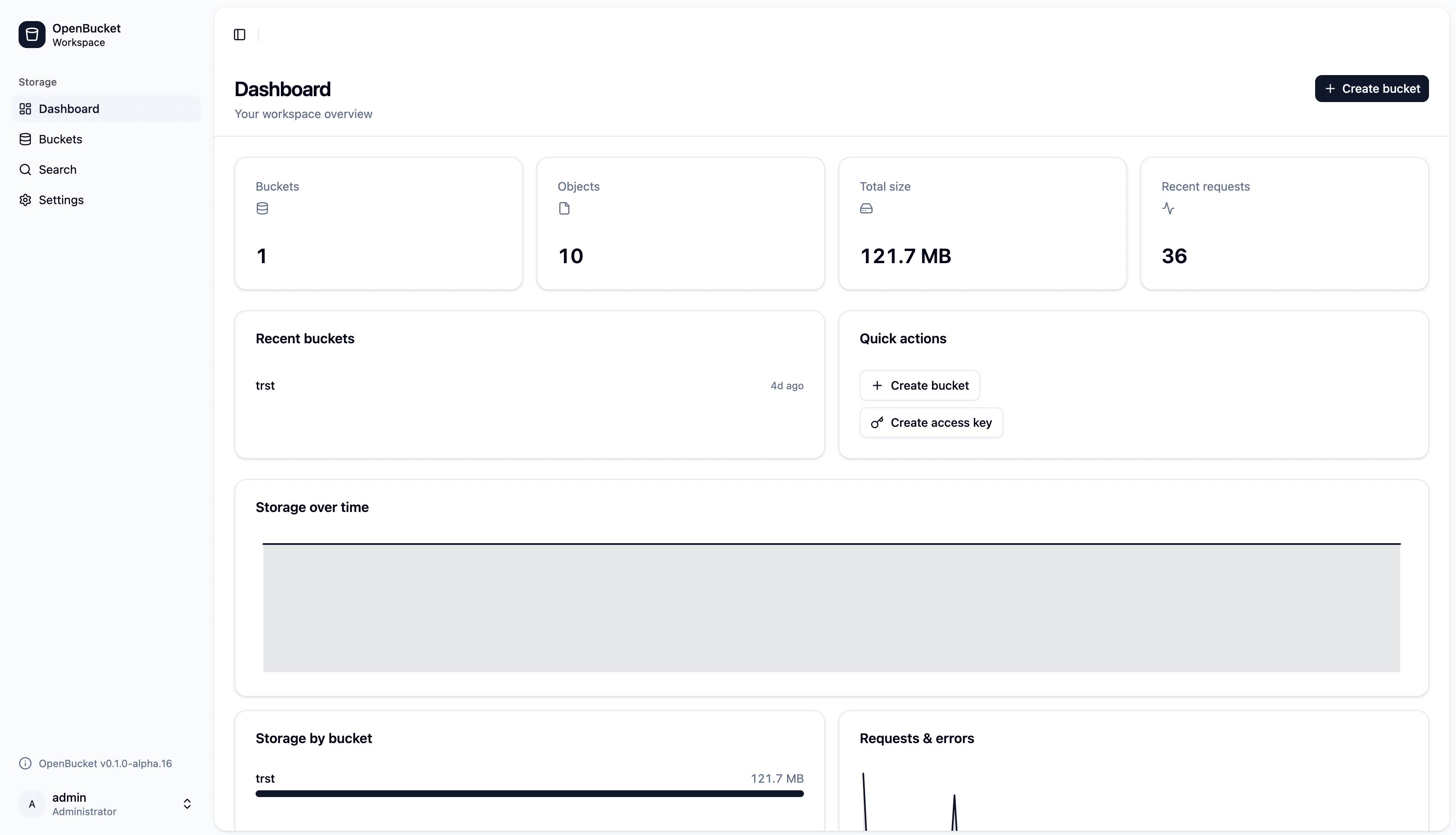
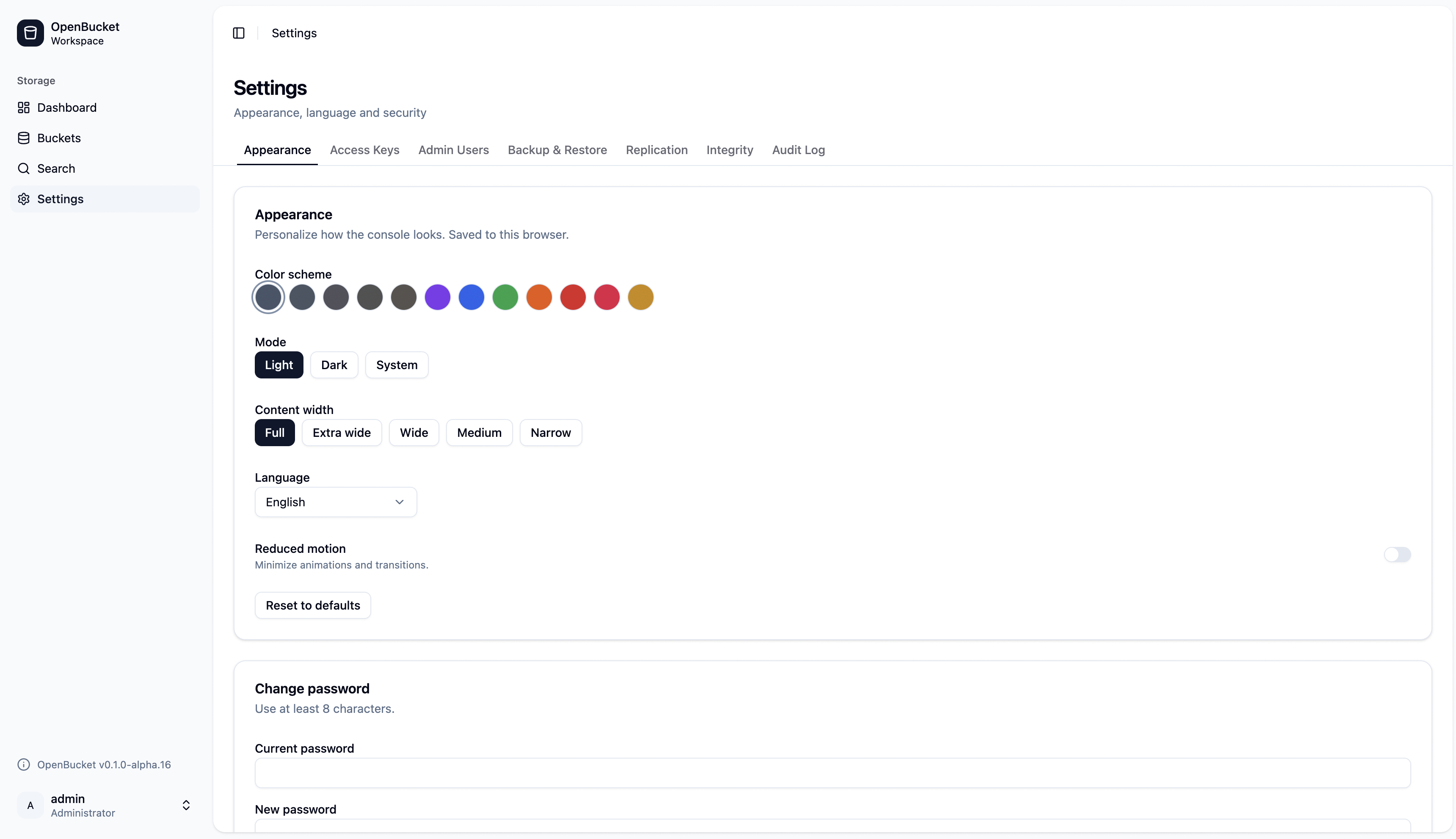
The bundled Angular console mounts at <mountPath>/admin — a dashboard (buckets,
usage, health) and a consolidated Settings area (access keys, admin users, backup &
restore, replication, audit log), plus a full bucket & object browser.
The admin block is opt-in and controls a real wiring switch — not just a flag:
- Include
admin→ the JSON admin API (<mountPath>/api/admin/*), the global JWT auth guard, and the first-run admin bootstrap are all wired. SetserveUi: trueto also serve the bundled Angular console at<mountPath>/admin. - Omit
admin→ a headless, S3-only store. No admin routes are mapped, no JWT guard is bound, no admin user is seeded, and the SPA is never served. Only the S3 wire protocol (and the<mountPath>/api/admin/health/readyprobes) respond.
// Headless: S3 wire protocol only, no admin API and no console.
OpenBucketModule.forRoot({
  dataDir: '/var/lib/openbucket',
  mountPath: '/storage',
  rootCredentials: { accessKeyId: '…', secretAccessKey: '…' },
  // no `admin` → admin surface is entirely absent
});
A partial admin block is rejected at startup (it would otherwise sign JWTs
with an empty secret): username, passwordHash, and jwtSecret are all required
when admin is present. Omit the whole block to go headless.
The object browser previews an object inline (a per-row Preview action and the
detail sheet) for images, PDF, text/code, and video/audio. Bytes are
read only through the guarded admin content route
(GET <mountPath>/api/admin/buckets/:name/objects/<key>?content) — the same
authenticated path as download — so preview adds no new API surface. The safeguards:
- Active-content neutralization — every read applies
Content-Security-Policy: default-src 'none'; sandbox+X-Content-Type-Options: nosniff, andtext/html/application/xhtml+xml/image/svg+xmlare forced toattachment; application/octet-stream, so uploaded markup/SVG can never script the admin origin (it falls through to a download-only fallback card instead of rendering). - PDF
<iframe sandbox>with no tokens (blocks scripts/forms/popups/same-origin) as defense in depth over the server CSP. - Per-kind size caps — the client refuses to fetch over-cap images/PDF/video/audio;
text is fetched with a bounded
Range: bytes=0-262143(256 KiB) request so a multi-gigabyte log never streams into the browser, with a truncation banner and a binary-content sniff that declines to dump control characters. - No shared caching —
?contentresponses carryCache-Control: private, no-storeso previewed bytes never land in a shared/browser cache (multi-operator installs).
The console's Search page (and GET <mountPath>/api/admin/objects/search) finds
objects across every bucket — or one named bucket — in two modes:
prefix(default) — an indexed byte-wise range scan on the key (ix_objects_bucket_key), matching S3'sStartAftersemantics; cheap even on huge buckets.contains— a substring match via a parameterisedLIKE … ESCAPE. The term is bound (never interpolated) and run through a wildcard-escaping helper, so%,_, and\in user input match literally (CWE-150). It requiresqof length ≥ 2 as a DoS guard against a full-table%%scan.
An optional tag filter (tagKey + tagValue, supplied together) narrows results
to objects carrying that exact tag. Tags are indexed in a denormalised object_tags
table (ix_object_tags_kv) kept in sync on the tagging write path and backfilled for
pre-existing objects by a background tick — so tag search is an index-backed exact
match, not a JSON scan. The unindexed objects.tagging JSON column stays the source
of truth; object_tags is a rebuildable index.
Pagination is keyset over (bucket, key) (an opaque nextCursor, never OFFSET),
so page N is as cheap as page 1 — no deep-pagination DoS. The endpoint inherits the
global JwtAuthGuard (401 without a bearer token) and the default throttle bucket
(100/min/IP → 429); each call emits an object.searched audit event recording the
search shape (mode, whether a tag filter was used, result count) — never the raw
query term, to avoid logging sensitive key fragments.
The console's Dashboard renders storage-over-time, a per-bucket size breakdown,
and request/error mini-charts, backed by three read-only endpoints under
<mountPath>/api/admin/analytics (JWT-guarded; in the OpenAPI doc so the generated
client has a typed AnalyticsService):
| Endpoint | operationId | What it returns |
|---|---|---|
GET /api/admin/analytics/storage?range=&bucket= |
getStorageAnalytics |
Storage-over-time points (sizeBytes, objectCount). Instance-wide, or one bucket via exact match (never LIKE). |
GET /api/admin/analytics/buckets |
getBucketBreakdown |
Per-bucket size + sharePct of the latest sample, limited to still-existing buckets. |
GET /api/admin/analytics/requests?range= |
getRequestAnalytics |
Request/error counts per window, pivoted across the admin and s3 surfaces. |
range is an allow-list enum (1h/24h/7d/30d/90d) — there is no
free-form window, so no unbounded scan. Every series is server-side downsampled
to ≤ 500 points so a 90-day range never streams thousands of rows to the browser.
The data comes from a background usage-rollup tick (USAGE_ROLLUP_INTERVAL_MS,
default 15 min): it snapshots per-bucket storage in one grouped aggregate, drains an
in-memory per-surface request/error counter (counts only — never URLs, keys, or
signatures), writes both to usage_samples / request_metric_samples with a shared
timestamp, and prunes rows older than USAGE_RETENTION_DAYS (default 90) to bound
table growth. A bucket delete does not erase its historical samples, so the
storage line never retroactively drops; the breakdown filters to existing buckets at
read time.
Every state-changing admin action (AuditService.emit) is both logged as a Pino
record (audit: true) and persisted to an audit_logs table, so the console's
Audit log page (<mountPath>/audit) can browse history the log stream can't. Two
read-only, JWT-guarded endpoints back it (typed AuditAdminService in the generated
client):
| Endpoint | operationId | What it returns |
|---|---|---|
GET /api/admin/audit?event=&subject=&bucket=&from=&to=&cursor=&limit= |
listAuditEvents |
A newest-first page { items, nextCursor }. Filters match exact, indexed columns (never LIKE); limit ≤ 200 with opaque keyset paging bounds every response. |
GET /api/admin/audit/catalog |
getAuditCatalog |
The static v1 event-name list for the filter dropdown (no distinct scan). |
Writes never block the request handler: emit pushes onto a bounded in-memory ring
buffer, and a background audit-flush tick (AUDIT_FLUSH_MS, default 2 s)
batch-inserts drained rows inside a per-tick RequestContext, then prunes rows older
than AUDIT_RETENTION_DAYS (default 90) once per day. The buffer is capped at
AUDIT_BUFFER_MAX (default 10 000) — past that the oldest row is dropped and the
flusher warns, so a burst or a stalled flusher can never exhaust the heap. Before a
row is stored, any secret-looking field (/secret|password|hash|token|authorization|cookie/i)
is stripped and the JSON detail is dropped if it exceeds ~2 KiB (defense-in-depth;
the v1 catalogue never carries secrets). Read-only GETs are not audited.
A Prometheus scrape endpoint is served at <mountPath>/metrics (text exposition
format 0.0.4). It is off by default — enable it via the metrics option:
OpenBucketModule.forRoot({
  // …
  metrics: {
    mode: 'token',        // 'off' (default) | 'public' | 'token'
    token: process.env.METRICS_TOKEN, // required + validated strong when mode: 'token'
  },
  tracing: { enabled: false }, // OpenTelemetry (see below)
});
Standalone / env: METRICS_MODE=off|public|token, METRICS_TOKEN=….
off— the route is not served (falls through to the S3 route; no registry body is ever leaked).public— an unauthenticated scrape (the intended default on a trusted network / an internal Prometheus).token— requiresAuthorization: Bearer <token>; the token is compared in constant time (crypto.timingSafeEqual) and must be strong (the app refuses to boot with a weak/empty token intokenmode). The token is never logged (redacted with the rest ofauthorization).
The /metrics request skips SigV4 verification (the classifier tags it
admin-kind), and its route is mapped before the greedy S3 :bucket route so
a bucket literally named metrics can't shadow it.
Exported families (all with bounded label cardinality — never a raw URL, object key, bucket beyond its public name, or client IP; CWE-770):
| Metric | Type | Labels |
|---|---|---|
openbucket_http_requests_total |
counter | surface, method, route_class, status_class |
openbucket_http_request_duration_seconds |
histogram | same as above |
openbucket_s3_operations_total |
counter | operation (the finite S3 op names) |
openbucket_storage_bytes |
gauge | bucket |
openbucket_object_count |
gauge | bucket |
openbucket_replication_outbox_depth |
gauge | status (pending/inflight/failed) |
openbucket_process_* / openbucket_nodejs_* |
default | — |
HTTP counters/histograms are live immediately (recorded by the single global
request interceptor). The gauges are refreshed on the usage-rollup tick
(USAGE_ROLLUP_INTERVAL_MS, default 15 min) from the same in-memory aggregate the
analytics rollup already computes — so a scrape never runs a query — and a deleted
bucket's series is evicted on the next tick. Host apps that want to scrape the
registry directly can inject PROM_METRICS / METRICS_REGISTRY.
Tracing — tracing: { enabled: true } (env OTEL_TRACING_ENABLED=true) wraps
each request in an OpenTelemetry span named by surface/route_class with only
bounded attributes (http.method, route_class, surface). The library never
hard-depends on any @opentelemetry/* package: it resolves @opentelemetry/api
dynamically and is a genuine no-op unless you install @opentelemetry/api and
register an SDK (trace.setGlobalTracerProvider(...)). If tracing is enabled but the
api is absent, it logs one boot warning and no-ops (fail-open — tracing is
non-critical telemetry).
For secrets resolved at runtime (e.g. from the host's ConfigService). Note
mountPath, serveUi, and admin (the on/off switch) are static — routing is
wired at module-config time — while the admin secrets still come from the factory:
OpenBucketModule.forRootAsync({
  mountPath: '/storage',
  serveUi: true,
  // admin: false,  // ← set this to run headless; then the factory may omit `admin`
  inject: [ConfigService],
  useFactory: (cfg: ConfigService) => ({
    dataDir: cfg.getOrThrow('OB_DATA_DIR'),
    rootCredentials: {
      accessKeyId: cfg.getOrThrow('OB_ACCESS_KEY'),
      secretAccessKey: cfg.getOrThrow('OB_SECRET_KEY'),
    },
    admin: { username: 'admin', passwordHash: cfg.getOrThrow('OB_ADMIN_HASH'), jwtSecret: cfg.getOrThrow('OB_JWT_SECRET') },
  }),
});
When the admin surface is enabled (the default), the factory must return an
admin block; pass admin: false to run headless and the factory may omit it.
Two ways to drive the store from your host app — pick by who's calling.
For your server-side code, inject OpenBucketService and call object/bucket
operations directly — no HTTP round-trip. It's exported by OpenBucketModule, so
it's available anywhere once the module is imported (works with or without the
admin surface). Each data method runs inside its own MikroORM context, so it's safe
to call from services, cron jobs, queue consumers, or lifecycle hooks.
import { Injectable } from '@nestjs/common';
import { OpenBucketService } from '@openbucket/nestjs';

@Injectable()
export class FilesService {
  constructor(private readonly ob: OpenBucketService) {}

  async onboard(orgId: string, avatar: Buffer) {
    await this.ob.createBucket(`org-${orgId}`, { versioning: true });

    // Upload a Buffer, string, or a Readable stream (large files stream to disk).
    const { etag } = await this.ob.putObject(`org-${orgId}`, 'avatar.png', avatar, {
      contentType: 'image/png',
    });

    // Read it back as a Buffer (or `getObjectStream` for large objects).
    const bytes = await this.ob.getObjectBuffer(`org-${orgId}`, 'avatar.png');

    // List with folder-style roll-up, or a flat prefix scan.
    const { contents, commonPrefixes } = await this.ob.listObjects(`org-${orgId}`, {
      delimiter: '/',
    });

    // Mint a time-limited URL to hand to a browser (download or direct upload).
    const downloadUrl = this.ob.presignGetUrl(`org-${orgId}`, 'avatar.png', {
      baseUrl: 'https://files.example.com', // your public origin (scheme + host)
      expiresIn: 900,
    });
    const uploadUrl = this.ob.presignPutUrl(`org-${orgId}`, 'next.png', {
      baseUrl: 'https://files.example.com',
    });

    return { etag, size: bytes.length, downloadUrl, uploadUrl };
  }
}
The facade covers: putObject, uploadFrom, getObjectStream, getObjectBuffer,
headObject, deleteObject, listObjects; createBucket, deleteBucket,
bucketExists, listBuckets; presignGetUrl / presignPutUrl; and
createPresignedPost. Methods throw OpenBucket's S3 domain errors
(NoSuchBucketError, NoSuchKeyError, …) — catch them or pre-check with
bucketExists / headObject. uploadFrom additionally throws
UploadValidationError (map its statusHint 400) on a rejected upload.
Presigned URLs are signed for the public origin you pass as
baseUrl(scheme
- host); the configured
mountPathand the object path are appended for you, so the URL verifies against the mounted S3 routes.baseUrldefaults to theendpointoption (over https) when set. The generated link is a normal S3 URL — hand it to any HTTP client or<img src>/fetch(url, { method: 'PUT' }).
createPresignedPost mints a short-lived, tightly-scoped HTML-form upload token so
a browser can upload straight to the store — no S3 SDK in the browser, no proxying
bytes through your server:
// Server: mint the form. Signed with the root credential; scoped to the
// key/prefix, content-type, and size range you specify.
const { url, fields } = this.ob.createPresignedPost('avatars', {
  key: 'users/${filename}',                // ${filename} filled from the file part
  keyStartsWith: true,                     // folder-scoped upload token
  contentLengthRange: { min: 1, max: 5 * 1024 * 1024 },
  contentType: { startsWith: 'image/' },
  expiresIn: 900,                          // 1 … 604800 s (7 days max)
  successActionStatus: '201',              // 201 → <PostResponse> XML, else 204
});
// Browser: append every `fields` entry, then the `file` part LAST, and POST to `url`.
const form = new FormData();
for (const [k, v] of Object.entries(fields)) form.append(k, v);
form.append('file', fileInput.files[0]); // MUST be last
await fetch(url, { method: 'POST', body: form });Security & limits. The server re-enforces the size range on the streamed bytes (never the client-declared
Content-Length), the token expires (≤ 7 days), and the bucket policy still applies. Acontent-length-rangedefaults to the server'smaxObjectSizeMbcap when you omit one. Thefilepart must be last.CORS. A cross-origin
multipart/form-dataPOST is a CORS "simple request" (no preflight), so the upload works, but reading a non-2xx error or201body cross-origin needs per-bucket CORS (PutBucketCors). For pure browser flows, prefersuccessActionRedirect— the browser navigates and needs no CORS to see the result.
For external clients (other services, browsers, CLIs), point the standard AWS S3 SDK at the mount — OpenBucket is wire-compatible, so no special client is needed.
npm install @aws-sdk/client-s3 @aws-sdk/s3-request-presignerimport { S3Client, PutObjectCommand, GetObjectCommand } from '@aws-sdk/client-s3';
import { getSignedUrl } from '@aws-sdk/s3-request-presigner';
const s3 = new S3Client({
endpoint: 'http://localhost:3000/storage', // host + mountPath
region: 'us-east-1', // must match OpenBucket's `region` option (default us-east-1)
forcePathStyle: true, // REQUIRED — virtual-host addressing is not supported
credentials: { accessKeyId: process.env.OB_ACCESS_KEY!, secretAccessKey: process.env.OB_SECRET_KEY! },
});
await s3.send(new PutObjectCommand({ Bucket: 'my-bucket', Key: 'a.jpg', Body: buf }));
const url = await getSignedUrl(s3, new GetObjectCommand({ Bucket: 'my-bucket', Key: 'a.jpg' }), { expiresIn: 900 });Streaming PUT/GET, multipart uploads (@aws-sdk/lib-storage), presigned URLs, range
reads, and object lock all work exactly as they do against AWS.
For administrative operations (creating access keys, editing per-bucket
versioning / encryption / lifecycle / CORS / policy, browsing audit events), call
the JSON admin API under <mountPath>/api/admin/* — the generated, typed
@openbucket/api-client wraps it.
The root credential (ROOT_ACCESS_KEY_ID / ROOT_SECRET_ACCESS_KEY) is
loaded from the environment, never persisted, and is always unrestricted — a
single-root deployment behaves exactly as before. On top of it you can mint
scoped sub-keys: full SigV4-capable access keys whose reach is confined to a
bucket + key-prefix (or an inline policy). Scoping is additive and opt-in —
omit scope and you get an unscoped sub-key.
A scope is compiled once, at mint time, into the same IAM-style PolicyDocument
the bucket-policy evaluator already understands, then enforced on every S3
request with implicit deny (defaultAllow: false) alongside the bucket
policy. The effective decision is bucket-policy AND scope:
- an action/resource the scope does not
Allowis denied — even when the bucket has no policy; - an explicit bucket-policy
Denystill overrides (checked first, never masked); - a prefix scope grants
s3:ListBucketonly under aStringLike s3:prefixcondition, so a tenant key cannot enumerate the whole bucket with an unprefixedListObjectsV2; - a scoped key calling a service-scope op (
ListBuckets) is denied unless its scope explicitly allowss3:ListAllMyBuckets.
Two authoring forms:
actions is optional and defaults to the read+write object set above. prefix
is optional (defaults to the whole bucket), capped at 1 KiB, and may not start
with / or contain a .. segment.
POST <mountPath>/api/admin/keys with a scope. The secret is returned once:
const { data } = await keysApi.createKey({
  label: 'tenant-a-uploader',
  scope: { kind: 'prefix', bucket: 'tenants', prefix: 'tenant-a/' },
});
// data.accessKeyId / data.secretAccessKey — hand these to the tenant.
// data.scope === { kind: 'prefix', bucket: 'tenants', prefix: 'tenant-a/' }
A key minted with a scope records role: 'scoped'; without a scope it records
role: 'root' (unscoped, root-equivalent) exactly as before.
The tenant then uses the pair with any SigV4 client (SDK header-signed and
presigned URLs are both enforced). GET /api/admin/keys returns each key's scope
summary (never the secret). Disabling or deleting a key takes effect immediately —
the in-memory SigV4 cache is invalidated on revoke.
Four more admin routes manage a key's lifecycle and let you audit exactly what it can do. Every state change invalidates the in-memory SigV4 cache synchronously, so it takes effect in-process at once:
// Roll the secret — a fresh secret is returned ONCE (id/accessKeyId/scope unchanged).
// Throttled to 10/min (argon2id hashing is CPU-heavy). Old secret stops verifying now.
const { data: rolled } = await keysApi.rotateKey(id); // rolled.secretAccessKey

// Revoke — disable the key (reversible; keeps the audit trail). Distinct from
// deleteKey(), which hard-removes the row.
await keysApi.revokeKey(id);

// Effective permissions — the compiled scope plus an allow/deny matrix over a
// fixed action catalogue × the key's scoped resources, evaluated with the SAME
// evaluator the S3 path uses (so the console and the real request path agree).
const { data: eff } = await keysApi.getKeyEffectivePermissions(id);
// eff.scoped, eff.scope (PolicyDocument | null), eff.matrix: { action, resource, decision }[]

// Simulate a single { action, resource } — `action` accepts `GetObject` or
// `s3:GetObject`. Returns the same allow/deny the guard would.
const { data: sim } = await keysApi.simulateKeyAction(id, {
  action: 'GetObject',
  resource: 'arn:aws:s3:::tenants/tenant-a/report.csv',
}); // sim.decision === 'allow'
rotateKey and revokeKey emit the key.rotated / key.revoked audit events;
getKeyEffectivePermissions and simulateKeyAction are read-only and never mutate
state or surface the secret.
SigV4 needs the plaintext secret to verify a signature, so a sub-key's secret is
stored encrypted at rest (AES-256-GCM) — never in plaintext — and decrypted on
the hot path. The 32-byte key-encryption key (KEK) is HKDF-derived from
KEY_ENCRYPTION_SECRET if set, otherwise from ROOT_SECRET_ACCESS_KEY.
Operational caveat: if you rotate
ROOT_SECRET_ACCESS_KEYwithout having set a dedicatedKEY_ENCRYPTION_SECRET, existing sub-key secrets become undecryptable and must be re-minted. SetKEY_ENCRYPTION_SECRET(a strong, 32+ char value) up front to decouple sub-key storage from the root credential.
The admin plane supports multiple admin users, each carrying a role:
admin(full admin) — every state-changing admin action.readonly— can sign in and read (all adminGETs succeed) but is403'd on any state-changing admin operation.
The first-run bootstrap admin (and every row created before this feature) defaults
to full admin, so single-admin instances are unchanged. Manage admins at
/api/admin/users — listAdminUsers, createAdminUser, updateAdminUser (reassign
role and/or reset password), deleteAdminUser — all full-admin-only.
Enforcement is server-authoritative and default-deny by HTTP method: a global
RolesGuard 403s any POST/PUT/PATCH/DELETE under /api/admin/* for a
read-only principal, except two self-service routes (settings/change-password,
auth/logout) and handlers explicitly marked @AllowReadOnly(). The role is read
fresh from the DB on every request (not the JWT claim), so a demotion takes
effect immediately even while an old token still verifies. GET /api/admin/auth/me
returns the caller's role for UI gating.
Two anti-lockout invariants are always enforced: you cannot delete or demote the
last full admin (409), and you cannot delete your own account (403).
Creating an admin forces a password change on first login; a password reset or a
delete immediately evicts that user's live sessions.
Data-plane vs admin roles. A minted S3 access key records
role: 'scoped'(created with a scope) orrole: 'root'(unscoped) — that labels a data-plane key's reach and is orthogonal to the adminadmin/readonlyrole above.
A very common pattern: your NestJS app takes a browser upload, streams it into OpenBucket, and saves a row (with a URL) in your own database.
1 — make sure the bucket exists (once, at startup):
import { Injectable, OnApplicationBootstrap } from '@nestjs/common';
import { OpenBucketService } from '@openbucket/nestjs';

@Injectable()
export class UploadsBootstrap implements OnApplicationBootstrap {
  constructor(private readonly ob: OpenBucketService) {}

  async onApplicationBootstrap() {
    if (!(await this.ob.bucketExists('uploads'))) {
      await this.ob.createBucket('uploads');
    }
  }
}
2 — the upload endpoint — parse the multipart file (multer, via
FileInterceptor) and hand it to uploadFrom. One call sniffs the real content
type, enforces your size/type rules, picks a safe key, and streams the body in —
then persist the stable { bucket, key } with your ORM:
import {
  BadRequestException,
  Controller,
  Post,
  UploadedFile,
  UseInterceptors,
} from '@nestjs/common';
import { FileInterceptor } from '@nestjs/platform-express';
import { OpenBucketService, UploadValidationError } from '@openbucket/nestjs';
import { PrismaService } from './prisma.service'; // ← your DB; swap for TypeORM / MikroORM / Drizzle

const BUCKET = 'uploads';
const PUBLIC_ORIGIN = 'https://files.example.com'; // where clients reach the store

@Controller('files')
export class FilesController {
  constructor(
    private readonly ob: OpenBucketService,
    private readonly db: PrismaService,
  ) {}

  @Post()
  @UseInterceptors(FileInterceptor('file')) // multipart field name: "file"
  async upload(@UploadedFile() file: Express.Multer.File) {
    if (!file) throw new BadRequestException('file is required');

    // Sniffs the real content type, enforces size/type, picks a safe key — one call.
    const { key, contentType, size, image } = await this.ob.uploadFrom(file, {
      bucket: BUCKET,
      keyStrategy: 'uuid', // → `${year}/${uuid}${ext}` (same stable, collision-free shape)
      validate: { maxBytes: 10 * 1024 * 1024, allowedContentTypes: ['image/*'] },
    });

    // Persist the STABLE identity (bucket + key) — NOT a signed URL (those expire).
    const saved = await this.db.file.create({
      data: {
        bucket: BUCKET,
        key,
        name: file.originalname,
        size,
        contentType, // the RESOLVED (sniffed) type, not the client's claim
        width: image?.width, // image metadata, when the body probed as an image
        height: image?.height,
      },
    });

    return this.toDto(saved);
  }

  private toDto(f: { id: string; bucket: string; key: string; name: string }) {
    return {
      id: f.id,
      name: f.name,
      // A fresh, time-limited download URL, minted on demand (pure crypto — no I/O).
      url: this.ob.presignGetUrl(f.bucket, f.key, { baseUrl: PUBLIC_ORIGIN, expiresIn: 3600 }),
    };
  }
}
Rejected uploads → 400. A too-large, disallowed-type, or active-content (HTML/SVG masquerading as an image) upload throws
UploadValidationError. Map it to a400— e.g. a one-line filterif (err instanceof UploadValidationError) throw new BadRequestException(err.message), or read itsstatusHint(400).
3 — serve it back. Because you stored the key (not a URL), mint a fresh presigned URL whenever you read the row — nothing leaks or goes stale:
const files = await this.db.file.findMany({ where: { ownerId } });
return files.map((f) => this.toDto(f)); // each gets a fresh 1-hour URL
“I just want a URL column.” Either store
presignGetUrl(...)with a longerexpiresIn(max 7 days) and re-mint it periodically, or — for a bucket you deliberately make public (an anonymous-GET bucket policy) — store the stable path-style URL`${PUBLIC_ORIGIN}${mountPath}/${bucket}/${key}`. The key + presign-on-read pattern above is the robust default: no expiry to babysit and nothing world-readable by accident.
Notes:
FileInterceptorbuffers the file in memory (file.buffer), which is fine for typical uploads. For large files,uploadFromalso accepts aReadable(or a disk-storage multer file) and streams it straight to disk without buffering — only a small header is peeked for sniffing, and thevalidate.maxBytescap aborts an oversize stream mid-write (no partial object is committed).uploadFromsniffs the content type from the body's magic bytes and rejects mismatched active content (HTML/SVG posing as an image) as defense in depth — it complements the locked-down response headers every object read already gets.putObjectremains the low-level primitive if you want no validation/sniffing and to pick the key yourself;uploadFromis sugar on top of it.- Your app’s multipart parsing is independent of OpenBucket — its S3 routes mount
under
mountPathand handle their own request bodies.
If your app already uses FileInterceptor, swap its storage for OpenBucket — the
file streams straight into the store (no temp file, no file.buffer, no
explicit uploadFrom call). The engine sniffs + validates + picks a safe key,
then merges the committed { bucket, key, url, etag, size, contentType } onto the
file, which @UploadedToBucket() hands your handler. These three symbols ship
behind the dedicated @openbucket/nestjs/multer subpath export (multer is an
optional peer, already present via @nestjs/platform-express — headless hosts
that never import this subpath never pull it in):
import { Controller, Post, UseFilters, UseInterceptors } from '@nestjs/common';
import {
  OpenBucketFileInterceptor,
  UploadedToBucket,
  UploadValidationExceptionFilter,
  type UploadedFileInfo,
} from '@openbucket/nestjs/multer';

@Controller('files')
@UseFilters(UploadValidationExceptionFilter) // maps a rejected upload → HTTP 400
export class FilesController {
  @Post()
  @UseInterceptors(
    OpenBucketFileInterceptor('file', {
      bucket: 'uploads',
      key: 'uuid', // built-in strategy, OR a (req, file) => string function (always assertSafeKey-guarded)
      validate: { maxBytes: 10 * 1024 * 1024, allowedContentTypes: ['image/*'] },
    }),
  )
  upload(@UploadedToBucket() file: UploadedFileInfo) {
    // Already committed to OpenBucket — persist the STABLE key (not the signed url).
    return { key: file.key, contentType: file.contentType, size: file.size };
  }
}
How OpenBucketFileInterceptor resolves the service. openBucketStorage
needs the OpenBucketService instance, but inside a class-property
@UseInterceptors(...) decorator this is not available at decoration time.
OpenBucketFileInterceptor handles that for you: it's a mixin interceptor whose
constructor receives OpenBucketService from the container and builds the storage
engine — so you just import it, no boilerplate. If you'd rather compose it
yourself, openBucketStorage(ob, opts) is exported too for use inside your own
FileInterceptor mixin.
Notes:
- Rejected uploads → 400. With
@UseFilters(UploadValidationExceptionFilter)a too-large / disallowed-type / active-content / unsafe-key upload renders a stable{ statusCode: 400, error: 'Bad Request', code, message }body instead of an opaque500. Register it per-controller (above) or globally (app.useGlobalFilters(new UploadValidationExceptionFilter())). It is scoped by@Catch(UploadValidationError), so an S3 error likeNoSuchBucketError(absent bucket) is not swallowed — make sure the bucket exists (step 1 above). - Key safety. Pass
keyas a built-in strategy name or a(req, file) => stringfunction (e.g.(req) =>tenant/${req.user.id}/${randomUUID()}); either way the derived key is routed throughassertSafeKey, so a../evil` / control-char key is rejected — a raw, unsanitized key string is never used verbatim. - Store the key, presign on read. The engine attaches a
url, but the robust default is still to persist the stable{ bucket, key }and mint a freshpresignGetUrl(...)on read (the#toDtopattern above) — no expiry to babysit. - For an array of files use
FilesInterceptorinside the same mixin and read aUploadedFileInfo[]via@UploadedToBucket(); for aFileFieldsInterceptorpass a field name,@UploadedToBucket('avatar').
| Option | Required | Default | Notes |
|---|---|---|---|
dataDir |
✅ | — | SQLite metadata DB + blob payloads + generated sse.key. |
rootCredentials |
✅ | — | { accessKeyId, secretAccessKey } (SigV4). |
mountPath |
/storage |
Path-style prefix for all routes. Virtual-host addressing is not supported. | |
region |
us-east-1 |
Region reported to clients (match it in your SDK config). | |
endpoint |
— | DNS-safe hostname for endpoint discovery. | |
sseKey |
generated | base64 of 32 bytes; else generated + persisted to <dataDir>/sse.key. |
|
admin |
— | Omit to disable the admin surface entirely (headless S3-only). When present: { username, passwordHash (argon2id), jwtSecret, serveUi?, jwtAccessTtl?, jwtRefreshTtl? } — username/passwordHash/jwtSecret are all required. |
|
limits |
{ maxObjectSizeMb?, maxMultipartParts?, multipartTtlHours? }. |
||
replication |
— | Omit to disable. Async one-way replication to an external S3-compatible target — see Async replication. | |
backups |
— | Omit to disable. Scheduled .zip snapshots + retention — see Scheduled backups. { scope?, cron?, intervalMinutes?, dir?, keepLast?, maxAgeDays?, checkIntervalMs?, pushToReplication? }; exactly one of cron/intervalMinutes (validated at boot). |
|
metrics |
{ mode: 'off' } |
Prometheus /metrics endpoint: { mode: 'off'|'public'|'token', token? }. token requires a strong token (validated at boot). See Prometheus metrics & OpenTelemetry. |
|
tracing |
{ enabled: false } |
OpenTelemetry span-per-request. No-op unless @opentelemetry/api + an SDK are installed. |
forRootAsync adds two static options alongside useFactory/inject:
serveUi? (default true) and admin? (default true — set false for headless).
- Mounting. Everything mounts under
mountPath, so OpenBucket's greedy S3 routes (:bucket/:key) never shadow your own routes. Your routes are untouched. - Errors. OpenBucket's exception filter only renders requests under
mountPath; errors on your routes fall through to your own filters / Nest's default. - Auth. When admin is enabled, the admin JWT guard only protects
<mountPath>/api/admin/*. When disabled, no global guard is bound at all. - Migrations run automatically on module init (no manual step).
OpenBucket encrypts objects at rest with a single, backend-managed 32-byte key (the SSE-S3 model). Operational notes:
- One key for the whole instance. Every encrypted object of every bucket is
encrypted with the same key — there is no per-object/per-tenant key derivation
(that is the SSE-KMS model, out of scope for v1) and no in-place key rotation
in v1 (persisted state is
{ algorithm, iv }with no key-id, so rotating would require re-encrypting every object). - Back it up. Losing the key makes every encrypted object permanently
unreadable. Store
<dataDir>/sse.key(or theOPENBUCKET_SSE_KEYvalue) with your other break-glass secrets. - Deliver it via a secrets manager or file, not an inline shell env var: prefer
mounting
sse.keyor injectingOPENBUCKET_SSE_KEYfrom a secrets store so the key doesn't leak into process listings, shell history, or logs. - Threat-model boundary. The at-rest design assumes the key material and the
metadata DB are protected; an attacker who can already read
sse.keyor write the DB has defeated the at-rest model regardless. A tamperedobj.encryptionflag does not disclose plaintext (the on-disk bytes are ciphertext) and is caught on read by thecontentSha256integrity gate. Known residual gaps: legacy objects without a storedcontentSha256, and range reads above the range-verify cap.
OpenBucket can asynchronously mirror every object mutation to an external S3-compatible bucket (AWS S3, Cloudflare R2, Backblaze B2, MinIO, or another OpenBucket). Replication is one-way (local → remote) and reflects the current visible state of each object — per-version history is not replicated.
It is built as a transactional outbox: every committed PUT/DELETE writes a
durable intent row in the same database transaction as the object metadata, so an
intent is never lost and never orphaned by a rollback. A background worker drains
the outbox with per-key ordering, last-writer-wins coalescing (two PUTs then
a DELETE on one key result in a single remote DELETE), exponential-backoff retry,
and a dead-letter cap. Because intents are durable, the worker simply resumes on
boot after a crash or a remote outage — local reads/writes keep working while the
remote is unreachable, and the backlog drains on recovery.
OpenBucketModule.forRoot({
  dataDir: '/var/lib/openbucket',
  rootCredentials: { accessKeyId: process.env.OB_ACCESS_KEY!, secretAccessKey: process.env.OB_SECRET_KEY! },
  replication: {
    // Omit `endpoint` for real AWS S3 (the SDK derives it from `region`).
    endpoint: 'https://<accountid>.r2.cloudflarestorage.com', // R2 / B2 / MinIO
    region: 'auto',
    bucket: 'my-remote-mirror',              // must already exist
    credentials: {
      accessKeyId: process.env.OB_REPL_KEY!,
      secretAccessKey: process.env.OB_REPL_SECRET!,
    },
    forcePathStyle: true,                    // true for MinIO/S3-compat; false for AWS
    // Tuning (all optional, defaults shown):
    maxAttempts: 12,                         // dead-letter cap
    drainIntervalMs: 5000,                   // background tick interval
    batchKeys: 50,                           // distinct keys drained per tick
    largeObjectThresholdBytes: 64 * 1024 * 1024, // switch to multipart above this
  },
})
Standalone (env-configured) deployments use the equivalent OPENBUCKET_REPLICATION_*
variables — see the root README.
- A present-but-partial
replicationblock refuses to boot (you must supplybucketand both credentials), matching the fail-closed posture of the other security-critical options. - Plaintext transport warning. The worker sends object plaintext (SSE is
decrypted before sending), so an
http://endpoint leaks object contents and logs a boot-time warning. Preferhttps://unless the target is MinIO on a trusted LAN. - Credentials are never logged — the replication secret lives only in the S3 client's credential closure and is in the pino redact paths.
The admin API exposes a read model + a backfill trigger for replication, mounted
under /api/admin/replication (JWT-guarded, in the OpenAPI doc so the generated
client has a typed ReplicationAdminService):
| Method & path | operationId | Purpose |
|---|---|---|
GET /api/admin/replication/status |
getReplicationStatus |
Read model: enabled, pending/inflight/failed depth, replication lag (age of the oldest pending intent), the last error, and a per-bucket breakdown. Pure GROUP-BY aggregates over the outbox — never materialises the table, never 500s on an unconfigured instance. |
POST /api/admin/replication/reconcile |
startReconcile |
Start a reconcile/backfill job ({ bucket? } — omit for the whole instance). Single-flight: a second call while a job is active returns 409. Returns a ReconcileJob (202). |
GET /api/admin/replication/reconcile/:jobId |
getReconcileJob |
Poll a job to a terminal completed/failed state. |
Reconcile runs on the background tick (reconcile, 5s): it pages local objects,
diffs each against ListObjectsV2 on the remote target, and re-enqueues anything
missing or size-divergent into the outbox — the drain worker then ships it.
It is bounded (a per-tick batch cap, resuming from a persisted cursor so a huge
bucket never loads whole into memory) and durable (the job row survives a
restart). One-way only: an object present remotely but not locally is counted,
never deleted. Redaction is preserved end-to-end — neither the status lastError,
the job error, nor the replication.reconcile.{started,completed} audit events
ever carry the remote endpoint, bucket, or credentials.
The admin console surfaces this at /replication: health stat cards (pending, lag, failed), a per-bucket table, and a confirm-guarded "Reconcile" action that starts a job and polls it to completion.
Beyond the on-demand backup/restore endpoints, OpenBucket can write .zip
snapshots on a schedule and prune them by a retention policy. A snapshot is the
exact same archive as the admin download (identical manifest.json v1 + per-object
data entries), written through the shared read path — so a scheduled snapshot and a
manual download are byte-for-byte the same format.
OpenBucketModule.forRoot({
  dataDir: '/data',
  rootCredentials: { /* … */ },
  backups: {
    scope: 'instance',        // or 'buckets' — one snapshot per bucket
    intervalMinutes: 1440,    // OR cron: '0 3 * * *' (exactly one; validated at boot)
    dir: '/data/backups',     // default <dataDir>/backups
    keepLast: 7,              // retention floor: keep the newest N
    maxAgeDays: 30,           // union: also keep anything younger than this
    pushToReplication: false, // also push each .zip to the replication target
  },
});
Behaviour and guarantees:
- Runs on the background tick. A
checkIntervalMswake tick (default 60s) asks "is a snapshot due?" from the cron/interval schedule plus a filesystem-persisted last-run marker (<dir>/state.json) — no DB table or migration, so the feature stays embeddable. A schedule change takes effect immediately (nextRunAtis computed on read, never stored). - Atomic + durable. Each snapshot streams into
<final>.part, isfsync'd, thenrename'd to the final.zip— a crash leaves only a.part(swept the next cycle), never a torn.zipseen as a good backup. A<name>.jsonsidecar records{ createdAt, scope, bucket?, bytes, objectCount, sha256 }. - Union retention.
retain = (rank < keepLast) OR (ageDays < maxAgeDays)— so keep-last-N is a hard floor (an old-but-within-N snapshot is kept) and max-age can never delete a fresh snapshot. Forscope: 'buckets'retention is per bucket. - Bounded / fail-safe. A pre-flight free-space guard skips a cycle (never fills
the disk);
scope: 'buckets'isolates per-bucket failures; an optional push to the replication target (_ob_backups/<scope>/…, multipart above the threshold) is non-fatal — the local snapshot is the system of record.
Security: snapshots contain decrypted plaintext object bytes (same posture
as the download / replication), so files are 0o600 under a 0o700 dir and the
backup volume inherits the data volume's trust boundary. dir is boot config only
— never derived from request input.
Two JWT-guarded admin routes (mounted under /api/admin/backup/schedule, in the
OpenAPI doc so the generated client has a typed BackupScheduleService):
| Route | operationId | Purpose |
|---|---|---|
GET /api/admin/backup/schedule |
getBackupSchedule |
Redacted status: enabled, scope, schedule, lastRunAt/nextRunAt, lastStatus/lastError, counts, retention numbers, snapshotCount. Carries no dir, credentials, or object keys. |
POST /api/admin/backup/schedule/run-now |
runBackupNow |
Trigger a snapshot now (202). Shares the in-flight lock with the scheduled tick: a concurrent call joins and returns { started: false } rather than launching a second cycle (the DoS guard). |
The admin console's Settings → Backup & Restore tab shows last-run / next-run
- a snapshot count and a Run now button.
Standalone (env) equivalents: OPENBUCKET_SCHEDULED_BACKUP_ENABLED, _SCOPE,
_INTERVAL_MINUTES / _CRON, _DIR, _KEEP_LAST, _MAX_AGE_DAYS,
_CHECK_INTERVAL_MS, _PUSH_TO_REPLICATION — see .env.example.
OpenBucket can offload cold objects to the same external S3-compatible target used for replication, then transparently rehydrate them on read — so a rarely accessed object's bytes live remotely while the object stays fully readable through the S3 API. It reuses the replication target, so no extra remote needs configuring.
How it works:
-
A transition rule on a bucket's lifecycle configuration selects cold objects. Add a
<Transition>to a lifecycle rule withDays(age since last access) and aStorageClass(STANDARD_IA,GLACIER, orDEEP_ARCHIVE):<Rule> <ID>tier-cold-logs</ID> <Status>Enabled</Status> <Filter><Prefix>logs/</Prefix></Filter> <Transition><Days>30</Days><StorageClass>GLACIER</StorageClass></Transition> </Rule>
-
A 60s sweep (
tiering-sweep) pages current, local objects per rule and, for each object whose last access is older than the window, streams its plaintext bytes to the remote, confirms durability, then flips the row to a remote stub and soft-deletes the local blob (recoverable during the trash grace window). The row keepssize/etag/contentSha256, soHEADanswers from metadata without touching the remote. -
On GET, a tiered object is transparently rehydrated (read-through): the bytes are fetched back, staged via the two-phase blob store, integrity-verified against the stored digest, and the row flips back to local — then served identically (same
ETag, same bytes). Concurrent reads of the same key rehydrate once (single-flight). Objects larger than the inline cap are answered with a 307 redirect to a short-lived presigned URL instead of being proxied through the process.x-amz-storage-classis emitted onGET/HEADfor any non-STANDARDobject (S3 parity);GetObjectAttributesreports the tiered class.
Tiering is off by default and a no-op unless it is explicitly enabled and a
replication target is configured — a fresh single-node install behaves exactly as
before. Standalone deployments configure it via OPENBUCKET_TIER_* environment
variables (defaults shown):
| Variable | Default | Purpose |
|---|---|---|
OPENBUCKET_TIER_ENABLED |
false |
Master switch. Still a no-op unless a replication target is configured. |
OPENBUCKET_TIER_INLINE_MAX_BYTES |
268435456 (256 MiB) |
Objects at/under this size are proxied on read-through; larger ones get a presigned redirect. |
OPENBUCKET_TIER_READTHROUGH_TIMEOUT_MS |
30000 |
Hard latency bound on a proxied remote fetch before returning 503 SlowDown. |
OPENBUCKET_TIER_MAX_CONCURRENT_REHYDRATE |
8 |
Global cap on concurrent rehydrations (disk + egress governor); excess reads get 503 SlowDown. 0 = unlimited. |
OPENBUCKET_TIER_PRESIGN_TTL_SECONDS |
300 |
TTL for presigned redirect URLs (30–3600). |
Security / durability notes:
- No data-loss window. The local blob is deleted only after the remote copy
is confirmed; a crash mid-offload simply leaves the object local and it is
retried. Rehydrated bytes are integrity-verified before they are served
(F1) — a corrupt/truncated remote yields a
500, never bad data. - Object lock is unaffected — tiering only moves the bytes; the row + lock stay, so retention/legal-hold are still enforced.
- The remote key is internal (key-codec encoded, bucket-scoped) and is never
exposed on the S3 wire or admin API — the admin object metadata surfaces only
location(local/remote) +storageClass.
Beyond the F1 read-time integrity gate (every full GET re-hashes the blob and
500s rather than serve corrupted bytes), a background scrubber proactively
walks current/local objects, re-computes each blob's whole-object plaintext
SHA-256 through the same shared IntegrityVerifier as the read gate, and records
a per-object verdict (unchecked → ok/corrupt) on the object row. When a blob
is corrupt and a replication target is configured, it fetches the good remote
copy (async replication stores it plaintext under the raw key), stages it through
the two-phase blob writer, re-verifies the on-disk bytes against the stored
contentSha256, and atomically swaps it in — flipping the row back to ok. A
remote copy that also fails the digest is rolled back (via backupCurrentBlob),
never overwriting the local blob.
It is default-off and strictly rate-limited so it never starves request
traffic: each tick is bounded by a hard per-tick object cap and a per-tick byte
budget, persists a resume cursor between ticks, and yields to the event loop
between batches (the same throttling shape as the tiering/reconcile runners).
Tiered objects (location !== 'local') and pre-F1 rows without a stored
contentSha256 are skipped, never marked corrupt.
Standalone deployments configure it via OPENBUCKET_INTEGRITY_SCRUB_* environment
variables (defaults shown):
| Variable | Default | Purpose |
|---|---|---|
OPENBUCKET_INTEGRITY_SCRUB_ENABLED |
false |
Master switch. A fresh install performs zero extra disk reads / DB writes. |
OPENBUCKET_INTEGRITY_SCRUB_INTERVAL_MS |
60000 |
Tick interval (floor 1s). |
OPENBUCKET_INTEGRITY_SCRUB_MAX_OBJECTS_PER_TICK |
1000 |
Hard per-tick object cap — bounds detection work regardless of blob sizes. |
OPENBUCKET_INTEGRITY_SCRUB_MAX_BYTES_PER_TICK |
1073741824 (1 GiB) |
Per-tick byte budget: the tick stops once this many bytes have been hashed. |
The admin API exposes a read model + a manual trigger under /api/admin/integrity
(JWT-guarded, in the OpenAPI doc so the generated client has a typed
IntegrityAdminService):
| Method & path | operationId | Purpose |
|---|---|---|
GET /api/admin/integrity/status |
getIntegrityStatus |
Summary: enabled, lifetime scanned/repaired, live ok/corrupt/unchecked counts, lastRunAt, and the resume cursor. Always 200, even when disabled/unconfigured. |
GET /api/admin/integrity/corrupt |
listCorruptObjects |
Paged corrupt-object list (limit capped at 200). Each row is { bucket, key, checkedAt, detail } — counts + identities only, never a target endpoint/credential. |
POST /api/admin/integrity/scrub |
startIntegrityScrub |
Kick a one-shot pass on the next tick (does not bypass the byte/object budget). Audited (integrity.scrub.started); 202. |
The admin console surfaces this at /settings?tab=integrity: scanned/ok/corrupt/
repaired stat cards, a corrupt-object table, a clean panel when there is no
corruption, and a "Scrub now" button — plus a small red corrupt-count badge in the
sidebar (hidden at zero). If the Prometheus /metrics endpoint is enabled it also
exposes openbucket_integrity_objects{status="ok|corrupt|unchecked"} and
openbucket_integrity_last_run_timestamp (counts + a timestamp only — never an
object key or a secret).
The package ships an openbucket command-line client for the admin API (a
bin, so npx openbucket … or a global install both work). It is
dependency-free — built entirely on Node built-ins (fetch, parseArgs,
readline), so it drags nothing extra into your install.
export OPENBUCKET_ENDPOINT=https://your-host/storage   # default http://127.0.0.1:3900
export OPENBUCKET_USERNAME=admin
export OPENBUCKET_PASSWORD=…            # or omit to be prompted (no echo); never a flag

openbucket buckets ls
openbucket buckets mb reports --versioning enabled
openbucket buckets rb reports

openbucket keys list
openbucket keys create --label ci --scope prefix:reports/2026/   # secret shown ONCE
openbucket keys revoke <id>

openbucket backup create -o snapshot.zip                  # whole-instance .zip
openbucket backup create --bucket reports -o reports.zip  # single bucket
openbucket backup restore -f snapshot.zip --yes           # RESETS the target — gated by --yes

openbucket replication status
One command is offline — openbucket hash mints the argon2id hash for
admin.passwordHash (ADMIN_PASSWORD_HASH standalone). It contacts no server and
needs no endpoint, login, or credentials, so it works straight from npx with no
repository checkout — the on-ramp for embedding, where you must supply the hash the
module validates at boot:
npx @openbucket/nestjs hash 'choose-a-strong-password'   # no repo checkout needed
openbucket hash            # omit the arg to be prompted (no echo)
The password comes from the positional arg, $OPENBUCKET_PASSWORD, or a
non-echoing prompt — never a flag — and only the hash is printed.
Security posture (mirrors the server's): the password is read only from
$OPENBUCKET_PASSWORD or an interactive non-echoing prompt — never from a
flag (so it can't land on argv/ps); the bearer token lives in memory for the
invocation only; and every error path is run through a central redactor that
strips Bearer tokens, JWTs, and secretAccessKey/password values before
anything reaches stderr. Data goes to stdout (--json for a single pipeable
JSON document, --quiet for just the essential datum); human errors go to
stderr.
Set $OPENBUCKET_TOKEN to reuse an existing bearer token and skip login (handy in
CI, where there is no TTY — the CLI then fails fast with an instructive message
instead of hanging). Exit codes: 0 success, 1 error, 2 usage, 3 auth (401),
4 rate-limited (429). backup restore is destructive and requires --yes.
- Body parsing. The S3 protocol needs raw, unbuffered request bodies. Do not
apply a global JSON/body parser to
mountPathin your host app. - MikroORM. OpenBucket runs its own MikroORM (SQLite) instance under an isolated context, so it won't collide with a host app's database.
- Graceful shutdown. Call
app.enableShutdownHooks()in your bootstrap so OpenBucket's in-flight-drain (OnApplicationShutdown) runs on termination. - Node ≥ 20 (libsql native bindings — N-API prebuilds, ABI-stable across Node majors).
@openbucket/nestjs pulls in @nestjs/swagger for the admin API docs, which in turn
resolves swagger-ui-dist → @scarf/scarf. Scarf runs a postinstall script that
sends anonymous install analytics to scarf.sh. OpenBucket ships
"scarfSettings": { "enabled": false } in its manifest to disable this best-effort,
but if your CI is privacy-sensitive, suppress the beacon deterministically by exporting
either variable before installing:
export DO_NOT_TRACK=1          # or: export SCARF_ANALYTICS=false
npm ci
Both are honored by scarf-js regardless of dependency-tree resolution. OpenBucket's own Docker image build and CI already set these.
MIT