Wei Huang1,3,*, Bohan Zhang2,*, Chenzhi Liu3, Isabella Liu1,4, Shuai Yang1, Weian Mao1, Luozhou Wang1, Yicheng Xiao3, Weifeng Lin1, Qixin Hu, Bryan Chu1, Sifei Liu1, Jim (Linxi) Fan1, Xiaojuan Qi3, Song Han1,2, Yukang Chen1
1NVIDIA
2MIT
3HKU
4UCSD
* Equal contribution.
Long-context world-action modeling with streaming visual memory.


▶ Watch the Long-WAM video on YouTube
Long-WAM connects long-video autoregressive modeling with robot action learning. It provides portable YAML configs, training/evaluation scripts for five benchmarks, and real-robot deployment interfaces.
| Stage | What is included | Start here |
|---|---|---|
| 1 · Robot video pretraining | LongLive 2.0 Robot autoregressive training and fixed-checkpoint video validation | Stage 1 guide |
| 2 · World-action learning | Benchmark-specific training, streaming policy inference, and simulator evaluation | Inference and evaluation |
See Verification for tested paths and known LIBERO/RoboTwin integration issues; full benchmark reproduction remains unverified.
- Checkpoints & Downloads
- Quick Start & Installation
- Inference & Evaluation
- Infra: Accelerated Inference & Robot Interfaces
- Data Preparation
- Training
- AR Video: LongLive 2.0 Robot
- Agentic API + Long-WAM
- Documentation & Repository Layout
- Paper & Citation
- License
- References & Acknowledgments
Public checkpoints are hosted by Efficient-Large-Model (ELM). Download → inference → evaluation; no retraining required.
| Model | Inference mode / use | Hugging Face | Download key |
|---|---|---|---|
| Long-WAM LIBERO | IDM | Long-WAM-LIBERO-IDM | libero_idm |
| Long-WAM LIBERO | COD | Long-WAM-LIBERO-COD | libero_cod |
| Long-WAM RoboTwin 2.0 | IDM | Long-WAM-RoboTwin2.0-IDM | robotwin2_idm |
| Long-WAM RoboTwin 2.0 | COD | Long-WAM-RoboTwin2.0-COD | robotwin2_cod |
| Long-WAM RoboCasa365 | 2.4-second context | Long-WAM-RoboCasa365 | robocasa365 |
| Long-WAM YAM | Bimanual YAM pretraining on ABC 130K | Long-WAM-YAM | yam |
COD uses inference_mode=codenoise with matching weights/config.
YAM is a pretraining release; see its model card for the camera/action interface.
All variants use 20-Hz control and a 16-step action chunk.
| History | Past control steps | Clean latent frames | Hugging Face | Download key |
|---|---|---|---|---|
| 0 s | P0 | 1 | Long-WAM-RoboCasa-GR1-0s | robocasa_gr1_p0 |
| 2.4 s | P48 | 4 | Long-WAM-RoboCasa-GR1-2.4s | robocasa_gr1_p48 |
| 4.8 s | P96 | 7 | Long-WAM-RoboCasa-GR1-4.8s | robocasa_gr1_p96 |
| 9.6 s | P192 | 13 | Long-WAM-RoboCasa-GR1-9.6s | robocasa_gr1_p192 |
| 19.2 s | P384 | 25 | Long-WAM-RoboCasa-GR1-19.2s | robocasa_gr1_p384 |
P0 uses only the current frame; other variants add the listed history. Use matching weights and config.
| Model | Training sequence lengths | Hugging Face | Download key |
|---|---|---|---|
| Robot-S | Short sequences, within a few seconds | LongLive2.0-Robot-S | stage1_robot_s |
| Robot-M | Short and medium-length sequences | LongLive2.0-Robot-M | stage1_robot_m |
S/M denote sequence-length coverage, not model size. These are video generators; see the Stage 1 guide.
Use a download key above; revisions are pinned in
configs/checkpoints.yaml.
python scripts/download_checkpoint.py robocasa365 --output checkpoints/robocasa365
python scripts/download_checkpoint.py robocasa_gr1_p192 --output checkpoints/gr1-9.6s
# Optional integrity check after downloading a bundle.
(cd checkpoints/gr1-9.6s && sha256sum -c SHA256SUMS)
Policy bundles include model.pt, config.yaml and dataset_stats.json;
keep them together. Video bundles include weights, a model card and checksums.
VAE/text assets, GR1 text cache and simulators are installed separately.
Download only Long-WAM; the other LongLive projects are not required:
git clone --filter=blob:none --sparse --single-branch --branch main --depth 1 https://github.com/NVlabs/LongLive.git
cd LongLive
git sparse-checkout set Long-WAM
cd Long-WAM
Partial clone fetches Git metadata and sparse checkout downloads this project's
files, plus the small shared root files—not the other projects' source or assets.
Run all commands below from LongLive/Long-WAM/, the independent project root.
Use Python ≥3.10 and compatible CUDA PyTorch (policy target: 2.7.x; see dependencies).
# Deployment environment: LIBERO/RoboTwin/Domino and LeRobot control interfaces.
pip install -e '.[infra]'

# Use a SEPARATE environment for training and its pinned data stack:
# pip install -e '.[train,test]'
#
# RoboCasa GR1/365 socket serving without LeRobot only needs: pip install -e .

export LONGWAM_DATA_ROOT="$PWD/data"
export LONGWAM_CHECKPOINT_ROOT="$PWD/checkpoints"
export LONGWAM_MODEL_ROOT="$PWD/models"
export LONGWAM_OUTPUT_ROOT="$PWD/outputs"
Set the roots to your storage paths. Install simulators via the benchmark setup guide.
Keep environments separate: .[infra] requires datasets 4.x; .[train]
pins 3.6.0. Stage 1 also has its own environment. GR1 and RoboCasa365 use
incompatible robocasa packages; select each simulator with simulator_python.
bash scripts/robocasa365/eval.sh --dry-run
bash scripts/robocasa_gr1/train.sh context=p96 --dry-run
--dry-run checks configuration without loading models/data or using a GPU.
After installing the simulator and model assets:
python scripts/download_checkpoint.py robocasa365 --output checkpoints/robocasa365

bash scripts/robocasa365/eval.sh \
  checkpoint=checkpoints/robocasa365/model.pt \
  model_config=checkpoints/robocasa365/config.yaml \
  stats=checkpoints/robocasa365/dataset_stats.json \
  simulator_python=/path/to/robocasa-env/bin/python \
  output_dir=outputs/robocasa365-eval
Use the bundle's inference config, your simulator path and a fresh output_dir.
Edit configs/eval/ or pass key=value overrides.
Add --dry-run to inspect settings; rollout videos are off by default.
LIBERO · IDM and COD (CodeDenoise)
python scripts/download_checkpoint.py libero_idm --output checkpoints/libero-idm
bash scripts/libero/eval.sh inference_mode=idm \
  checkpoint=checkpoints/libero-idm/model.pt \
  model_config=checkpoints/libero-idm/config.yaml \
  stats=checkpoints/libero-idm/dataset_stats.json \
  output_dir=outputs/libero-idm-eval
For COD, use libero_cod and inference_mode=codenoise with its matching bundle.
Covers Spatial, Object, Goal and Long.
Configuration: configs/eval/libero.yaml.
RoboTwin 2.0 · IDM and COD (CodeDenoise)
python scripts/download_checkpoint.py robotwin2_cod --output checkpoints/robotwin2-cod
bash scripts/robotwin2/eval.sh inference_mode=codenoise \
  checkpoint=checkpoints/robotwin2-cod/model.pt \
  model_config=checkpoints/robotwin2-cod/config.yaml \
  stats=checkpoints/robotwin2-cod/dataset_stats.json \
  simulator_root=/path/to/RoboTwin \
  output_dir=outputs/robotwin-codenoise-eval
For IDM, use robotwin2_idm and inference_mode=idm with its matching bundle.
Covers clean/randomized settings; follow the simulator setup.
Configuration: configs/eval/robotwin2.yaml.
Domino · OOD and fine-tuned evaluation
bash scripts/domino/eval.sh \
  checkpoint=/path/to/policy.pt \
  model_config=/path/to/resolved-config.yaml \
  stats=/path/to/stats.json \
  simulator_root=/path/to/DOMINO \
  output_dir=outputs/domino-eval
OOD uses a RoboTwin policy without Domino fine-tuning; fine-tuned evaluation uses a Domino-trained policy. Compare within each setting using identical tasks/seeds/episodes. Reports SR/MS.
Configuration: configs/eval/domino.yaml.
RoboCasa GR1 · History-specific checkpoints
python scripts/download_checkpoint.py robocasa_gr1_p384 --output checkpoints/gr1-19.2s
bash scripts/robocasa_gr1/eval.sh expected_history=384 \
  checkpoint=checkpoints/gr1-19.2s/model.pt \
  model_config=checkpoints/gr1-19.2s/config.yaml \
  stats=checkpoints/gr1-19.2s/dataset_stats.json \
  text_cache=/path/to/text_cache \
  simulator_python=/path/to/gr1-env/bin/python \
  output_dir=outputs/gr1-p384-eval
Set expected_history to 0, 48, 96, 192 or 384 and use the matching
bundle/text cache. This flag checks history; it does not resize memory.
Configuration: configs/eval/robocasa_gr1.yaml.
RoboCasa365 · Target50
Use Quick start.
Defaults: task_set=target50 split=pretrain episodes=50 env_seed=7.
The Agentic experiment uses a separate protocol.
Configuration: configs/eval/robocasa365.yaml.
| Benchmark | Coverage | Seed / reset protocol | Action horizon / executed prefix |
|---|---|---|---|
| LIBERO | 4 suites × 10 tasks × 50 episodes | Seed 1 | 80 / 10 |
| RoboTwin 2.0 | 50 tasks × clean/randomized × 100 episodes | Native clean/randomized protocol | 32 / 24 |
| Domino | 35 level-1 tasks × 5 episodes | Seed 41 | 32 / 24 |
| RoboCasa GR1 | 24 tasks × 10 episodes; 5 environments | Recorded unseeded resets | 16 / 16 |
| RoboCasa365 | Target50 × 50 episodes; pretrain split | Environment seed 7 | 32 / 32 |
These are project defaults; checkpoint-specific metadata takes precedence. LIBERO uses 20 action-denoising steps; others use 10. IDM adds 4 partial video-denoising steps.
| Mode | Inference behavior | Public benchmark variants |
|---|---|---|
| IDM | Partial video denoising, then conditioned action denoising | Default benchmark recipes |
| CodeDenoise | Joint video/action denoising | LIBERO and RoboTwin 2.0 |
Match the checkpoint's denoising mode and context. P counts raw control steps
(GR1: P48 = 2.4 s); startup history repeats the oldest observation.
GR1/365 evaluation manages the policy server automatically. For custom clients,
use scripts/infer.sh with the same bundle arguments.
longwam.runtime provides sync/async inference, streaming VAE and accelerated
hardware backends. See the infra guide.
| Device | GPU compute capability | Compile on the target device | Evaluation setting |
|---|---|---|---|
| NVIDIA GeForce RTX 5090 | 12.0 | longwam build rtx5090 |
hardware=rtx5090 |
| NVIDIA DGX Spark | 12.1 | longwam build spark |
hardware=spark |
| NVIDIA Jetson AGX Thor | 11.0 | longwam build thor |
hardware=thor |
Acceleration uses NVFP4 video / BF16 actions and KV. Build on the target device with compatible PyTorch, CUDA and C++ tools; follow the platform instructions, especially on Spark/Thor.
# In a separate deployment environment:
pip install -e '.[infra,native]'

# Add --check-only to validate patches without compiling or requiring a GPU.
longwam build rtx5090 --check-only
longwam build spark --check-only
longwam build thor --check-only

# Inspect an async recipe without loading weights or starting a simulator.
longwam eval libero --dry-run execution=async \
  action_horizon=32 execute_steps=24 trigger_stride=16 streaming_vae=true
Remove --check-only to compile; select hardware=<target> for inference.
hardware=reference needs no native build. Python entry point:
from longwam.runtime import create_policy (LeRobot reset / select_action).
Async is opt-in; preserve the benchmark settings for reproduction. GR1/365 retain socket inference without these edge backends. Checks above validate configuration/patches, not device performance.
YAM, Franka and G1 share create_policy and the existing infra backends.
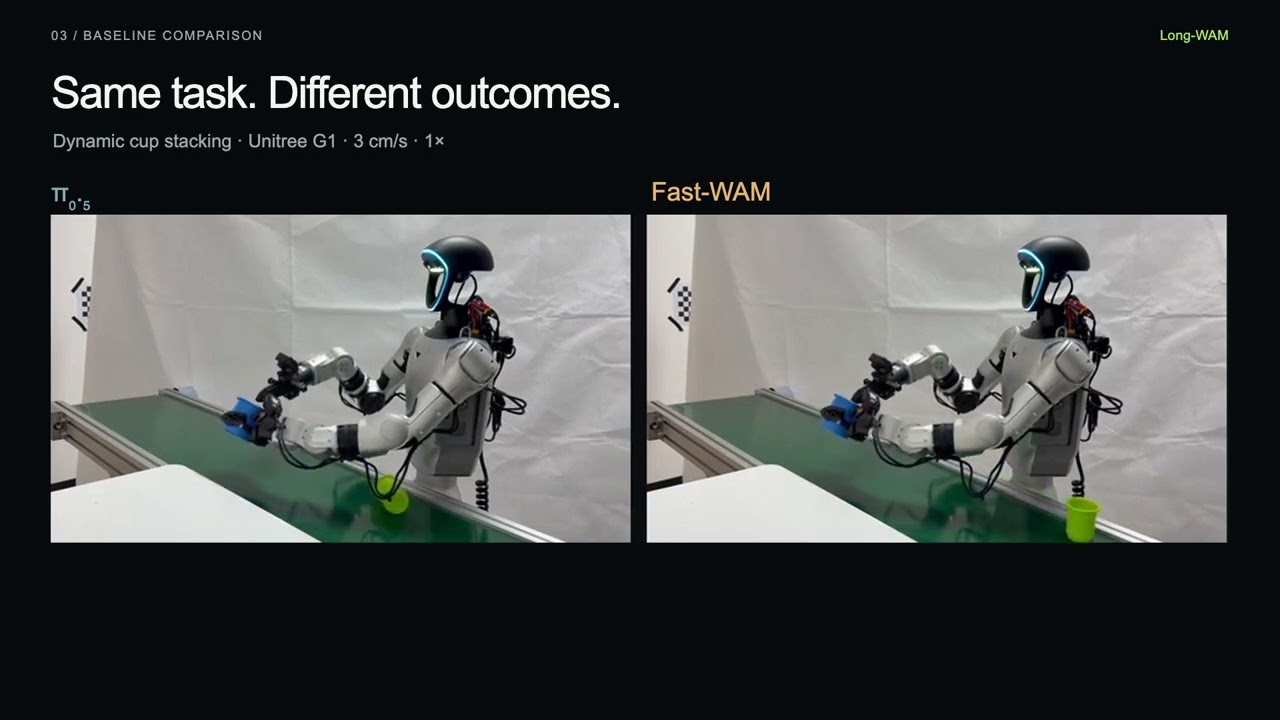
| G1 · Dynamic cup stacking (1×) | G1 · Moving-cup grasping (1×) |
|---|---|
 |
 |
YAM · Bowl stacking and brick sorting (2×)

G1 runtime comparisons (1×)
Synchronous execution vs. accelerated infra

Synchronous (top) vs. asynchronous (bottom), across four speeds

Real-robot recordings from the project page; click a GIF to watch on the project page.
| Robot | Supported policy interface | Deployment configuration | Inspect without hardware |
|---|---|---|---|
| YAM | 14D bimanual state/action; top and two wrist cameras | yam.yaml | longwam deploy yam --dry-run |
| Franka | 8D state with 7D Cartesian-delta/gripper or 8D joint/gripper actions | franka.yaml | longwam deploy franka --dry-run |
| Unitree G1 + Dex1 | 16D dual-arm/three-camera or 8D right-arm/two-camera manipulation | g1.yaml | longwam deploy g1 --dry-run |
Train on your own robot/task data, then supply matching weights, model config
and statistics. Deployment checkpoint paths are blank; no public model is selected.
Provide a calibrated driver (G1 includes an optional ial_g1d bridge wrapper).
# Fill a copy of the robot YAML with your own policy bundle and calibrated driver.
longwam deploy g1 --config /path/to/your-g1.yaml --dry-run

# Read observations and run your policy, but do not arm or send robot commands.
longwam deploy g1 --config /path/to/your-g1.yaml
Default: read-only inference, no robot commands. Motion requires explicit enablement, calibrated limits and a working emergency stop. These examples have offline tests, not new physical-robot validation. See the deployment guide.
Evaluation needs the policy bundle, model/simulator assets and released statistics; training demonstrations are not required.
| Benchmark | Training data used by this release | Preparation |
|---|---|---|
| LIBERO | Four LeRobot suites: Spatial, Object, Goal, Long | Download and directory layout |
| RoboTwin 2.0 | Recorded RoboTwin 2.0 LeRobot release | Download and archive extraction |
| Domino | Domino + RoboTwin replay, sampled 50:50 | Subset selection and conversion |
| RoboCasa GR1 | Good Teleop release; 24 tasks / 24,000 demos at 20 Hz | Pinned dataset and statistics |
| RoboCasa365 | Human300; 100 demos/task | Download, selection and statistics |
python scripts/download_data.py libero --output data/downloads/liberoFollow docs/DATA.md for extraction, layouts, statistics and
text caches. GR1 requires the good Teleop release; Domino requires prepared
LeRobot data.
Each benchmark has its own train.sh and eval.sh. Prepare data, text embeddings
and initialization weights; select variants with context= or denoising=.
Fresh benchmark training initializes the video expert from public LongLive2.0-Robot-S, not general LongLive 2.0. Download it once:
python scripts/download_checkpoint.py stage1_robot_s \
  --output "${LONGWAM_CHECKPOINT_ROOT:-./checkpoints}/LongLive2.0-Robot-S"
See initialization and fine-tuning for task-specific settings.
| Benchmark / launcher | Default GPUs × batch/GPU × accumulation | Global batch | Peak LR | Training length | History / action chunk |
|---|---|---|---|---|---|
| LIBERO | 8 × 8 × 2 | 128 | 1e-4 | 10 epochs | P48 / 32 |
| RoboTwin 2.0 | 8 × 16 × 8 | 1024 | 1e-4 | 5 epochs | P48 / 32 |
| Domino | 8 × 16 × 8 | 1024 | 3e-6 | 300 updates | P48 / 32 |
| RoboCasa GR1 | 16 × 30 × 1; P768 below | 480 | 3e-5 | 30K updates | Selected P / 16 |
| RoboCasa365 | 16 × 16 × 1 | 256 | 1e-4 | Fresh 100K updates | P48 / 32 |
All recipes use BF16, seed 42 and gradient clipping 1.0. Exact schedules and initialization: training guide.
# Inspect the 100K recipe.
bash scripts/robocasa365/train.sh --dry-run

# Start training after preparing the required data and initializers.
bash scripts/robocasa365/train.sh output_dir=outputs/robocasa365-100k

# LIBERO and RoboTwin support both training regimes.
bash scripts/libero/train.sh denoising=idm --dry-run
bash scripts/robotwin2/train.sh denoising=codenoise --dry-run
For Domino, set LONGWAM_ROBOTWIN_CHECKPOINT to the full RoboTwin initializer.
All six contexts support training/inference with the same Teleop data, 30K updates, H16 action chunk and global batch 480.
| Context | History at 20 Hz | Raw / sampled training frames | Batch/GPU × accumulation at 16 GPUs |
|---|---|---|---|
context=p0 |
0 s | 33 / 9 | 30 × 1 |
context=p48 |
2.4 s | 81 / 21 | 30 × 1 |
context=p96 |
4.8 s | 129 / 33 | 30 × 1 |
context=p192 |
9.6 s | 225 / 57 | 30 × 1 |
context=p384 (default) |
19.2 s | 417 / 105 | 30 × 1 |
context=p768 |
38.4 s | 801 / 201 | 6 × 5 |
Frames count the full training window. Context configs update both the data window and model.
bash scripts/robocasa_gr1/train.sh context=p384 --dry-run

# Robot-S video initialization is the default at every context length.
bash scripts/robocasa_gr1/train.sh context=p192 \
  output_dir=outputs/gr1-p192-robot
GR1 retains its own action architecture and mapped action-backbone initializer.
Keep global batch = GPU workers × batch/GPU × accumulation. For GR1 on four GPUs (global batch 480):
NPROC_PER_NODE=4 bash scripts/robocasa_gr1/train.sh context=p96 --dry-run \
  batch_size=15 gradient_accumulation_steps=8
resume=/path/to/weights.pt starts a new optimization run from policy weights;
a training-state directory restores optimizer/scheduler/data state.
Use matching model/data configs; see multi-GPU and resume details.
Based on LongLive 2.0,
with separate training and video-validation launchers in stage1/.
Use its own environment. Recorded training uses 128 workers; validation uses 8 GPUs.
| Shoe → container (1×) | Bun → steamer (1×) | Lid → pan (1×) |
|---|---|---|
 |
 |
 |
| Pour water (1×) | Fold clothing (2×) | Empty measuring cup (1×) |
 |
 |
 |
Generated from an image and instruction, not executed robot rollouts. Click a GIF to watch on the project page.
Use a Robot-S checkpoint or your own compatible video generator. Seven RGB first frames and their original instructions are bundled:
short_00 · Bun → steamer |
short_04 · Lid → pan |
long_00 · Shoe → container |
|---|---|---|
 |
 |
 |
bash stage1/infer.sh --example all --dry-run
bash stage1/infer.sh --example short_00 \
  --checkpoint checkpoints/robot-s/model.pt --assets-root /path/to/video-assets \
  --output-dir outputs/video-demo
Output: outputs/video-demo/short_00.mp4. Uses 50 steps, CFG 3 and 24 FPS.
For installation, downloads and your own --image / --prompt, see the
inference guide.
Sample images: RoVid-X, CC-BY-4.0.
# CPU-only planning; does not launch distributed training or validation.
export LONGWAM_VIDEO_DATA_ROOT=/path/to/robot-video-data
export LONGWAM_VIDEO_INDEX_CACHE=/path/to/robot-video-index
bash stage1/train.sh --stage S --output outputs/video-S \
  --assets-root /path/to/video-assets --generator /path/to/initial-generator.pt --plan
bash stage1/eval.sh --stage S --training-step 28602 \
  --generator /path/to/S/model.pt --assets-root /path/to/video-assets \
  --output outputs/video-S-validation --plan
--plan checks settings without launching jobs. For data, curriculum and real-run
commands, see the Stage 1 guide; weights are listed above.
longwam.agentic provides a reusable model/tool runtime.
The RoboCasa365 adapter adds instruction
decomposition and action review at inference time. Codex defaults:
gpt-6-astra / xhigh; model and effort are configurable.
bash scripts/robocasa365/eval.sh --agentic --dry-run
# Select another exact Codex model ID without changing the framework:
bash scripts/robocasa365/eval.sh --agentic --dry-run \
  agentic.model=YOUR_EXACT_CODEX_MODEL_ID agentic.effort=high
Protocol: 50 tasks × 5 episodes, pretrain split, seed 7; use 5 episodes/task for student-only comparisons. Live runs require model access, observation-sharing consent and a token budget. Dry-runs make no model calls. Authenticate with your own account/key; no credentials are included. See configuration and new adapters.
| Guide | Contents |
|---|---|
| Benchmark setup | Pinned simulators, compatibility patches and external prerequisites |
| Data preparation | Downloads, directory layouts, subsets, statistics and text caches |
| Training recipes | Exact parameters, GR1 scaling, initializers, resume and multi-GPU launch |
| Stage 1 | LongLive 2.0 Robot training and long-video validation |
| Agentic API | Configurable Codex models, benchmark adapters and RoboCasa365 hybrid inference |
| Infra | Accelerated inference, device builds, async control and LeRobot/robot interfaces |
| Verification | CPU regression checks and outstanding end-to-end validation |
| Import notes | Source provenance and intentionally retained functionality |
Long-WAM/
├── configs/          # Benchmark recipes, GR1 contexts and denoising modes
├── scripts/          # Shared helpers + one train/eval pair per benchmark
├── infra/            # Deployment guide and hardware/runtime integration
├── src/longwam/      # Models, training, data and benchmark adapters
├── stage1/           # LongLive 2.0 Robot curriculum and video validation
├── third_party/      # Attributed FourOverSix/CUTLASS build sources; no compiled artifacts
├── tools/            # Reusable data preparation and weight conversion
├── tests/            # CPU regression tests
└── docs/             # Detailed setup and reproduction guides
Long-WAM: Scaling the Context of World-Action Models
@misc{huang2026longwamscalingcontextworldaction,
  title={Long-WAM: Scaling the Context of World-Action Models},
  author={Wei Huang and Bohan Zhang and Chenzhi Liu and Isabella Liu and
          Shuai Yang and Weian Mao and Luozhou Wang and Yicheng Xiao and
          Weifeng Lin and Qixin Hu and Bryan Chu and Sifei Liu and
          Linxi Fan and Xiaojuan Qi and Song Han and Yukang Chen},
  year={2026},
  eprint={2610.10528},
  archivePrefix={arXiv},
  primaryClass={cs.RO},
  url={https://arxiv.org/abs/2610.10528},
}Long-WAM is released under Apache 2.0. Third-party components retain their original licenses.
We thank FastWAM for the foundation of parts of the model/data implementation. Long-WAM is independently maintained with its own interfaces and no runtime dependency on the FastWAM framework.
We also acknowledge LongLive 2.0, Wan, LeRobot, and the LIBERO, RoboTwin 2.0, Domino, RoboCasa GR1 and RoboCasa benchmark teams. External models, datasets and simulator assets retain their own terms.